
Buzz and static noise can completely ruin an otherwise good recording. They distract from speech, mask musical detail, and make audio feel unprofessional, whether you're working on a podcast, interview, voiceover, or music track.
Unlike simple background noise, buzz and static often overlap with the main signal. That makes them harder to remove cleanly and easier to damage if processed incorrectly.
This guide walks you through practical, realistic ways to reduce buzz and static. Each method is explained with clear expectations, so you know what works and what doesn't.
In this article
What Is Buzz and Static Noise in Audio?

Buzz and static are often lumped together as noise, but they behave very differently. Buzz is usually a steady electrical tone, while static is more chaotic and unpredictable.
Here's a quick comparison table to help you understand the difference.
| Noise Type | How It Sounds | Typical Behavior | Best Removal Method |
| Buzz | Steady hum or tone | Constant, tonal | EQ (notch filtering) |
| Static | Crackling, bursts, fizz | Random or semi-random | AI tools or light noise reduction |
| Hiss | Smooth "shhh" sound | Broadband, steady | Noise reduction |
| Hum | Low electrical tone | Fixed frequency + harmonics | EQ + grounding fixes |
Understanding which noise you're dealing with is the single most important step before you even consider touching any software.
What Causes Buzz and Static in Recordings?
Buzz and static almost always come from technical issues, not the room itself.
The most common causes include:
- Electrical hum from ground loops or nearby power sources
- Faulty or poorly shielded cables and loose connectors
- Inadequate grounding across audio devices
- Digital clipping caused by incorrect gain staging
Remember this: If you don't address the source issue, any kind of software cleanup becomes much harder.
The Best Practices to Prevent Buzz and Static Before Recording

Prevention is always the best cure, and it's way more effective than post-processing. Before you hit that record button, make sure that you go through this checklist:
- Make sure to check and replace all old or damaged cables.
- Use balanced cables (XLR or TRS) whenever possible.
- Ensure that all audio gear is grounded.
- Record away from power supplies, monitors, and routers.
- Set the input gain to a proper level to avoid digital clipping.
Clean signal paths dramatically reduce the need for heavy cleanup later.
How to Remove Buzz and Static Noise from Audio?
AI-Based Noise Removal with Media.io
AI-based tools are often the most effective solution, especially for inconsistent static or mixed noise types. Out of a sea of different options, Media.io's Noise Reducer stands out because it automatically isolates and suppresses unwanted buzz and static without requiring manual noise profiling.
This and similar AI tools work well here because you don't have to go frequency hunting or threshold tuning. It gives cleaner results for changing or irregular static, and it is generally a much faster workflow for non-technical users. With Media.io's online AI noise reducer feature, you can remove background noise, reduce reverbs, remove hiss and hum, remove wind, and reduce echos in one click.
Here's how it works.
- Visit the Media.io Noise Reducer page.
- Upload your audio file.
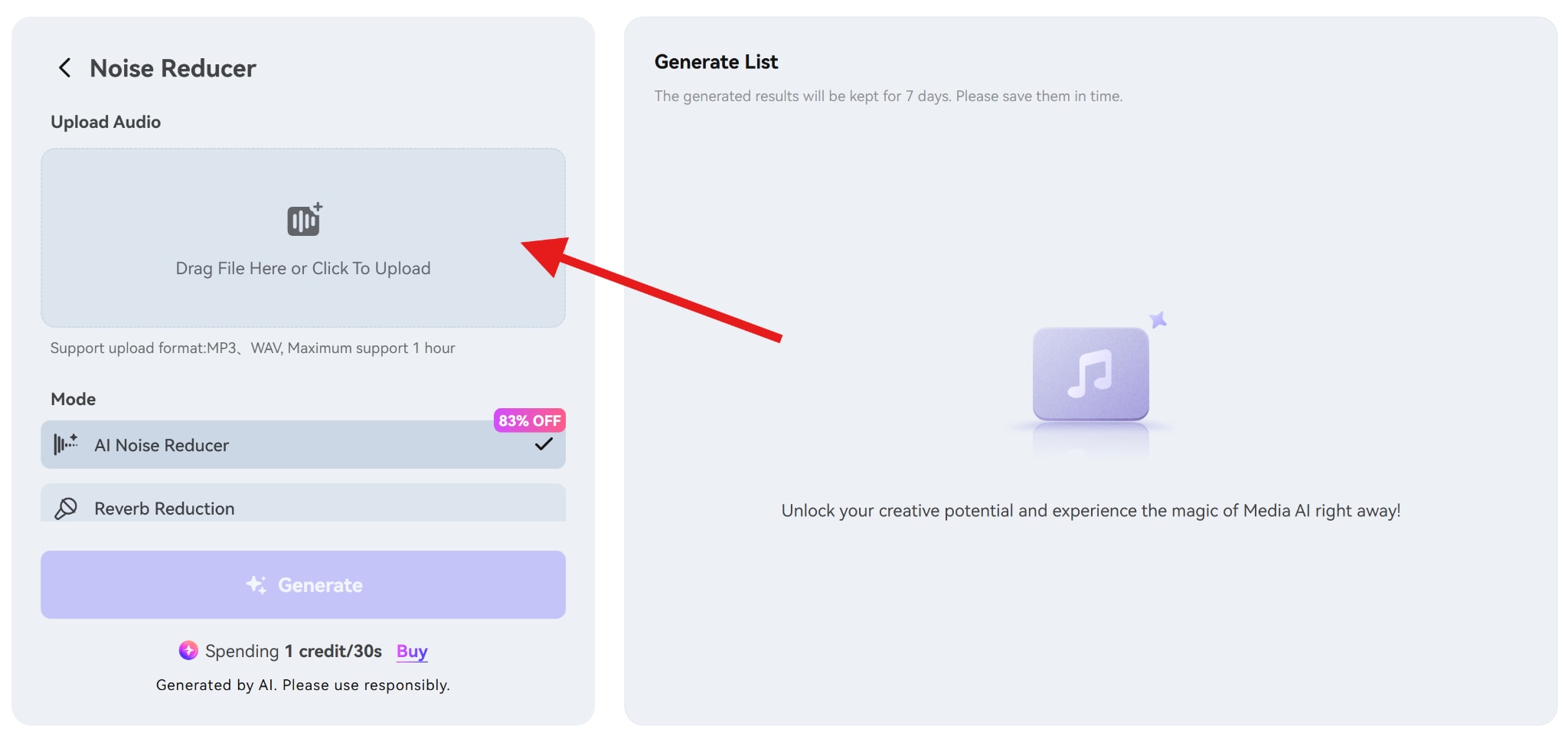
- Select the AI Noise Reducer feature and click on Generate.
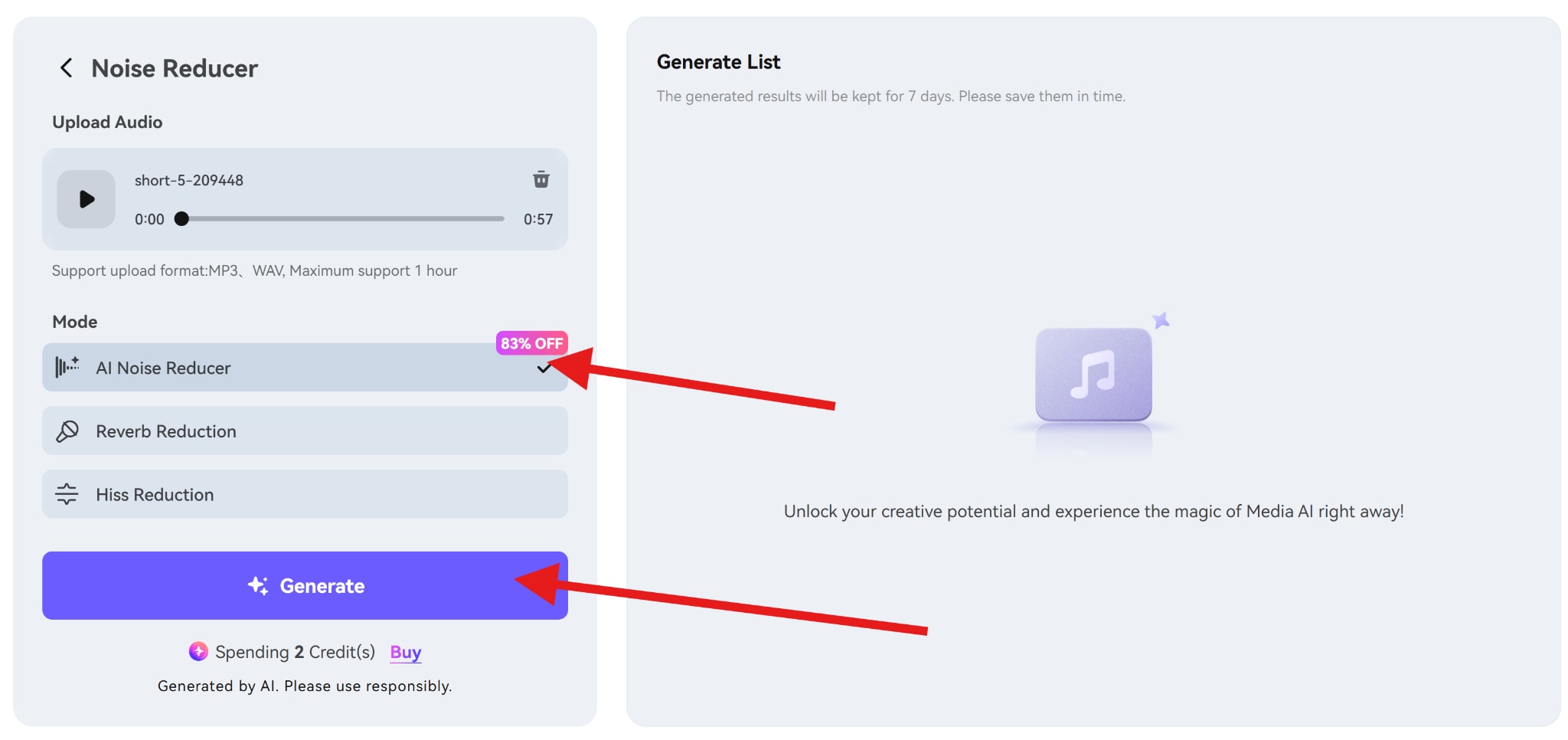
It's very simple and effective.
Remove Buzz from Audio With EQ Techniques
EQ (equalizer) is the most effective tool for removing buzz, because buzz is a tonal type of sound. It's very predictable. All you need to do is find the frequency that it occupies and reduce the volume of that frequency.
Electrical buzz is usually found at 50 Hz (in many regions around the world), 60 Hz (in the use US and some other regions).
Plus harmonics are found at 100/120 Hz, 150/180 Hz, etc.
If you want to remove buzz with an EQ, you first need to download a sound editing tool like Audacity, Fruity Loops, Reaper, Premiere Pro, and so on. Whatever the tool, the workflow is more or less the same. Here's how it usually works.
- Open the program and import your audio file.
- Insert or activate an EQ plugin.
- Use a narrow band (high Q).
- Sweep frequencies until the buzz becomes front and center.
- Apply a narrow cut at that frequency.
- Repeat for harmonics if necessary.
Important tips:
- Keep cuts narrow to avoid thinning vocals
- Always A/B test your changes
- Stop once the buzz is no longer distracting
EQ works extremely well for buzz, but it is not effective for random static.
Remove Static from Audio Using Noise Reduction Tools
You can also try a bit longer route. Noise reduction in popular audio editors works like this.
First you need to profile constant noise. Then, you need to tell the tool to reduce it across the recording. They are best suited for steady static, and not random crackles or bursts. The quality of the output will depend on the quality of the noise sample you provided to create the noise profile.
So, when the static noise is consistent, noise profiling can soften it, and you can try multiple light passes. This method work better than one aggressive pass.
However, when the noise is random, then noise reduction often causes artifacts, and you might end up with an audio that has an underwater feeling with or metallic sounds appearing all over the place.
Check out this cool video resource to learn more.
Practical Tips for Best Results

Here are the tips that can help you achieve the best results, but before that, always save a copy before heavy processing.
- Use multiple light passes, not extreme settings.
- Monitor with good headphones.
- Identify whether you're dealing with buzz, static, hiss, or hum before choosing tools.
- If cleanup starts damaging speech, stop.
Conclusion
In this article, we have learned the causes of buzz and static noise, tips to prevent noises and tools for removing buzz and static noise from audio. But remember, preventing buzz and static is always easier than removing them. Proper cables, grounding, and gain staging drastically reduce post-production headaches.
Start with clean recording practices, apply subtle processing, and prioritize clarity over perfection. That balance is what leads to professional-sounding audio.


