AI Reverb Remover
Want to clean up your podcasts, vocals, or video audio from unwanted echo and reverb? The AI reverb remover online helps you easily transform audio with AI. Media.io's reverb remover online makes it simple to create crystal-clear sound for professional content, music production, or social media.
Remove Reverb from Audio Online – Fast & Easy with Media.io
Looking for a fast and professional way to clean your audio? Try the AI reverb remover with Media.io! This easy-to-use online tool lets you remove reverb from audio—whether it's podcasts, vocals, or music—in seconds. With just a few clicks, you can apply our powerful online reverb remover and enhance your recordings using advanced AI technology. No technical skills or expensive software required. Whether you're creating content for YouTube, TikTok, or professional projects, Media.io makes reverb removal fast, effective, and accessible. Start cleaning your audio today!
How to Remove Reverb from Audio with Media.io AI?
-

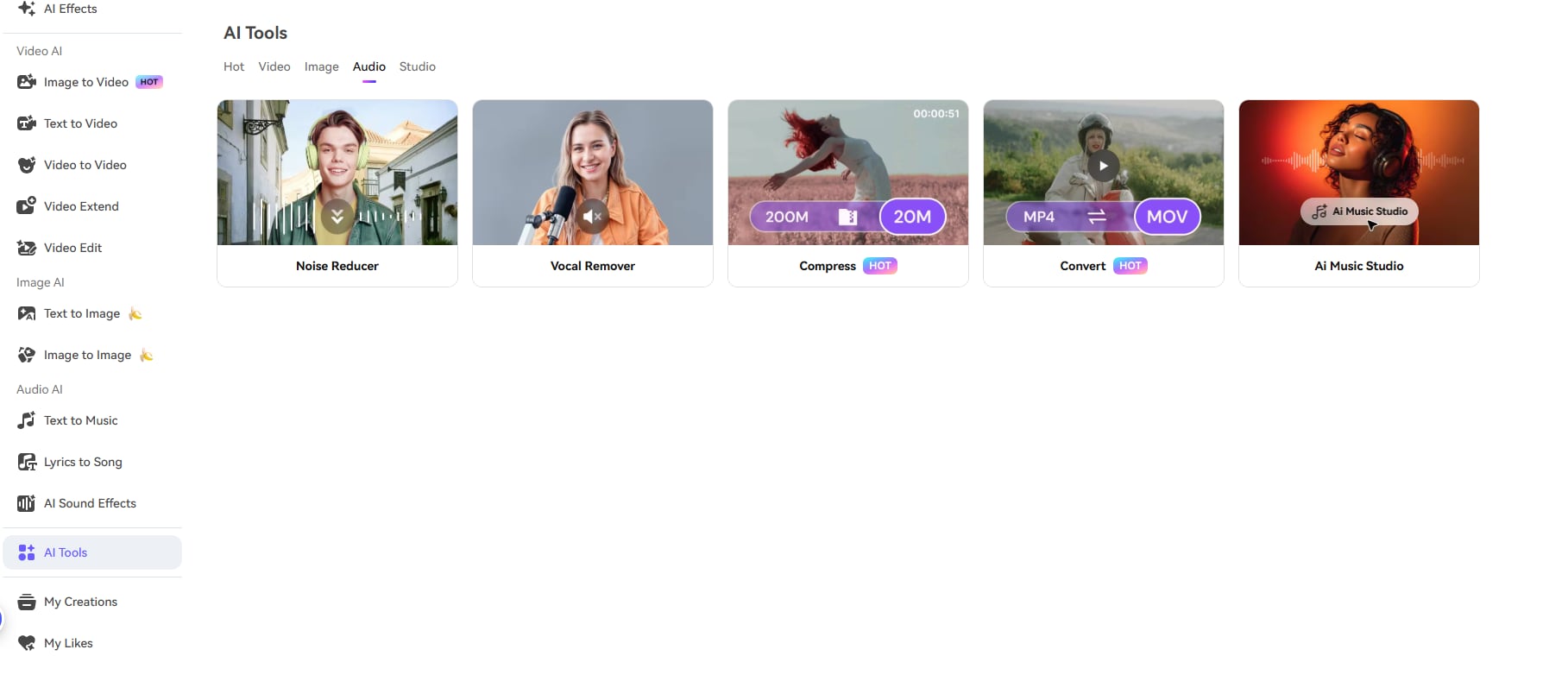
Step 1. Go to Media.io's AI Noise Reducer Tool
Head to Media.io's AI Tools > navigate to Audio > and select Noise Reducer.
-

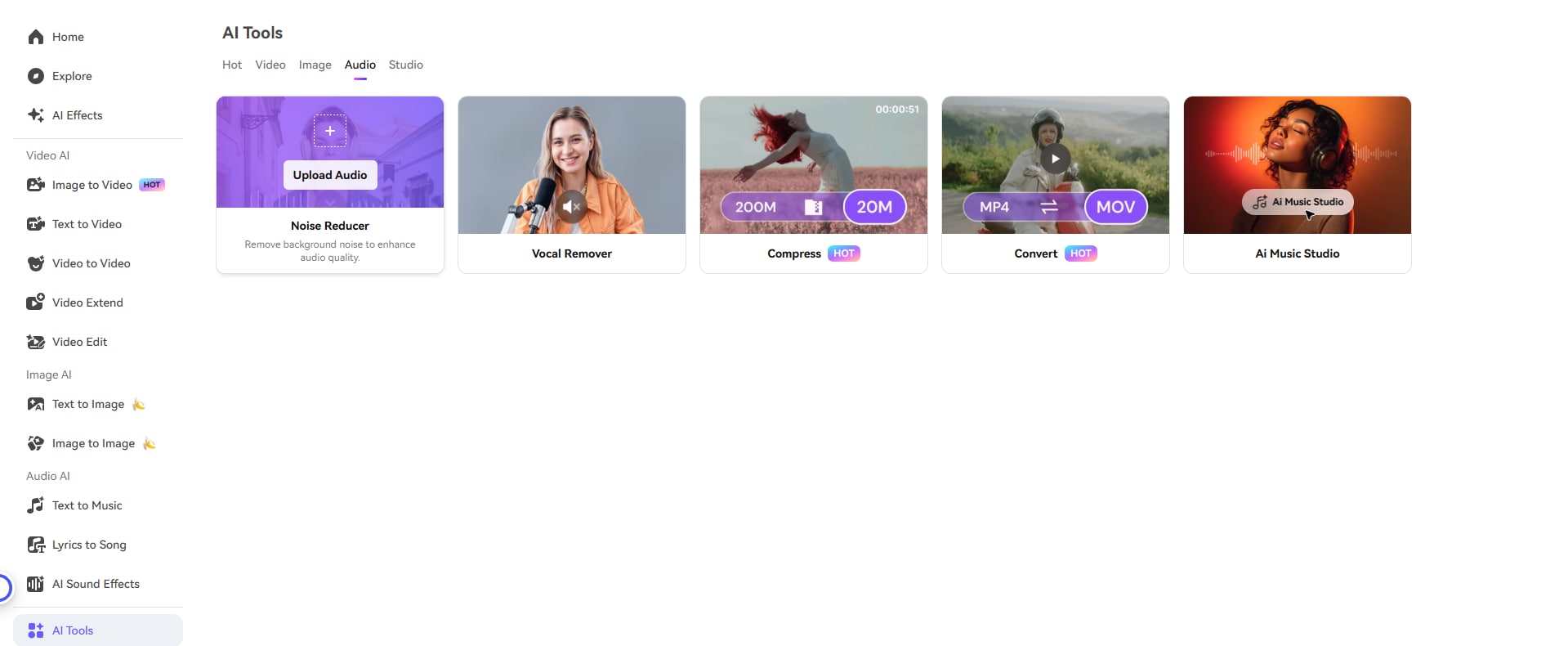
Step 2. Upload Your Audio File
Hover on the feature > tap on Upload Audio to upload your voice recordings, songs, podcasts, vocals, or video audio, our AI will detect and prepare your file for reverb removal.
-

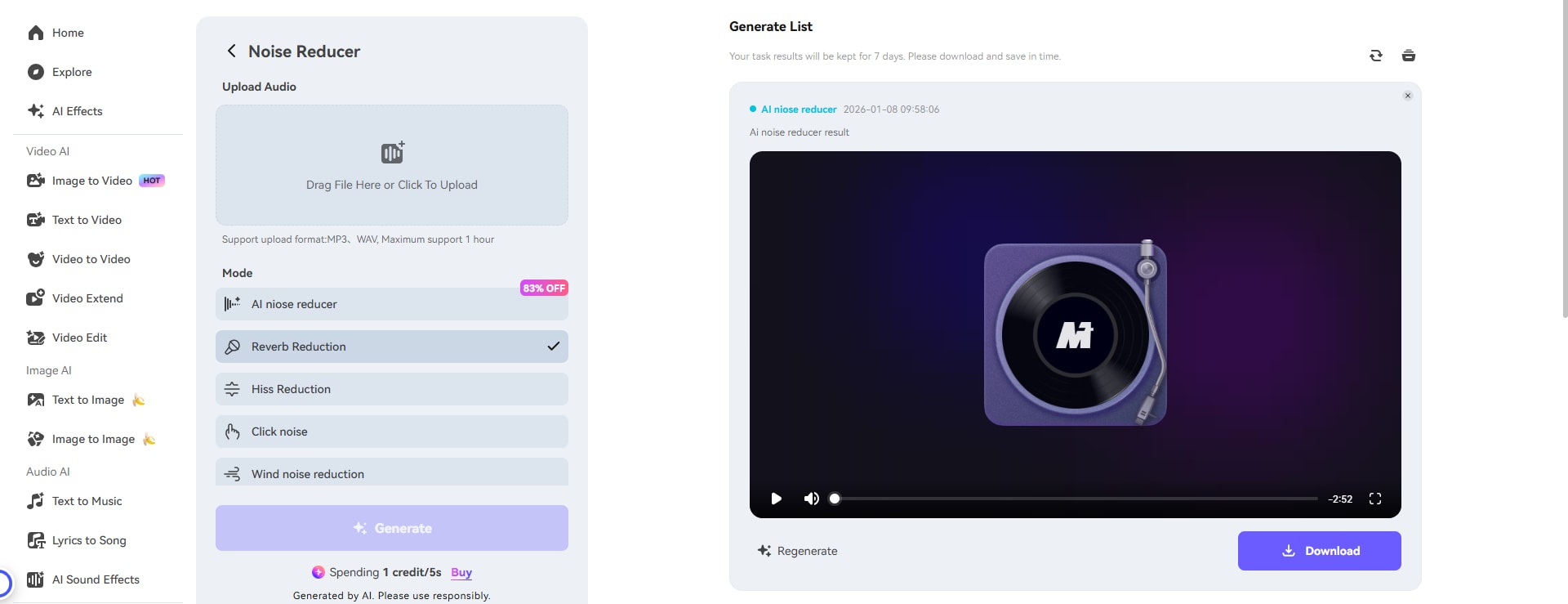
Step 3. Remove Reverbs and Save the File
Once your file is uploaded, select the Reverb Reduction Mode, and tap on Generate to start the process, then our AI reverb remover automatically analyzes your audio and intelligently removes unwanted echo and reverb while preserving the original voice quality and natural tone. Once processing is complete, preview your reverb-free audio to verify the quality and download to save it if you are satisfied.
Who Needs a Reverb Remover? Perfect for Every Audio Creator

Podcast Audio Enhancement
Recorded your podcast in a bedroom, living room, or empty office? Remove reverb from audio files to achieve broadcast-quality sound. Our free reverb remover eliminates room echo automatically, making your podcast episodes sound professionally produced.

Music Production & Vocal Cleaning
Remove reverb from vocals that were recorded in less-than-ideal acoustic environments. Whether you're working on demos, covers, or professional tracks, our AI reverb remover preserves the natural tone while eliminating unwanted room ambience.

Video Dialogue & Narration
Remove reverb from video audio to enhance your YouTube videos, TikToks, Instagram Reels, or professional video content. Clean dialogue makes your content more engaging and professional without expensive post-production.

Remote Recording Enhancement
Clean up Zoom recordings, remote interviews, or virtual presentations. Our reverb remover free tool transforms echoey video calls into crisp, clear audio recordings suitable for professional use.
Why Choose Media.io AI Reverb Remover?
Easy to Use
Media.io's AI Reverb Remover is beginner-friendly. Just upload a file—no apps, no editing skills needed. The AI handles everything.
Fast Processing
Remove reverb from audio in seconds. The AI applies realistic effects and smooth transitions instantly—perfect for quick projects.
Works on Any Device
Use the AI reverb remover online on any device—phone, tablet, or computer. No download required, fully browser-based.
Fun for Everyone
Whether it's podcasts, music, or videos, Media.io brings professional quality to all creators. Share your clean audio with confidence!


Media.io's AI Reverb Remover is surprisingly good! I used it to clean up podcast audio recorded in my apartment—super fast and the results were smooth. Great for creators who need professional sound quickly.

I cleaned up my vocal recordings using Media.io and it was amazing! It took less than a minute and didn't require any audio engineering skills. The reverb was completely gone and my vocals sound studio-quality now.

The AI reverb remover is a game-changer for our video content! Media.io makes it so easy to clean up audio from various shooting locations, and I love that it works directly in the browser. Highly recommended for content teams!
What Our Users Say about AI Reverb Remover

Frequently Asked Questions
 What is a reverb remover and why do I need one?
What is a reverb remover and why do I need one?
A reverb remover is an AI-powered tool that eliminates unwanted echo and room ambience from audio recordings. You need one when you've recorded audio in untreated spaces like bedrooms, offices, or large empty rooms that create unpleasant reverb effects. Our free reverb remover helps you achieve professional-sounding audio regardless of your recording environment, saving you from expensive studio rentals or acoustic treatment.
How to remove reverb from audio online?
How to remove reverb from audio online?To remove reverb from audio online free using Media.io: (1) Visit the Media.io reverb remover page, (2) Upload your audio file (MP3, WAV, etc.), (3) Select the reverb reduction option, then let our AI analyze and remove reverb automatically in seconds, (4) Download your clean, reverb-free audio file.
What audio formats can I use with your reverb remover?
What audio formats can I use with your reverb remover?Our reverb remover online supports popular audio formats including MP3 and WAV.
Can I remove reverb from music and instrumental recordings?
Can I remove reverb from music and instrumental recordings?Yes! While our AI excels at removing reverb from vocals and spoken word (podcasts, voiceovers, interviews), it also works effectively on instrumental recordings and full music tracks. However, results may vary depending on the complexity of the music arrangement and the type of reverb present. We recommend testing with a short clip first to ensure it meets your quality standards.
How long does it take to remove reverb from audio?
How long does it take to remove reverb from audio?Most audio files are processed in 30-90 seconds using our AI reverb remover. Processing time depends on file size, duration, and complexity. Our cloud-based system ensures fast, efficient processing without taxing your computer's resources, and you can continue browsing while we work on your file.