AI Face Editor Online for Retouching, Restyling & Custom Edits
Edit faces in photos with one AI face editor instead of jumping between separate effects. Change expressions or hairstyles, fine-tune details such as teeth, freckles, wrinkles, glasses and beard, try creative face styles, or simply describe the exact edit you want with a prompt.
What Can You Edit with Media.io AI Face Editor?
Media.io works as an AI face photo editor for both quick preset edits and more specific prompt-based changes. Use it for everyday face retouching, trying a new look, or turning a portrait into a different visual style without learning a traditional photo editor.


How to Edit a Face Online in 3 Steps
Use the same workflow whether you want a quick preset edit or a more specific prompt-based face edit.

Go to Media.io AI Tools, choose Face Editor, and upload the portrait or selfie you want to edit.
Select a preset for expressions, hairstyles, facial details, or styles. For a custom result, type how you want to edit the face or photo in the prompt box.
Click Generate, review the result, and adjust the preset or prompt if you want another version. Save the version that fits your goal.
One Face Editor, Two Ways to Edit
Media.io combines ready-made controls with prompt editing. Presets are useful when the edit is already defined; prompts give you more freedom when you want a specific or combined change.
Fine-Tune and Retouch Facial Details
For a focused face retouch online workflow, choose a fine-tune option instead of changing the whole image. Available edits include whitening teeth, removing freckles, reducing wrinkles, removing glasses, and adding or removing beard. This makes the Face Editor useful for selfies, portraits, and profile photos that need a targeted adjustment rather than a full makeover.


Change Hairstyles and Facial Hair
Try a different hairstyle or compare beard and clean-shaven looks directly on your portrait. This turns the page into more than a basic face filter: it helps you explore appearance changes from one photo face editor workflow, while dedicated tools such as AI Hairstyle Changer can handle a hairstyle-specific task when that is your only goal.
Restyle Face Photos with AI Presets
Use style transfer when your goal is creative rather than corrective. Available presets can reinterpret a face photo as Ghibli-inspired art, One Piece-inspired art, a Minecraft-inspired character, anime, Pixar-style art, or a minimal illustration. These face filters online are useful for avatars, social posts, profile images, and playful portrait experiments.
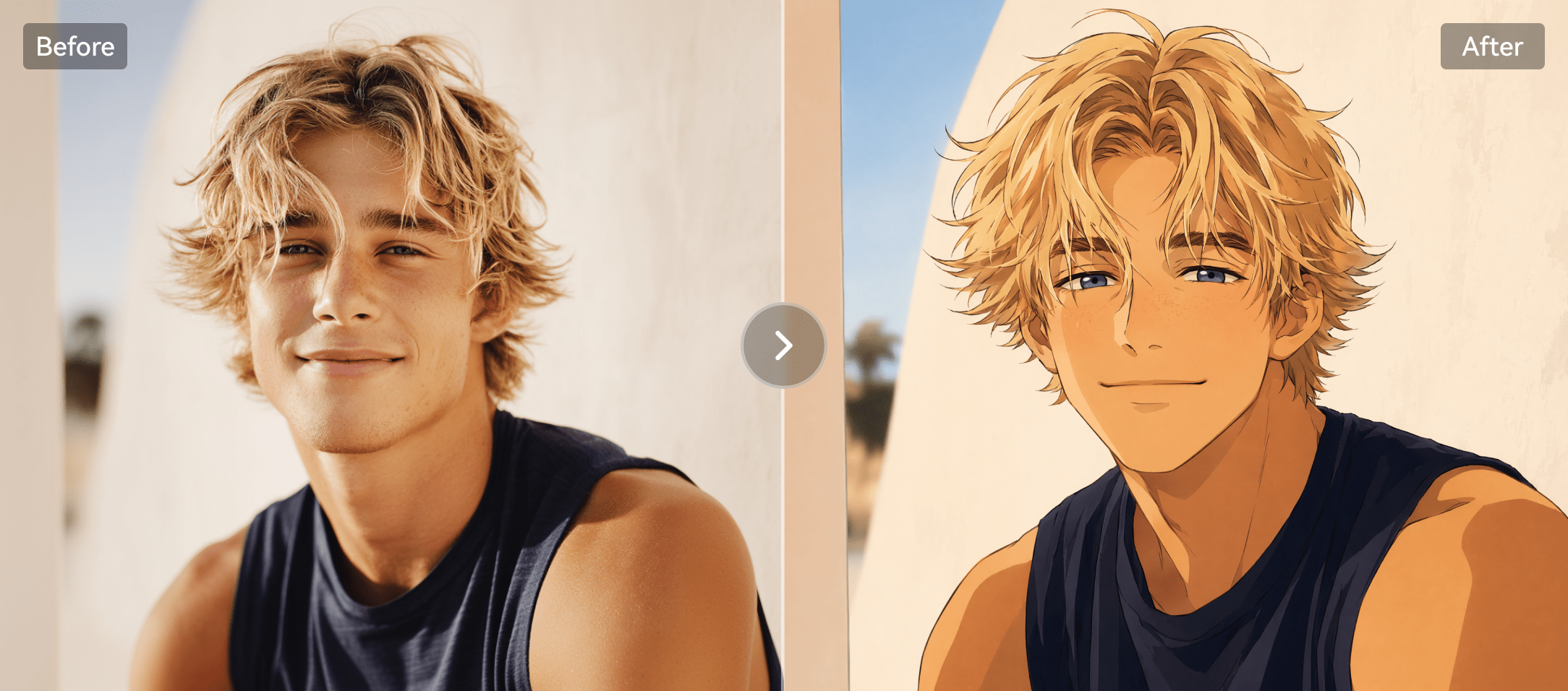

Edit Any Face with a Custom Prompt
Presets cover common edits, but they cannot describe every idea. Use a text prompt when you want a more specific change, such as "remove my glasses, add a subtle smile, and keep the hairstyle unchanged." Prompt editing also lets you describe broader image changes while keeping your face edit in the same workflow.
Face Editing Presets vs. Custom Prompts
| Editing Method | Best For | Example | How You Control It |
|---|---|---|---|
| Preset face editing | Common, clearly defined edits | Change expression, hairstyle, glasses, beard, wrinkles, or style | Select an available option |
| Custom prompt editing | Specific, unusual, or combined edits | "Remove glasses and add a subtle smile while keeping everything else unchanged." | Describe the result in natural language |
When Is an AI Face Editor Useful?
A face editor is most useful when you already have a photo you like and want to change only the face, appearance, or artistic treatment instead of generating a completely new person.
Selfie Retouching
Fine-tune teeth, freckles, wrinkles, glasses, or beard for a cleaner selfie without using a complex retouching app.
Trying a New Look
Preview hairstyles, facial hair, expressions, or eyewear before deciding which appearance suits your portrait.
Profile & Social Photos
Refresh an existing profile photo with a targeted face edit rather than replacing the whole scene or identity.
Creative Portrait Styles
Turn a portrait into anime, illustration, game-inspired, or other preset styles for avatars and shareable visuals.
Explore Gemini AI Face Editing Prompts
Need more editing ideas? Explore ready-to-use Gemini AI photo editing prompts for natural face retouching, facial details, grooming changes, and creative portrait styles.
Explore More AI Haircut Filters

FAQs about AI Face Editor Online
 What is an AI face editor?
An AI face editor is a photo editing tool that uses AI to modify facial appearance or style in an existing image. Media.io combines preset edits with custom prompt editing so you can change expressions, hairstyles, facial details, or visual styles from one workflow.
What can I edit with Media.io Face Editor?
What can I edit with Media.io Face Editor?You can change expressions and hairstyles, whiten teeth, remove freckles or wrinkles, add or remove glasses, add or remove beard, try an attractiveness test, apply preset styles such as anime or illustration looks, and describe custom edits with a text prompt.
How do I edit a face online with Media.io?
How do I edit a face online with Media.io?Open Media.io AI Tools and choose Face Editor, upload your image, select a preset or describe your edit with a prompt, then click Generate and review the result.
Should I use a face editing preset or a custom prompt?
Should I use a face editing preset or a custom prompt?Use a preset when your goal matches a common edit such as changing an expression, hairstyle, glasses, beard, or style. Use a custom prompt when you want a more specific edit or want to combine several changes in one instruction.
Do I need to install a face editing app?
Do I need to install a face editing app?No separate desktop face editing app is required for the Media.io web workflow. You can access AI Tools in a browser, open Face Editor, upload a photo, and generate an edited result online.

Open Media.io AI Tools, choose Face Editor, upload a photo, and create the version you want.


