
















Extend Your Video Seamlessly with AI
Make your clips longer, smoother, and story-consistent with the power of AI. With Media.io’s AI Video Extender, you can extend video length effortlessly—just upload your clip, enter a prompt, and let AI generate natural transitions and extra footage that match your original scene perfectly. No looping, no manual editing, no quality loss—just a seamless video extension that keeps your story flowing.
Extend Any Video Seamlessly with AI
Upload any clip—whether it’s a short TikTok, vlog intro, or cinematic B-roll—and let Media.io’s AI Video Extender extend your video length automatically. Our AI analyzes motion, lighting, and camera flow to generate new frames that look and feel completely natural. No need for re-shoots or editing timelines—just seamless video extension that keeps your story moving without interruption.
Try AI Video Extender Now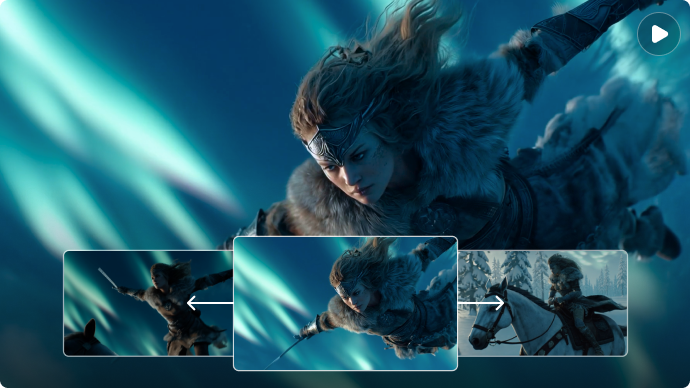
Smooth, Loop-Free Transitions for a Natural Flow
Forget awkward cuts or repetitive loops. Media.io uses advanced frame-to-frame motion understanding to ensure every transition blends perfectly. Each extended segment maintains the same color tone, rhythm, and visual consistency as your original footage—so the viewer never notices where the extension begins or ends. The result: longer, smoother, and more professional-looking videos.
Create Smooth Transitions Instantly
Full Creative Control — Guide AI with Prompts and Duration
Stay in control of your story. Choose exactly how long to extend your clip and use AI prompts to define what happens next—whether it’s a slow sunset fade, a longer dance spin, or an extended dialogue scene. Media.io’s Cinematic AI Engine interprets your creative direction and produces story-consistent, high-quality video extensions in minutes. No technical skills required—just imagination and a few words.
Extend with Custom AI Prompts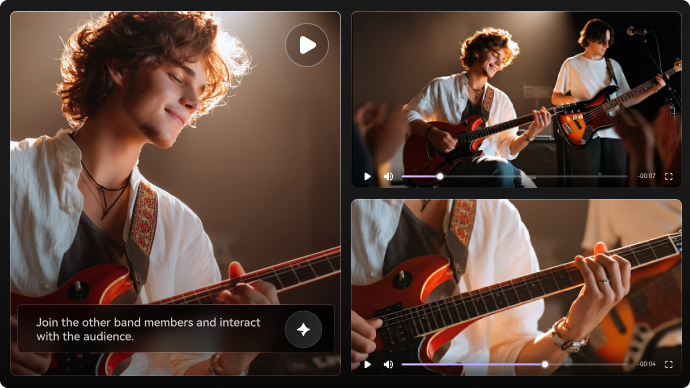
Why Use Media.io AI Video Extender

Seamless Video Extension That Looks 100% Real
Media.io extends your clip with smooth, loop-free transitions that match your original motion, lighting, and pacing. The AI generates new frames that blend in perfectly, making your extended footage look professionally shot from the start.

Smart AI That Understands Your Story
Unlike tools that simply repeat frames, our Cinematic AI Engine analyzes your scene’s movement and context to create story-consistent extensions. Every added second feels logical, natural, and visually aligned with the original shot.

Save Hours of Editing and Costly Reshoots
Skip timeline adjustments, patchwork edits, or scheduling new recordings. Media.io lets you extend your video in minutes, making it ideal for creators, marketers, and editors who need polished results fast—without extra effort or cost.

Creative Control with Simple Prompts
Guide the extension with your own words. Describe the motion, mood, angle, or pacing, and the AI follows your direction. It’s an easy way to shape the final look without technical skills, giving you both flexibility and precision.

Professional Quality, Social-Ready Output
Your extended video exports in crisp, stable quality, ready for TikTok, YouTube, Reels, Shorts, ads, or long-form content. No need for additional formatting—the output is instantly usable across devices and platforms.

Secure, Private, and Cloud-Based
Your videos are fully protected during processing, and all uploaded or generated files are auto-deleted within 7 days. Media.io ensures a private, secure workflow suitable for personal projects, client files, and commercial use.
How to Extend Your Video with Media.io AI Video Extender
Step 1: Open Media.io AI Video Extender
Visit Media.io in your browser and choose the AI Video Extender tool. Everything runs online—no installation, no heavy software, no learning curve. Want a seamless workflow across devices? Media.io works perfectly on desktop, tablet, and mobile.
Step 2: Upload Your Video and Add a Custom Prompt
Import the clip you want to extend—whether it’s a vlog snippet, animation, cinematic shot, or a cut-off scene. Use your own words to describe how you want the extension to continue: motion, pacing, mood, or style.
Step 3: Generate, Preview, and Download
Choose your extension length and click Generate. Media.io’s AI will create a smooth, loop-free extension that naturally matches your original footage. Preview multiple variations, pick your favorite result, and download it in high quality—ready for TikTok, YouTube, Reels, ads, or any creative project.
What Real Users Say About Media.io AI Video Extender

Online Store Owner

“Made my short clip feel complete.” I used the AI Video Extender to add smooth motion to a travel clip that ended too suddenly. The extended frames blended so perfectly with the original footage that no one noticed it was AI-generated—the pacing, lighting, and movement felt completely natural.

Graphic Designer
“Better continuity than I expected.” I thought the extension might look artificial, but the AI matched my clip’s color tone and motion flawlessly. The transition was seamless, making my video look like it was shot in a single continuous take. It saved me hours of manual editing.

Student
“A perfect TikTok upgrade.” I extended a dance reel using a custom prompt, and the result was unbelievably smooth. When I posted it on TikTok, people kept asking how I filmed such a “perfectly timed ending.” They had no idea AI created the final few seconds.

Social Media Manager
“Saved my project without needing a reshoot.” My product video ended too early and I didn’t have time to film again. Media.io’s AI Video Extender recreated the missing motion so naturally that the client thought I had re-edited the original footage. Total lifesaver for tight deadlines.
Explore the Hottest AI Features and Effects




FAQs About AI Video Extender
1. What is an AI Video Extender and how does it work?
Media.io’s AI Video Extender analyzes your clip frame-by-frame — including motion, lighting, and pacing — and then generates new frames that seamlessly continue your original footage. Simply upload a video, enter a prompt, choose your desired duration, and let AI extend your video naturally without loops, cuts, or visible artifacts.
2. Can AI extend my video without losing quality?
Yes. Media.io uses a Cinematic AI Engine to maintain the same resolution, visual tone, and movement style as your source video. The extended footage blends smoothly with your original clip, making it suitable for TikTok, YouTube, Reels, ads, vlogs, trailers, and any professional use case where quality matters.
3. Can I customize what happens during the extended part of the video?
Absolutely. You can guide the AI using custom prompts, telling it how you want the scene to continue — e.g., longer camera movement, extended landscape, additional action, slower pacing, or atmospheric transitions. This gives you full creative control over the extension without needing advanced editing skills.
4. Is Media.io’s AI Video Extender free to use?
Yes — you can try the AI Video Extender for free. Upload your video, set the duration, enter a prompt, and generate your extended clip with no hidden setup or editing requirements. Paid plans are available if you want higher resolution, more credits, or faster processing.
5. Is my uploaded video safe and private?
Yes. Your files are processed securely, and Media.io automatically deletes all uploaded and generated content within 7 days. No one can access your materials, and nothing is stored permanently — ensuring complete privacy protection for personal, commercial, or client videos.
More from Media.io
 4.7 (162,357 Votes)