














All
Image
Video
Audio

Kling 3.0 Motion Control: More Precise Face, Body & Camera Motion

Upgraded from Kling 2.6 Motion Control, Kling 3.0 MC transfers motion from a reference video with smoother full-body movement, more accurate hand gestures, and stronger camera sync. Turn any character or portrait image into a natural-looking AI motion video - perfect for dances, action scenes, gesture clips, and creator content.

Reference vs Result: Tyla "Chanel" Dance by Kling Motion Control on Media.io
Reference
Result
Reference vs Result: Pet Drunk Dance by Kling Motion Control on Media.io
Reference
Result
Reference vs Result — Kling Motion Control
Reference
Result

Explore More Kling Motion Control Videos

What's New About Kling 3.0 Motion Control

Precise Motion Transfer from Reference Video

Upload a motion reference video and let Kling 3.0 transfer the exact movement to your image. Actions like dancing, walking, or gestures are reproduced with smoother and more predictable results.

Accurate Face, Hand & Gesture Animation

Kling 3.0 significantly improves facial motion and hand gestures, reducing distortion and making character movement look more natural and expressive.

Smoother Full-Body Motion

Characters move more naturally with improved body physics and motion stability. Complex actions like dancing or fighting stay fluid without awkward movement.

Cinematic Camera Motion Control

Generate videos with synchronized camera motion including pans, tracking shots, and zoom effects that follow the action smoothly.

Stable AI Animation for Creator Content

Perfect for creator videos, dancing characters, action scenes, and animated storytelling. Kling 3.0 produces more stable AI motion videos ready for social media or content production.

Kling 3.0 Motion Control vs Kling 2.6 Motion Control

A quick comparison to see what actually improves in Kling 3.0 Motion Control.

Feature Kling 2.6 MC Kling 3.0 MC
Biggest Upgrade Basic motion transfer ⭐ Smoother body + camera sync
Motion Quality Good for simple clips More natural & fluid
Face & Hands ⚠️ Can distort in complex moves More stable gestures
Body Motion Works for basic actions Better for dance & action
Camera Movement Basic follow-through ⭐Stronger camera sync
Reference Video Supports motion reference 3–30s motion reference
Pricing 💰 Lower Higher
Best For Simple motion clips Creator-ready motion videos

Tips: If you want more professional scenes, Kling 3.0 Motion Control delivers the smoothest and most believable motions.

AI Motion Control Use Cases: What You Can Create with Kling 3.0

Animate Portraits, Babies, or Pets

Turn a portrait, baby photo, or pet image into a natural motion clip with subtle head movement, expressions, and gestures. Kling 3.0 transfers motion from a reference video to make still images feel more alive and real.

Copy Dance Moves for Viral Clips

Upload a dance reference video and let your character, avatar, or even pet-inspired image follow the same choreography. Kling 3.0 captures full-body motion with smoother, more stable movement for trend-ready videos.

Bring Characters or Avatars to Life

Animate an illustration, mascot, game character, or virtual avatar using real motion. Walking, posing, waving, and action scenes become easier with more precise motion transfer from reference clips.

Create Social & Marketing Motion Videos

Turn static images into eye-catching motion videos for ads, creator content, product showcases, or family edits. Control gestures, actions, and camera movement with a reference clip—without filming from scratch.

How to Use Kling 3.0 Motion Control

1
2
3
1
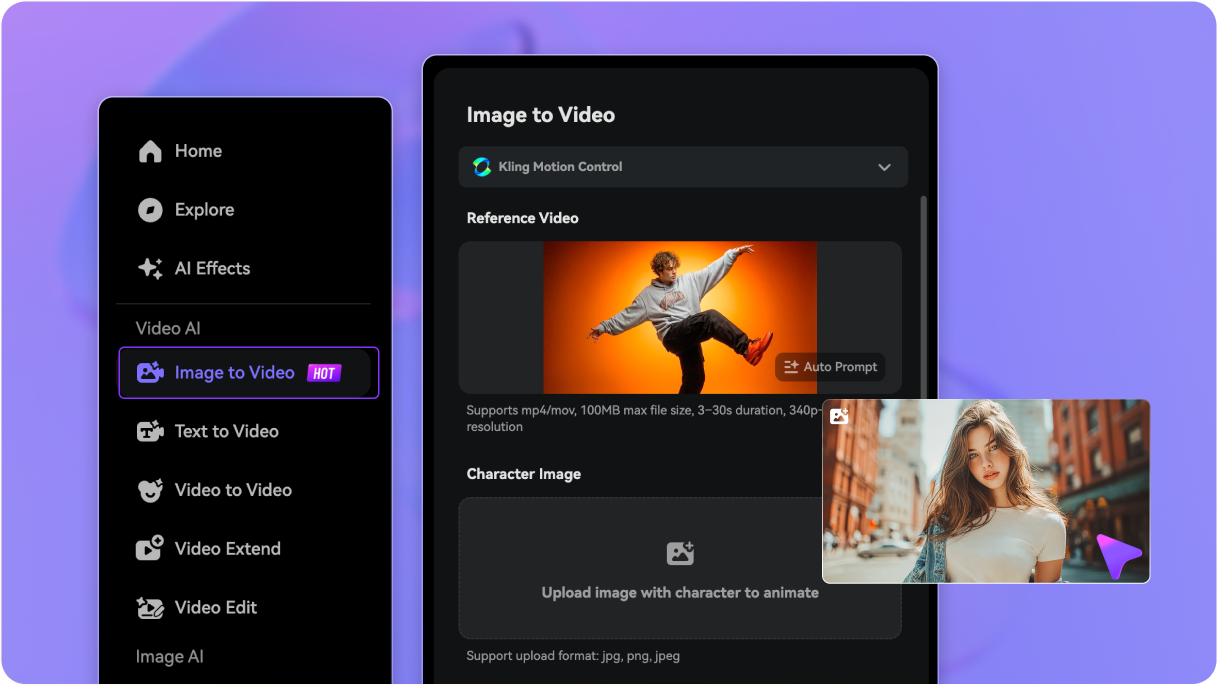
Step 1: Upload an Image

Open Media.io Motion Control and upload the image you want to animate. Portraits, full-body photos, avatars, pets, babies, and character art all work well.

2
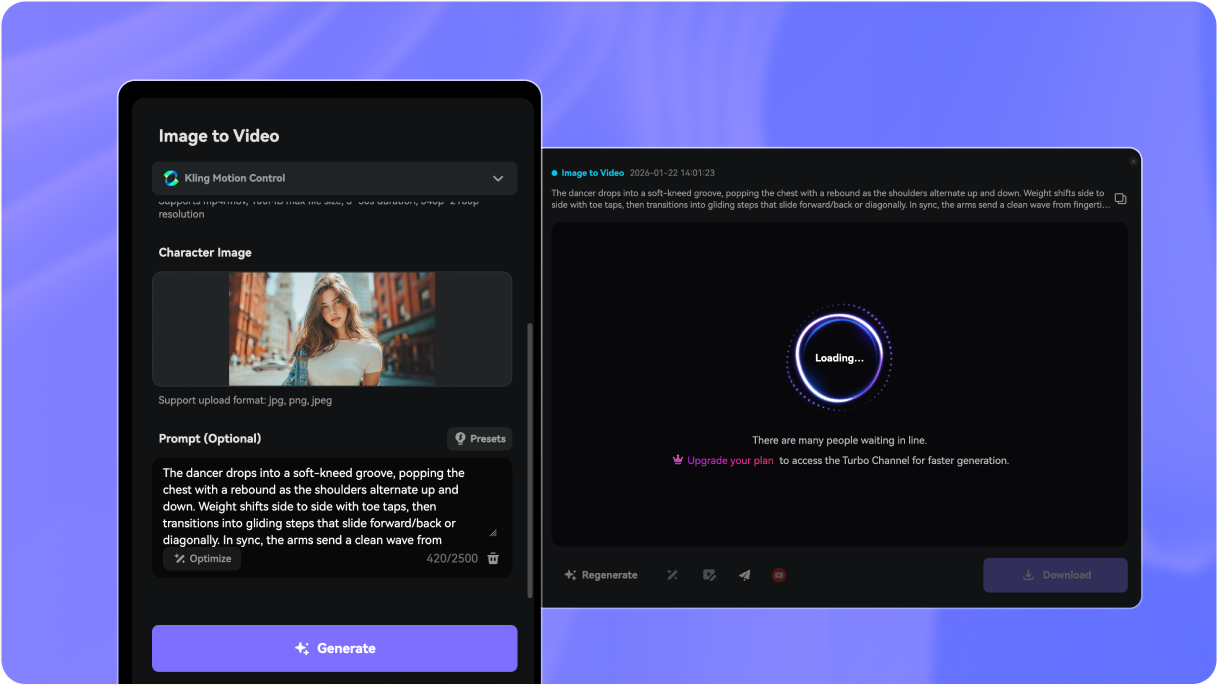
Step 2: Add a Motion Reference Video

Upload a reference clip to control the movement. Kling 3.0 transfers facial motion, hand gestures, body movement, and even camera rhythm for more realistic and precise animation.

3
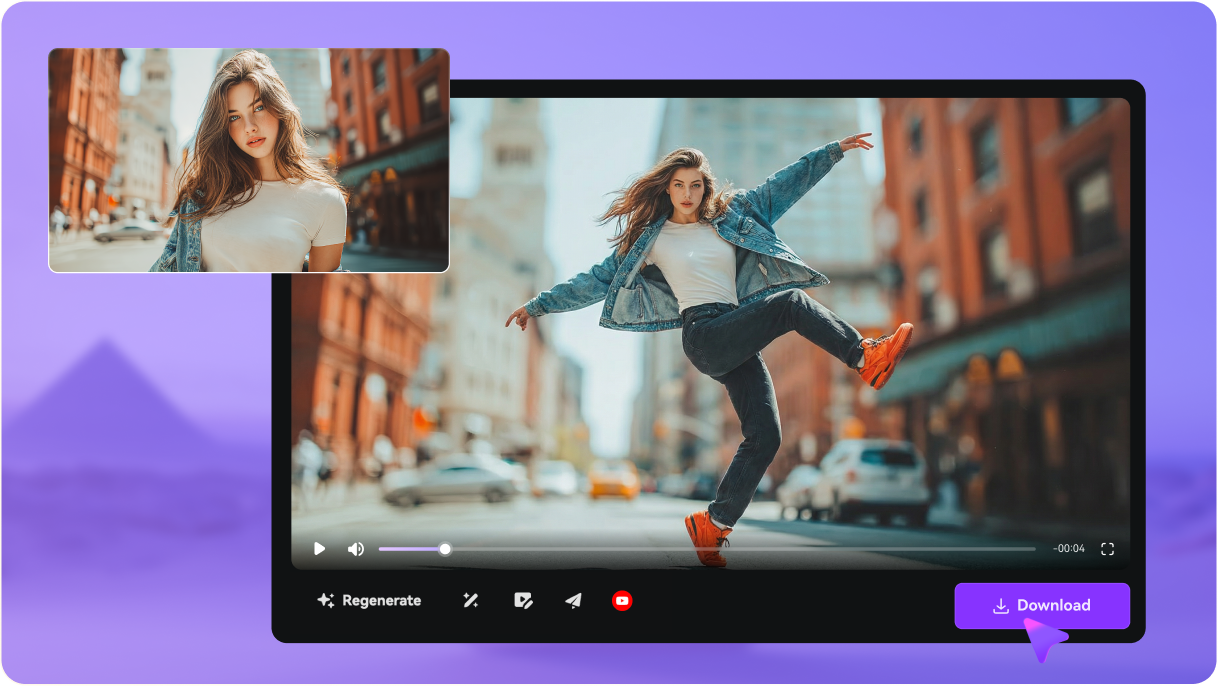
Step 3: Generate & Download

Click Generate to create your AI motion video. Preview the result, regenerate if needed, and download a smoother, more natural motion clip ready for sharing or editing.

Step 1: Upload an image to Kling 3.0 Motion Control
Step 2: Add a motion reference video to Kling 3.0 Motion Control
Step 3: Generate and download AI motion video with Kling 3.0 Motion Control

FAQs About
Kling 3.0 Motion Control

What is Kling 3.0 Motion Control?

Kling 3.0 Motion Control is an advanced AI image-to-video feature that animates a still image using motion from a reference video. The model transfers gestures, body movement, and camera motion from the reference clip to your subject, producing more natural and controllable AI motion videos.

Most AI video generators create motion automatically from prompts. Kling Motion Control instead uses a motion reference video to guide movement. This allows you to produce more predictable actions like walking, dancing, gestures, and camera motion.

What improved in Kling 3.0 Motion Control compared with Kling 2.6?

Kling 3.0 Motion Control improves full-body movement stability, hand gesture accuracy, and camera synchronization. It generates smoother and more believable motion compared with Kling 2.6.

What types of images work best with Kling Motion Control?

Clear images with visible subjects work best. Portraits, full-body photos, avatars, characters, pets, and illustrations can all be animated. Images showing body posture typically produce more natural motion.

What kind of reference videos can I use?

You can use short clips that clearly show the motion you want to transfer — such as walking, dancing, turning, waving, or gestures. The model analyzes the movement and applies it to your uploaded image.

A prompt is optional. Kling 3.0 Motion Control mainly follows your reference motion video. You can add a short prompt if you want to customize the background, lighting, or visual style, such as "cinematic sunset street" or "clean studio background".

Can Kling Motion Control animate pets, babies, or characters?

Yes. Many creators animate pets, babies, avatars, or illustrated characters using motion reference clips. As long as the subject is clearly visible, the AI can transfer motion to it.

Is Kling 3.0 Motion Control free to try?

Yes. Media.io offers a 3-day free trial so you can test Kling 3.0 Motion Control and generate AI motion videos online before upgrading.

Is there a Kling 3.0 Motion Control MOD APK?

There is no official mod APK for Kling Motion Control. Downloading modified apps from unofficial sources can pose security risks. For a safe and reliable experience, use the official Kling AI platform or trusted web tools like Media.io.

Media.io Online AI Tools Quality Rating:
vote 4.7 (162,357 Votes)