
Background noise is one of the most common problems editors face in Final Cut Pro projects. It shows up in YouTube videos, interviews, vlogs, online courses, and talking-head content, and more often than not, you notice it only after you sit down to edit and put on headphones.
If you are using Final Cut Pro, the good news is that this tool can handle certain types of noise very well, especially low-level, consistent background sounds. However, it is not a full audio restoration suite. Some problems can be reduced cleanly, while others will quickly push Final Cut Pro beyond its comfort zone.
Let's unpack this and learn why.
In this article
Types and Causes of Audio Noise
The first thing you should do is understand the type of noise you're dealing with. This will help you understand which tool to use for cleanup and how to use it.
| Audio Noise Types | Causes |
| Background Hum | Electrical interference, AC units, computer fans |
| Wind Noise | Outdoor recording, uncovered microphones |
| Hiss / Static | High-gain levels, low-quality microphones |
| Room Echo | Untreated rooms, reflective surfaces |
Each type behaves differently, and not all of them respond well to the same tools. For example, removing high-frequency sounds will address the hissing, but it won't address low-frequency hums.
How to Remove Noise from Audio in Final Cut Pro?
Final Cut Pro offers several ways to reduce background noise, depending on the severity and consistency of the problem. The key is choosing the right method and stopping before the audio starts sounding unnatural.
Reduce Background Noise in Final Cut Pro with Effects
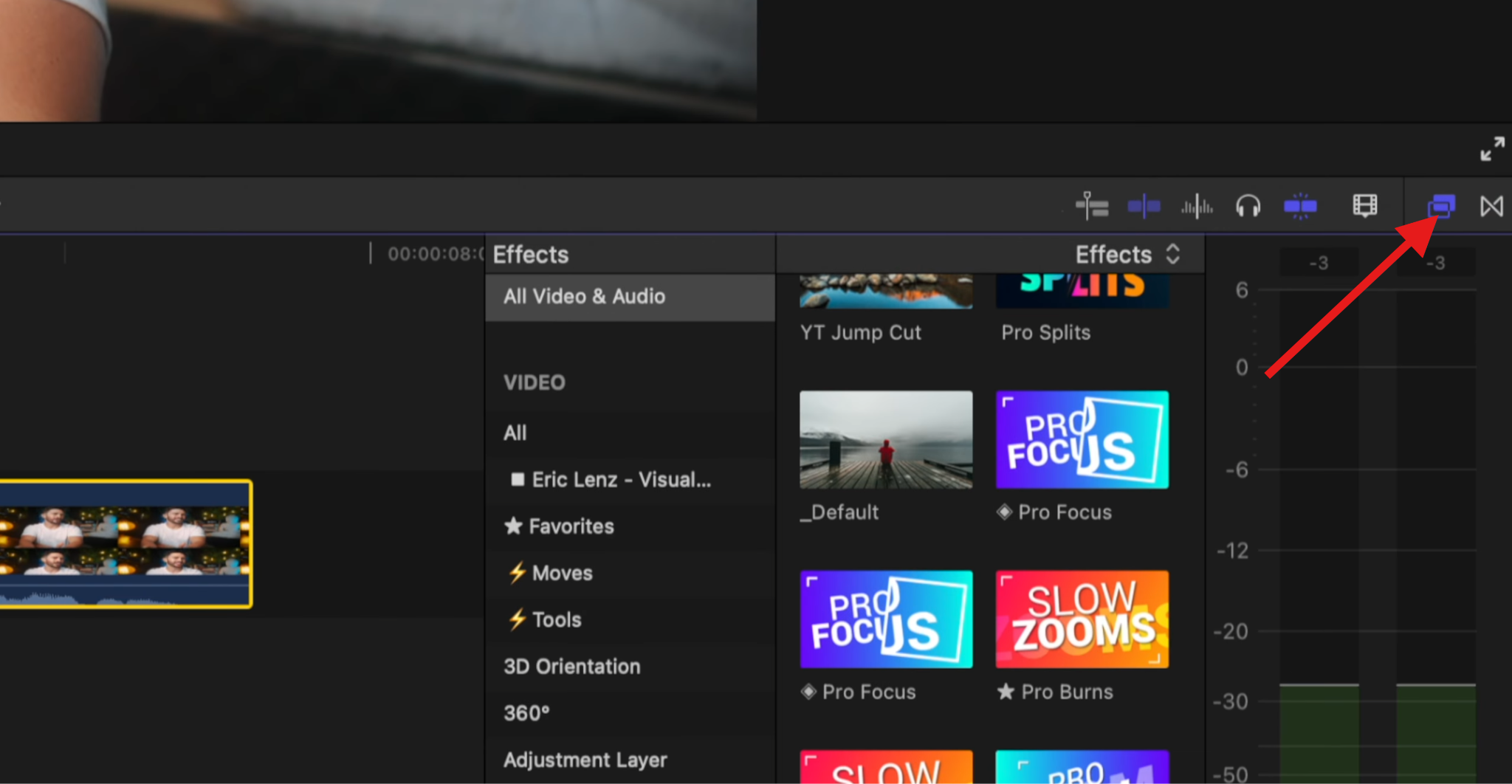
- Download and install Final Cut Pro, open it, import the audio file where you need to remove background noise, select it, and then go to the Effects Browser.
- Search for "voice" and double-click on the Voice Over Enhancement 2 effect.
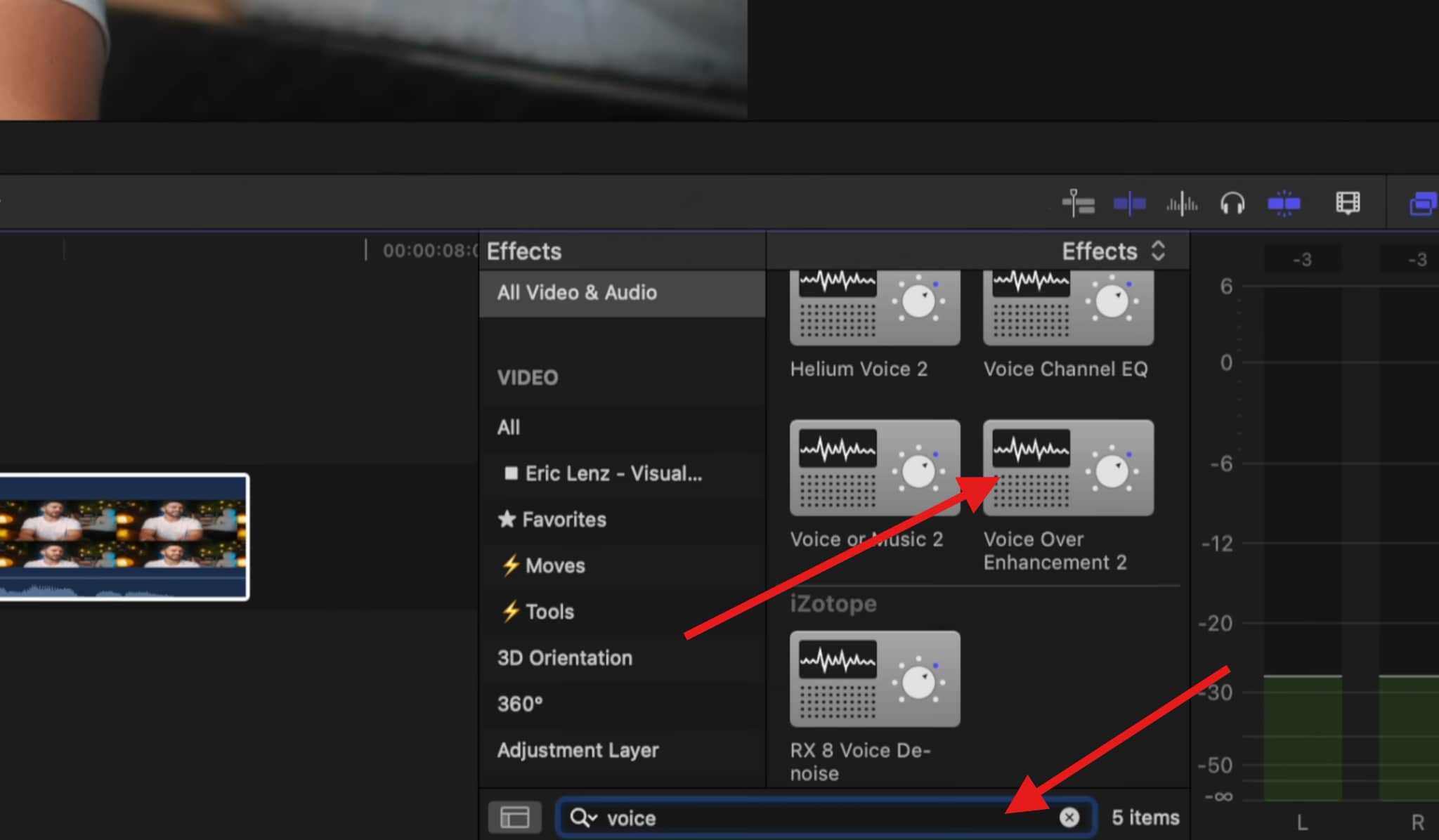
As soon as you do that, the effect will be applied to the audio file you previously selected. Now, you should know that this is not the best solution by any stretch of the imagination, but it does the job fairly well, and it is best suited for beginners.
Ideal Use Cases: home videos, school projects, funny video content, non-professional scenarios, etc.
Remove Background Noise Final Cut Pro with the Enhance Audio Feature
Now, we move to something a little more complicated that offers better results.
- Click on the Magic Wand icon and select Enhance Audio.
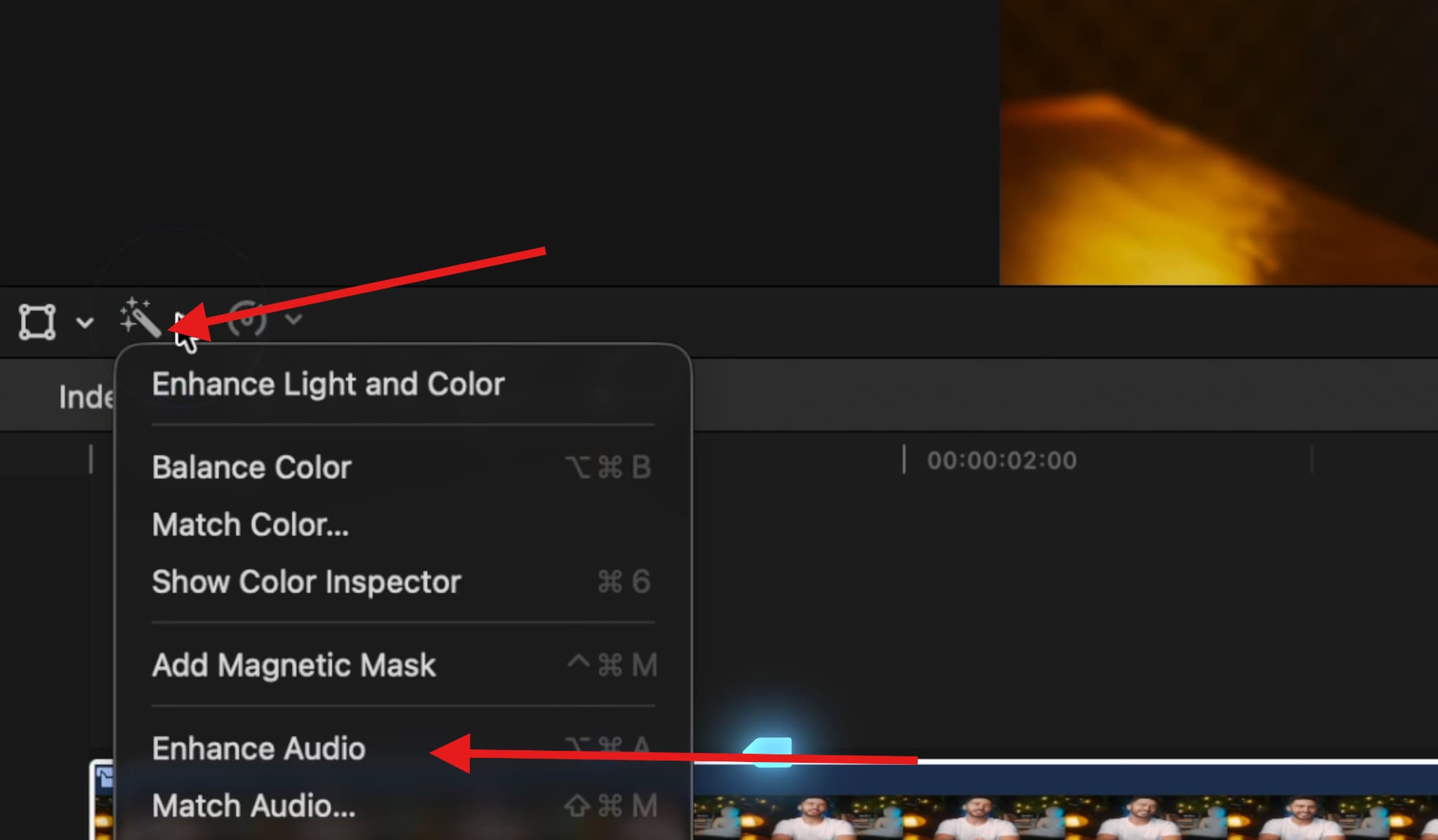
- As soon as you click, FCP's AI will automatically enhance the audio, but you can go further by clicking on the Inspector Window.
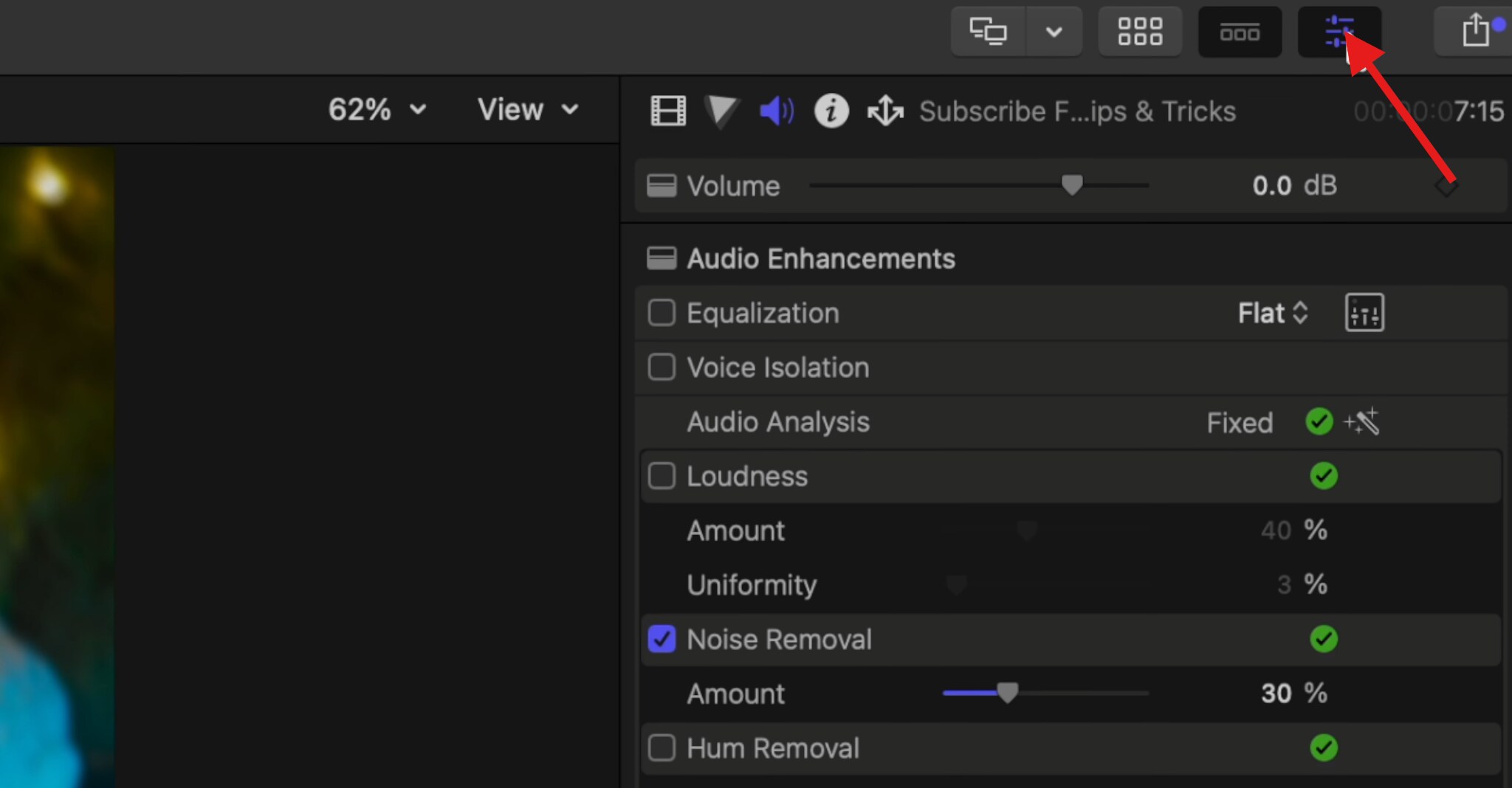
- Click on the Speaker Icon to activate the Audio Inspector, and check the selected Noise Removal feature. You can play around with different features here.
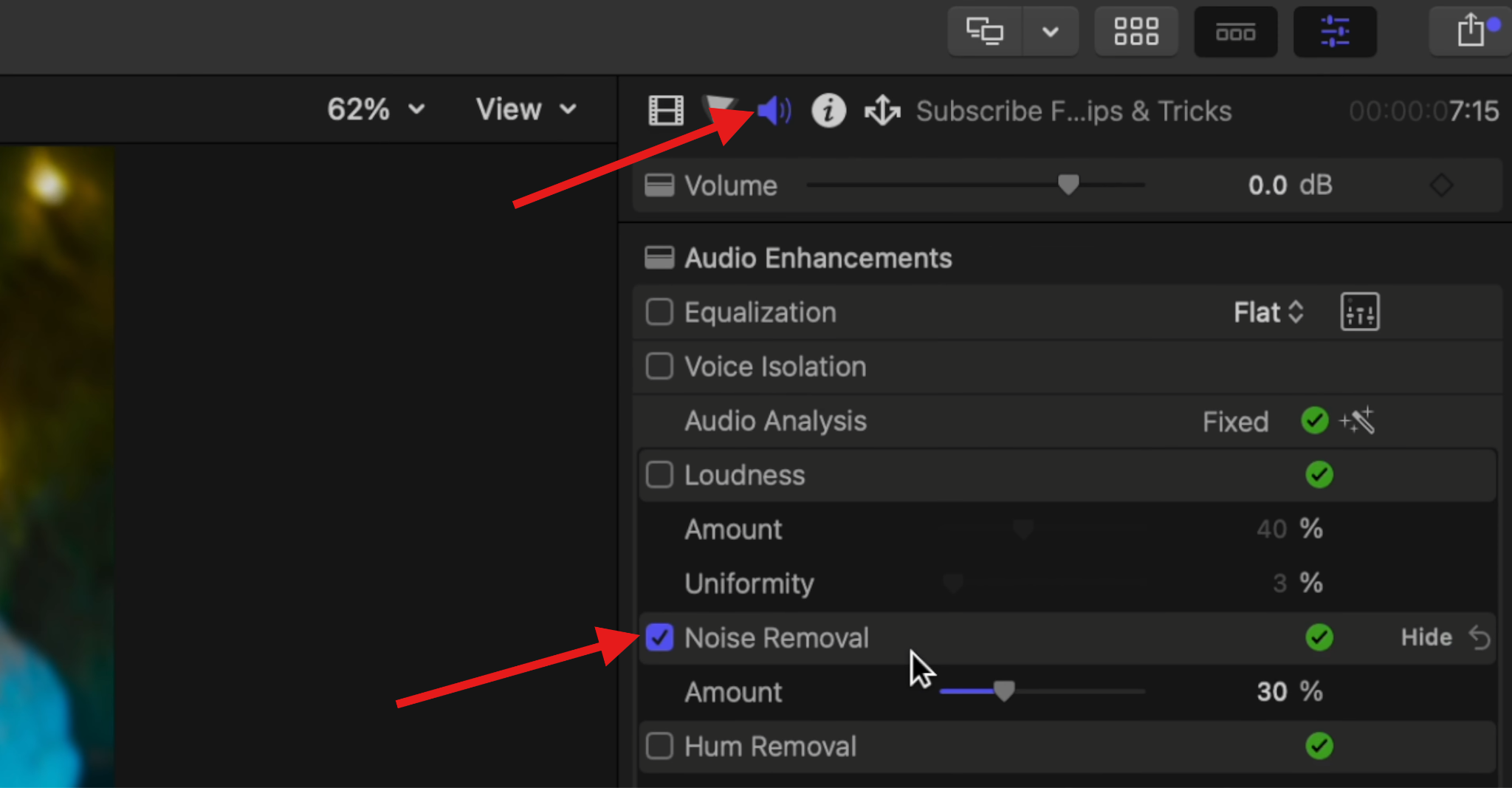
Apart from the Noise Removal feature, you can use Voice Isolation to enhance speech or Loudness to increase volume without distorting the sound. Check other features as well, activate them, and listen to your audio to see how it sounds. If you dislike a certain feature, simply deselect it.
Ideal Use Cases: YouTube videos, podcasts, interviews, voiceovers, lessons, etc.
If these built-in methods aren't doing a good job, try something else.
Pro Tips to Effectively Reduce Background Noise in Final Cut Pro
Reducing noise is all about finding the right balance. The goal is sound clarity. You don't need to chase silence where the only thing you can hear is the sound of the speaker. Some background noise is actually preferable.
Take a look at this table that shows common recording scenarios and how to remove background noise for each.
| Recording Scenario | Recommended Tool | Core Parameter Settings |
| Indoor Recording (Minor Air Conditioning Noise) | Audio Inspector Noise Removal | Low to moderate reduction |
| Outdoor Interview (Obvious Wind Noise) | Plugin or AI tool | Avoid aggressive FCP noise removal |
| Online Meeting Recording (Microphone Hiss) | Noise Removal + Light Gate | Gentle reduction, low gate threshold |
When tools like FCP are not up to the task, if the background noise is too chaotic, or if you find yourself spending too much time adjusting sliders only to end up with sub-par audio, you should consider using AI for background noise removal.
AI-Based Alternative to Final Cut Pro Noise Reduction: Media.io
Sometimes Final Cut Pro simply isn't enough. It struggles with inconsistent noise, heavy wind distortion, echo mixed with background sounds, poorly recorded dialogue, and other forms of unpredictable background sound.
In these cases, AI-based noise removal is a better option in these cases, and one of the best tools that you can try is actually a browser-based tool called Media.io.
The Noise Reducer feature uses AI models trained to automatically separate voice from background noise. It works online, requires no installation, and delivers clean results in a few clicks. Take a look.
- Open the Noise Reducer online tool.
- Click and upload an audio file.
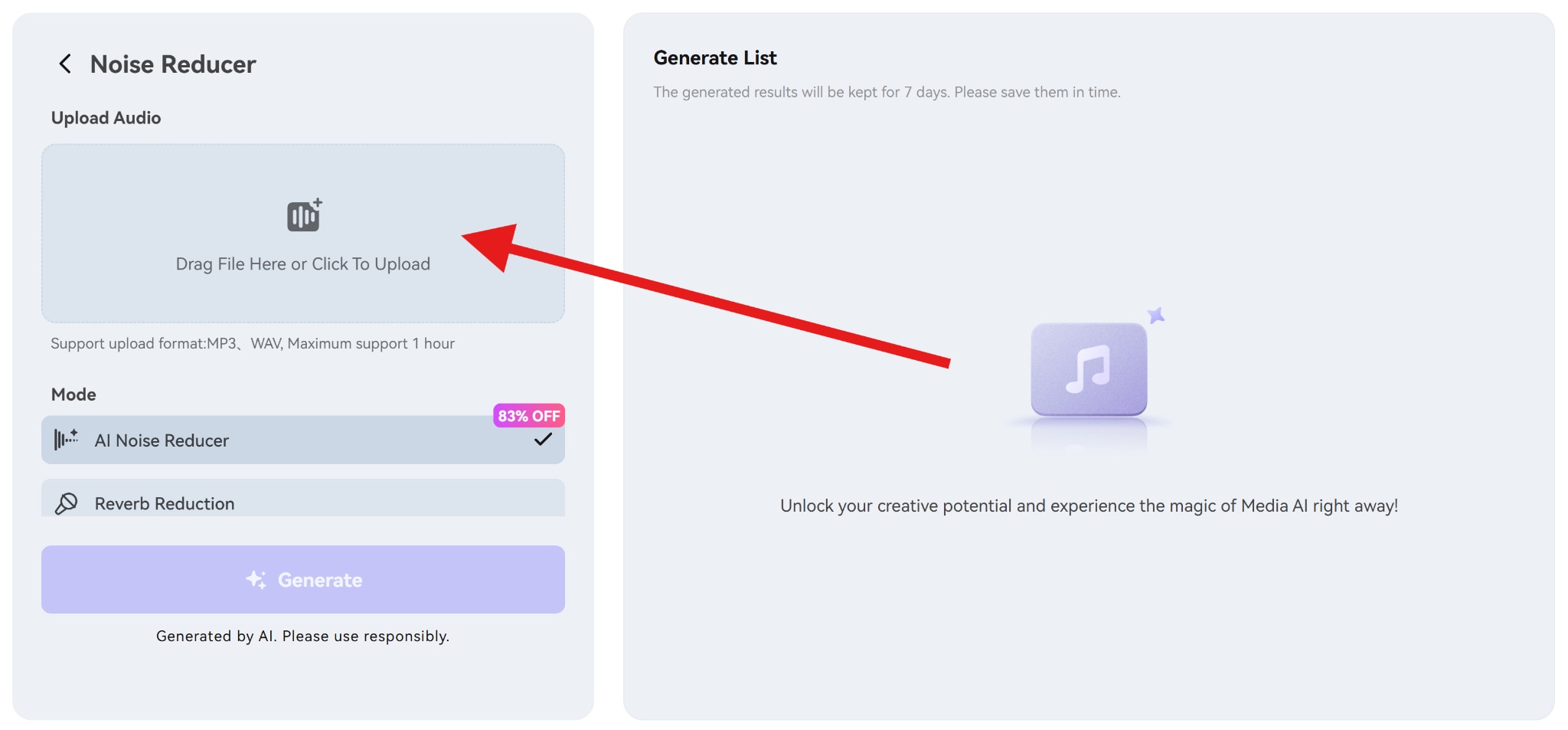
- The final step is to select the AI Noise Reducer and click on Generate.
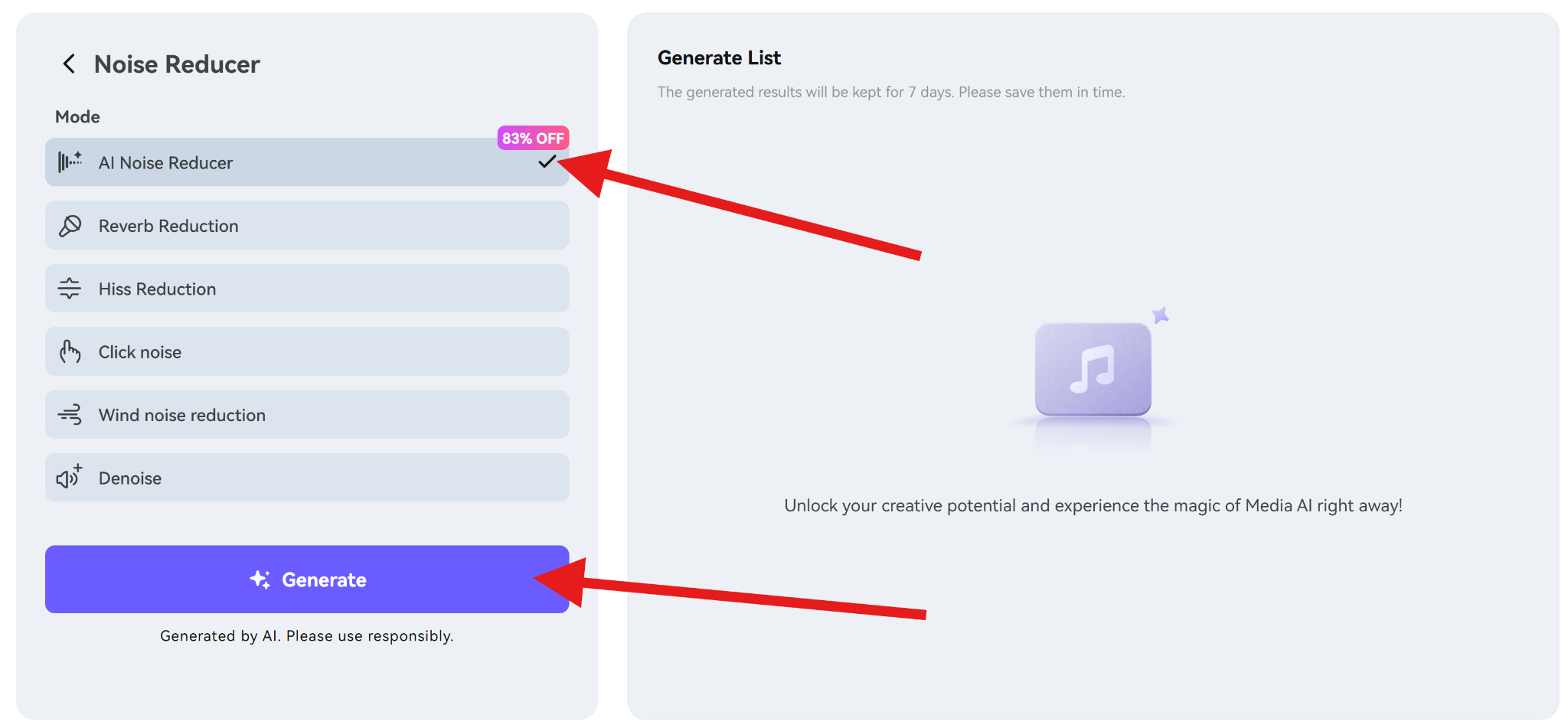
After a very short period, you can download the clean audio file.
The best part about this tool is that it offers features for specific sounds, like clicking, wind, hiss, and reverb, which is a huge timesaver when you need to act fast (like if you are on a deadline).
Conclusion
Final Cut Pro is excellent for reducing light, consistent background noise when the recording quality is already decent. Its built-in tools are fast, simple, and effective within their limits. When noise becomes complex, aggressive, or inconsistent, pushing Final Cut Pro too far can result in robotic or damaged audio.
In those cases, switching tools saves time and protects voice quality.
The most important takeaway is that clean audio starts at the recording stage. Noise reduction should enhance good audio, not attempt to repair bad recordings.
FAQs
-
Can Final Cut Pro remove wind noise completely?
No. It can reduce mild wind noise, but strong wind distortion usually requires AI tools or plugins. -
Why does my audio sound robotic after noise reduction?
Too much reduction. Dial back the strength or switch to a different method. -
Are there free plugins for FCPX audio noise removal?
Yes, but results are limited. Professional or AI tools perform better. -
How to batch remove noise from multiple clips in Final Cut Pro?
Apply effects to one clip, then copy and paste attributes to others. -
Does noise reduction affect audio quality permanently?
Yes. Noise reduction is destructive once rendered, so always keep a backup.


