

 ChatGPT
 Perplexity
 Gemini
 Claude
 Grok
Grok

Higgsfield AI has become one of the most searched AI video generators for cinematic camera movement, image-to-video generation, viral presets, and multi-model video creation. But is it worth paying for in 2026, and how does its credit-based pricing work in real creator workflows?
This Higgsfield AI review focuses on practical decision-making: output quality, prompt accuracy, camera controls, pricing, credits, hidden costs, best use cases, limitations, and alternatives. Prices and model credit usage can change, so always confirm the latest details on the official Higgsfield pricing page before subscribing.
- Best for: cinematic AI videos, fashion clips, music promos, social media ads, image-to-video tests, and camera-movement-heavy visuals.
- Not ideal for: long narrative videos, exact product accuracy, strict brand compliance, or multi-shot character consistency.
- Pricing concern: Higgsfield uses credits, and premium models can consume credits quickly when several generations are needed.
- Workflow tip: Treat Higgsfield AI as a creative generation tool, then polish strong outputs with enhancement, compression, resizing, and editing tools.
In this article
Part 1. Quick Verdict
Higgsfield AI is worth trying if you want fast, stylish, short-form AI videos with strong camera movement. Its biggest advantage is visual direction: users can create cinematic portrait clips, social ads, image-to-video shots, talking-style content, and dramatic motion effects without building every scene manually.
In our Higgsfield AI review, the tool performed best when the prompt had one clear subject, one visual style, and one camera move. It was less reliable when the request involved exact logo placement, long story continuity, complex multi-character action, or consistent identity across several shots.
| Review Item | Verdict |
| Overall Rating | 8.1/10 for short-form cinematic AI video workflows |
| Best For | Higgsfield AI image-to-video generation, camera controls, social clips, fashion visuals, music promos, ad concepts |
| Not Ideal For | Long-form storytelling, exact product details, strict character continuity, legal or brand-sensitive final assets |
| Main Strength | Fast cinematic experimentation with presets, visual references, and camera-style controls |
| Main Weakness | Credit costs and output consistency can vary by model, prompt complexity, resolution, and number of retries |
| Best Workflow | Generate in Higgsfield AI, select the best clip, then polish with Media.io AI Video Enhancer, compressor, converter, or online editor |
Part 2. What Is Higgsfield AI?
Higgsfield AI is an AI-native creative suite for generating and editing images, videos, and audio. For video creators, the most relevant features include text-to-video, image-to-video, first and last frame references, video editing, motion control, Cinema Studio, Marketing Studio, viral presets, and access to multiple AI video models in one workspace.
Compared with a basic AI video generator, Higgsfield AI is more focused on visual direction and camera language. Its official AI video page highlights multi-model access, reference frames, motion control, video editing, and Cinema Studio features designed for cinematic generation.
Higgsfield AI is especially relevant for creators making TikTok videos, Instagram Reels, YouTube Shorts, fashion visuals, music clips, product ad concepts, UGC-style ads, and fast social campaigns. If your task starts from a still image and you only need simple online animation, you can also compare it with Media.io's AI image-to-video generator.
Part 3. How We Tested Higgsfield AI
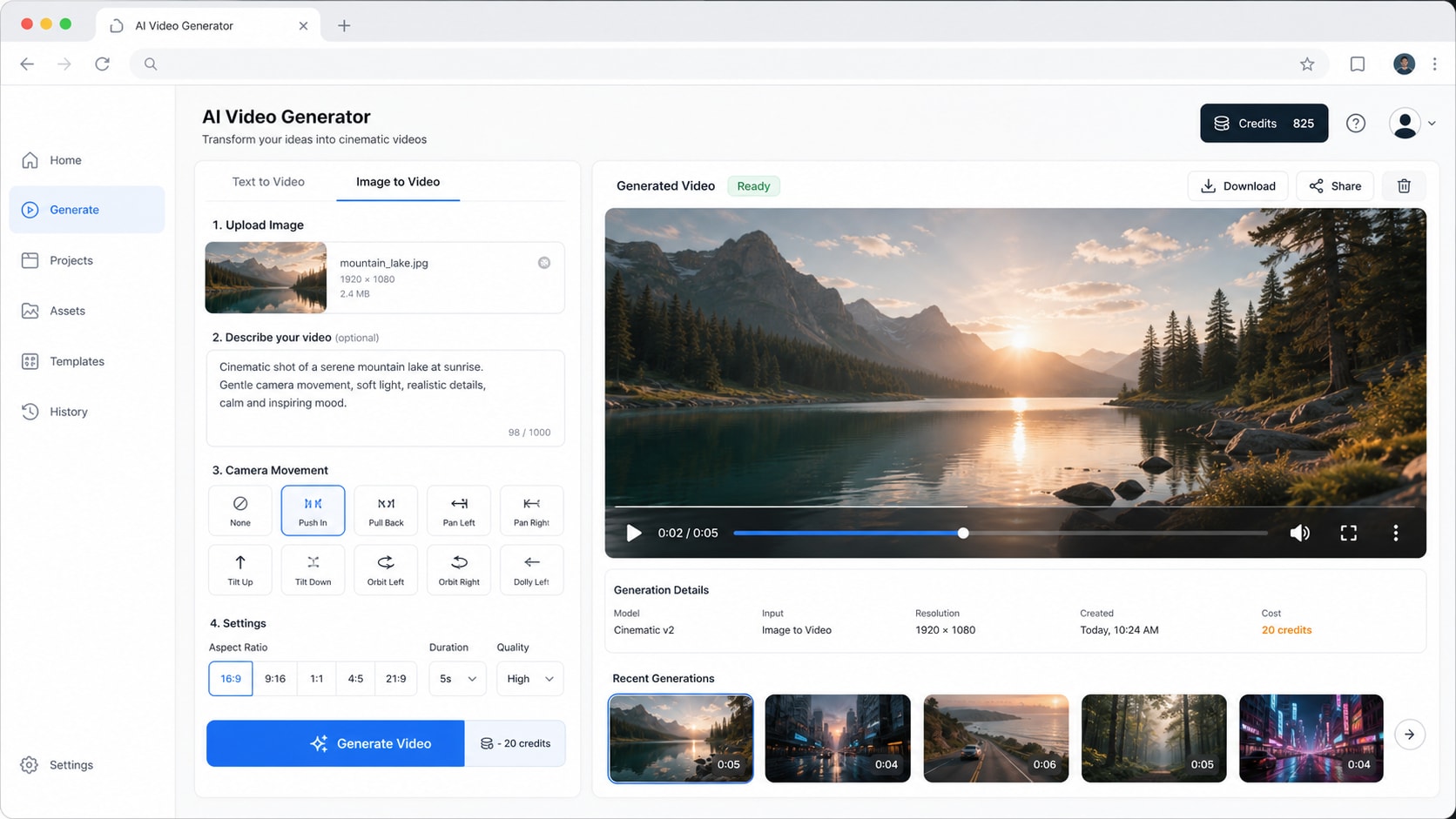
To make this Higgsfield AI review more useful than a feature list, we evaluated the tool through common creator scenarios: a cinematic portrait, an image-to-video clip, a camera movement prompt, a product promo concept, a complex action scene, and a failure stress test.
| Test Area | What We Evaluated | Why It Matters |
| Output quality | Realism, lighting, skin detail, motion smoothness, compression, and visible AI artifacts | Determines whether the clip is usable for social posting, ads, or client previews |
| Prompt accuracy | Subject, action, camera movement, visual style, background, and negative details | Shows whether Higgsfield AI follows the creative brief or only captures the mood |
| Image-to-video performance | Subject stability, face drift, background shifts, and motion believability | Important for creators animating photos, product shots, portraits, or concept art |
| Camera controls | Zoom, orbit, dolly, pan, push-in, pull-back, and cinematic motion language | One of the main reasons users search for Higgsfield AI instead of a generic video generator |
| Workflow value | Generation speed, retries, credit usage, export quality, and post-production needs | Helps estimate the real cost per usable AI video, not just the subscription price |
Sample prompts used for review-style testing
| Scenario | Prompt Direction | Expected Result |
| Cinematic portrait | A close-up fashion portrait with soft studio lighting, slow push-in camera movement, shallow depth of field, realistic skin texture | Stable face, elegant motion, believable lighting, minimal artifacts |
| Image-to-video | Animate the uploaded portrait into a short cinematic clip with subtle hair movement and a slow orbit camera | Subject remains recognizable while the camera movement feels natural |
| Product ad concept | A premium skincare bottle on a marble surface, soft reflections, water droplets, commercial lighting, slow dolly-in | Strong mood board quality without distorting the product shape too much |
| Stress test | A person walks through a busy neon street, turns toward camera, smiles, picks up a product, and the camera circles around them | Tests whether Higgsfield AI can handle multi-action continuity and identity stability |
Part 4. Hands-On Test Results
Higgsfield AI delivered its strongest results when the prompt was short, visual, and camera-focused. It struggled more when the scene required many simultaneous actions, precise text, exact packaging, or a stable character identity across longer movement.
| Test Scenario | What We Checked | Result Summary | Score |
| Cinematic portrait video | Face quality, lighting, camera movement, realism | Strongest use case. Portrait-style clips can look polished and social-ready when the camera move is clear and the subject is simple. | 8.6/10 |
| Higgsfield AI image-to-video clip | Motion smoothness, subject stability, visual continuity | Good for short clips from still images, but faces, hands, and backgrounds still need manual review before publishing. | 8.2/10 |
| AI camera effect prompt | Zoom, orbit, dolly, FPV-style movement, shot control | Camera movement is one of Higgsfield AI's clearest strengths. Results improve when the prompt uses one subject and one motion direction. | 8.3/10 |
| Product promo video | Object shape, logo accuracy, text accuracy, product consistency | Useful for ad concepts and mood boards, but risky for final product ads if packaging, logo, or label text must remain exact. | 7.0/10 |
| Complex multi-action prompt | Multiple objects, action sequence, scene detail, timing | Often simplifies the scene or skips details. Complex ideas work better when split into multiple short generations. | 6.6/10 |
| Failure stress test | Long motion, expression changes, identity stability, artifact rate | Character drift, stiff expressions, or unnatural motion can appear when the clip asks for too much movement or emotional nuance. | 6.1/10 |
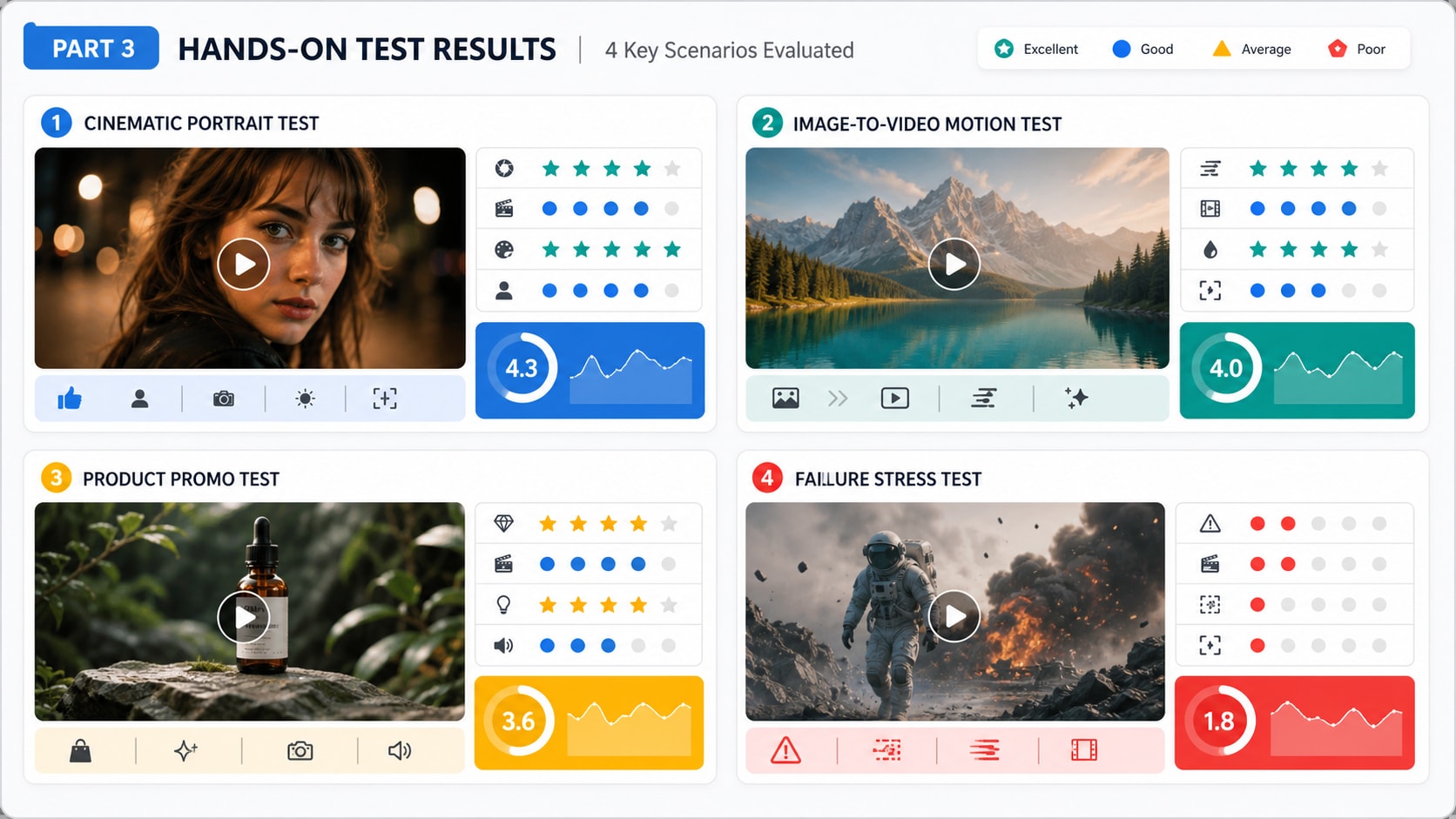
Overall, Higgsfield AI is better at creating impressive short visual drafts than producing a guaranteed final asset in one click. If a clip looks promising but slightly soft, noisy, or compressed, Media.io can help with the final pass through AI video enhancement, format conversion, compression, trimming, subtitles, and resizing.
Part 5. Best Use Cases and Limitations
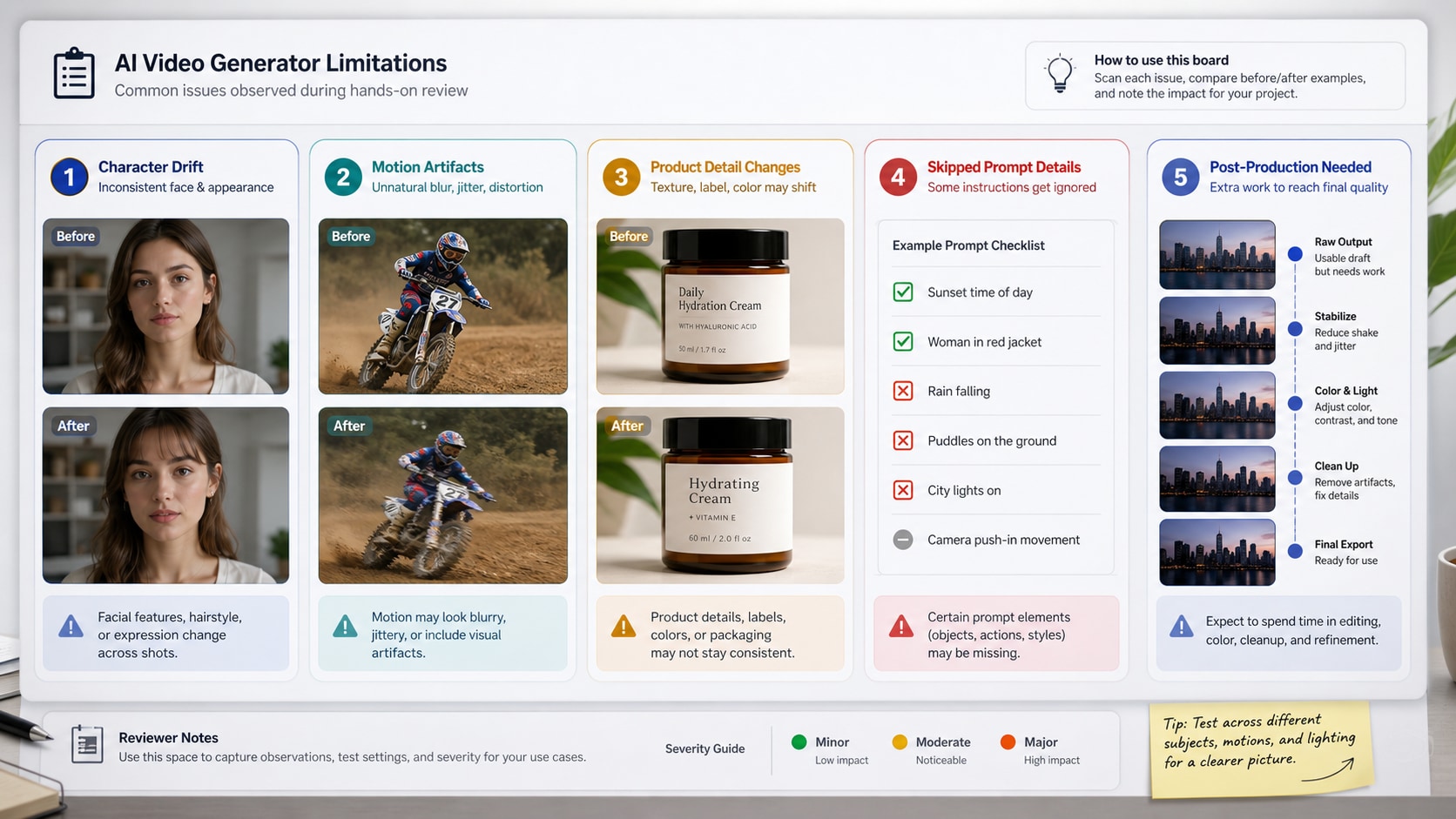
Higgsfield AI is strongest for creators who need fast visual impact. It is less suitable when the project requires strict brand control, legal accuracy, product text accuracy, or long-scene continuity.
| Best Use Case | Why Higgsfield AI Fits | Recommended User |
| Social media AI videos | Fast generation, viral presets, short-form effects, and visually dramatic motion | Creators, influencers, social teams, short-form editors |
| Fashion and lifestyle visuals | Cinematic movement works well for portrait scenes, outfits, beauty shots, and studio-style looks | Fashion brands, photographers, agencies, creative marketers |
| Music videos and promo clips | Strong for mood, atmosphere, camera movement, lighting, and stylized scenes | Musicians, editors, social video creators |
| Ad concepts and mood boards | Useful for testing visual directions before production or client approval | Marketing teams, brand designers, creative directors |
| Image-to-video experiments | Can animate portraits, product concepts, artwork, and references into short video drafts | Designers, content creators, e-commerce teams |
| Limitation | Why It Matters | Possible Workaround |
| Character drift | Faces, expressions, or identity details may shift during motion | Use shorter clips, simple camera movement, and fewer expression changes |
| Limited product precision | Exact logos, labels, packaging, and small text may not remain accurate | Use Higgsfield AI for concepts, then edit final product details manually |
| Prompt details may be skipped | Complex prompts can produce attractive but incomplete outputs | Break one complex idea into several smaller generations |
| Credit cost can rise quickly | Several retries may be needed before one clip is usable | Test with simpler prompts first, then spend credits on stronger concepts |
| Post-production is often needed | AI videos may need enhancement, trimming, resizing, subtitles, compression, or conversion | Use Media.io online video editor to finish the clip before publishing |
Part 6. Higgsfield AI Pricing, Credits, and Hidden Costs
Higgsfield AI pricing deserves close attention because AI video generation is credit-based. A plan can look affordable, but the real cost depends on the model you use, the resolution, clip length, number of retries, and how many outputs are good enough to publish.
Public 2026 pricing snapshots report a plan structure that includes Free access plus paid tiers such as Starter, Plus, Ultra, and Business. Because the official pricing page may render plan details dynamically and pricing can change, treat the table below as a decision checklist and verify the latest numbers before purchase.
| Plan | Reported 2026 Monthly Price | Reported Credits | Best Fit |
| Free access | Limited free use | Limited daily or trial usage may vary | Testing interface, prompt quality, and watermark/export limits |
| Starter | About $15/month | About 200 credits/month in some 2026 pricing snapshots | Light experimentation and occasional short-form tests |
| Plus | About $49/month, lower with annual billing | About 1,000 credits/month | Regular creators who use AI video several times per month |
| Ultra | About $129/month, lower with annual billing | About 3,000 credits/month | High-volume creators testing multiple models and premium outputs |
| Business | Per-seat pricing may vary | Shared team credits may apply | Agencies, teams, and collaborative production workflows |
How Higgsfield AI credits affect real cost
The subscription price is only one part of Higgsfield AI pricing. Different models can consume different credit amounts per generation. Public 2026 pricing analyses report examples such as lower-credit image generation, mid-range short video clips, and higher-credit premium video models. In practice, one usable video may require several attempts, so the real cost should be calculated by usable output, not by generation alone.
| Cost Factor | What to Check | Why It Matters |
| Credit usage by model | Check the in-app credit cost for Kling, Seedance, Veo, Sora, Wan, image models, and premium settings | Premium models and higher settings can reduce how many videos your plan actually produces |
| Failed or rejected generations | Confirm whether unsatisfactory outputs still consume credits | AI video often needs several tries before one clip is usable |
| Watermark rules | Check whether free or lower-tier exports include branding | Watermarked clips may not be usable for clients, ads, or brand channels |
| Export quality | Review resolution, duration, aspect ratio, frame rate, and file format limits | Shorts, Reels, YouTube, client decks, and ad platforms may require different specs |
| Commercial rights | Read current licensing terms for your plan | Important for paid ads, client work, branded content, and product campaigns |
| Annual billing | Confirm monthly vs annual billing before checkout | Annual discounts may require upfront payment and may have different refund rules |
| Post-production time | Estimate enhancement, trimming, resizing, compression, subtitles, and format conversion | Editing time is a hidden cost even when the generation itself looks good |
After generation, you may still need to compress AI videos for TikTok and Reels, change AI video format online, or use Media.io online video editor to trim, crop, add text, and prepare the final version for upload.
Part 7. Higgsfield AI Alternatives
The best Higgsfield AI alternative depends on what you are trying to create. Some users need stronger editing control, some need cheaper generation, some need better image-to-video motion, and others only need a post-production workflow after generating clips.
| If You Need... | Consider... | Why |
| Cinematic short videos with camera controls | Higgsfield AI | Strong presets, multi-model video access, camera-style workflows, and visual direction tools |
| Advanced AI video editing and professional creative control | Runway | Useful for creators who want a mature editing and generation environment |
| Image-to-video motion realism | Kling, Seedance, Veo, or Wan models | Worth comparing when motion quality, physics, or model-specific output matters most |
| Fast social video concepts | Pika, Luma, or similar AI video tools | Good for creators testing styles, short clips, and quick idea generation |
| Simple photo-to-video workflow | Media.io AI Image to Video | Useful when you want to animate a still image online without managing a full multi-model workspace |
| Enhancing and publishing generated videos | Media.io post-production workflow | Best for enhancement, compression, conversion, trimming, resizing, and final publishing polish |
Part 8. Final Recommendation
Part 9. FAQs
-
Is Higgsfield AI free?
Higgsfield AI offers free access to get started, but free usage may be limited by model access, credits, watermark rules, export quality, or daily generation limits. Check the latest official pricing page before relying on the free tier for production work. -
How much does Higgsfield AI cost in 2026?
Public 2026 pricing snapshots report paid tiers such as Starter, Plus, Ultra, and Business, with credit-based monthly allowances. Exact pricing can change, so confirm the latest subscription price, billing period, and credit rules on Higgsfield's official pricing page before subscribing. -
How do Higgsfield AI credits work?
Higgsfield AI uses credits for generation. Different models, resolutions, clip lengths, and premium settings may consume different amounts of credits. The real cost depends on how many attempts you need before getting one usable video. -
What is Higgsfield AI best for?
Higgsfield AI is best for cinematic AI videos, image-to-video generation, social media clips, fashion visuals, music promos, talking-style content, ad concepts, and camera-movement-heavy creative tests. -
Is Higgsfield AI good for image-to-video generation?
Yes. Higgsfield AI image-to-video generation is useful for turning portraits, product concepts, artwork, and reference images into short cinematic clips. Users should still check for face drift, motion artifacts, background changes, and product detail errors before publishing. -
What are the biggest limitations of Higgsfield AI?
The biggest limitations are character drift, skipped prompt details, occasional unnatural motion, limited precision for exact product details, variable credit cost, and the need for post-production before many clips are ready to publish. -
Can I use Higgsfield AI videos commercially?
Commercial use depends on Higgsfield AI's current terms of service and the plan you use. Always check the latest licensing rules before using generated videos in paid ads, client work, branded content, or product campaigns. -
What is the best Higgsfield AI alternative?
The best alternative depends on your workflow. Runway is worth comparing for advanced video editing, Kling or Veo-style models are worth testing for motion quality, and Media.io is useful when you need image-to-video generation or post-production tools such as enhancement, compression, conversion, trimming, and resizing. -
Do I still need a video editor after using Higgsfield AI?
In many cases, yes. AI-generated videos often need enhancement, cropping, resizing, compression, format conversion, subtitles, trimming, or final cleanup before they are ready for TikTok, Instagram Reels, YouTube Shorts, ads, or client delivery.


