
You just want your photo to look like a cartoon of you, not a stranger with a watermark. That is the whole product. When people search the best apps to turn photo into cartoon, they are really asking about likeness, the save button, iPhone or Android reality, and what happens to the selfie after upload.
I judged Media.io, Voila AI Artist, ToonMe, Picsart, Prisma, Lensa, Snapchat, and ToonApp the way you would on a Saturday: take a photo, apply the look, save the file, and inspect it outside the app. Media.io is a browser tool that works on mobile with no install, not a native App Store camera. Native apps are stronger for stickers and camera roll, and often weaker on watermarks, subscriptions, and privacy.
In this article
- Photo-to-Cartoon Apps Often Change the Person More Than the Style
- Best Apps to Turn a Photo Into a Cartoon by Export Reality
- 8 Photo to Cartoon Apps for iOS, Android, and Browser
- Likeness, Watermarks, and Privacy Before You Upload a Selfie
- The Likeness Retention and Export Friction Test
- When a Browser Cartoonizer Beats a Phone App
- Final Picture to Cartoon App Recommendations
- Photo to Cartoon App FAQ
Photo-to-Cartoon Apps Often Change the Person More Than the Style
A look that seems charming in the preview can still fail when the jaw changes, the download is locked, or the selfie goes to a cloud trainer you did not mean to join. Likeness is what you came for. The filter name is just packaging.
Four phone-specific failures dominate:
- Identity slip: eyes, age, or bone structure move while the filter name stays cute.
- Watermark tax: the free export is unusable, and the paid export is hiding in a different button.
- Resolution trap: the preview is sharp and the saved file is small or compressed.
- Privacy surprise: the upload is used for cloud processing or avatar training under terms nobody read.
Web cartoon generators that take text prompts and style bibles are a sibling page. This page is the selfie-to-export page.
Best Apps to Turn a Photo Into a Cartoon by Export Reality
Rank the save button before the filter pack. An app with 80 looks and a hostage watermark loses to a browser export you can actually post.
| App | Platform reality | Likeness tendency | Export friction | Privacy note |
|---|---|---|---|---|
| Media.io | Mobile browser, no install | Depends on cartoon path; start from the real photo | Browser download, no App Store gate | Cloud processing; review current terms; creations stored 7 days unless membership |
| Voila AI Artist | iOS and Android app | Filter-dependent | In-app export and paywalls vary by look | Cloud styles; read current privacy policy |
| ToonMe | Native app plus web presence | Cartoonizer looks can slim or beautify | Watermarks and paid unlocks are the decision | Selfie upload for processing |
| Picsart | Full editor app | Many tools, inconsistent lock | Subscription sits around export and gold features | Broad editor permissions |
| Prisma | Classic style-transfer app | Style can overpower face | Usually simpler than avatar suites | Processing terms still apply |
| Lensa | Avatar and selfie suite | Avatars can drift far from the person | Packs and subscriptions | Avatar training and gallery terms need a careful read |
| Snapchat | Camera app, not a file exporter | Lenses are playful by design | Saving and watermarks follow Snap behavior | Social graph and camera permissions |
| ToonApp | iOS and Android cartoon app | Varies by filter | Compare watermark and resolution against ToonMe | Standard selfie-upload caution |
8 Photo to Cartoon Apps for iOS, Android, and Browser
Each review opens with a platform/export/privacy line. That line is the app decision. Filter taste comes after.
Media.io
How you actually use it: open it in a desktop or phone browser, with no App Store install. You download from the site. Processing happens in the cloud under current Terms of Use, and creations are stored 7 days unless you have membership. Media.io is not a native iOS or Android cartoon camera. It is here because many people searching "app" will take a mobile browser if the export is cleaner and easier to judge on a larger screen.
Use image to cartoon for the photo-to-cartoon job. If the look you want is anime rather than western cartoon, photo to anime is the closer long-tail. A yellow portrait path exists when that specific family is the brief. Do not promise an offline camera roll widget that Media.io does not ship.
Choose Media.io when you want a no-install cartoonizer and you are willing to upload a selfie in a browser. Skip it when you need a homescreen camera lens, stickers inside iMessage, or offline processing.
How to Cartoon Myself Online with Media.io?
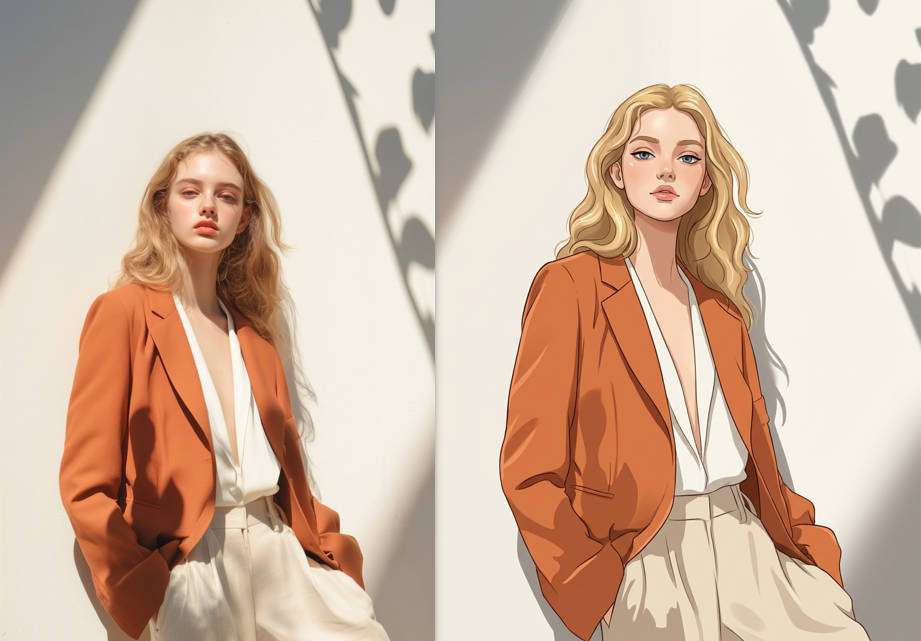
If you want to cartoonize yourself online without installing any app, you can try Media.io. It provides features like image to image that allows you to genrate the cartoon version of yourself with ease. Here are the steps:
- Go to Media.io's AI Image to Image.
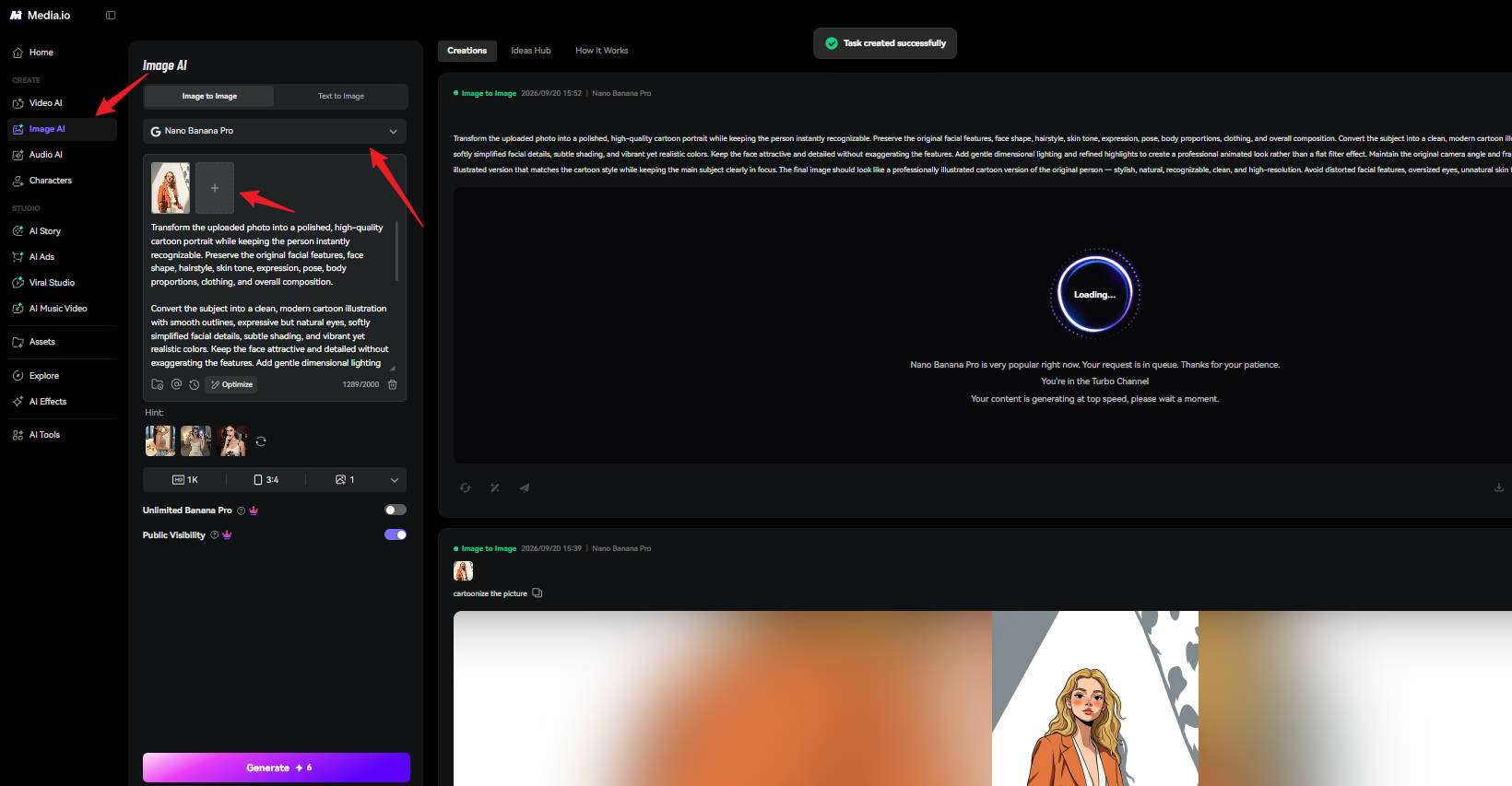
- Upload your selfie, select an image model, then type in the prompts, and tap on Generate to start the process.
- Wait for a few seconds, and preview the result, download to save it if you are satisfied.
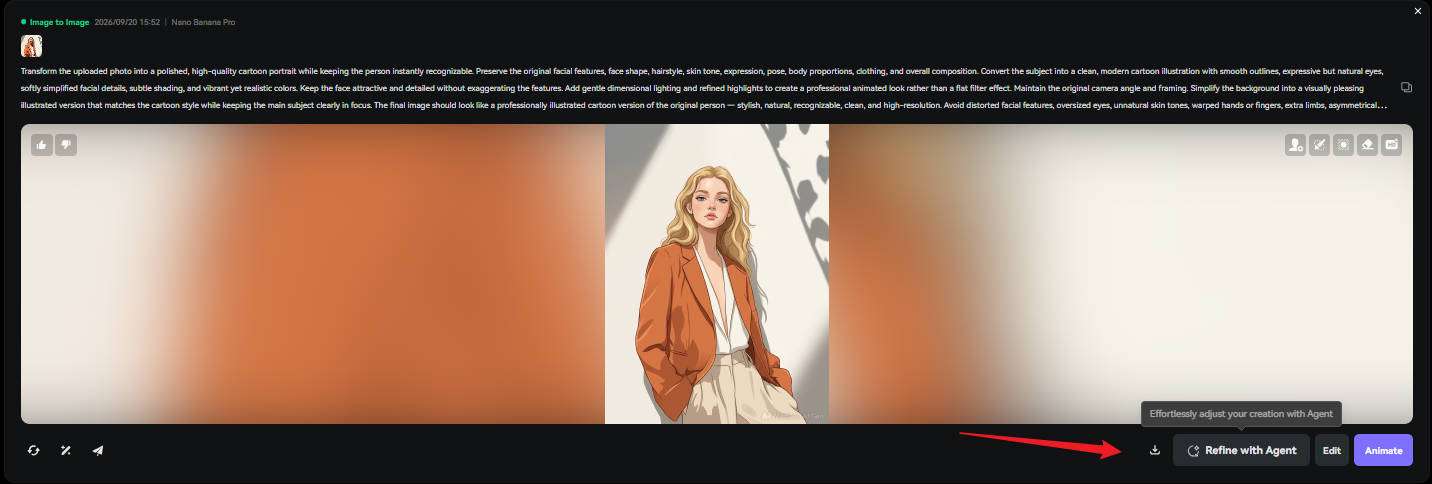
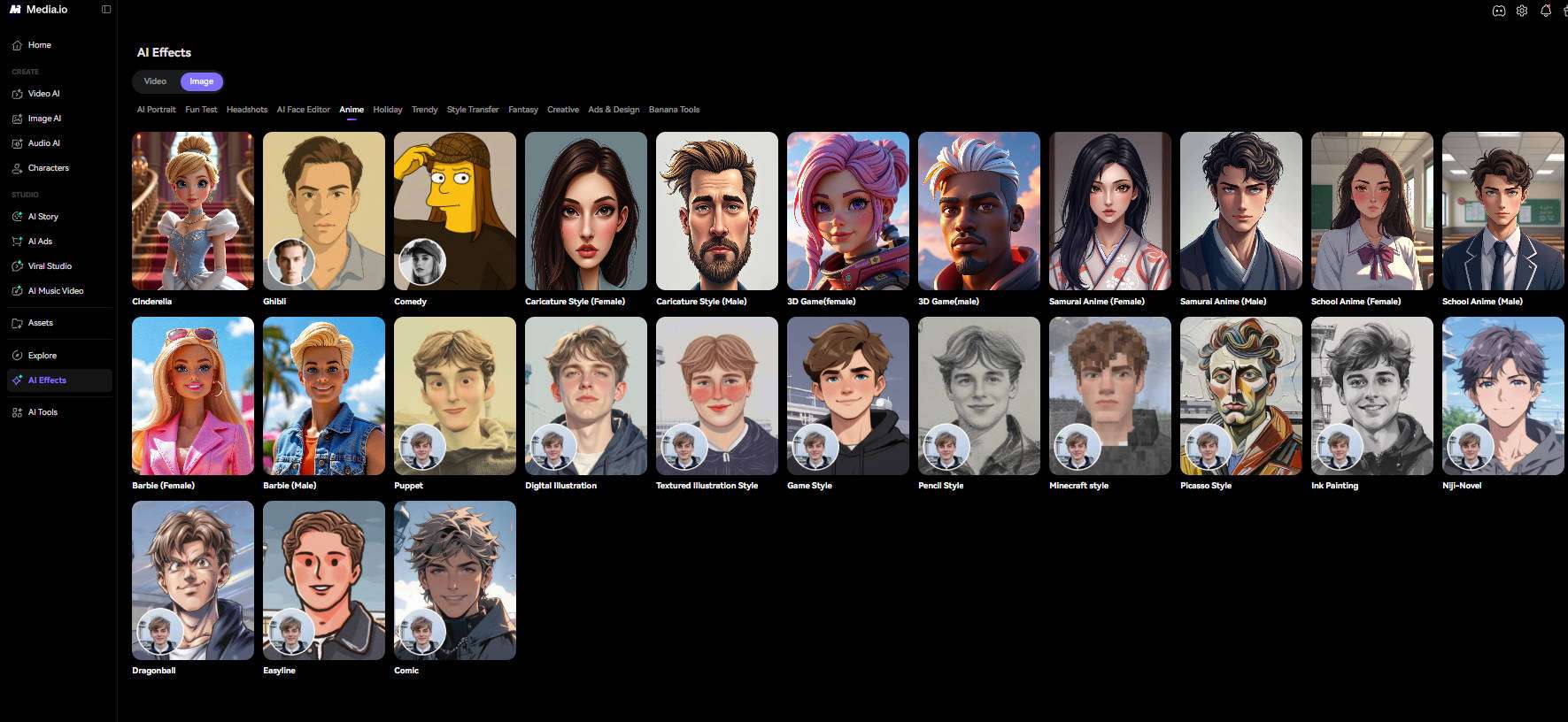
In addition to that, you can also explore many built-in AI Effects including anime, ghibli, caricature and more styles in Media.io's Effects Hub, which allows you change your image style in one-click.
Voila AI Artist
How you actually use it: if you want a native camera-style cartoon app, Voila is the old-school AI artist path. Native iOS and Android, in-app exports, cloud styles. It still shows up in app-store searches for cartoon selfies because of that history.
Test likeness on a front-facing photo and a three-quarter photo. Some artist looks paint over bone structure. If the export is only sharp inside the app, save to camera roll and inspect there, not in the preview.
ToonMe
How you actually use it: if you want a dedicated cartoon look on your phone, ToonMe is a native app (and web) built around those looks. Watermarks and paid unlocks are the real decision points. You still have to upload a selfie for the look.
ToonMe is the dedicated cartoonizer on this list. That focus is the advantage. The likeness risk is beautifying: jaw, skin, and eye size can move toward a template. If you need the person more than the template, reject the look even if it is popular.
Picsart
How you actually use it: if you will crop, retouch, or composite after the cartoon step, Picsart is a full editor for iOS and Android. Cartoon is one tool among many. Subscriptions often sit between you and a clean export, and the app requests broad photo access because it is an editor, not a single-filter toy.
Choose Picsart when you will also crop, retouch, or composite after the cartoon step. Skip it if you only wanted one tap and the subscription wall is the product.
Prisma
How you actually use it: if you want a classic style-transfer look rather than an avatar factory, Prisma is generally simpler. The style can still erase the person by painting the whole face as brushwork.
Prisma is useful when "cartoon" really means "painted style" rather than a character design. Run the likeness test anyway. A famous art style that hides the eyes fails this page even if it would win a filter contest.
Lensa
How you actually use it: if you want an avatar pack rather than one cartoon still, Lensa is a stylized-selfie suite with packs and subscriptions. Privacy and training terms have been a public concern for avatar apps, so read the current policy before uploading a child's photo or a sensitive selfie.
Lensa can produce striking avatars that no longer look like the sitter. That may be fine for a fantasy profile and a fail for "turn my photo into a cartoon of me." Decide which job you have before you pay for a pack.
Snapchat
How you actually use it: if the cartoon only needs to live in a story, Snapchat is a camera social app. Cartoon lenses are for in-the-moment posts. Saving behavior, watermarks, and social permissions follow Snapchat, not a design-export dialog.
Use Snapchat when the cartoon is a chat lens, not a file you need at 4K for a poster. It is the wrong "app" if the next step is a print, a merch mockup, or a client delivery.
ToonApp
How you actually use it: if ToonMe is already on your shortlist, test ToonApp on the same selfie. It is another iOS and Android cartoon app. Compare watermark, resolution, and whether the face survives.
Include ToonApp as a control, not as a default winner. Cartoon-app stores are crowded with lookalike names. Judge the save file, not the icon.
Likeness, Watermarks, and Privacy Before You Upload a Selfie
Do the legal and practical checks before the fun filters.
- Likeness: you should be recognizable at a glance by someone who knows you. If only the hairstyle survived, the app made a character, not a cartoon of the photo.
- Watermarks: a corner logo on a "free" export is often the business model. Budget the unlock if you need a clean file.
- Resolution: open the saved file at 100%. Do not trust the in-app preview.
- Children: skip cloud avatar trainers for kids unless you have read the policy and have a reason.
- Work selfies: uniforms, badges, and workplaces in the background are extra data you may not want on a vendor server.
Browser tools are not automatically safer. They are often more honest about being cloud software. Native apps can hide the upload behind a camera UI.
Subscriptions, previews, and the camera-roll truth
Cartoon apps often show a sharp, unmarked preview and then save a smaller, marked file. That is not a glitch. That is the funnel. The test has to include the camera-roll file because that is what Instagram, the printer, or the client will see. If you cannot save without creating an account, count that as friction. If you cannot save without a weekly subscription, count that as cost, not as quality.
iMessage stickers, widget cameras, and "live" lenses are extra products. They can be worth a native app. They are irrelevant if the user wanted a still of their kid as a birthday cartoon. Match the deliverable. Snapchat is almost never the still-file tool. Picsart might be, if the subscription is already paid for other editing. Media.io is the still-file tool that does not need a store install, with the trade-off that it is clearly cloud software.
Beautifying cartoon apps create a second social problem: friends say "that does not look like you," which is the likeness test administered by your actual audience. If you are making a gift, that reaction is a fail. If you are making an avatar, that reaction may be the goal. Do not use one app for both jobs without changing the look and the privacy read.
When comparing ToonMe and ToonApp, ignore the store screenshots. Run the same selfie on the same afternoon. These apps change looks and paywalls. Your test file is the only ranking that matters for your face.
The Likeness Retention and Export Friction Test
Use one selfie, one indoor photo with a badge or logo in frame, and one photo of a second person who consented. Run every app on the same three stills.
- Take a neutral selfie with visible ears, glasses if you wear them, and no beauty filter from the camera app.
- Apply the app's default cartoon look and the look that marketing screenshots push.
- Score likeness 0-2: stranger, family-resemblance, or obviously you (glasses, jaw, hairline).
- Save the file. Note watermark, pixel size, and whether the save required a subscription wall.
- Time the path from photo to a file you could post without further editing.
- Read the current privacy policy for training, sharing, and deletion. Record whether a child or work badge would be a bad upload.
- Fail any app that beautifies you into a different age or face while calling the result "your photo."
The winner is the app that still looks like the sitter after a clean export. A prettier stranger with a watermark is a double fail.
When a Browser Cartoonizer Beats a Phone App
The browser wins when the deliverable is a file, the user will not pay a filter subscription, or the selfie needs a larger preview to judge likeness. It also wins when IT will not allow another camera app on a work phone.
The native app wins when the user needs a homescreen camera, stickers, or a social lens, and they accept the store's payment and permission model. Snapchat wins when the cartoon should die with the chat. Lensa-style suites win only when an avatar, not a likeness, is the brief.
If you are already in a browser and you also need anime or yellow-portrait families, stay on Media.io rather than hopping into a third cartoon app that will watermark the same selfie.
A worked Saturday selfie
Take one photo in daylight, glasses on, no in-camera beauty mode. Run it through Media.io in a mobile browser, ToonMe, Voila, and Picsart. Save each file to the camera roll. Open them in the Photos app, not in the cartoon UI. The ranking will often change when watermarks and softness appear. If ToonMe looks best in-app and worse as a file, the in-app preview was the product.
Then run a second photo that includes a work lanyard. If the app cartoonizes the badge into a readable name, that is a privacy fail even if the face looks good. Crop the badge before upload, or skip the app. Avatar suites such as Lensa should not get the lanyard photo at all unless you have a specific reason and have read the current policy.
Parents should run a stricter version: do not upload children's faces to avatar trainers for a joke. A browser cartoon still for a family card may be acceptable under terms you have actually read. A viral avatar pack is a different decision. This page treats those as different jobs on purpose.
If the user wanted a mascot system or a text-to-cartoon world, send them to the cartoon generators article. If they wanted a file of themselves, stay here and keep scoring the save button.
Final Picture to Cartoon App Recommendations
Judge the saved file and the privacy policy. Filter packs are advertising.
- Use Media.io if a mobile or desktop browser, no install, and a downloadable cartoon still are enough.
- Use ToonMe or ToonApp if you want a dedicated native cartoonizer and you have tested watermarks.
- Use Voila or Prisma for artist-style looks after a likeness check.
- Use Picsart if cartoonizing is one step inside a larger edit.
- Use Lensa only for avatars, after reading privacy terms.
- Use Snapchat for in-camera social lenses, not for print files.
Photo to Cartoon App FAQ
-
What is the best app to turn a photo into a cartoon in 2026?
Media.io is the strongest no-install browser option that works on mobile. ToonMe, ToonApp, Voila AI Artist, Prisma, and Picsart are the native-app shortlist. Lensa fits avatars more than likeness. Snapchat fits lenses more than file exports. -
Is Media.io a photo-to-cartoon app?
It is a browser tool that works on phones without installing a native iOS or Android app. If you need a homescreen camera, choose a native app. If you need a clean download without a store install, Media.io is the practical "app." -
Why does the cartoon not look like me?
Many apps beautify or force a template face. Use a neutral selfie, avoid extra beauty filters, and reject looks that change jaw, age, or glasses. Likeness retention is the test, not the filter name. -
How do I avoid watermarks on cartoon selfies?
Save the file and inspect it. If a watermark appears, that is usually a paid unlock, not a bug. Browser tools can be cleaner, but you should still check the download. -
Are photo-to-cartoon apps safe for privacy?
They vary. Assume a selfie is uploaded for processing unless the app clearly works on-device. Read terms for training and sharing, and be stricter with children's photos and work badges. -
Should I use Snapchat to cartoonize a photo for print?
No. Snapchat lenses are for in-camera social posts. Use a browser or editor app when you need a still file at usable resolution. -
What is the difference between a cartoon app and a cartoon generator?
An app is judged on likeness, export, platform, and privacy for a selfie. A cartoon generator is judged on style families, text prompts, and sheet reuse. They are sibling jobs. -
What is a likeness retention and export friction test?
It is a three-photo test that scores whether you still look like yourself after a real save, including watermark, resolution, time-to-file, and privacy warnings.


