AI Jawline Editor
Free AI Jawline Enhancer & Face Sculpting Tool Online
Want to sharpen, define, or subtly reshape your jawline for a more sculpted, photogenic look — without filters, apps, or editing skills? Use Media.io's AI Jawline Editor to instantly enhance jaw contours, reduce double chin appearance, or soften angular features — free online, powered by Nano Banana Pro.
Whether you're refining a professional headshot, boosting confidence in social media selfies, preparing dating profile pictures, or retouching portrait photography for clients, our AI analyzes facial structure and lighting to deliver natural-looking jawline enhancements that preserve your authentic features.
Try the AI Jawline Editor Now →
How to Enhance Your Jawline in Seconds
— Use Media.io AI & Prompts
Transform any portrait with a sharper, more defined jawline — or soften angular features for a gentler look — with just a few clicks. Follow these steps using Media.io's AI Image-to-Image tool, and use our curated prompts below to achieve anything from subtle contouring to dramatic sculpting — perfect for LinkedIn headshots, dating profiles, Instagram selfies, professional portraits, and creative content.
Open the AI Jawline Editor
Go to Media.io's AI Image-to-Image tool — your free, browser-based jawline enhancer and face sculpting tool. No sign-up or app download required. Works on desktop and mobile, optimized for natural facial contouring, realistic shadow blending, and authentic feature preservation.
Upload & Describe Your Jawline Goal
Upload any portrait photo — a selfie, headshot, or professional portrait. Then type a prompt describing the jawline enhancement you want, like "sharpen and define my jawline for a more sculpted look" or "soften angular jaw features for a gentler appearance". Not sure what to write? Try one of our ready-made prompts below — tested for natural facial proportions, realistic lighting integration, and authentic feature preservation.
Generate & Download Your Enhanced Portrait
Click Generate, and in seconds your photo will be transformed with a naturally enhanced jawline that follows your facial structure, lighting, and expression. Use the before/after slider to compare, then download your image — ready for LinkedIn, dating apps, Instagram, professional portfolios, or any personal project.
Portrait → Sharp, Defined Jawline Sculpt
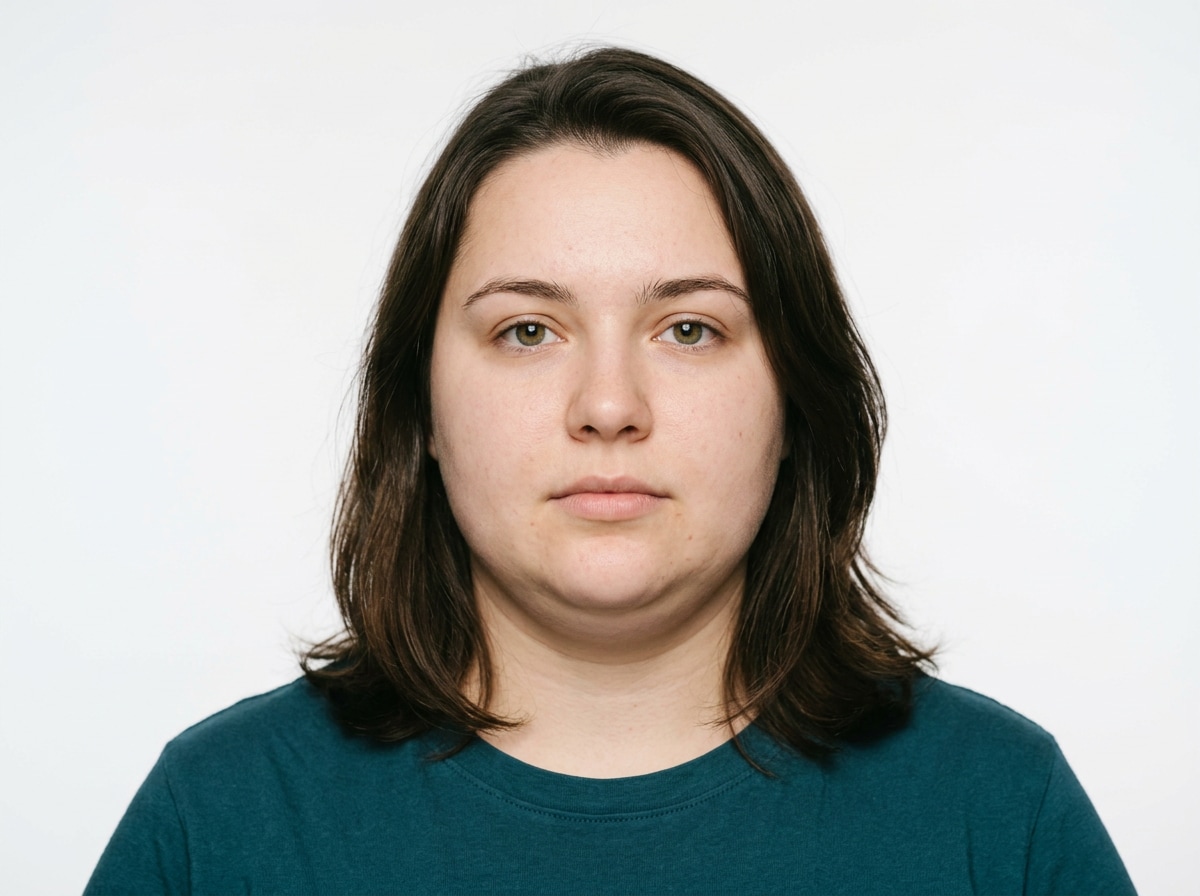
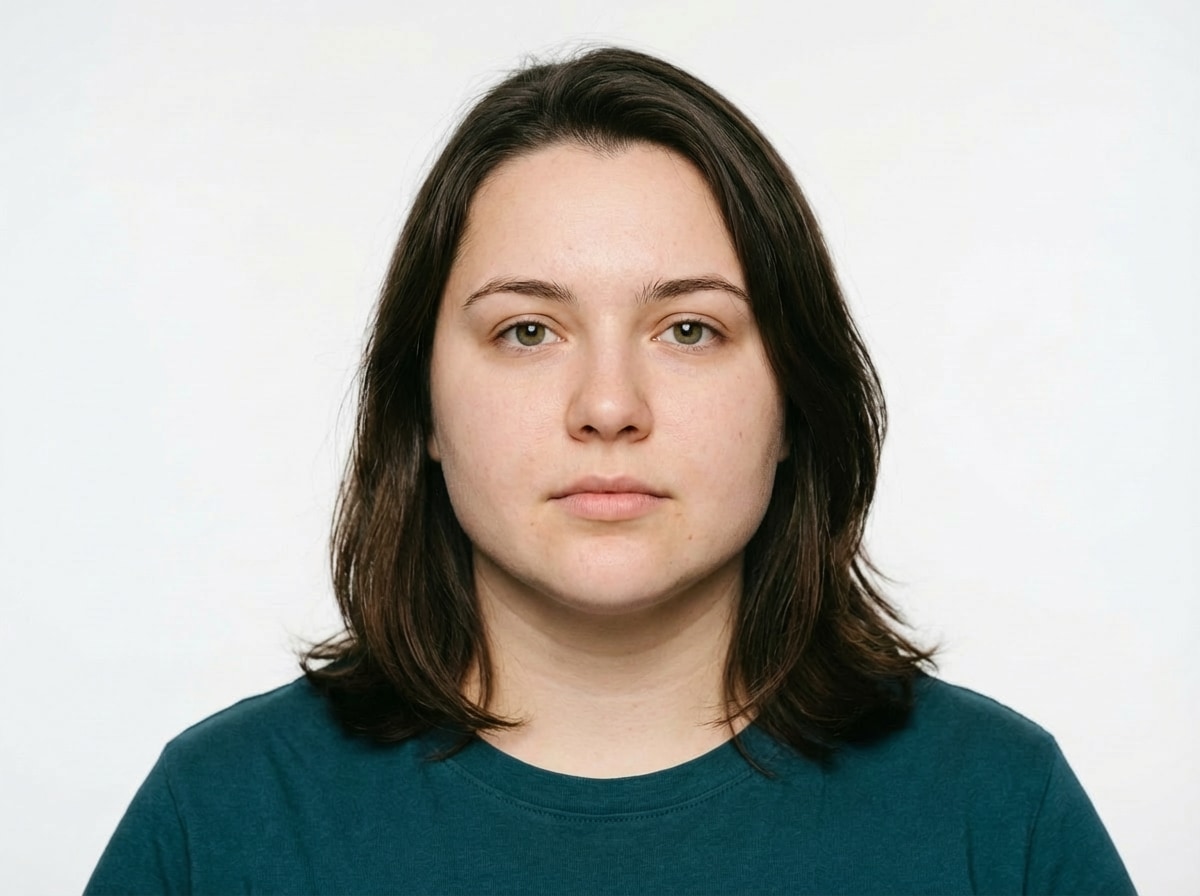
Sharpen and define the jawline for a more sculpted, photogenic look. Enhance natural bone structure with subtle shadow contouring along the jaw edge, maintain realistic skin texture and lighting, keep facial expression and identity completely unchanged, photorealistic facial enhancement, natural jawline definition
Portrait → Softened, Gentle Jawline Refinement
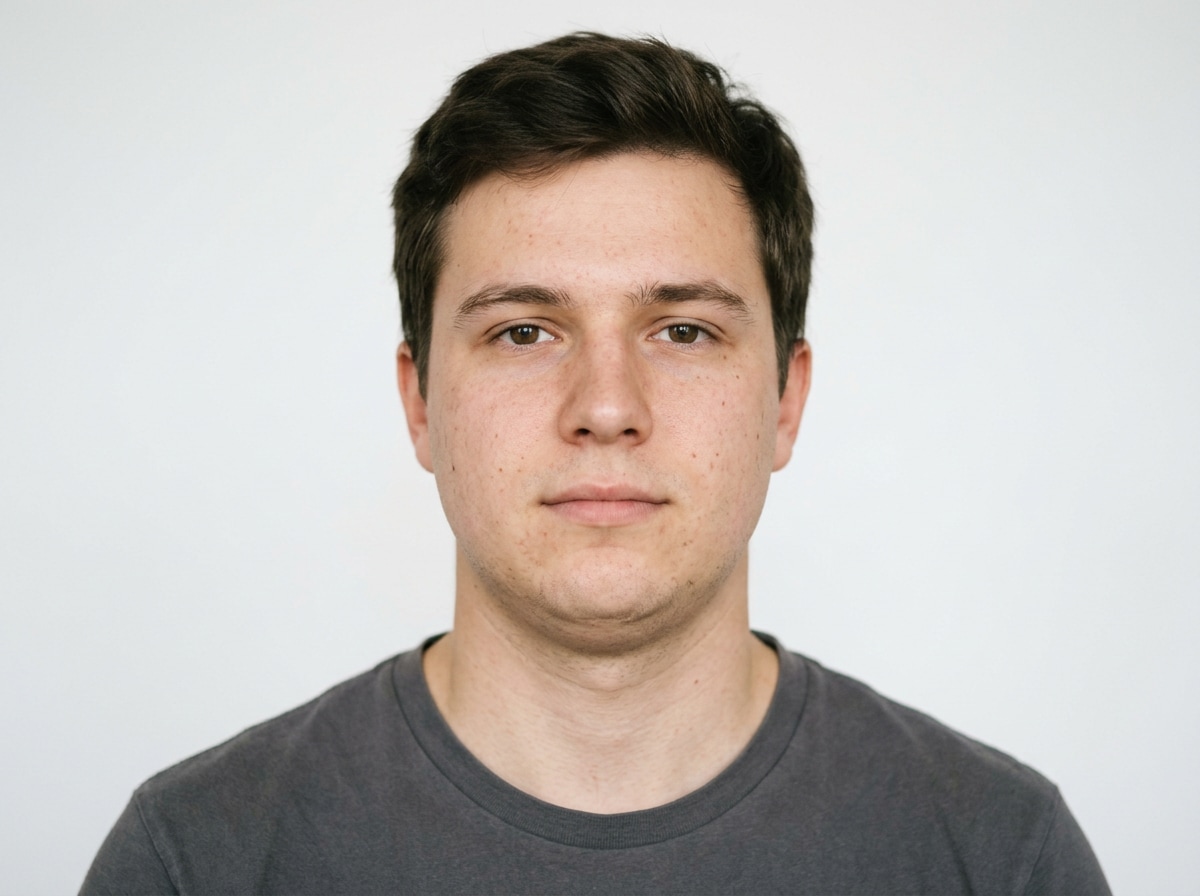
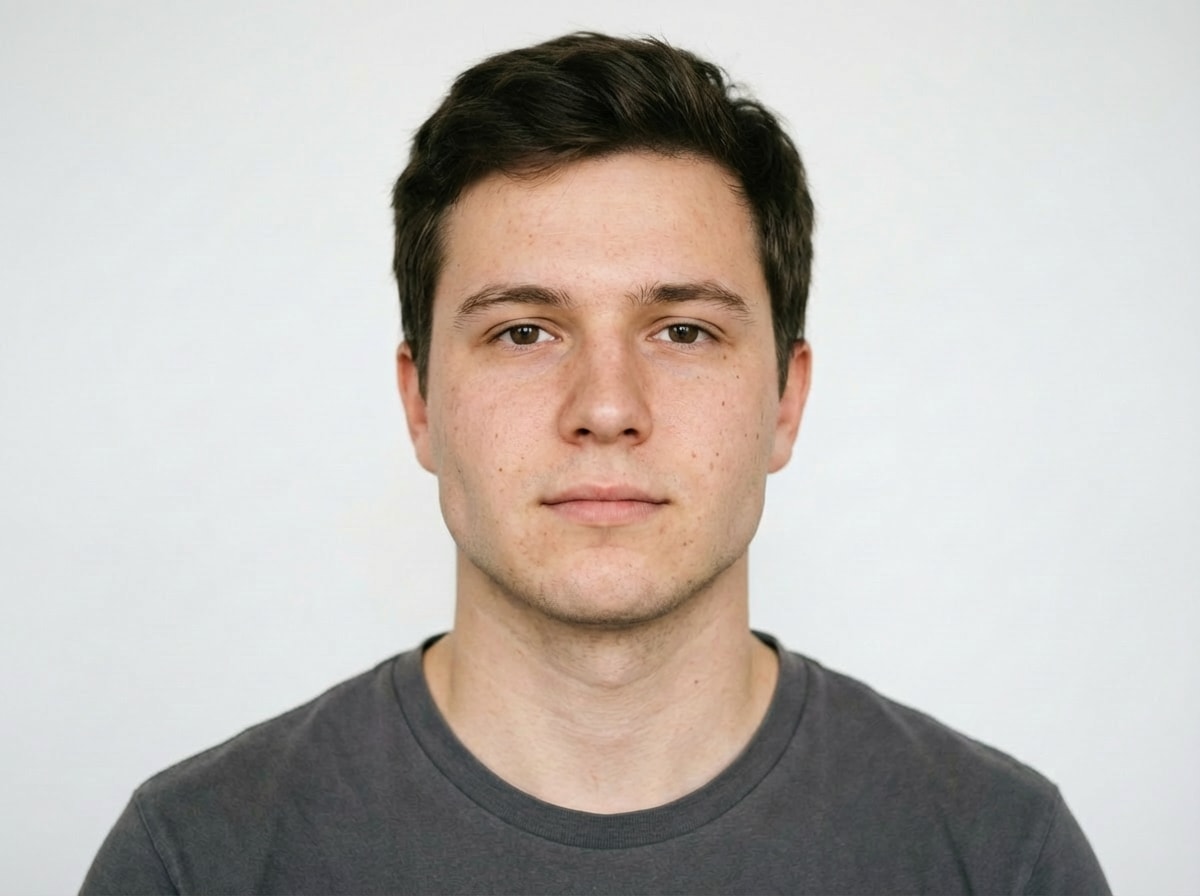
Soften angular jawline features for a gentler, more feminine appearance. Subtly round the jaw contour while preserving natural facial proportions, maintain realistic skin texture and lighting, keep facial expression and identity completely unchanged, photorealistic facial refinement, natural jawline softening








Why Use Media.io AI Jawline Editor
Whether you're preparing a professional headshot for LinkedIn, boosting confidence in dating profile pictures, refining Instagram selfies, or retouching client portraits — your jawline enhancement should look natural, not "filtered." With Media.io's AI Image-to-Image tool, powered by Nano Banana Pro, you get intelligent facial analysis that enhances jaw contours while preserving authentic features, lighting, and expression — all in seconds, online, and free to start.

AI Facial Structure Analysis
Our AI maps your facial bone structure, skin tone, and lighting direction to enhance jawlines naturally — adding subtle shadow contouring, preserving skin texture, and maintaining authentic proportions. Not a generic filter, but intelligent, personalized facial refinement.

100% Free — No Skills, No Signup
No app installs, no Photoshop skills, no design experience needed. Just upload, prompt, and generate — on phone or desktop. Media.io's AI runs securely in the cloud for instant, high-quality jawline enhancement with no sign-up and no watermark.

Sharpen, Soften, or Subtly Reshape
Define a sharper jawline for a sculpted look, soften angular features for a gentler appearance, reduce double chin visibility, or subtly adjust jaw width — describe your goal in plain language and the AI delivers exactly what you envision, from minimal refinement to noticeable enhancement.

Headshots, Dating Profiles, Social & More
Perfect for LinkedIn professional headshots, dating app profile pictures, Instagram and TikTok selfies, portrait photography retouching, actor/model portfolios, corporate team photos, and any personal or professional image that benefits from subtle facial contouring and enhanced confidence.
FAQs About
AI Jawline Editor
1. Does the jawline enhancement look natural or artificial?


Completely natural. Powered by Nano Banana Pro's AI, Media.io analyzes your facial structure, lighting direction, and skin tone to enhance jawlines with realistic shadow contouring and subtle definition. The result preserves your authentic features, expression, and identity — no "plastic" or over-filtered look.
2. What types of photos work best for jawline editing?
Portrait photos with clear facial visibility work best: professional headshots, selfies with good lighting, dating profile pictures, and studio portraits. Front-facing or slight 3/4 angle shots typically yield the most natural and effective jawline enhancements. Avoid heavily filtered or low-resolution images for optimal results.
3. Can I sharpen OR soften my jawline?
Yes! Simply describe your goal in the prompt. For a sharper look: "define and sharpen my jawline for a sculpted appearance". For a softer look: "gently soften angular jaw features for a more feminine profile". You can also request subtle adjustments like "reduce double chin appearance" or "slightly narrow jaw width" — the AI adapts to your specific request.
4. Will my facial identity and expression stay the same?
Absolutely. Media.io's AI is designed to enhance, not replace. Your facial identity, expression, eye shape, nose, lips, and overall likeness remain 100% unchanged. Only the jawline contour is subtly refined to match your requested style — preserving authenticity while boosting confidence.
5. Is the AI Jawline Editor free and watermark-free?
Yes — Media.io's AI Jawline Editor is completely free to use online. No watermark, no subscription, and no app download required. Unlike apps that limit free edits or require premium upgrades, Media.io lets you enhance jawlines for free, directly in your browser, with high-resolution results you can download and share instantly.



