AI Dreads Filter
Free Online Dreadlocks Hairstyle Try-On — AI Dreads & Locs Photo Effect
Ever wondered how you'd look with dreadlocks — long flowing locs, bold short dreads, colorful boho locs, or thick freeform Rastafarian style? Use Media.io's free AI Dreadlocks Filter to instantly try on any dreadlocks hairstyle on your photo — no salon appointment, no commitment, no app download needed.
Whether you're a man curious about shoulder-length dreads, a woman thinking about waist-length locs, or anyone wanting to preview micro locs, sister locs, dread buns, or colored dreads in red, blonde, or blue — just upload a front-facing photo, describe the style you want, and see your transformation in seconds. Our AI adapts the dreadlocks naturally to your facial features, head shape, and existing hair for a photorealistic try-on result.
Try the AI Dreadlocks Filter Now →
How to Try On Dreadlocks in Seconds
— Use Media.io AI Dreads Filter & Prompts
See exactly how you'd look with dreads — long locs, short dreads, colored styles, or thick freeform locs — all from a single photo, in seconds. Follow these steps using Media.io's AI Image-to-Image tool, and use our curated prompts below to try on everything from classic shoulder-length dreadlocks to micro locs, bob dreads, dread buns, and rainbow-colored locs — before making any real commitment to your hair.
Open the AI Dreadlocks Filter
Go to Media.io's AI Image-to-Image tool — your free, browser-based dreadlocks hairstyle try-on generator. No sign-up or app download required. Works on desktop and mobile. Best results with a clear, well-lit, front-facing portrait photo where your current hair and face are fully visible.
Upload Your Photo & Describe Your Dreadlock Style
Upload a clear front-facing portrait. Then type a prompt describing the dreads style you want, like "give me long thick dreadlocks falling past my shoulders" or "short bob dreadlocks with golden highlights" or "thin micro locs in a high bun." Not sure what to write? Use one of our ready-made prompts below — each tested for realistic loc texture, natural hair sectioning, and authentic dreadlocks appearance that adapts to your face.
Generate & Download Your Dreads Photo
Click Generate, and in seconds your portrait will be transformed with photorealistic dreadlocks that follow your head shape, facial features, and natural lighting. Use the before/after slider to compare your old and new look, then download your dreadlocks photo — perfect for sharing on TikTok, Instagram, or showing your stylist exactly what you want.
Women's Portrait → Long Natural Dreadlocks Locs
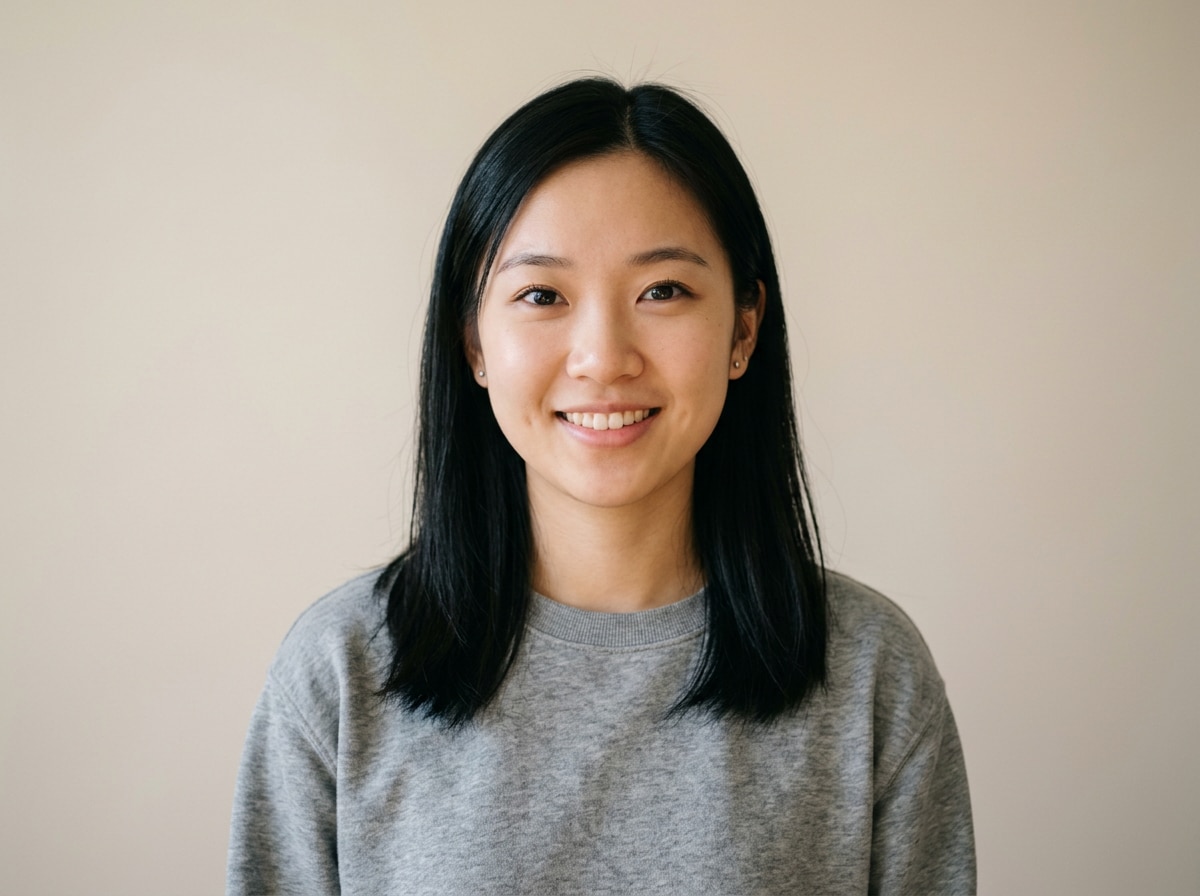
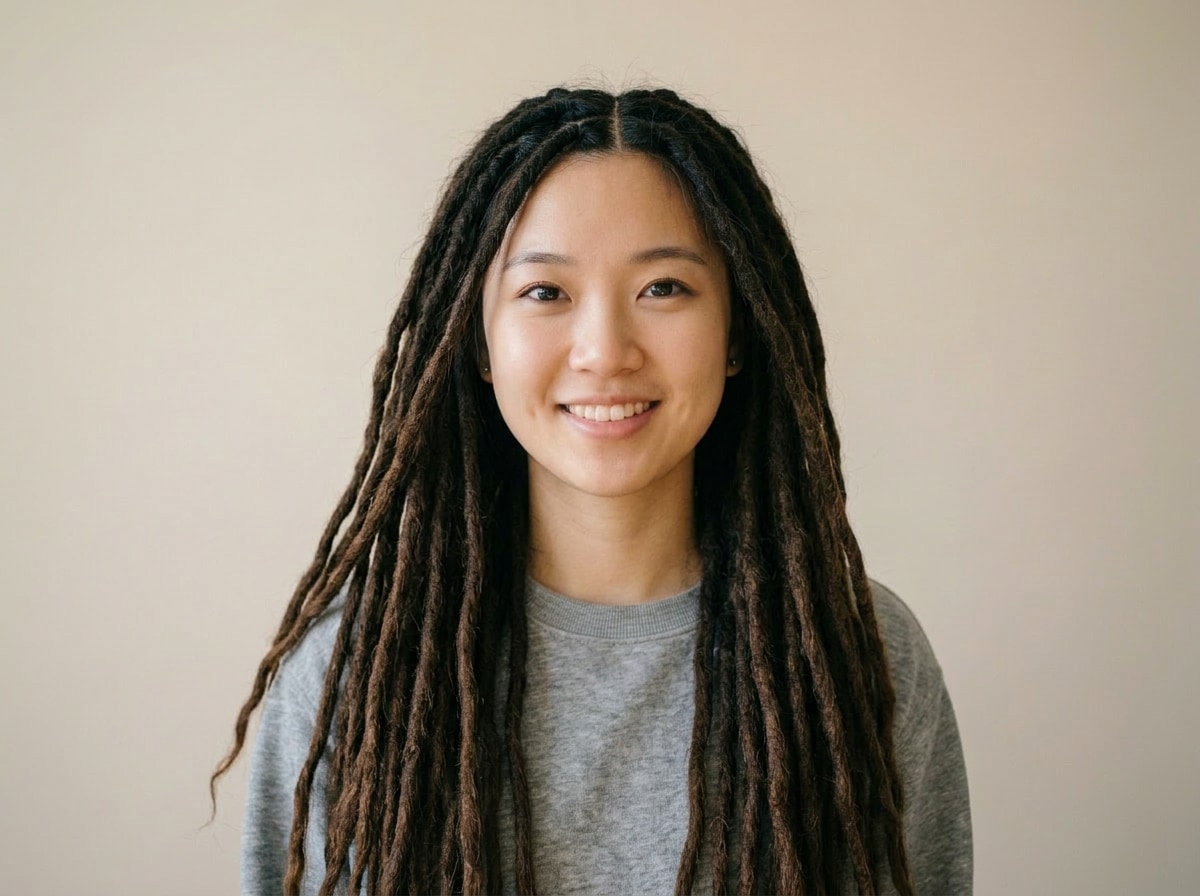
Transform her hair into beautiful long natural dreadlocks falling past her shoulders to waist length. Natural dark brown thick dreadlocks with authentic rope-like loc texture, realistic sectioning and natural volume, soft flowing locs with slight variation in thickness. Same face, skin, and background completely unchanged. Photorealistic women's dreadlocks hairstyle transformation
Men's Portrait → Medium-Length Dreadlocks
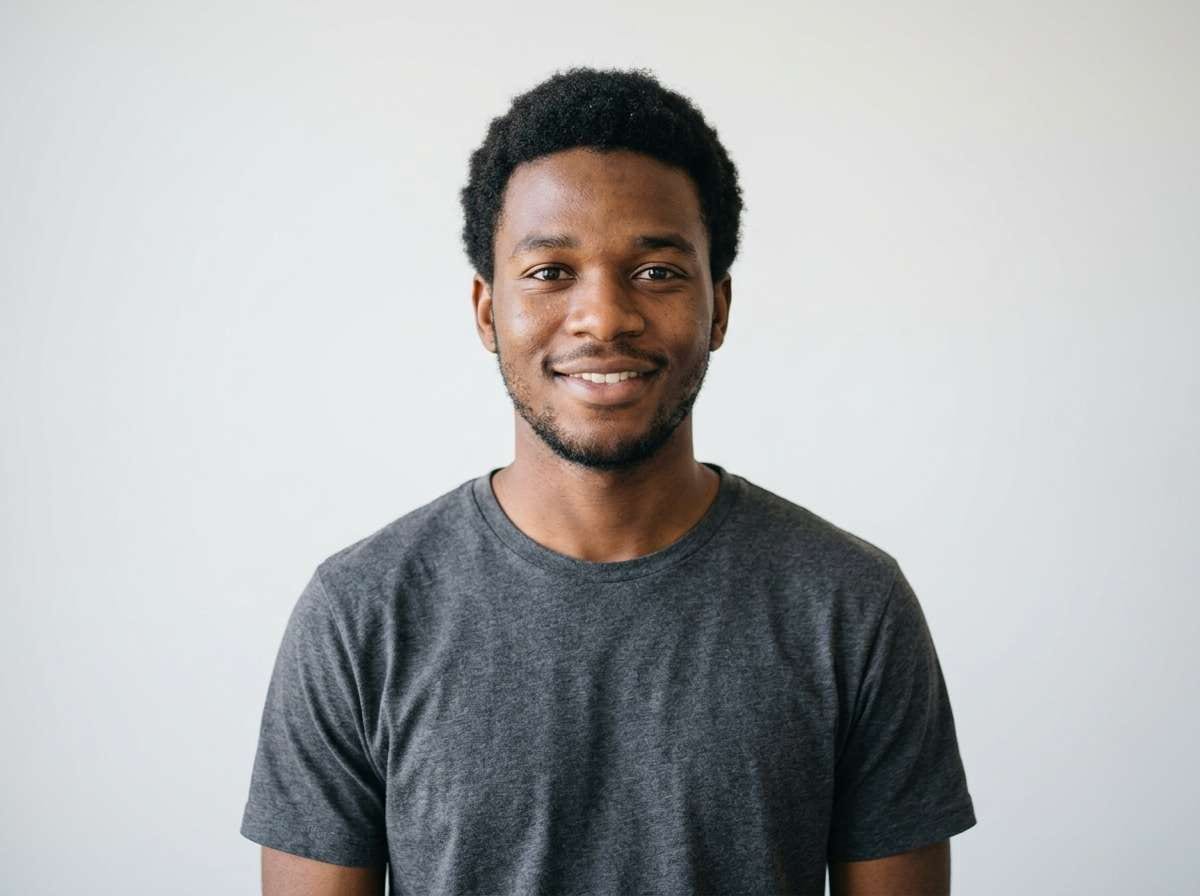
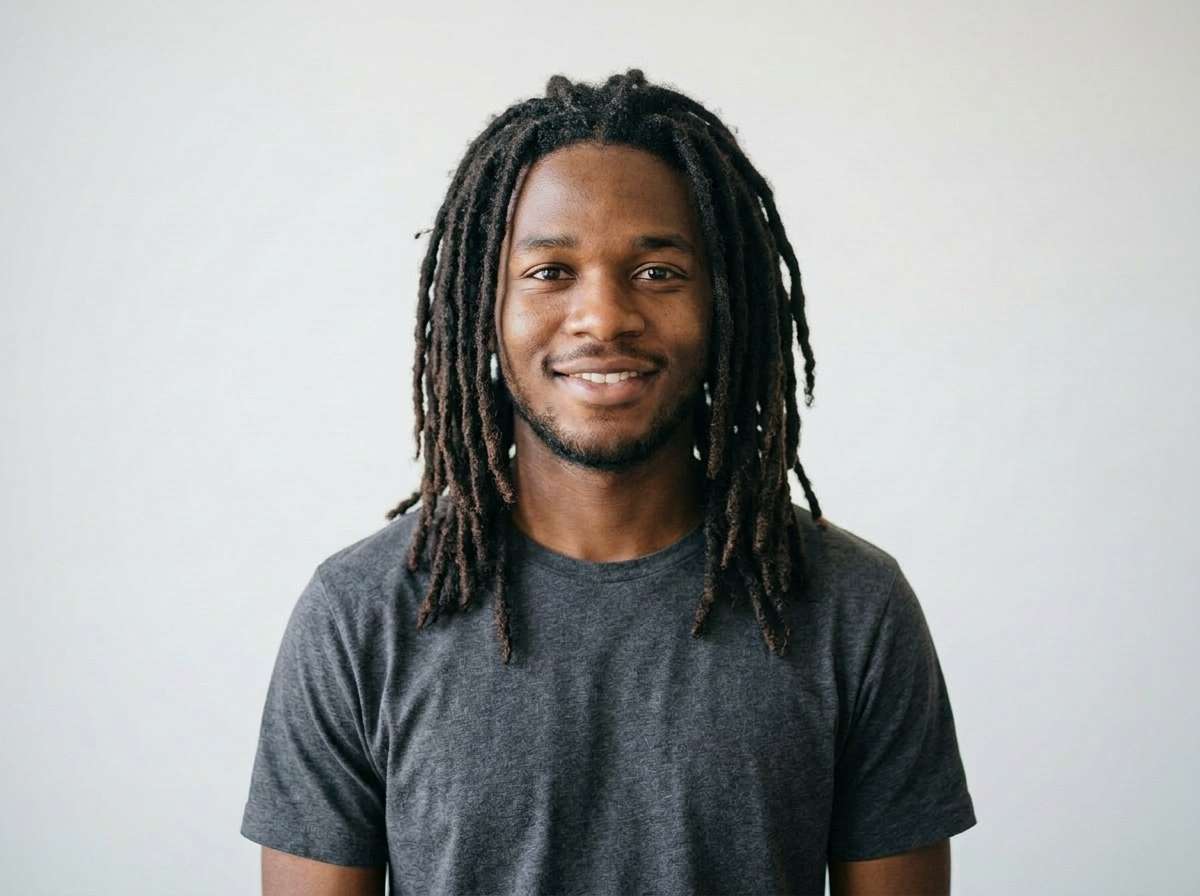
Transform his hair into medium-length thick dreadlocks at shoulder length. Natural dark brown rope-like dreadlocks with realistic loc texture, authentic sectioning, natural volume and weight. Bold and confident men's dreads style. Same face, skin tone, and background completely unchanged. Photorealistic men's dreadlocks hairstyle transformation








Why Use Media.io's AI Dreads Filter to Try On Dreadlocks
Getting dreadlocks is a major commitment — locs take months to form, are difficult to reverse, and require consistent maintenance. Before you make that decision, you deserve to see exactly how different dreadlock styles look on your face, with your features, and with your personal style. With Media.io's AI Image-to-Image tool, you get a realistic, face-adapted dreadlocks preview in seconds — free, no app, no stylist consultation required.

Face-Adapted Realistic Dreadlocks
Our AI analyzes your facial features, head shape, existing hair color, and lighting to apply dreadlocks that look like they naturally grew from your scalp — with authentic rope-like loc texture, realistic sectioning, and natural weight and volume. Not a wig overlay, but a true photorealistic hair transformation.

100% Free — No Signup, No App
Unlike YouCam which pushes you to install an app, or insMind which requires registration, Media.io's AI dreadlocks filter is 100% free and runs directly in your browser — no account, no download, no watermark. Upload, prompt, and download your dreads photo instantly.

Every Style — Long, Short, Colored & More
Long waist-length locs, short bob dreads, micro locs, jumbo thick dreads, freeform Rastafarian locs, sister locs, dread bun updo, colored dreads in red, blonde, blue, or auburn — describe any dreadlock style and length in your prompt and the AI delivers a realistic preview tailored to your portrait.

Works for Men, Women & All Hair Types
Whether you currently have a buzz cut, natural afro, straight hair, curly hair, or shoulder-length waves — our AI adapts the dreadlocks to your existing hair type and head shape. Perfect for men exploring their first dreads, women considering a loc journey, or anyone wanting a bold new look before the salon visit.
FAQs About
AI Dreads & Dreadlocks Filter
1. How realistic does the AI dreadlocks filter look?


Very realistic. Media.io's AI analyzes your facial features, head shape, skin tone, and existing hair to apply dreadlocks that look naturally grown from your scalp — complete with authentic rope-like loc texture, realistic sectioning, natural weight distribution, and proper lighting integration. The result is a photorealistic dreads portrait, not a flat wig pasted on top of your face. It adapts the dreadlock style to your specific face and features for a convincing, share-ready result.
2. What dreadlock styles can I try on with this AI filter?
You can try on virtually any dreadlocks style by describing it in your prompt. Popular styles include: Long flowing locs (waist-length or longer), Short bob dreads (chin-length or shoulder-length), Micro locs / Sister locs (thin, refined dreadlocks), Jumbo dreads (thick, bold statement locs), Freeform locs (organic, uneven natural style), Dread bun / updo (locs pulled into a high or low bun), Colored dreads (red, blonde, auburn, blue, or ombre), and Starter locs / baby dreads (early-stage short and tight locs). Just specify your preferred style, length, and color in the prompt.
3. Does the AI dreadlocks filter work for men and women?
Yes — Media.io's AI dreadlocks filter works for men, women, and any gender. The AI adapts the chosen dreadlocks style to your specific face shape and features regardless of your current hair length or type. Men can preview shoulder-length dreads, short starter locs, or long Rastafarian-style dreadlocks. Women can try on long flowing locs, micro locs, dread buns, or boho-colored dreads. Even if you currently have a buzz cut, straight hair, or natural curls, the AI adjusts the dreadlocks naturally to your portrait.
4. What type of photo should I upload for the best dreads result?
For the most realistic dreadlocks result, use a clear, well-lit, front-facing portrait photo where your full head and hair are visible. Avoid hats, heavy accessories, or photos where your head is tilted at a sharp angle. Natural or soft studio lighting produces the best hair texture matching. The AI works with any hair type — afro, straight, wavy, curly, or even a buzz cut — and adapts the dreadlock hairstyle to fit naturally. Passport-style or selfie-style photos work very well.
5. Is the AI dreadlocks filter free? Do I need to sign up?
Yes — Media.io's AI dreads filter is completely free to use online with no account or signup required. Unlike YouCam (which requires an app download) or insMind (which requires registration), you can try on dreadlocks with Media.io directly in your browser, on any device, with no watermark and instant download. Just upload your photo, type your dreadlocks style prompt, generate, and download — the entire process takes under 30 seconds.



