Add Neon Effect to Photo
Free AI Neon Glow Filter Online
Want to transform any portrait, street photo, or urban scene with stunning neon glow effects — from vibrant Tokyo night aesthetics to dramatic neon rim lighting and colorful bokeh? Use Media.io's AI Neon Effect Tool to instantly add realistic neon signs, glowing light reflections, and cinematic neon atmospheres — free online, powered by Nano Banana Pro.
Whether you're creating eye-catching social media content, enhancing fashion photography with urban night vibes, designing music album covers with neon aesthetics, or crafting cyberpunk-inspired visuals for creative projects, our AI seamlessly blends neon lighting with your photo's existing scene for a truly photorealistic result.
Try the AI Neon Effect Tool Now →
How to Add Neon Effect to Any Photo in Seconds
— Use Media.io AI & Prompts
Turn any portrait, street photo, or urban scene into a stunning neon-lit masterpiece with just a few clicks. Follow these steps using Media.io's AI Image-to-Image tool, and use our curated prompts below to achieve anything from dreamy Tokyo night aesthetics to dramatic cyberpunk neon atmospheres — perfect for social media content, fashion photography, music visuals, album covers, and creative projects.
Open the AI Neon Effect Tool
Go to Media.io's AI Image-to-Image tool — your free, browser-based neon glow filter and effect generator. No sign-up or app download required. Works on desktop and mobile, optimized for realistic neon lighting, natural light reflections, and seamless scene integration.
Upload & Describe Your Neon Style
Upload any photo — a portrait, street shot, urban scene, or night photo. Then type a prompt describing the neon effect you want, like "add vivid pink and purple neon signs glowing around subject" or "create electric blue neon rim lighting with cyberpunk atmosphere". Not sure what to write? Try one of our ready-made prompts below — tested for authentic neon lighting, realistic reflections, and cinematic visual impact.
Generate & Download Your Neon Photo
Click Generate, and in seconds your photo will be transformed with stunning, realistic neon effects that match your scene's lighting, perspective, and mood. Use the before/after slider to compare, then download your image — ready for Instagram, TikTok, music albums, fashion campaigns, or any creative project.
Portrait → Dreamy Tokyo Night Neon Glow
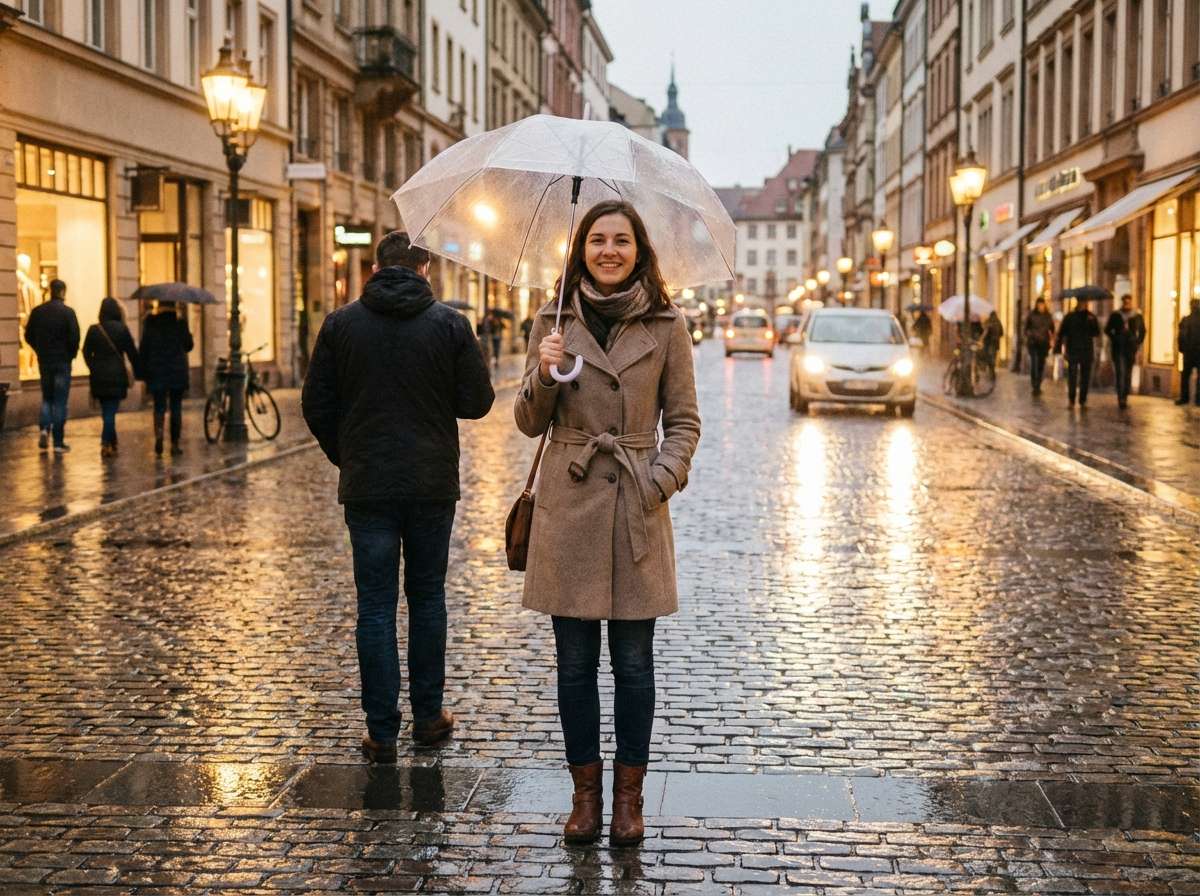
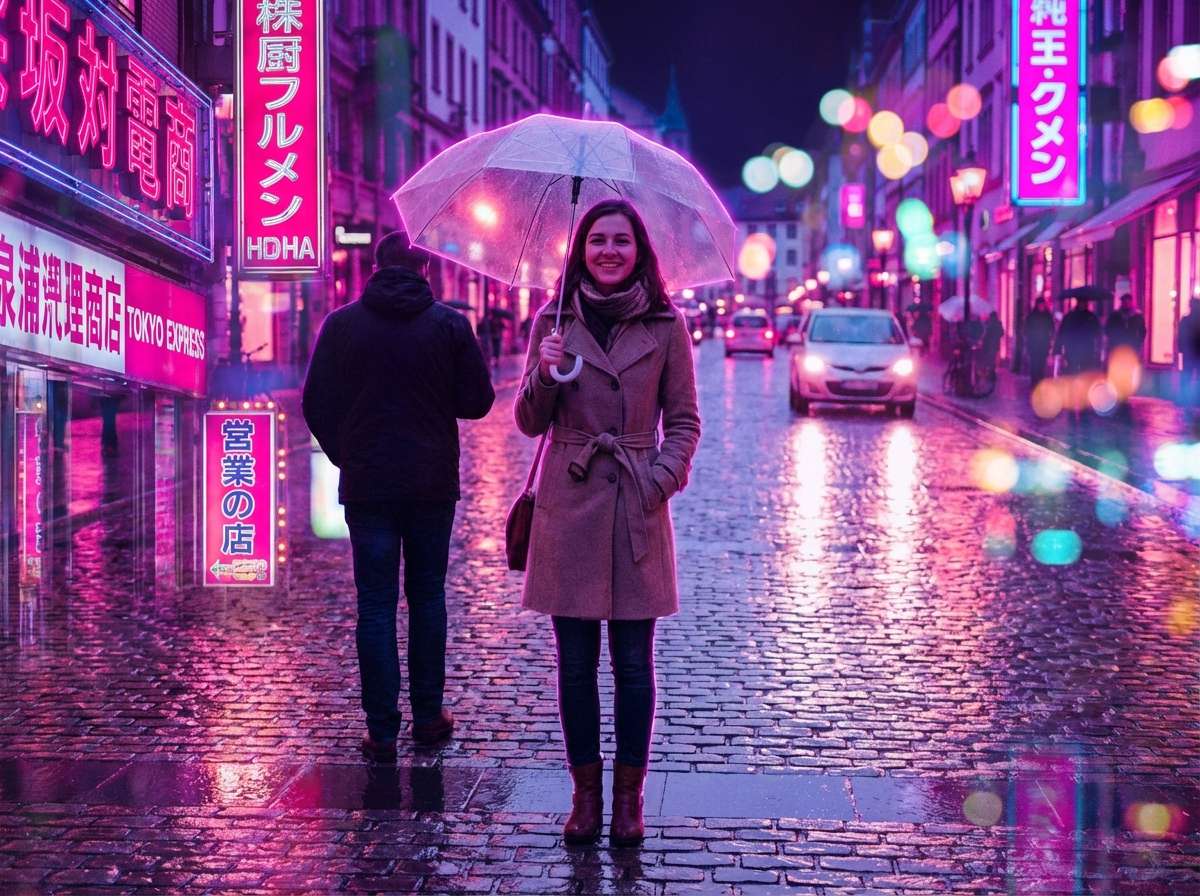
Same woman on the same rainy city street, now with stunning AI neon effect: vivid pink and purple neon signs glowing around her, neon light reflecting beautifully on the wet pavement, her silhouette outlined with soft magenta neon rim light, colorful neon bokeh in background, the scene looks like a dreamy Tokyo night — gorgeous, viral, cinematic, fashion editorial quality, colors are vibrant yet beautiful not garish
Portrait → Electric Blue Cyberpunk Neon Street
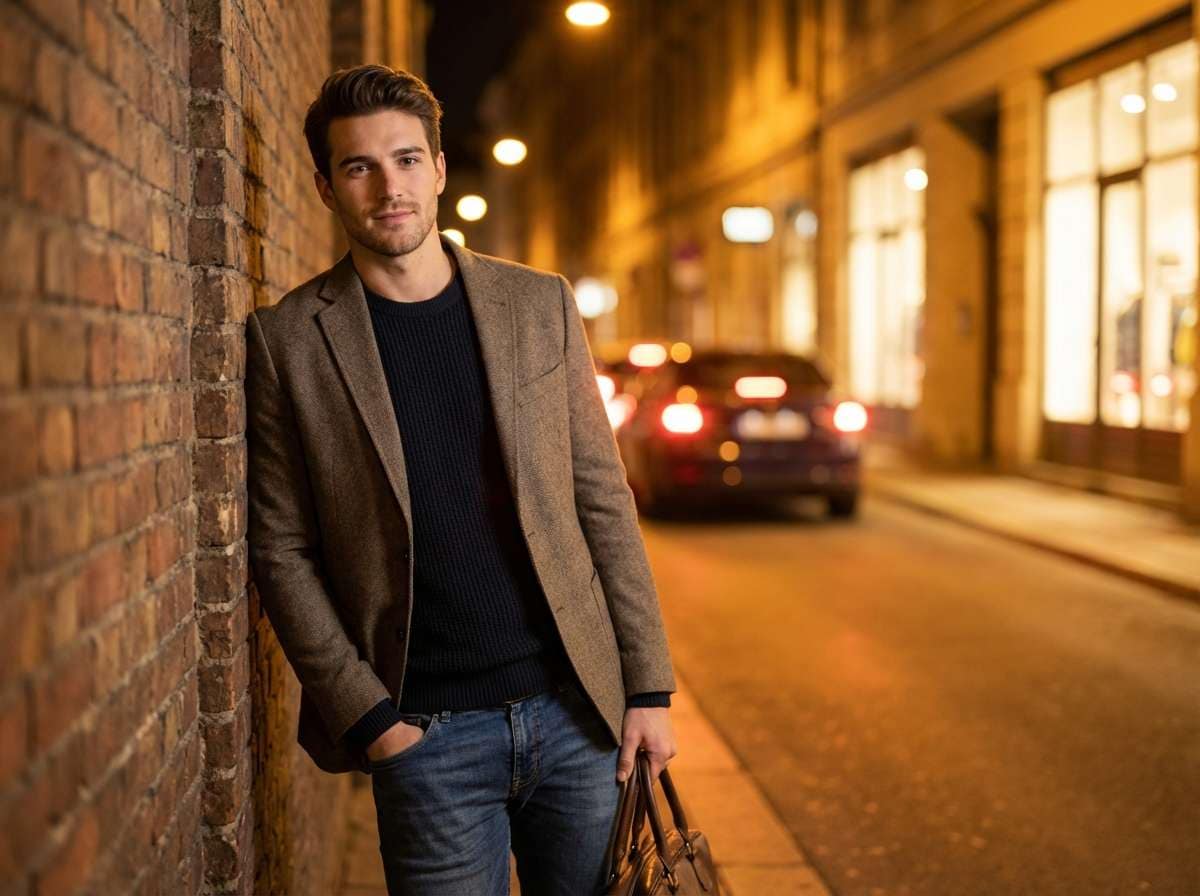
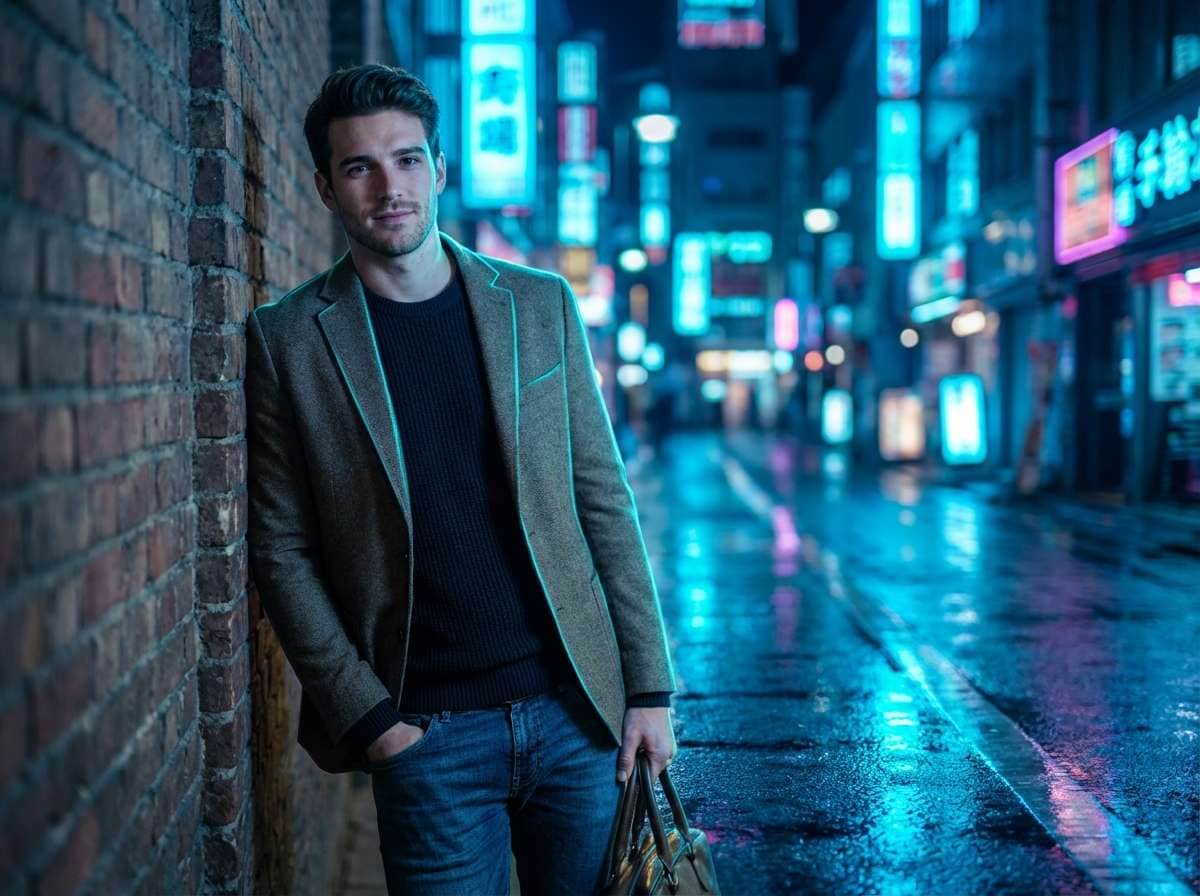
Same stylish man on the same urban street, now with stunning AI neon effect: electric blue and cyan neon signs casting dramatic colored light on him, vivid neon reflections on the ground, cool neon rim lighting on his jacket edges, futuristic neon city atmosphere behind him, like a high-end fashion campaign in a neon-lit Tokyo/Hong Kong street, cinematic, gorgeous and cool, colors are bold yet refined








Why Use Media.io to Add Neon Effects to Your Photos
Whether you're a content creator wanting viral Instagram aesthetics, a photographer enhancing fashion shoots with urban night vibes, a musician designing album covers with neon visuals, or someone who just wants to add cinematic cyberpunk magic to a portrait — your neon effect should look like it was captured in the moment. With Media.io's AI Image-to-Image tool, powered by Nano Banana Pro, you get context-aware neon lighting that matches real reflections, shadows, and scene depth — all in seconds, online, and free to start.

AI-Intelligent Neon Lighting Integration
Our AI analyzes your photo's lighting conditions, surface reflections, and scene depth to place neon effects where they look most natural — glinting off wet pavement, casting colored rim light on subjects, or creating realistic neon bokeh in the background. Not a flat overlay, but true context-aware neon integration.

100% Free — No Skills, No Signup
No app installs, no Photoshop skills, no design experience needed. Just upload, prompt, and generate — on phone or desktop. Media.io's AI runs securely in the cloud for instant, high-quality neon effect output with no sign-up and no watermark.

Every Neon Style — Tokyo, Cyberpunk, Retro & More
Dreamy Tokyo night pink-purple glow, electric blue cyberpunk atmospheres, retro 80s neon grids, vibrant Hong Kong street neon, soft magenta rim lighting, colorful neon bokeh backgrounds — describe any neon style in your prompt and the AI delivers exactly what you envision, from subtle accents to full neon transformation.

Portraits, Fashion, Music & Social Content
Perfect for Instagram and TikTok social content, fashion photography and editorial shoots, music album covers and promotional visuals, cyberpunk and sci-fi creative projects, nightlife and event photography, brand marketing campaigns with urban aesthetics, and any creative project that calls for stunning neon glow and cinematic atmosphere.
FAQs About
AI Neon Effect Tool
1. Does the neon effect look realistic or like a flat filter?


Completely realistic. Powered by Nano Banana Pro's AI, Media.io understands your photo's lighting conditions, surface textures, and scene depth to integrate neon effects that look genuinely part of the image — including authentic light reflections on wet surfaces, realistic rim lighting on subjects, natural color blending, and depth-of-field neon bokeh. It's not a sticker or flat neon layer pasted on top; the result looks like the neon lights were captured in the original photo shoot.
2. What types of photos work best for adding neon effects?
Virtually any photo works well. The neon effect is especially popular for: portrait and street photography (urban night aesthetics), fashion shoots and editorial content (dramatic colored lighting), music album covers and promotional visuals (cyberpunk vibes), nightlife and event photos (club and concert atmospheres), and social media content for Instagram and TikTok. Night or low-light photos with reflective surfaces typically yield the most impressive and realistic neon results.
3. What neon styles and colors can I create?
You can create any neon style by describing it in your prompt. Popular styles include: Tokyo Night (pink-purple dreamy glow with wet pavement reflections), Cyberpunk (electric blue-cyan futuristic atmosphere), Retro 80s (neon grids and synthwave aesthetics), Hong Kong Street (vibrant multicolor neon signs), Magenta Rim Light (soft colored outline on subjects), Neon Bokeh (colorful out-of-focus background lights), and Neon Sign Glow (realistic neon signage with text). Specify colors, intensity, and placement in your prompt for full creative control.
4. Can I control where the neon lights appear in my photo?
Yes! Just specify the location in your prompt. For example: "add pink neon signs in the background only", or "create blue neon rim lighting around subject's silhouette", or "scatter neon reflections on wet ground in foreground", or "place colorful neon bokeh in background, keep subject sharp". The AI follows your instructions to target specific areas, giving you precise creative control over the neon placement without any manual selection tools.
5. Is adding neon effect to a photo free?
Yes — Media.io's AI Neon Effect Tool is completely free to use online. No watermark, no subscription, and no app download required. Unlike apps that limit free generations or require premium upgrades, Media.io lets you add neon glow effects to photos for free, directly in your browser, with high-resolution results you can download and share instantly.



