





Page Not Found - Media.io

Pick Your Tools

WHAT WILL YOU CREATE TODAY?

Create Authentic Images And Videos.

Generate Video
Create videos from text
Create Image
Turn words into images
Make Music
Generate music in seconds
Remove from video
Delete anything from video
Remove from image
Remove object from photo
Reduce Noise
Clean audio & video
Cartoonizer
Turn video into anime
Enhance Video
Boost video quality fast
Edit Video
Edit faster with AI
Motion Control
Control motion precisely
AI Character
Copy & change looks
Remove Vocal
Extract clean vocals
Make Photo Talk
Turn photos into speakers
Lip Sync Video
Perfect lip sync fast

Get Inspiration

Smile Filter

AI Transition

Beach Photo

Beach Photo

Celebrity Lookalike

Celebrity Lookalike

Viral Effects

Motion Control

Baby Dance

AI Hairstyle

AI Hairstyle

Couple Photoshoot

Couple Photoshoot

Age Filter

Age Filter

Birthday Photoshoot

Birthday Photoshoot

Me & My Pet

Me & My Pet

Gender Swap

AI Dance

AI Pet Videos

media.io

AI Video Generator star

Easily generate videos from text or images

Generate
robot TL;DR:

You can find and watch deleted YouTube videos by retrieving the original video link from your YouTube history or playlists and searching for it on internet archive tools like the Wayback Machine.
    ● You must have the original video URL or its unique Watch ID (the alphanumeric string following "v=" at the end of the link) to successfully locate the archived file.
    ● Users who prefer a faster workflow can install the Wayback Machine Chrome extension to search for the deleted video URL directly from the browser toolbar instead of visiting the archive.org website.
    ● If the full URL does not yield results on the Wayback Machine, you can use alternative archives like Archive.today and Time Travel, or search Google using the Watch ID to find copies published on other platforms.


Ask AI for a summary

如果你之前看過某部影片,而它現在已經無法觀看,你可能會想知道 如何觀看已刪除的 YouTube 影片的便利方法。具體來說,YouTube 的資料庫裡有大量已刪除的影片,原因可能有很多。例如,上傳者可能已從自己的 YouTube 頻道移除該片段、YouTube 認為影片內容不適當,或是影片違反了 YouTube 的條款約定等。

幸運的是,有許多經過驗證的方法可以幫助你 觀看已刪除的 YouTube 影片,以下將詳細說明三種最有效的解決方案:

本文內容

  1. 方法 1:透過 Wayback Machine 以網址觀看已刪除的 YouTube 影片
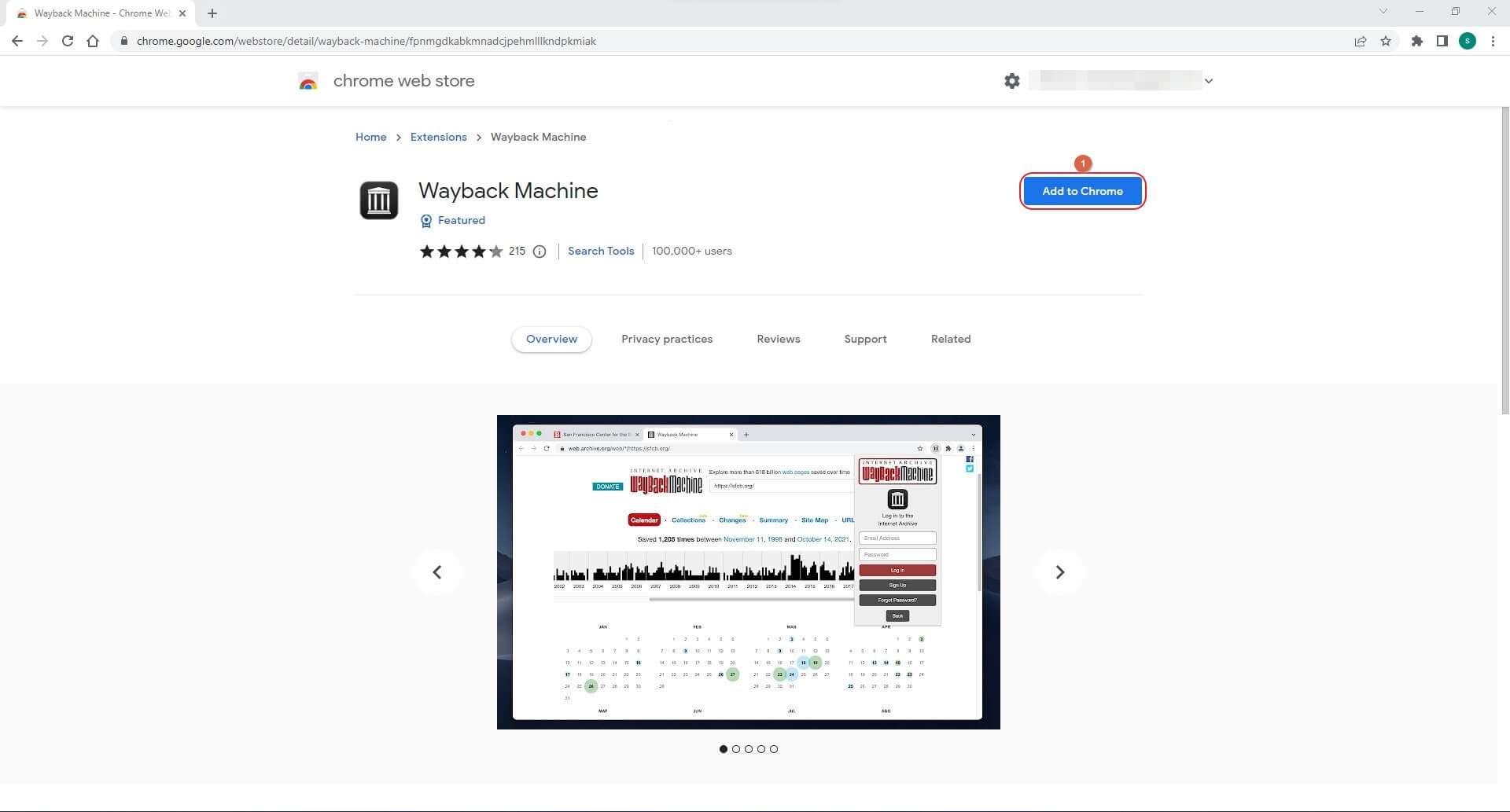
  2. 方法 2:使用 YouTube Video Finder – Wayback Machine Chrome 擴充功能
  3. 方法 3:使用其他存檔網站觀看已刪除的 YouTube 影片
  4. 方法 4:在沒有網址的情況下觀看已刪除的 YouTube 影片

如何觀看已刪除的 YouTube 影片

在本節中,你將學到四種最常用的方法來 檢視已刪除的 YouTube 影片:

另請參閱:YouTube Video Trimmer↗ 

方法 1:透過 Wayback Machine 以網址觀看已刪除的 YouTube 影片

這個方法需要你擁有想觀看影片的網址。雖然聽起來有點奇怪,但你可以透過進入 YouTube 觀看記錄,然後點擊該已刪除影片的連結來取得網址。或者,如果你曾對該影片按讚,或將它加入自訂播放清單,你也可以分別在「喜歡的影片」頁面找到它,或直接從播放清單中開啟。在這次示範中,網址是從 YouTube 觀看記錄頁面取得,接著使用 Wayback Machine 入口網站從網路存檔中觀看該影片。流程說明如下:

步驟 1:取得已刪除影片的網址

開啟你慣用的網頁瀏覽器並登入你的 YouTube 帳戶。點擊左側導覽列中的 記錄,然後在右側 觀看記錄區段下方的清單中,點擊你想再次觀看的已刪除影片。當影片頁面開啟後,先忽略其他所有內容,尤其是影片無法播放時,並從上方的網址列複製該影片的網址。

步驟 2:前往 Wayback Machine 入口網站

在瀏覽器開啟新分頁,前往 https://archive.org/web/連結,即可進入 Wayback Machine 入口網站。

步驟 3:觀看已刪除的 YouTube 影片

將你在上一個步驟中複製的網址貼到 Wayback Machine 頁面上方的搜尋列,然後點擊 BROWSE HISTORY。接著你就可以在開啟的下一頁觀看該影片。
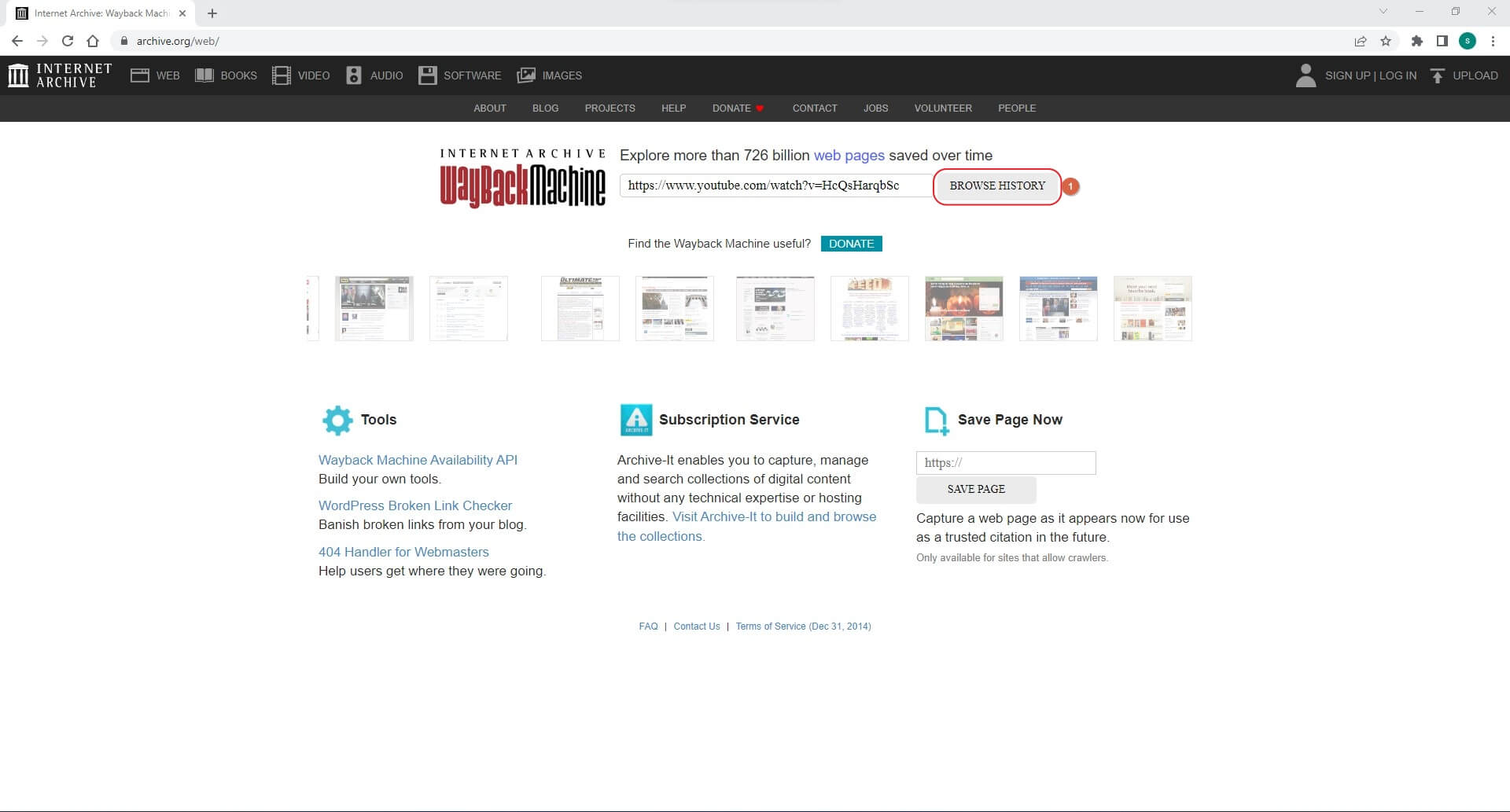
watch deleted youtube video on wayback machine

方法 2:使用 YouTube Video Finder – Wayback Machine Chrome 擴充功能

許多人可能不知道,Wayback Machine 也有可在 Google Chrome 上安裝的擴充功能。這個附加元件讓你甚至不必開啟 Wayback Machine 網站,就能找到已刪除的 YouTube 影片。

安裝 Wayback Machine Chrome 擴充功能,並用它來尋找和 觀看已刪除的 YouTube 影片 的流程如下:

install
  • 在 Google Chrome 中開啟新分頁,然後點擊右上角的 Wayback Machine 擴充功能
  • 將已刪除 YouTube 影片的網址複製並貼到搜尋框中進行搜尋。當 Wayback Machine 擴充功能在存檔中找到該影片時,即可觀看已刪除的 YouTube 影片
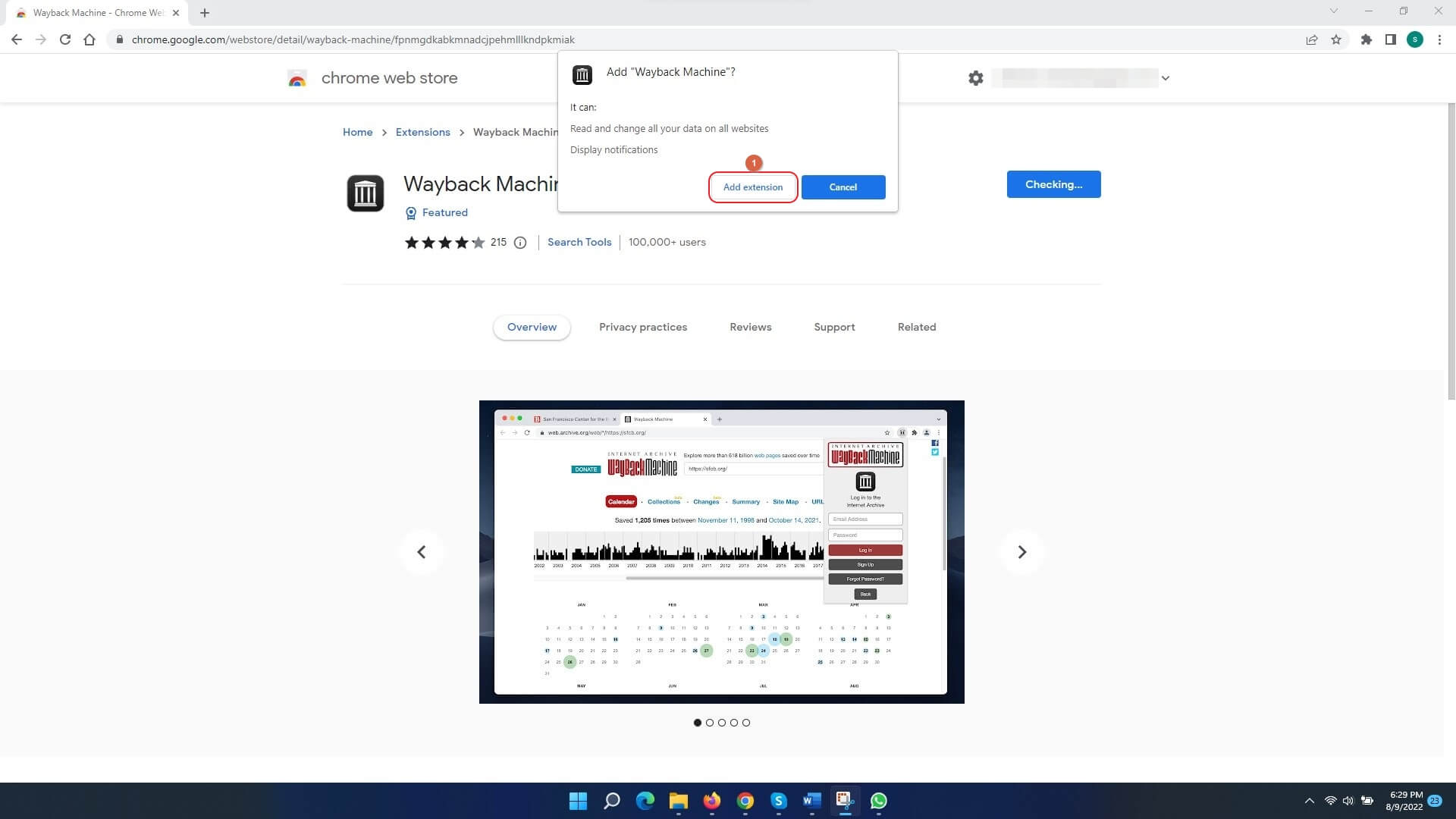
Copy

方法 3:使用其他存檔網站觀看已刪除的 YouTube 影片

如果 Wayback Machine 沒有找到結果,可以考慮使用其他存檔網站,例如 Archive.today 或 Time Travel,它們可能保存了網頁與影片的副本
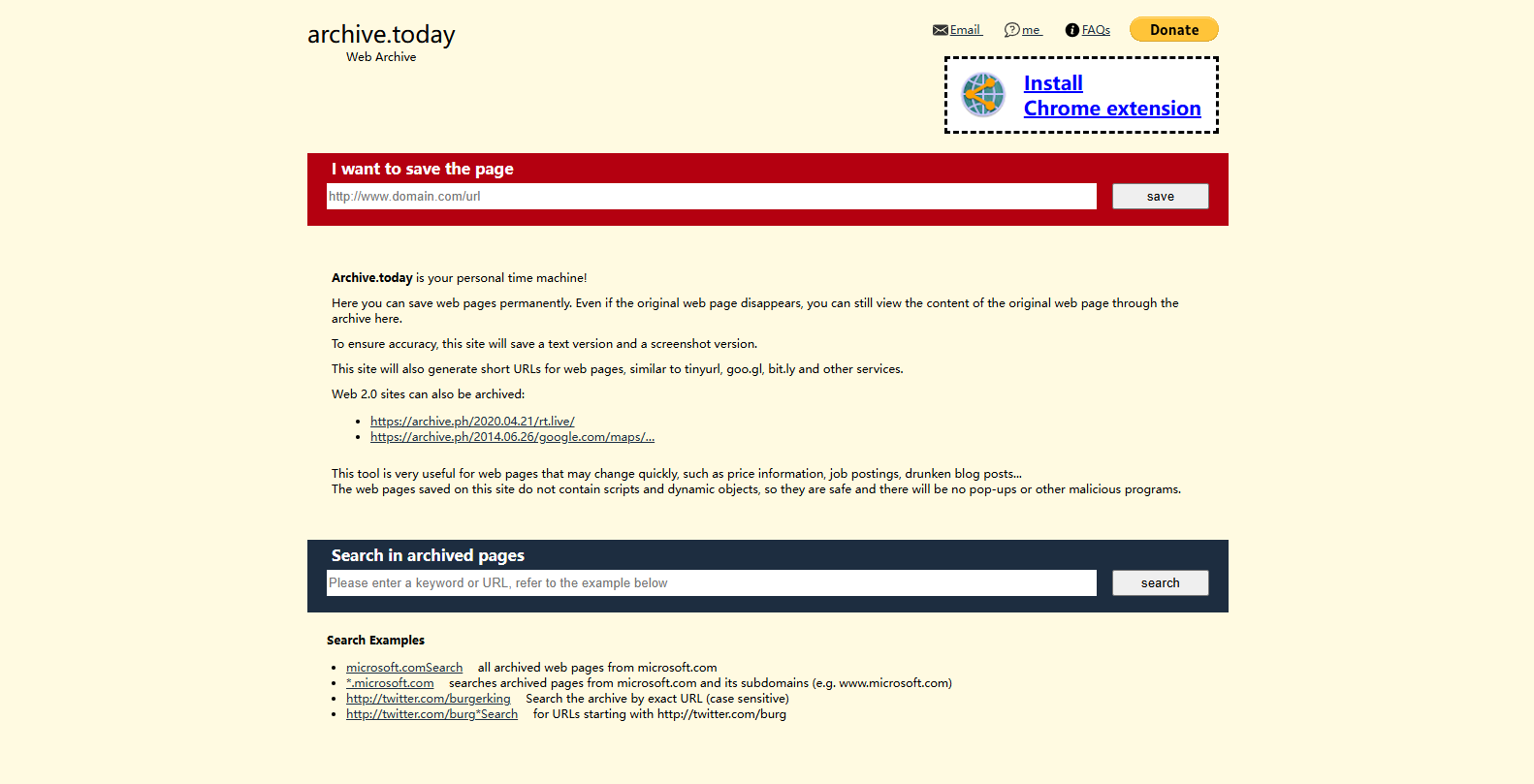
archive today

方法 4:在沒有網址的情況下觀看已刪除的 YouTube 影片

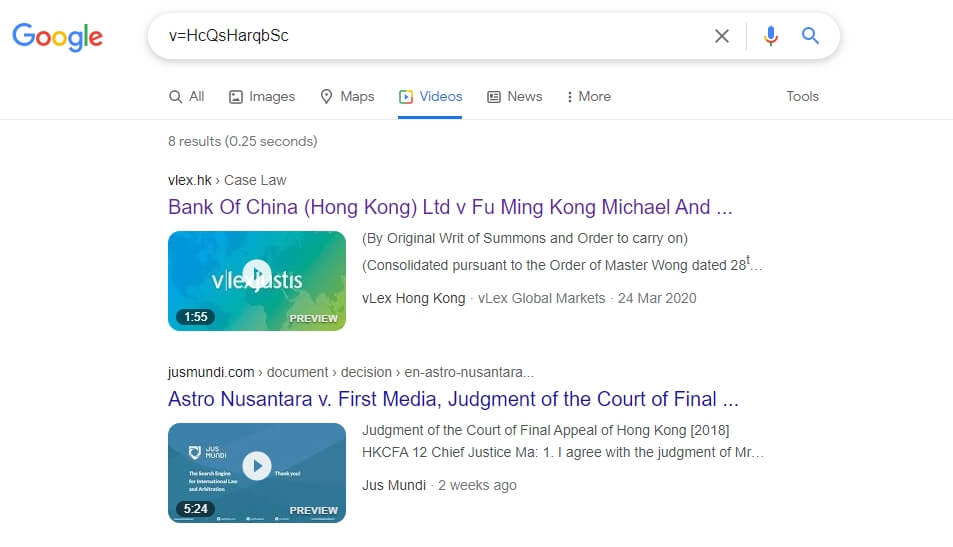
事實上,即使你沒有已刪除影片的完整網址,仍然需要它的觀看 ID 才能進行線上搜尋。此外,這個方法只有在該影片曾發佈於其他地方,而且它的完整資訊也一併存在時才會奏效。

影片的觀看 ID 是以「v」開頭,後面接著等號「=」,再加上一些英數字與數字的組合。通常觀看 ID 會位於網址的末端,這也意味著你仍然需要該影片的連結,而你可以依照「方法 1」中「步驟 1」說明的流程輕鬆找到它。

找到觀看 ID,然後定位並 觀看已移除的 YouTube 影片的程序說明如下:

  • 使用先前說明的方法,取得你想尋找的已刪除影片網址
  • 複製任何以「v」開頭及其後面的內容(本示範中為 v=OCAajWux2W8)
  • 在網頁瀏覽器開啟新分頁,並搜尋該觀看 ID(此處為 v=OCAajWux2W8)
  • 捲動搜尋結果頁面,直到找到你想觀看的已刪除影片
Watch

你也可以在 Google 搜尋引擎上搜尋像是 site:www.youtube.com + 影片名稱 這樣的關鍵字,來找出已刪除的 YouTube 影片。

結論

雖然學會 如何觀看已刪除的 YouTube 影片 很容易,但這個流程大多只有在你能順利取得影片網址時才有效。由於許多影片都被存檔在網際網路的某處,Wayback Machine 網頁或 Google Chrome 擴充功能能幫助你相當便利地找到並播放它們。此外,如果你無法透過連結找到已刪除的影片,也可以使用以「v」開頭、後接等號及一些英數字與數字組成的觀看 ID 來搜尋該片段。

Page Not Found - Media.io

Pick Your Tools

WHAT WILL YOU CREATE TODAY?

Create Authentic Images And Videos.

Generate Video
Create videos from text
Create Image
Turn words into images
Make Music
Generate music in seconds
Remove from video
Delete anything from video
Remove from image
Remove object from photo
Reduce Noise
Clean audio & video
Cartoonizer
Turn video into anime
Enhance Video
Boost video quality fast
Edit Video
Edit faster with AI
Motion Control
Control motion precisely
AI Character
Copy & change looks
Remove Vocal
Extract clean vocals
Make Photo Talk
Turn photos into speakers
Lip Sync Video
Perfect lip sync fast

Get Inspiration

Smile Filter

AI Transition

Beach Photo

Beach Photo

Celebrity Lookalike

Celebrity Lookalike

Viral Effects

Motion Control

Baby Dance

AI Hairstyle

AI Hairstyle

Couple Photoshoot

Couple Photoshoot

Age Filter

Age Filter

Birthday Photoshoot

Birthday Photoshoot

Me & My Pet

Me & My Pet

Gender Swap

AI Dance

AI Pet Videos

media.io

AI Video Generator star

Easily generate videos from text or images

Generate

田中 菜月
田中 菜月 Oct 13, 26
Share article:

Page Not Found - Media.io

Pick Your Tools

WHAT WILL YOU CREATE TODAY?

Create Authentic Images And Videos.

Generate Video
Create videos from text
Create Image
Turn words into images
Make Music
Generate music in seconds
Remove from video
Delete anything from video
Remove from image
Remove object from photo
Reduce Noise
Clean audio & video
Cartoonizer
Turn video into anime
Enhance Video
Boost video quality fast
Edit Video
Edit faster with AI
Motion Control
Control motion precisely
AI Character
Copy & change looks
Remove Vocal
Extract clean vocals
Make Photo Talk
Turn photos into speakers
Lip Sync Video
Perfect lip sync fast

Get Inspiration

Smile Filter

AI Transition

Beach Photo

Beach Photo

Celebrity Lookalike

Celebrity Lookalike

Viral Effects

Motion Control

Baby Dance

AI Hairstyle

AI Hairstyle

Couple Photoshoot

Couple Photoshoot

Age Filter

Age Filter

Birthday Photoshoot

Birthday Photoshoot

Me & My Pet

Me & My Pet

Gender Swap

AI Dance

AI Pet Videos

media.io

AI Video Generator star

Easily generate videos from text or images

Generate

media.io

AI 影片生成器

輕鬆透過文字或圖片製作影片

立即製作