






How to Remove Green Screen from Video Online?
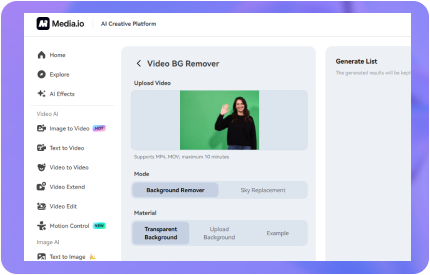


Step 1: Upload Video & Background
Navigate to Media.io's video background remover. Click to upload your green screen clip, and if needed, you can simultaneously upload the image you'd like to use as your new background.
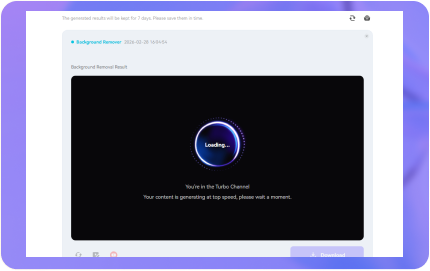
Step 2: Generate & Auto-Replace
Click "Generate" to start. Our AI chroma key remover will delete green screen backdrops in just 3-5 seconds. If you uploaded a background image, it will be automatically applied to your subject instantly.
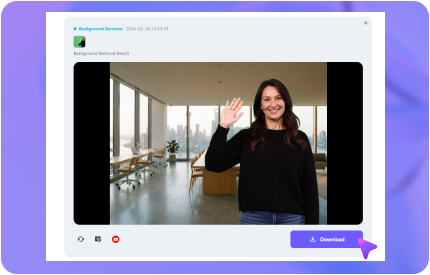
Step 3: Download Your Video
Preview your result and ensure the edges are perfect. Once satisfied, simply click the "Download" button to save your high-quality remove green screen video online result to your device.
What is Green Screen & Chroma Key?
A green screen is a solid-colored backdrop used in production. Chroma keying is the technique that makes that specific color transparent. AI-powered tools like Media.io act as a smart chroma key remover to automate this process.
Green Screen Basics
Bright green is used because it rarely matches human skin tones. This allows a green screen background remover to isolate the subject without affecting clothing or appearance.
How Chroma Key Works
A chroma key background remover identifies specific color values and replaces those pixels with transparency. AI helps maintain perfect edges around hair and fingers.
AI-Powered Automation
Media.io's AI green screen remover handles chroma keying automatically — no manual color picking needed. Get a transparent background in seconds.
Elevate Content with Chroma Key Background Remover
100% Automated Chroma Key Removal — No Clicks Required
With Media.io's green screen remover, making your video transparent is a breeze. Simply upload your video, and the AI chroma key engine will automatically delete green screen backgrounds in seconds, providing a professional result. Our green screen background editor ensures precise removal for any surface or color.

Accurate Edits with Green Screen Background Remover
Media.io's green screen remover ensures no detail is lost. Even fine elements like hair strands are preserved. When you remove green screen from video, original quality remains intact. Our green screen background editor guarantees a pristine transparent video for all your creative projects.
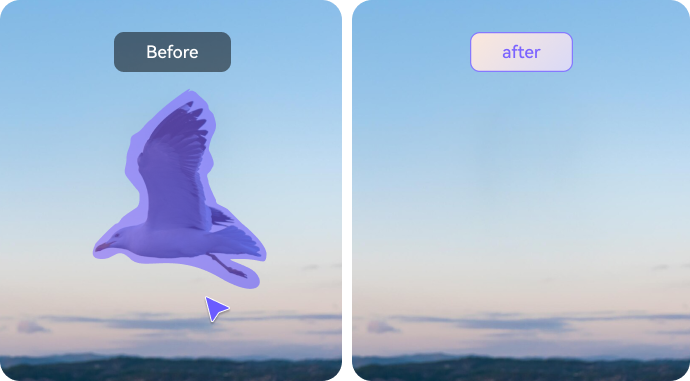
Transform Backgrounds for Creative Possibilities
Create stunning videos with custom backgrounds using our chroma key tools. Easily remove green screen from video and replace it with custom images. Our tool simplifies this: upload your video, delete green screen with one click, and choose a new image or video background effortlessly.
Why Choose Media.io Green Screen Background Remover?

One-Click Removal
Effortlessly remove green screen from video with our AI tool. It provides precise chroma key extraction for high-quality results.

Precision Background Removal
Our green screen remover guarantees accurate backdrop elimination, leaving your video ready for a new, seamless background.

Multiple Background Options
After removing the green screen, use our green screen background editor to choose from various solid colors or gradients.

Customizable Replacement
The green screen remover allows for easy customization, letting you insert and adjust videos behind your main content.

No Experience Needed
Media.io's green screen remover video tool is user-friendly. Upload your video — no manual colour picker or experience needed.

Free to Use
Enjoy our tool at no cost! Remove green screen from video and access all features for free, with no watermark added to your export.
FAQ
Q1. What is a green screen?
A green screen is a solid-colored backdrop (typically bright green) used in video and photo production. Combined with chroma keying technology, the green color is made transparent and replaced with any image or video background, allowing subjects to be placed into entirely different scenes.
Q2. What is the easiest way to remove green screen from video?
The simplest way to remove green screen from video is to use Media.io's free online green screen remover. Upload your MP4 or MOV video, and the AI chroma key engine handles everything automatically. No software to install, no manual colour selection, and no experience needed — results are delivered in seconds.
Q3. How does chroma key (green screen) work?
Chroma keying works by targeting a specific colour (usually green or blue) and replacing every matching pixel with transparency. This creates a "cutout" of the subject, which can then be placed over any background. Media.io's AI green screen remover automates this process and refines edges around complex shapes like hair and fingers for a natural result.
Q4. Does Media.io's AI remove green screen accurately?
Yes. Media.io's AI-powered chroma key tool provides highly accurate green screen removal. It precisely eliminates the green backdrop, preserves fine details like hair strands, and maintains the original video quality — no compression or alteration.
Q5. Is Media.io's green screen video editor free?
Yes, Media.io's green screen video editor is free to use. It allows users to remove green screen from video and access all essential features — including background replacement and export — without any cost or watermark, making it accessible to everyone.
Q6. Can I also remove green screen from images (photos)?
Yes! For photos and images, Media.io offers a dedicated AI Background Remover that can detect and remove green screens as well as any other background from images. It supports JPG, PNG, and WebP formats, delivering a clean transparent PNG in seconds.
Q7. What video formats does the green screen remover support?
Media.io's green screen remover currently supports MP4 and MOV input formats. Files can be up to 500 MB in size and up to 10 minutes in duration. The output video retains the original quality with the green background cleanly removed.
Q8. How do I get the best green screen removal results?
For the best chroma key results: (1) Use an evenly lit green screen to avoid shadows. (2) Keep the subject at least 1–2 metres from the backdrop to prevent green colour spill. (3) Avoid wearing green clothing or accessories. (4) Shoot in good lighting to maximise contrast. Following these tips ensures Media.io's AI can deliver the cleanest possible cut-out.
 Video Watermark Remover
Removal Tips



"Wow, Media.io's green screen video editor totally blew me away! It made removing the green screen from video super easy and quick. The results were clean and professional without needing any special skills."
"Media.io's green screen remover is amazing! It not only removes the green screen from video effortlessly but also lets you easily swap in any background you want."
More than a Green Screen Remover
Beyond our green screen remover, Media.io provides a suite of advanced AI tools including TikTok watermark remover, background noise reduction, and video watermark removal.
Edit Video Now


