AI Face Cut Out Tool
Instantly Create Clean Head & Big Head Cutouts Online
Cut out faces from photos in seconds with AI face cut out technology. Easily crop face from photo, extract clean head cutouts or fun big head cutouts with smooth edges and detailed hair. Download high-quality transparent PNGs perfect for avatars, stickers, memes, and social media—no editing skills needed.
Try AI Face Cut Out Tool Now →
How to Cut Out a Face from a Photo with AI
— Use Our AI Tool & Prompt Library
Create a clean face cut out or big head cutout in just a few clicks. With Media.io’s AI-powered tool, you can extract faces from photos online—fast, accurate, and beginner-friendly.
Open the AI Face Cut Out Generator
Go to the Media.io AI Face Cut Out Generator and start a new project in your browser. No software installation or design experience is required. Everything runs online, so you can begin instantly.
Upload Your Photo & Enter a Prompt
Upload a clear photo showing the face you want to extract. Enter a short prompt to describe your desired result, or pick one from the prompt library below for styles like big head cutouts, avatars, or stickers. The AI automatically detects facial features and hair for precise cutouts.
Generate, Preview, and Save
Click generate and let the AI create your face cut out in seconds. Preview the result and check the clean edges, natural hair details, and accurate face shape. Download your cutout as a high-quality transparent PNG, ready for social media, stickers, or further editing.
Clean Face & Head Cutout

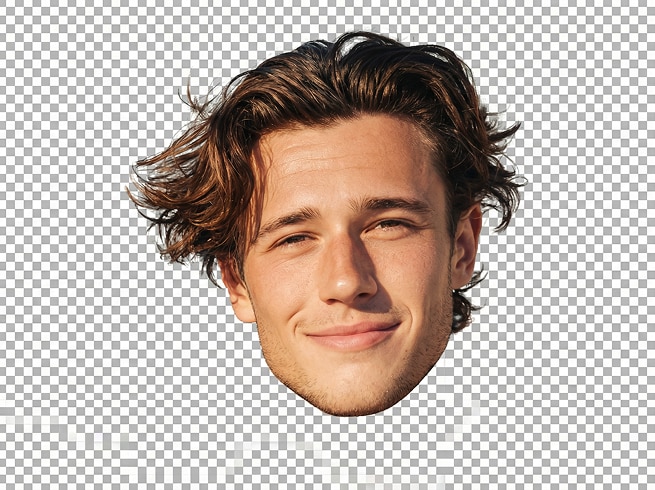
Extract a clean face and head cutout from the uploaded photo.Keep the entire head fully visible, including hair, ears, forehead, and chin.Remove the background completely and output a smooth, natural edge.Preserve realistic facial features, skin texture, and hair details.Transparent background, high-resolution, PNG style.No body, no shoulders, no background elements.
Clean Face & Head Cutout

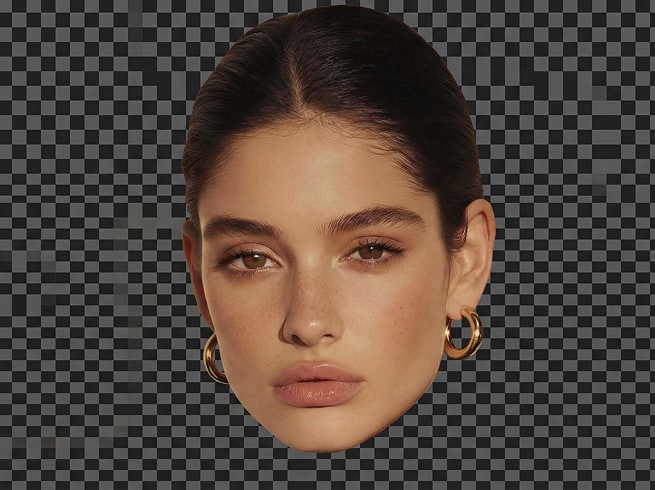
Extract a clean face and head cutout from the uploaded photo.Keep the entire head fully visible, including hair, ears, forehead, and chin.Remove the background completely and output a smooth, natural edge.Preserve realistic facial features, skin texture, and hair details.Transparent background, high-resolution, PNG style.No body, no shoulders, no background elements.








Why Use Media.io for AI Face Cut Out?
Whether you need a clean face cut out for practical use or a fun big head cutout for social sharing, Media.io is built to deliver fast, accurate, and ready-to-use results—no editing skills required.

Clean Face & Head Cutouts with Natural Edges
When users search for cut out face or crop face from photo, what they truly want is accuracy. Media.io’s AI precisely isolates the face and head from the background, preserving natural contours, skin tones, and even fine hair details. The result looks clean and professional—not rough or artificially cropped. This makes every head cutout feel complete and usable, whether you’re creating a profile image or preparing assets for further design.

Big Head Cutouts Made for Fun & Sharing
The big head cutout trend isn’t about perfection—it’s about personality. With Media.io, you can easily turn a normal portrait into an oversized, expressive head cutout that feels playful, eye-catching, and instantly shareable. Perfect for memes, jokes, group chats, or event designs, these big head results are made to stand out on TikTok, Instagram, and beyond—without needing cartoon skills or manual edits.

Transparent PNGs Ready for Any Use
A face cutout is only useful if you can actually use it. Media.io lets you download your face cut out as a high-quality transparent PNG, making it easy to place on new backgrounds, stickers, posters, or digital designs. From avatars and profile pictures to printable big head cutouts, your extracted face is ready for any creative or practical scenario—no extra cleanup needed.

Fast, Online & Beginner-Friendly AI Tool
Most users searching for face cut out AI want speed and simplicity, not complicated software. Media.io works fully online, runs in your browser, and delivers results in seconds—no downloads, no learning curve. Just upload a photo, add a prompt if needed, and generate. It’s designed for everyday users who want great results quickly, without design experience or technical effort.
FAQs About
AI Face Cut Out tool
1. Is Media.io’s AI Face Cut Out tool free to use?


Yes. You can try the AI face cut out tool online for free and see real results before deciding to upgrade. Free users can upload photos, generate face cutouts, and preview outputs easily. Advanced features or higher-quality exports may require credits, but you’re never forced to commit upfront.
2. Can this tool accurately cut out faces with hair and details?
Absolutely. Media.io uses AI trained to detect facial features, head shapes, and hair contours. Whether you’re creating a clean head cutout or a playful big head cutout, the tool focuses on smooth edges and natural details—so the result looks complete, not roughly cropped.
3. What file format will my face cutout be saved in?
Your face cutout can be downloaded as a high-quality transparent PNG, making it easy to use anywhere. This format works perfectly for profile pictures, stickers, memes, presentations, or placing your cutout onto new backgrounds without extra editing.
4. Are my photos safe and private when using Media.io?
Yes. Media.io respects your privacy and takes data protection seriously. All uploaded and generated content is automatically deleted from our servers within 7 days, so your photos are never stored long-term. You can use the tool with confidence, knowing your data stays secure.
5. Can I use the generated face cutouts for any purpose?
Media.io gives you full access to download and use your generated face cutouts in personal and creative projects. If you plan to use the results in public, branded, or commercial contexts, we recommend reviewing your specific use case and ensuring it aligns with relevant guidelines and third-party rights. This helps you use AI-generated content responsibly and with peace of mind.



