Change Eye Color Online with AI
How to Change Eye Color in Photos with AI Instantly
Wondering how to change eye color or if it’s possible to change your eye color without surgery or contacts?
With Media.io’s AI change eye color tool, you can instantly change or lighten eye color in photos—safely, naturally, and effortlessly. Just upload a photo, try different eye colors, and see the result in seconds. No pain, no risk, just a realistic preview of your new look.
See Your New Look Instantly →
How to Change Eye Color with AI in 3 Simple Steps
— Use Our AI Tool & Prompt Library
Changing your eye color doesn’t have to be complicated. With Media.io’s AI eye color generator, you can preview a new eye color in photos in just a few clicks—safe, fast, and effortless.
Open the AI Eye Color Generator
Go to Media.io’s AI change eye color generator and get started instantly—no downloads or design skills required. The tool works directly in your browser, making it easy to try from any device. You’re just one step away from seeing how different eye colors can transform your look.
Upload a Photo & Choose a Prompt
Upload a clear photo and enter your desired eye color, or select a ready-to-use prompt from the prompt library below. You can experiment with natural shades or bold styles to match your mood or aesthetic. The AI automatically detects your eyes and applies the change with realistic detail.
Generate & Save Your Result
Click generate and watch your eye color change instantly in the photo. Review the result, compare different colors, and fine-tune if needed. Once you’re happy, download or save your image to use anywhere you like.
Natural Eye Color Changer
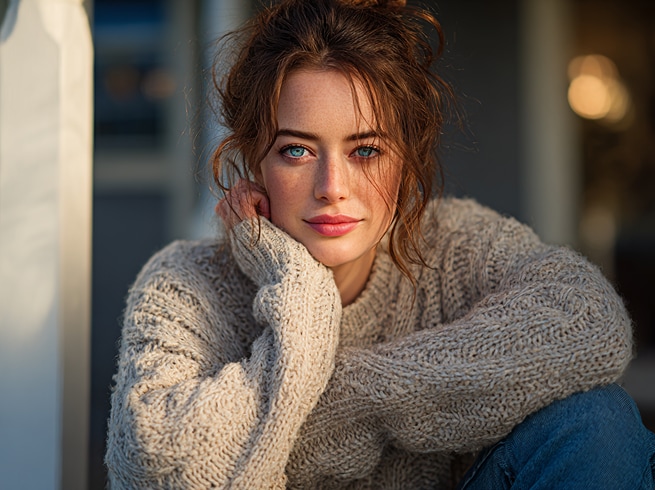
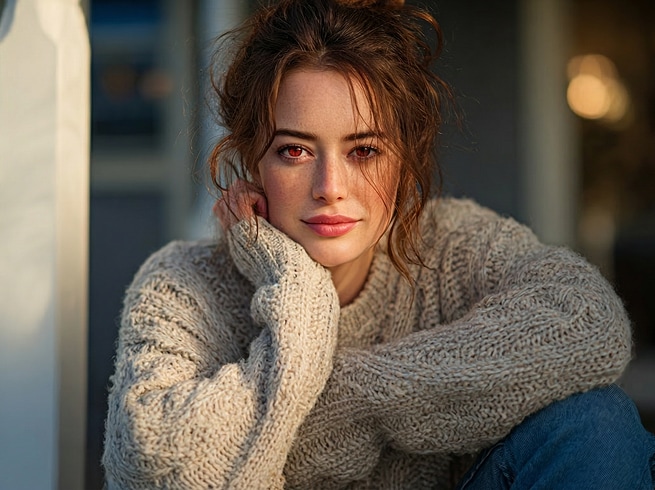
Change the eye color of the person in the uploaded photo to a natural, realistic [desired eye color].
Keep the face, skin tone, facial features, and expression exactly the same.Precisely detect the eyes and apply smooth, lifelike color blending with natural reflections and lighting.No makeup change, no filter effect, no cartoon style.Ultra-realistic portrait, high detail, natural human appearance.
Natural Eye Color Changer
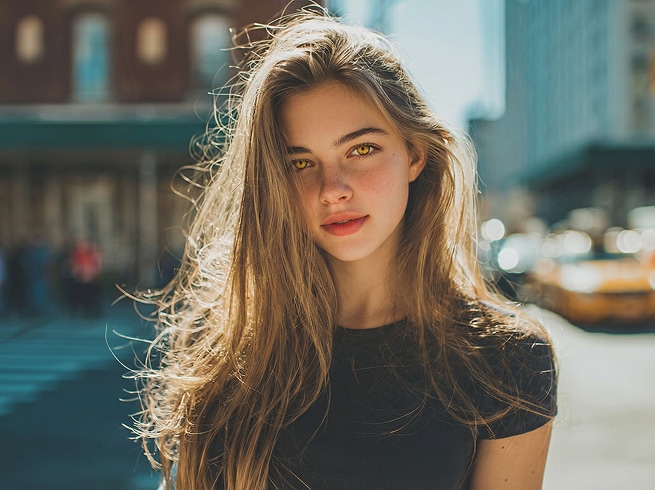
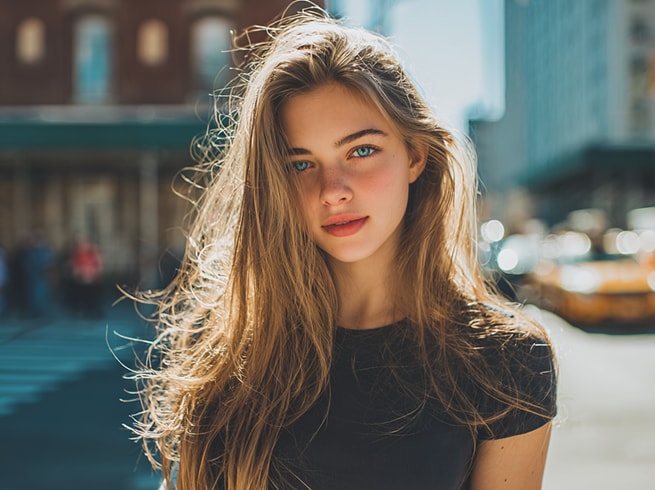
Change the eye color of the person in the uploaded photo to a natural, realistic [desired eye color].
Keep the face, skin tone, facial features, and expression exactly the same.Precisely detect the eyes and apply smooth, lifelike color blending with natural reflections and lighting.No makeup change, no filter effect, no cartoon style.Ultra-realistic portrait, high detail, natural human appearance.








Why People Choose AI to Change Eye Color
From curiosity to confidence, more people are turning to AI as a safe, effortless way to explore eye color changes—without pressure, pain, or permanent decisions.

See the Result Before Making Any Decision
Many people search can I change my eye color because they’re curious—but also cautious. AI lets you explore different eye colors visually, so you can see exactly how it looks on you before committing to anything in real life. Instead of guessing or imagining, you get a realistic preview that helps you feel confident and in control.

Change Eye Color Without Pain, Risk, or Commitment
When users ask is it possible to change your eye color, what they’re really asking is whether there’s a safe way to try. With AI, nothing about your body changes—only the appearance in your photo. There’s no discomfort, no long-term consequence, and no pressure. You’re free to experiment as much as you like, completely risk-free.

Perfect for Photos, Profiles, and Social Sharing
For many users, the goal isn’t a permanent change—it’s looking great in photos. Whether it’s a profile picture, a social post, or a creative project, AI makes it easy to change or lighten eye color to match your style or mood. You get clean, natural-looking results that enhance your image without looking artificial or over-edited.

Try Any Eye Color, Anytime You Want
AI removes limitations. You’re no longer locked into one look or one choice. From subtle enhancements to bold transformations, you can explore multiple eye colors in seconds—just by changing a prompt. It’s the easiest way to satisfy curiosity, express creativity, and discover what truly suits you.
FAQs About
Changing Eye Color with AI
1. Can I really change my eye color with AI?


AI doesn’t change your eye color in real life, but it allows you to change the appearance of eye color in photos. By analyzing your facial features, the AI applies realistic color adjustments so you can see how different eye colors would look on you—instantly and naturally. This makes AI a popular choice for visual previews, profile photos, and creative exploration.
2. Is it possible to change or lighten eye color without surgery?
If your goal is to see a different eye color rather than make a permanent physical change, AI is one of the easiest options available. It lets you change or lighten eye color visually in photos, without discomfort, commitment, or recovery time. That’s why many people use AI tools to explore new looks before making any real-world decisions.
3. Is the AI eye color changer free to try?
Yes. Media.io offers a free way to try the AI eye color change feature so you can preview the result before upgrading. You can upload a photo, test different eye colors, and see how the AI works with no upfront commitment. This makes it easy to experiment and decide if the tool fits your needs.
4. Is my photo safe and private when I use Media.io?
Yes. Your privacy is taken seriously. Uploaded photos and generated results are automatically removed from Media.io’s system within 7 days. This allows you to use the AI tool with confidence, knowing your content isn’t stored indefinitely or reused without permission.
5. Can I use AI-generated eye color images for any purpose?
AI-generated images are great for personal use, previews, and creative projects. If you plan to use the results in professional, commercial, or public-facing contexts, it’s a good idea to review how the content will be used and ensure it aligns with relevant guidelines and third-party rights. This helps you use AI-generated images responsibly and with peace of mind.



