AI Relight Photo Online
Fix Bad Lighting and Add Studio-Quality Light Instantly
Relight any photo in seconds with AI relight technology. Instantly fix dark, flat, or uneven lighting, adjust light direction and color temperature, and create natural, realistic, studio-quality results—all while keeping your subject looking authentic. No editing skills, no complex tools, just upload and relight.
Add Studio Lighting to My Photo Instantly →
How It Works: Relight Your Photo with AI in 3 Simple Steps
— Use Our AI Tool & Prompt Library
Relighting a photo has never been easier. With the AI relight generator, you can fix lighting issues or add studio-quality light to any image in just a few simple steps.
Open the AI Relight Generator
Start by opening the AI relight generator on Media.io. The tool works entirely online—no downloads or installations required. You can begin instantly from any device, whether desktop or mobile.
Upload Your Photo & Enter a Relight Prompt
Upload your photo and describe the relight effect you want, such as softer light, directional lighting, or warmer tones. You can specify light direction, intensity, and color temperature using a simple text prompt. This tells the AI exactly how to reshape the lighting while keeping the subject natural.
Generate & Save Your Relit Image
Click generate and let the AI relight your photo in seconds. Review the result and make adjustments if needed for the perfect lighting balance. Once satisfied, download your professionally relit photo in high quality.
Cinematic Side Lighting
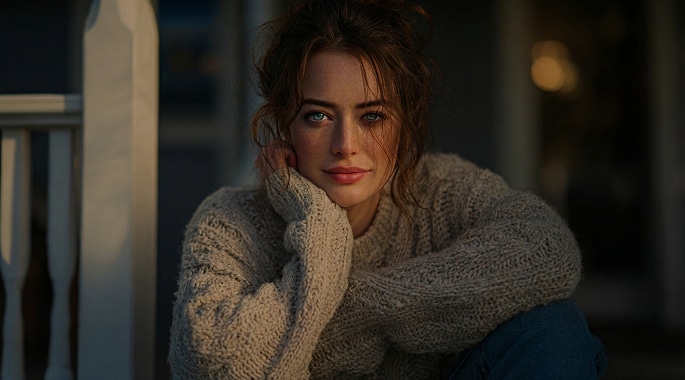

Apply cinematic side lighting to the photo.Add directional light coming from one side to create depth, soft shadows, and dramatic contrast.Use realistic light falloff and natural skin tones for a cinematic, high-end look.Keep the subject unchanged and photorealistic.
Natural Soft Light
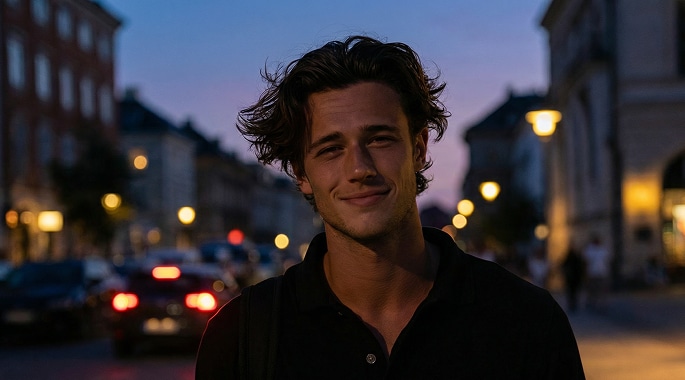
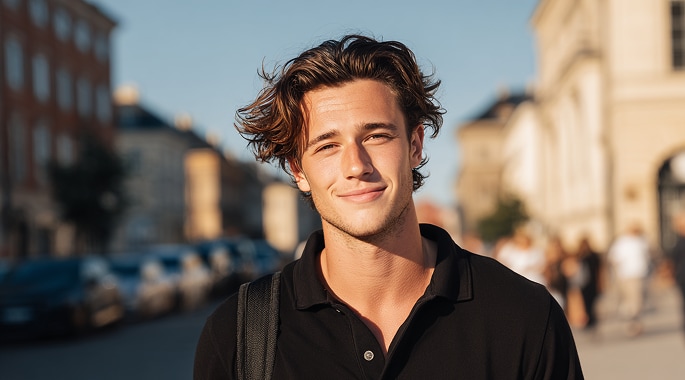
Relight the photo with soft, natural lighting.Add gentle, even light from the front to brighten the face and reduce harsh shadows.Keep skin tones realistic and natural, with balanced highlights and smooth shadow transitions.Do not change facial features, expression, or identity.








Why Use AI Relight for Your Photos
Whether you’re fixing a poorly lit photo or upgrading your image to a professional look, AI relight gives you full control over lighting—without retouching skills, complex tools, or reshoots.

Fix Dark, Flat, or Backlit Photos Instantly
You don’t need to throw away photos just because the lighting went wrong. With AI relight, you can recover details from dark, underexposed, or backlit images, bringing faces and subjects back to life with balanced, natural light—no manual adjustments required. This is perfect for everyday photos that look “almost right” but suffer from poor lighting conditions.

Add Studio-Quality Lighting Without a Studio
Not every photo is taken under perfect conditions—but now it doesn’t have to be. Use AI relight photo technology to simulate professional studio lighting, including soft key light, side lighting, or subtle rim light, all from a single image. The result feels polished and intentional, making selfies, portraits, and headshots look professionally shot.

Control Light Direction, Mood, and Color Temperature
Lighting isn’t just about brightness—it’s about mood and atmosphere. By adjusting light direction, intensity, and color temperature, you can transform the emotional tone of a photo, from warm and inviting to cool and cinematic. This gives creators and marketers the freedom to match lighting with branding, storytelling, or visual style—without reshooting.

Relight Photos Naturally While Keeping the Subject Real
One of the biggest fears with AI photo tools is losing authenticity. Our AI relight generator is designed to preserve facial features, skin tone, and overall identity while intelligently recalculating light and shadow for a realistic result. You get a cleaner, better-lit photo that still looks like you—not an overprocessed filter.
FAQs About
AI Relight with media.io
1. What is AI Relight and how does it work?


AI relight uses advanced image analysis to understand existing lighting in your photo and intelligently adjust brightness, direction, and color temperature. Instead of applying a simple filter, it recalculates light and shadow to create a more natural, realistic result. This allows you to fix lighting issues or add studio-style lighting from a single image.
2. Will AI Relight change my face or the subject in my photo?
The goal of AI relight photo is to improve lighting—not to change who you are. The tool focuses on reshaping light and shadow while keeping facial features, skin tone, and overall appearance as authentic as possible. Minor variations may occur due to lighting reconstruction, but the subject’s identity remains consistent.
3. Is my photo safe and private when using AI Relight?
Yes. Media.io takes user privacy seriously. Uploaded and generated files are automatically removed from our servers within seven days, helping ensure your content stays private and secure. Your images are processed only to deliver the relight result and are not stored long term.
4. Can I try AI Relight for free?
You can try AI relight online for free to explore how it works and see the lighting improvement for yourself. Free usage allows you to test different relight effects before deciding whether you want higher-resolution exports or additional features.
5. Can I use AI-relit photos for professional or commercial projects?
AI relight is designed to help improve lighting for a wide range of creative needs, from personal photos to visual content. When using generated images beyond personal use, it’s a good idea to review your specific project requirements and ensure the final result aligns with applicable guidelines or third-party rights related to your content.



