






Home>Online Tools>Upside Down Scene

Upside Down Scene Switch OnlineInstantly Create a World Turned Upside Down

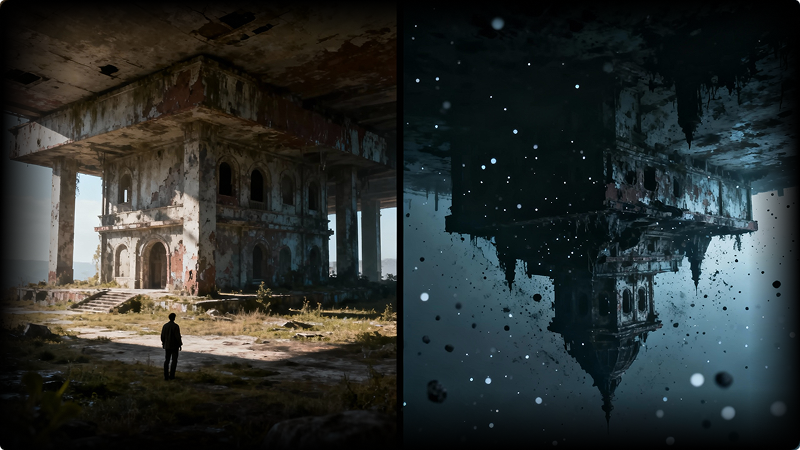
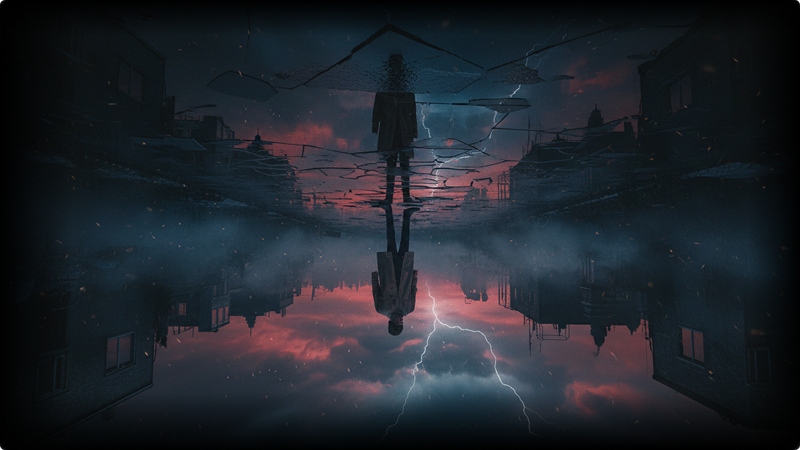
Turn any photo into an Upside Down Scene with AI. With Media.io, you can recreate a world turned upside down—the same scene transformed into a dark mirror reality with eerie lighting, twisted atmosphere, and cinematic contrast. No editing skills needed. Just upload your image and apply the upside down scene switch to see your world flip into its shadow side in seconds.

Why Try the AI Upside Down Scene Effect?

Recreate a World Turned Upside Down Instantly

Recreate a World Turned Upside Down Instantly

You don’t need to understand complex visual effects or cinematic editing to bring a world turned upside down to life. This AI effect transforms a familiar scene into its dark mirror version while preserving the original structure, perspective, and composition. What users love most is how recognizable the scene remains—yet everything feels wrong in the best way. The lighting shifts, the atmosphere darkens, and the world you know suddenly looks twisted, eerie, and unreal.

One Scene, Two Realities: Normal vs. Upside Down

One Scene, Two Realities: Normal vs. Upside Down

The magic of an Upside Down Scene lies in contrast. With a single image, you can showcase two versions of the same world—one normal, one corrupted—creating a powerful visual story without extra effort. This makes the effect perfect for before-and-after comparisons, split scenes, or dramatic transformations that instantly grab attention. Users searching for an upside down scene switch are often looking for this exact moment of visual shock.

Designed for Social Sharing & Visual Impact

Designed for Social Sharing & Visual Impact

Most users aren’t creating Upside Down scenes just to experiment—they’re creating them to be seen. This effect is optimized for bold contrast, cinematic lighting, and eye-catching atmosphere that stands out on TikTok, Instagram, and other social platforms. The result is an image that feels cinematic, mysterious, and instantly shareable—no animation or video editing required. One image is enough to tell the story.

No Editing Skills Needed — Just Upload and Switch

No Editing Skills Needed — Just Upload and Switch

Traditional scene manipulation takes time, tools, and experience. Media.io removes all of that. Simply upload your photo, apply the upside down scene switch, and let AI handle the transformation. This makes the effect ideal for casual users, creators, and anyone exploring AI visuals for the first time. What once took hours of manual editing now takes seconds—and delivers a result that looks intentional, immersive, and professionally styled.

How to Create an Upside Down Scene with AI

Creating an Upside Down Scene is simple and intuitive. With Media.io’s AI generator, you can turn a normal photo into a world turned upside down in just a few clicks—no editing experience required.

01

Step 1 Open the Upside Down Scene Generator

Start by opening the AI Upside Down Scene Generator on Media.io. This tool is designed specifically to recreate the dark mirror world effect users are searching for. No setup or technical knowledge is needed—just access the generator and get started instantly.

02

Step 2 Upload Your Photo and Choose a Prompt

Upload a clear photo of a person, place, or scene you want to transform. Then enter an Upside Down Scene prompt—or select one from the prompt library below to match your desired style. The AI will keep the original composition while preparing the upside down scene switch.

03

Step 3 Generate and Save Your Image

Click “Generate” and let the AI transform your photo into a world turned upside down. Within seconds, you’ll see a dark, twisted mirror version of the same scene. Preview the result, download the image, and share your Upside Down scene anywhere you like.

Upside Down Scene Filter Online

Fast, consistent, share-ready prompts with a polished, responsive table.

Style Ghost Filter Prompt Copy
Classic Upside Down Scene

Transform the uploaded photo into an Upside Down Scene, reimagining the same location as a dark mirror world. Keep the original composition, perspective, and subject placement exactly the same. Change the environment into a world turned upside down with eerie lighting, cold shadows, dark red or gray sky tones, floating particles in the air, subtle fog, and a twisted, unsettling atmosphere. Add cinematic contrast, realistic shadows, and dramatic lighting while maintaining photorealistic detail.

Normal World vs Dark Mirror World

Create a split-scene Upside Down Scene switch using the uploaded image. One side shows the normal world with natural lighting and realistic colors, while the other side reveals a dark mirror world version of the same scene. Preserve all structures, subjects, and angles, but transform the upside down side with corrupted textures, dim lighting, cold tones, drifting particles, and a cinematic, surreal mood.

Cinematic Dark Mirror World

Recreate the uploaded photo as a cinematic Upside Down Scene set in a dark mirror reality. Maintain the original scene layout, but replace the lighting with moody, low-key illumination, heavy shadows, atmospheric fog, and subtle environmental decay. Use dramatic color grading, high contrast, realistic film lighting, and a tense, cinematic atmosphere to make the world turned upside down feel immersive and believable.

Portrait Upside Down Scene

Transform the uploaded portrait into an Upside Down Scene while keeping the person’s pose, facial features, and expression unchanged. Reimagine the surrounding environment as a dark mirror world with distorted lighting, cold shadows, floating particles, and an unsettling atmosphere. The subject remains realistic and sharp, while the world around them feels twisted, cinematic, and surreal.

Subtle Upside Down Reality

Convert the uploaded photo into a subtle Upside Down Scene that feels realistic rather than exaggerated. Preserve the original environment and structure, but introduce a world turned upside down through darker lighting, muted colors, atmospheric haze, and quiet visual tension. The result should look like an alternate reality—familiar, yet slightly wrong and unsettling.

bg

Millions of people like Media.io

user
Kriti Agarwal

Content and Film Programmer

star star star star star

Made my Upside Down scene instantly unforgettable. I uploaded a normal photo and used the AI Upside Down Scene effect to recreate a world turned upside down. I expected a simple filter, but the result looked cinematic—dark lighting, twisted atmosphere, and a true mirror-world feel. My friends couldn’t believe it was generated from a single image.

user
Kriti Agarwal

Content and Film Programmer

star star star star star

Way more realistic than I expected. I thought the Upside Down scene might look artificial, but the lighting, shadows, and atmosphere felt surprisingly natural. The AI kept the original scene intact while transforming it into a dark mirror world. The upside down scene switch looked intentional, not overdone.

user
Kriti Agarwal

Content and Film Programmer

star star star star star

Perfect for social sharing—and it actually went viral. I tried the Upside Down scene trend and shared the image on TikTok. The contrast between the normal world and the dark mirror version immediately caught attention. People kept asking how I made it, and the post gained way more engagement than I expected.

Explore Trending Halloween AI Filters

Ghostface AI Photo
AI Michael Myers Picture
Freddy Krueger AI photo
AI Chucky photo
Freddy Krueger AI photo
AI Freddy Krueger photo
Freddy Krueger AI photo
AI Skeleton Filter
Joker Filter
Joker Filter
Beetlejuice Photo Filter
Zombie Filter
Tim Burton Filter
bg bg

FAQs about AI Upside Down Scene Generator

An Upside Down Scene transforms a normal photo into a dark mirror version of the same world. Instead of simply flipping the image, the AI reimagines the scene with altered lighting, atmosphere, and mood—creating a world turned upside down while keeping the original composition intact. This effect is ideal for users looking to recreate a cinematic, twisted reality with minimal effort.
Not at all. The AI Upside Down Scene Generator is designed for beginners and creators alike. Simply upload your photo, apply an upside down scene switch prompt, and let the AI handle the transformation. No manual editing, layering, or technical experience is required.
Clear photos with recognizable environments work best—such as street scenes, rooms, buildings, or portraits with visible backgrounds. The AI performs especially well when there is a defined scene to transform, allowing the contrast between the normal world and the dark mirror world to stand out visually.
Yes. Media.io places a strong emphasis on user privacy and data protection. Uploaded images and generated content are automatically removed from our servers within 7 days, ensuring your files are not stored longer than necessary. You remain in control of your content throughout the entire creation process.
Yes, you can explore the Upside Down Scene effect with a free trial on Media.io. Free access allows you to test the visual quality and experience the world turned upside down effect before deciding whether to continue with additional features or higher-resolution outputs.
Media.io Online Tools Quality Rating:
vote 4.7 (162,357 Votes)
media.io

AI Video Generator star

Easily generate videos from text or images

Generate