







Home > AI Video Effects > AI Baseball Fan Cam Video

AI Baseball Fan Cam Video: From Stadium Crowd to Player Action Viral Highlight Clips

Create viral AI baseball fan cam videos using first and last frame generation. Start from a stadium crowd scene, zoom into the action, generate dynamic player focus effects, and smoothly transform into real-world highlight footage for TikTok, Reels, and sports storytelling content.

Create AI Fan Cam Video Now

Free credits available after signup/login.

✓ AI baseball fan cam video generator ✓ Stadium crowd to player action storytelling ✓ Dynamic zoom & action focus effect ✓ TikTok / Reels viral video format

How to Create an AI Map to Travel Video

Upload a map image → generate a travel photo → animate a smooth map zoom and landmark transition into a cinematic AI travel video.

AI baseball stadium fan cam reference frame

Identity Reference Image

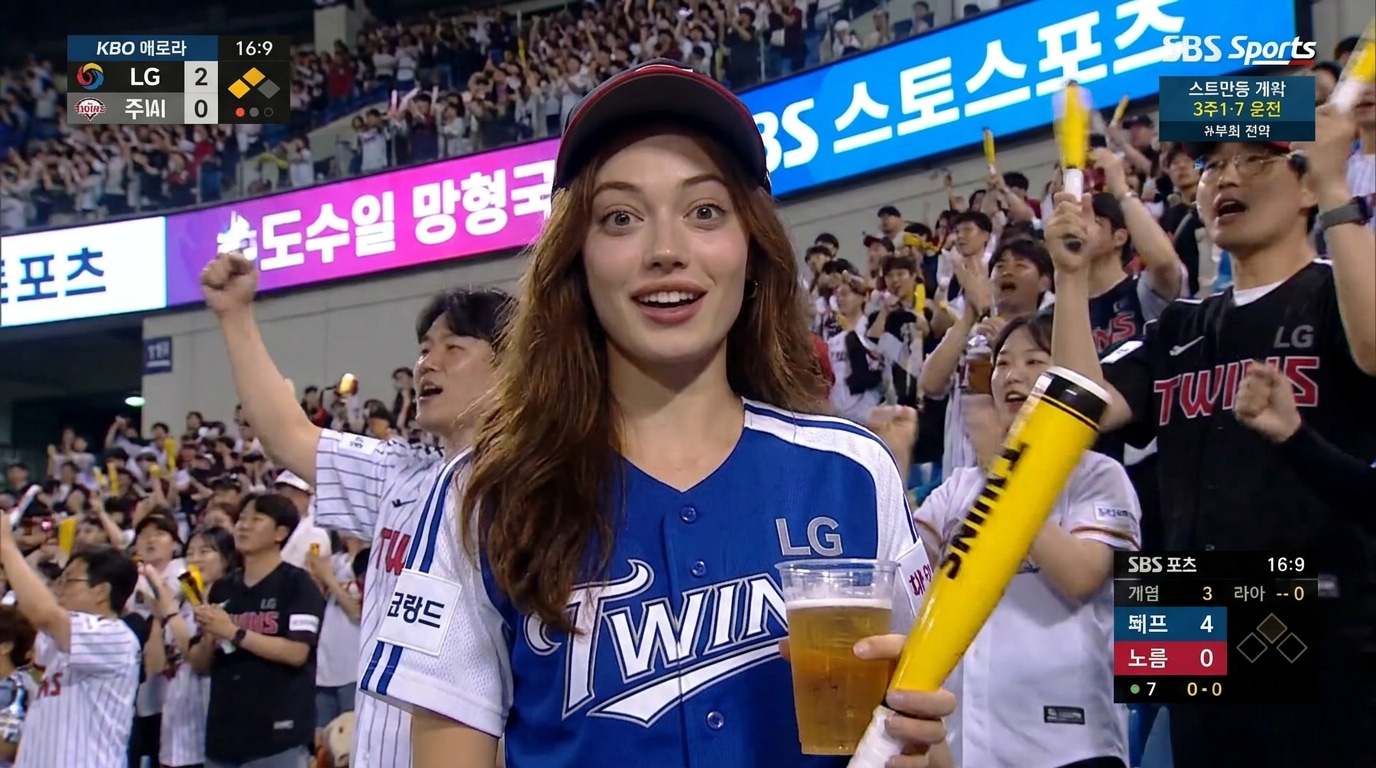
KBO stadium fan cam broadcast screenshot

Fan Cam Broadcast Frame

Step 1

Create AI Baseball Stadium Fan Cam Image

  1. Open Media.io Image to Image .
  2. Upload your reference portrait as identity anchor (face must remain unchanged).
  3. Generate a realistic KBO/MLB stadium fan cam screenshot inside a live broadcast.
  4. Ensure composition looks like a television sports capture (16:9 broadcast frame).
Baseball Fan Cam Image Prompt
Ultra-realistic KBO baseball stadium fan cam screenshot. Preserve exact face identity from reference image. Subject sitting in crowd holding drink and cheering stick, wearing baseball jersey. Caught by live TV broadcast camera, slight surprised smile. Stadium crowd around, LED boards blurred. Telephoto lens, shallow depth of field, slight motion blur, broadcast compression, 16:9 TV frame, cinematic realism.
Generate Fan Cam Image 💡 Tip: Keep face identity locked — do NOT stylize into another person. Focus on "caught on TV" realism.
Baseball stadium fan cam still frame

AI Stadium Fan Cam Video

Step 2

Convert Fan Cam Image to Viral Stadium Video

  1. Open Media.io Image to Video .
  2. Upload the generated stadium fan cam image.
  3. Set duration to 4–5 seconds, 16:9 sports broadcast format.
  4. Paste the animation prompt below and generate.
Fan Cam Video Prompt
Realistic baseball stadium broadcast fan cam video. Subject sitting in crowd during live KBO match. Subtle blinking, natural breathing, slight head movement, hair moving from stadium breeze. Telephoto sports camera with shallow depth of field. Crowd waving cheering towels, LED scoreboard glow, broadcast compression artifacts, slight handheld micro shake. Authentic "caught on camera" viral stadium goddess moment. No posing, no direct camera look.
Generate Stadium Video ⚡ Tip: Keep motion subtle — viral fan cam style is about realism, not animation exaggeration.

Viral Broadcast Clip

Step 3

Download & Share Viral Fan Cam Video

  1. Download your AI baseball stadium fan cam video.
  2. Post on TikTok, Instagram Reels, YouTube Shorts.
  3. Use trending captions like "I got caught on camera at the stadium…"
  4. Add hashtags: #baseballfancam #stadiumgoddess #aivideo #kbobroadcast #caughtoncamera
Start Creating Viral Fan Cam 🔥 Tip: Viral performance comes from "randomness illusion" — make it look unplanned, not generated.

Social Media Showcase

Watch real examples on Instagram: Sky Fall Trend, Walk Transition, and Minecraft Background.

Why Choose Media.io for AI Baseball Stadium Fan Cam Videos

Stadium Crowd to Player Focus Transformation

Turn a wide stadium crowd view into dynamic player close-ups. Zoom from the stands, focus on key moments, and seamlessly transition into highlight replays using stadium ambiance and first-to-end frame animation.


Designed for Viral Sports Content

Perfect for trending AI baseball highlight videos on TikTok and Instagram Reels. The stadium zoom-in + action reveal + crowd reaction creates an instant visual hook and drives high engagement.

Consistent Stadium Perspective & Action Tracking

Maintain the same camera angle, zoom speed, and lighting between crowd shots and player action to ensure smooth and realistic stadium-to-highlight transitions.

Simple Stadium Shot to Highlight Workflow

No editing skills needed. Upload a stadium crowd image as the start frame and a player action shot as the end frame, then use prompts to generate a complete AI fan cam video in seconds.

bg bg

Frequently Asked Questions About AI Baseball Stadium Fan Cam Videos

What is an AI baseball stadium fan cam video?
The AI baseball fan cam video is a viral animation where the camera zooms from stadium crowd shots into player action, creating dynamic transitions that capture game excitement and fan reactions.
Upload a stadium crowd image as the start frame and a player action shot as the end frame. Then add a prompt describing the camera zoom, player focus, and crowd reactions to generate the video.
They combine game action and emotional storytelling, making baseball content more immersive and shareable compared to static highlights or traditional replays.
Keep consistent lighting, camera speed, and action continuity between frames, and describe smooth zoom-in with natural crowd energy for seamless transitions.
Short clips of 3–8 seconds perform best for TikTok and Reels, with quick stadium zoom and instant action payoff for maximum engagement.
Yes. AI baseball fan cam videos are perfect for TikTok, Instagram Reels, and YouTube Shorts due to their dynamic action, strong hook, and high replay value among sports fans.
Media.io Online Tools Quality Rating:
vote 4.7 (162,357 Votes)
media.io

AI Video Generator star

Easily generate videos from text or images

Generate
