Kive AI for Product Photography: Features, Boards and Costs

When a brand has thousands of source images, keeping them organized can be as important as generating the next product shot. Kive AI combines creative asset search, collaborative boards, AI product photography, generation and style-related features in one workspace. This review looks at the content library and team workflow behind the editor, with a practical comparison to Media.io for quick marketing assets.

Primary Features of Kive AI Studio and Product Photography

Kive AI is a visual asset workspace combining searchable libraries, collaborative moodboards, AI image and video generation, product photography and higher-tier brand style training.

Core Feature Overview

AI-Powered Visual Library Search

Kive organizes uploaded and generated imagery into a searchable reference collection. Teams can locate products, campaign variants or previous creative direction without treating every prompt as an isolated task.

Illustrative Media.io workflow graphic, not a Kive AI interface screenshot

Collaborative Boards and Concept Planning

Shared boards let a marketing and design team compare references before choosing a campaign direction. Free-tier board limits make it important to distinguish inspiration use from a full production workspace.

Illustrative Media.io workflow graphic, not a Kive AI interface screenshot

AI Product Photography Studio

A product can be placed into new lifestyle or advertising contexts within Kive's image generation workflow. Teams should inspect brand, package and product-text consistency before using the resulting image on a storefront.

Illustrative Media.io workflow graphic, not a Kive AI interface screenshot

Text-to-Image and Video Generation

Basic and higher tiers list image and video generations paid from monthly credits. The number of outputs is approximate because different tasks such as upscales, edits and videos can consume different credit amounts.

Illustrative Media.io workflow graphic, not a Kive AI interface screenshot

Brand Style Training on Pro

The Pro plan advertises custom brand style training. This is particularly relevant for agencies that need repeated on-brand visual sets, but it is not a feature to assume in the free plan.

Illustrative Media.io workflow graphic, not a Kive AI interface screenshot

Team Access, Versions and Sharing

Kive lists different user allowances, asset caps and versioning options by tier. A creative director can keep approved references visible while contributors create new variations in their shared workspace.

Illustrative Media.io workflow graphic, not a Kive AI interface screenshot

How to Create a Product Lifestyle Photo Online

1
2
3
1
Upload your product image

Upload a licensed product image with clear packaging details and a recognizable product shape, then describe the lifestyle scene you want to create.

2
Set your image options

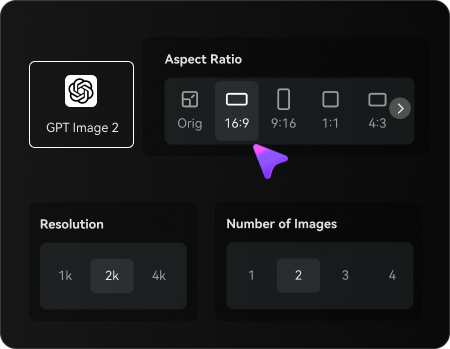
Choose an AI model, adjust the aspect ratio and resolution, and select the number of images to generate based on your intended use.

3
Generate and refine your image

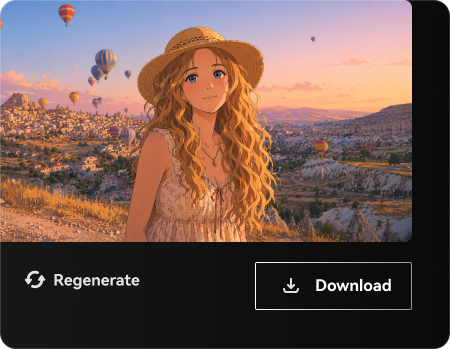
Generate your product lifestyle photo, review the product details and visual consistency, then refine the prompt or regenerate before downloading.

Illustrative Media.io workflow graphic, not a Kive AI interface screenshot

Best Uses of Kive AI: Visual Asset Workspace And Ai Product Photos For Teams

Build a board from the existing SKU photos and plan a coordinated holiday set before generating ad variations. Additional tasks include brand asset discovery and creative team handoff.

Seasonal E-Commerce Product Launch

Build a board from the existing SKU photos and plan a coordinated holiday set before generating ad variations.

Agency Concept Approval

Collect approved mood references for multiple stakeholders and reduce back-and-forth around visual language. For a related Media.io workflow, explore Product Photo To Video Prompts.

Brand Asset Discovery

Locate a previously approved campaign visual among a large collection rather than generating a near-duplicate.

Lifestyle Product Mockups

Test how a packaged product looks on a desk, countertop or outdoor surface for early marketing proposals.

Creative Team Handoff

Share the selected reference set and generation history with a copywriter, designer and performance marketer. For a related Media.io workflow, explore AI Ad Generator.

Reusable Brand Styling

Experiment with a repeatable brand aesthetic for several image variants when the plan supports style training.

Kive AI Pricing, Restrictions and Practical Limitations

Kive lists limited free generations and a small number of boards; serious team production uses paid capacities. Generation, edits and upscaling all draw against quotas. Published per-month image counts are estimates rather than a guaranteed output number.

Free Tier Is Primarily for Discovery

Kive lists limited free generations and a small number of boards; serious team production uses paid capacities.

Credits Cover Different Task Types

Generation, edits and upscaling all draw against quotas. Published per-month image counts are estimates rather than a guaranteed output number.

Library Storage Is Plan Based

The Basic and Pro plans list different asset limits. Teams with an extensive media archive should size the workspace before migration.

Brand Training Is Not Included Everywhere

Custom style training is advertised on Pro, so a lower-tier trial may not represent the desired brand-governance workflow.

Synthetic Products Still Need QA

Generated labels, package geometry and logos may deviate from approved product data; production packaging should be checked side by side.

A Library Is Not a Publishing Platform

An organized visual archive does not automatically deliver ad scheduling, storefront deployment or campaign analytics.

Kive AI vs Media.io: Pricing, Features and Workflow Fit

Kive is principally a team visual operating environment: search, library storage, moodboards, credit-funded generation and brand styling sit together. Media.io is more relevant to a marketer who already has a finished product packshot and needs one lifestyle treatment or promotional creative.

Decision Factor Kive AI Media.io
Primary task Manage a shared reference library, plan concept boards and train a repeatable brand style. Make a quick product lifestyle image or transform an existing approved product photo without first building a team asset archive.
Core feature AI-Powered Visual Library Search: Kive organizes uploaded and generated imagery into a searchable reference collection. Teams can locate products, campaign variants or previous creative direction without treating every prompt as an isolated task. Turn one existing product shot into a themed lifestyle image for a promotion.
Source and preparation A product can be placed into new lifestyle or advertising contexts within Kive's image generation workflow. Teams should inspect brand, package and product-text consistency before using the resulting image on a storefront. Upload a licensed product image with legible pack details and a clean silhouette.
Ideal deliverable Seasonal E-Commerce Product Launch: Build a board from the existing SKU photos and plan a coordinated holiday set before generating ad variations. Explore different environments without first migrating an entire asset archive.
Workflow control Basic and higher tiers list image and video generations paid from monthly credits. The number of outputs is approximate because different tasks such as upscales, edits and videos can consume different credit amounts. Create image-to-image variants for a single product launch or campaign.
Pricing model Kive's official pricing lists a free tier, Basic and Pro subscriptions, with Basic around $15/month billed yearly and Pro around $75/month billed yearly at the researched snapshot. Basic includes 1,000 monthly credits and 3 users; Pro lists 5,000 monthly credits and 10 users. Confirm the monthly billing toggle. Kive bundles monthly generation credits with library-item and collaborator limits. When evaluating a one-off Media.io product scene, price that actual image operation rather than comparing it directly with Kive storage capacity or team seats.
Main production limitKive lists limited free generations and a small number of boards; serious team production uses paid capacities.Add follow-up video or ad assets in adjacent Media.io workflows.
Who owns the process Kive lists different user allowances, asset caps and versioning options by tier. A creative director can keep approved references visible while contributors create new variations in their shared workspace. Compare the generated marketing visual with the original packshot before exporting an ad or listing asset.

Best user fit Manage a shared reference library, plan concept boards and train a repeatable brand style. Make a quick product lifestyle image or transform an existing approved product photo without first building a team asset archive.
Best for Kive AI

Choose Kive AI for Visual Asset Workspace And Ai Product Photos For Teams

Kive AI is the more logical choice when you need to manage a shared reference library, plan concept boards and train a repeatable brand style. Its dedicated workflow matters most for the following decisions.

  • Seasonal E-Commerce Product Launch: Build a board from the existing SKU photos and plan a coordinated holiday set before generating ad variations.
  • Agency Concept Approval: Collect approved mood references for multiple stakeholders and reduce back-and-forth around visual language.
  • Brand Asset Discovery: Locate a previously approved campaign visual among a large collection rather than generating a near-duplicate.
  • Lifestyle Product Mockups: Test how a packaged product looks on a desk, countertop or outdoor surface for early marketing proposals.
  • Creative Team Handoff: Share the selected reference set and generation history with a copywriter, designer and performance marketer.
Visit Kive AI
Best for Media.io

Choose Media.io for Fast Product Lifestyle Images

For a single launch image, Media.io can place an approved item into a new lifestyle environment without a large archive migration. Kive is better suited to agencies that must collect references, coordinate approvals and reuse a trained brand style over time.

  • Turn one existing product shot into a themed lifestyle image for a promotion.
  • Explore different environments without first migrating an entire asset archive.
  • Create image-to-image variants for a single product launch or campaign.
  • Add follow-up video or ad assets in adjacent Media.io workflows.
Create Product Lifestyle Photos

Kive AI Review: Who Should Use It?

Our Take

Agency Concept Approval is a revealing evaluation: Collect approved mood references for multiple stakeholders and reduce back-and-forth around visual language. Shared boards let a marketing and design team compare references before choosing a campaign direction. Free-tier board limits make it important to distinguish inspiration use from a full production workspace. A rigorous comparison needs a real lifestyle product mockups sample, because synthetic products still need qa could change the value of this feature.

Kive lists limited free generations and a small number of boards; serious team production uses paid capacities. The Basic and Pro plans list different asset limits. Teams with an extensive media archive should size the workspace before migration. The pricing decision is also concrete: Kive's official pricing lists a free tier, Basic and Pro subscriptions, with Basic around $15/month billed yearly and Pro around $75/month billed yearly at the researched snapshot. Basic includes 1,000 monthly credits and 3 users; Pro lists 5,000 monthly credits and 10 users. Confirm the monthly billing toggle.

Choose Kive AI if you manage a shared reference library, plan concept boards and train a repeatable brand style. Choose Media.io if your priority is to make a quick product lifestyle image or transform an existing approved product photo without first building a team asset archive. Before selecting a plan, examine library storage is plan based and test seasonal e-commerce product launch with an authorized source asset.

Kive AI FAQ: Features, Pricing and Alternatives

Is Kive AI an image generator or a visual library?
faq faq

Kive AI is a visual asset workspace combining searchable libraries, collaborative moodboards, AI image and video generation, product photography and higher-tier brand style training.

A product can be placed into new lifestyle or advertising contexts within Kive's image generation workflow. Teams should inspect brand, package and product-text consistency before using the resulting image on a storefront.

The Pro plan advertises custom brand style training. This is particularly relevant for agencies that need repeated on-brand visual sets, but it is not a feature to assume in the free plan.

Shared boards let a marketing and design team compare references before choosing a campaign direction. Free-tier board limits make it important to distinguish inspiration use from a full production workspace.

Kive's official pricing lists a free tier, Basic and Pro subscriptions, with Basic around $15/month billed yearly and Pro around $75/month billed yearly at the researched snapshot. Basic includes 1,000 monthly credits and 3 users; Pro lists 5,000 monthly credits and 10 users. Confirm the monthly billing toggle.

Kive lists limited free generations and a small number of boards; serious team production uses paid capacities.

Generated labels, package geometry and logos may deviate from approved product data; production packaging should be checked side by side.

make a quick product lifestyle image or transform an existing approved product photo without first building a team asset archive. Kive is stronger when boards and asset governance matter.

manage a shared reference library, plan concept boards and train a repeatable brand style. Check planned asset counts and credit budget.

What Media.io Creators Say About Their Workflow

Media.io AI video generator user
Sarah L.

Content Creator

star star star star half star

Media.io makes it much easier to test different AI video styles without jumping between several platforms. I can start with a text prompt or image, compare model results, and then resize or polish the clip for social media in the same workspace.

Media.io AI video creator
John D.

Social Media Marketer

star star star star half star

I use Media.io to create quick product clips, ad concepts, and short-form videos from images. The biggest advantage is that generation does not feel like the final step - I can continue with music, captions, enhancement, and format conversion before publishing.

Media.io AI video editing user
Emily T.

Freelance Designer

star star star star half star

The workflow is approachable even when I am experimenting with unfamiliar AI models. I can animate artwork, try different motion prompts, preview the output, and prepare a cleaner final version without needing advanced video-editing experience.

Media.io Online Tools Quality Rating:
vote 4.7 (162,357 Votes)
media.io

AI Video Generator star

Easily generate videos from text or images

Generate