🎬 Cinematic Abandoned Movie Scenes
Generate AI abandoned videos that place decayed film characters inside ruined movie sets—dusty stages, broken props, and forgotten locations that feel frozen in time.
Join the viral AI abandoned video trend taking over TikTok, Reels, and YouTube Shorts. Create creepy abandoned movie scenes where once-famous characters are left behind on ruined sets—dusty, decayed, and frozen in time. Using realistic AI motion, found-footage camera movement, and cinematic lighting, you can generate emotionally powerful abandoned movie set videos that feel unsettling, nostalgic, and unforgettable.
One click to generate cinematic, creepy video.







Generate a photoreal image with Nano Banana Pro, then animate it with cinematic camera motion in Kling 2.6 or Veo 3.
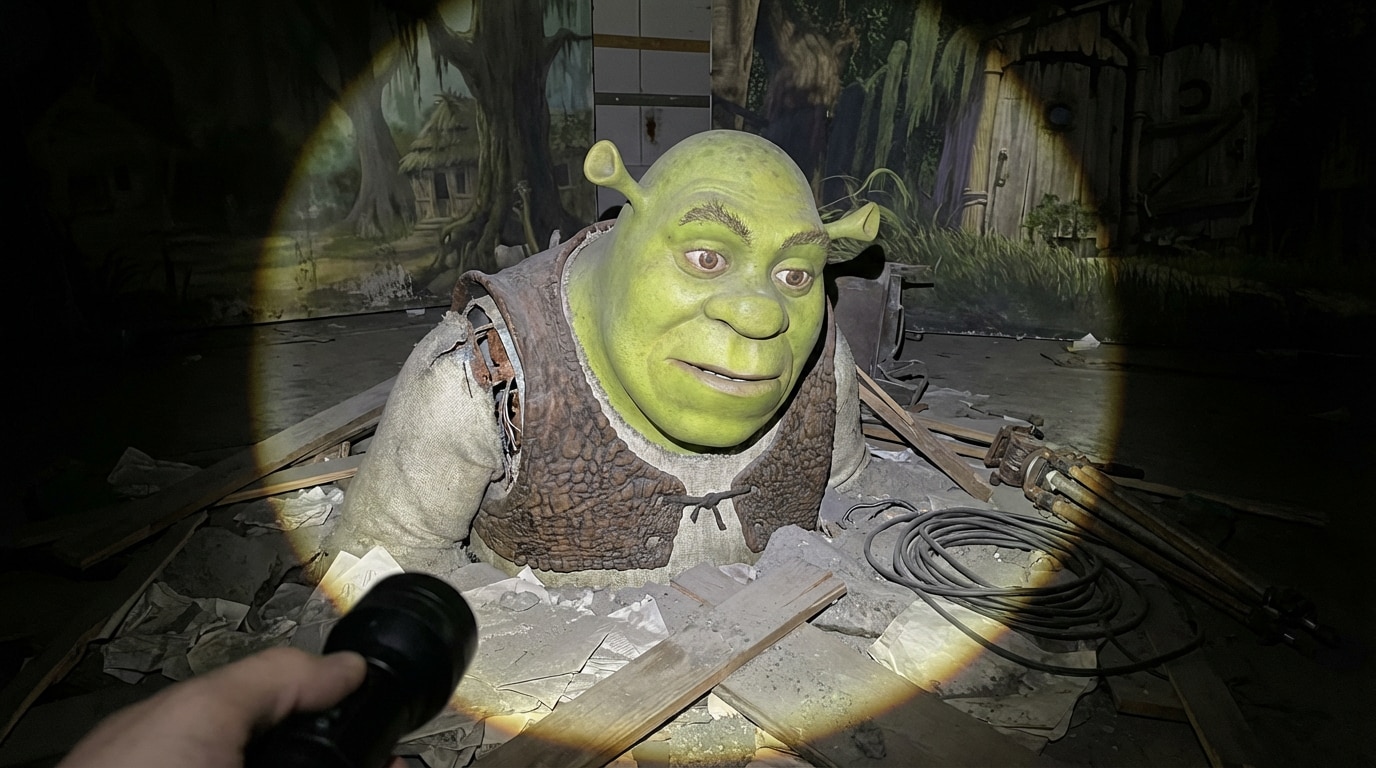
On a decaying swamp-themed movie set from Shrek, Shrek’s massive animatronic body stands slumped and inert, half-buried in dust and debris as the viewer holds a flashlight, its single circular beam illuminating his exact original green skin texture, ear shape, facial proportions, and vest materials taken directly from the uploaded image reference with no stylization or redesign. His once-leather vest is cracked, peeling, and stiff with grime, while seams split at the shoulders reveal rusted internal joints and inactive servos. His face is completely lifeless, eyes dull and unfocused like a forgotten prop. Around him, the floor is coated in thick dust, tangled cables snake between overturned light stands, and obsolete cameras sit abandoned against faded swamp set pieces. Everything beyond the flashlight beam dissolves into darkness, captured from a low, cinematic handheld angle with ultra-realistic, photorealistic lighting and deep decay shadows.
Tip: Need more variations? Use the Abandoned Movie Scenes prompt plugin .
The camera is a real human point of view, walking slowly into the same location with grounded, realistic motion: subtle vertical bob from footsteps, gentle side-to-side sway, and imperfect handheld movement. The viewer holds a flashlight, and the beam reacts naturally with slight delayed motion, small overcorrections, and uneven, searching scans across the scene. The character is completely lifeless at all times — no blinking, no breathing, no posture shifts, no movement of any kind. Only environmental motion is allowed, such as floating dust, and very slight movement of loose elements. The environment remains consistent throughout the entire shot: no set changes, no object teleporting, and no new elements appearing or disappearing. The overall look is photorealistic, with found-footage realism, low light, strong shadows, gritty textures, and natural imperfections like noise, grain, and minor exposure fluctuations.
Generate AI abandoned videos that place decayed film characters inside ruined movie sets—dusty stages, broken props, and forgotten locations that feel frozen in time.
Create immersive footage with human-like camera movement, including subtle footsteps, handheld sway, and flashlight scanning—built to mimic found-footage realism.
Characters remain completely still—no blinking or breathing—while environmental details like floating dust, light flicker, and loose debris subtly move, creating an unsettling, realistic contrast.
Media.io integrates leading video generation models to deliver high realism, consistent scenes, and cinematic quality—so you can create viral abandoned movie videos without complex workflows.


 4.7 (162,357 Votes)