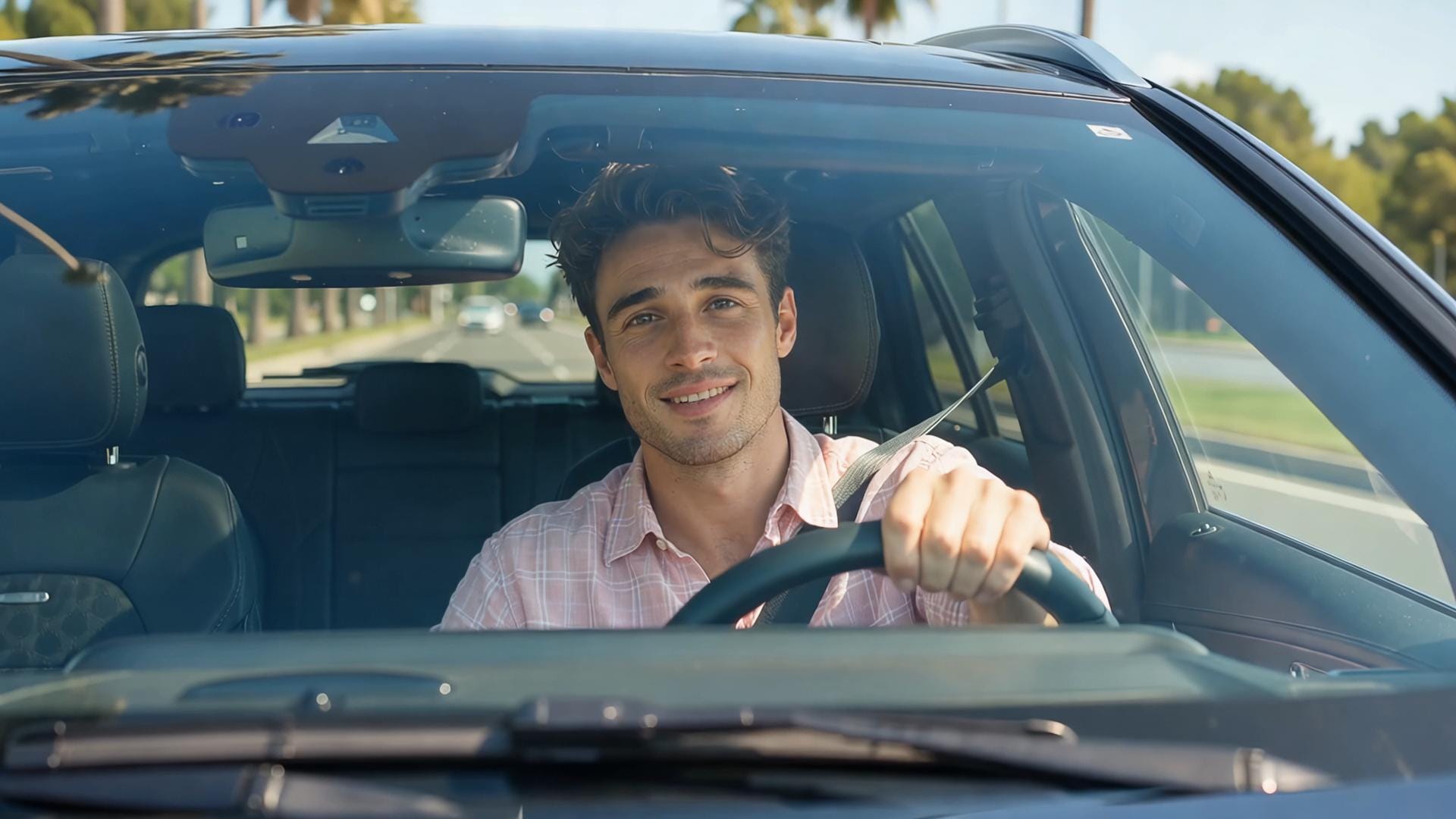
Car Video Prompts for Driving Shots, Showcases, and Ads
These car video prompts treat body design as the product. Use ai car video prompts to animate a vehicle still or write a commercial driving beat, then generate the clip in Media.io.
Car video prompts collapse when the body warps. Open Media.io's Reference to Video, paste paint and badge lock-offs plus one weather or camera path, then generate a short automotive clip.
1
Choose "Reference to Video"
Open Media.io and choose Reference to Video so your car video scene starts from a written prompt. Stay on this path for the Seedance 2.5 text-to-video workflow.
2
Enter Your Prompt
Paste one of these car video prompts into the box. Lock body, paint, and badge, then add weather or a single camera path around the vehicle. Use Inspire Me, duration, or resolution controls if you need a tighter test.
3
Generate and Download
Generate a short clip first, review motion and artifacts, then download the take you want to cut. Results vary, so rewrite one note at a time instead of stacking extra effects.
Cinematic Car, Driving, and Auto Ad Prompt Examples
Mercedes Street Approach
9:16 cinematic phone video. A Mercedes-Benz S-Class rolls straight toward camera on a sunny tree-lined street. Open on a wide front so the chrome Mercedes star is clearly readable and the plate is blank. Push in, then slide to the open driver's window for a smile-and-wave.
Replace the person in the video with the person from my uploaded reference image. Keep the same seat, wave, car, street, and camera move.
BMW Hood Approach
Vertical luxury-car clip, one continuous move. Start inches above a graphite BMW 7 Series hood: kidney grille and roundel fill the frame, blank plate. Glide up the hood, rise, and settle on the open window as the driver waves.
Replace the driver in the video with the person from my uploaded reference image. Do not change the BMW, driveway, or camera path.
Porsche Golden Approach
Golden-hour 9:16 shot of a cream Porsche Panamera on a palm boulevard. Begin on a front-left three-quarter and track backward with the car so the Porsche crest stays readable. Pan to the open window for a friendly wave.
Replace the person in the car with the person in my reference image, same pose and timing. Leave the Porsche, palms, and lighting untouched.
Audi Night Approach
Night commercial, 9:16. Locked-off from a wet sidewalk: a black Audi A8 comes out of the background, four rings readable, blank plate. When it hits the foreground, pan with it onto the open window and a wave.
Use my uploaded reference image as the driver. Replace the person in the video with that face and keep the wet street, neon, and camera pan.
Bentley Driveway Approach
Start high over a stone mansion driveway. A pearl-white Bentley Flying Spur is the whole subject; B-wings badge readable. Crane down and push to the open window for a wave.
Replace the driver with the person from my uploaded reference image. Keep the Bentley, mansion, and crane move exactly.
Jaguar Rain Approach
Open on a puddle: the Jaguar growler badge is readable in the wet reflection. Tilt up to a dark green Jaguar XF on a rainy street, then slide to the open window for a wave.
Replace the person in the video with the person from my uploaded reference image. Same rain, same car, same camera tilt.
Maserati Garage Approach
From between concrete pillars, a burgundy Maserati Quattroporte emerges from a garage exit, trident badge catching daylight. Dolly sideways with the car to the open window; the driver waves.
Replace the driver in the video with the person from my uploaded reference image. Do not restage the garage or the dolly.
Lexus Rooftop Approach
Long-lens 9:16 from across a rooftop at sunset. A matte black Lexus LS rolls closer, spindle badge readable, then a snap push-in to the open window and a wave.
Swap the person in the car for the person in my reference photo. Keep the Lexus, sunset, and compressed rooftop framing.
Cadillac Coastal Approach
Handheld follow on a coastal cliff road. A champagne Cadillac CT5 comes around the bend toward camera, crest readable, then the shot settles on the open window for a wave.
Replace the person in the video with the person from my uploaded reference image. Keep the handheld feel, ocean light, and Cadillac.
Range Rover Snow Approach
Snowy residential street, 9:16. Start behind a white Range Rover, catch up, then pull alongside so the grille lettering reads before landing on the open window and a wave.
Replace the driver with the person from my uploaded reference image. Leave the snow, chase, and Range Rover unchanged.
Genesis Neon Approach
Low Dutch angle on a dark purple Genesis G90 at night. Winged badge readable in pink-cyan neon. Orbit the front corner to the open window for a wave.
Replace the person in the video with the person from my uploaded reference image. Keep the neon, orbit, and Genesis.
Rolls-Royce Club Approach
Reverse-tracking in front of a British-green Rolls-Royce Ghost on a country-club driveway. Spirit of Ecstasy readable. Peel left and hold the open window as the driver waves.
Use my reference image as the person in the car. Replace the driver only; keep the Rolls-Royce, driveway, and peel-off.
BMW Dawn Approach
Misty dawn, one slow orbit. Start on the BMW roundel and kidney grille of a silver BMW i7, then travel around the front-right fender into a window close-up and a wave.
Replace the driver in the video with the person from my uploaded reference image. Do not change the mist, orbit, or i7.
Maybach Hotel Approach
Side angle under a hotel porte-cochere. A glossy black Mercedes-Maybach turns in; the Mercedes star becomes readable as the nose swings toward camera. Push to the open window for a wave.
Replace the person in the video with the person from my uploaded reference image. Keep the hotel canopy, turn-in, and Maybach.
Lexus Autumn Approach
Begin looking through the windshield of a dark bronze Lexus LS on an autumn street, spindle badge still readable low in frame. Move outside to the open window for a smile and wave.
Replace the person in the car with the person in my uploaded reference image. Same autumn road, same Lexus, same inside-to-outside move.
Mercedes Night Approach
Parallel tracking from the next lane at night. Hold a moving three-quarter of a dark blue Mercedes-Benz S-Class, chrome star readable, then ease into the open window for a wave.
Replace the driver with the person from my uploaded reference image. Keep the night street, tracking speed, and Mercedes.
G-Class Desert Approach
High front-right three-quarter looking down at a white Mercedes-Benz G-Class on a desert resort driveway. Star on the grille readable. Descend and push to the open window for a wave.
Replace the person in the video with the person from my uploaded reference image. Do not change the desert, the high angle, or the G-Class.
BMW Blossom Approach
A pearl-white BMW 5 Series passes camera-right on a blossom-lined street, roundel readable in the pass-by. Whip around after it and catch the open window wave.
Swap the driver for the person in my reference image. Keep the blossoms, whip-around, and BMW.
Porsche Garage Approach
Extreme low bumper shot: Porsche crest fills the frame on a matte gray Cayenne in an underground garage. Pull back and up, then slide to the open window for a wave.
Replace the person in the video with the person from my uploaded reference image. Leave the garage, crest close-up, and Cayenne.
Aston Vineyard Approach
Long lens down a vineyard row. A deep burgundy Aston Martin DBX comes toward camera, wings badge readable in the dust, then dolly in to the open window for a wave.
Replace the driver in the video with the person from my uploaded reference image. Keep the vineyard, long lens, and Aston.
Mercedes Rain Approach
Stand in the middle of a wet night road. A black Mercedes-Benz S-Class comes straight on, chrome star readable in the headlight bloom. Sidestep at the last moment onto the open window and a wave.
Replace the person in the video with the person from my uploaded reference image. Keep the rain, the dodge, and the Mercedes.
Mercedes Beach Approach
High front-right look down into a white Mercedes-Benz SL convertible at a beach club. Star on the grille readable, cockpit open, no closed window. Drop closer as the driver waves.
Replace the person in the car with the person from my uploaded reference image. Keep the convertible, beach club, and overhead-to-close move.
Audi Tower Approach
Start high in a canyon of glass towers. A charcoal Audi A7 is small in the street; drop until the four rings read, then truck sideways to the open window for a wave.
Use my uploaded reference image as the driver. Replace only the person; keep the city canyon, drop, and Audi.
Mercedes Bridge Approach
Offset front-right three-quarter, reverse-tracking on a blue-hour bridge. Navy Mercedes-Benz S-Class, chrome star readable, then drift into the open window for a wave.
Replace the driver with the person from my uploaded reference image. Do not change the bridge, twilight, or camera offset.
BMW Villa Approach
Open on the side profile of a graphite BMW 7 Series on a modern villa driveway. Walk around the nose until the kidney grille and roundel read, then finish on the open window wave.
Replace the person in the video with the person from my uploaded reference image. Keep the villa, the walk-around, and the BMW.
Lock the Vehicle Design Before You Add Rain or a Chase
Strong cinematic car prompts protect the body and then pick a road, a height, and a speed.
An automotive prompt formula
Lock body, paint, lights, and badges.
Pick the moment: studio hero, wet city, coastal drive, interior, or reveal.
Name camera height: bumper, drone, passenger seat, or three-quarter hero.
Set speed and weather: rain, dusk, desert heat, or clean studio.
Forbid extra cars, warped roads, and melting logos.
What car commercial prompts usually need
Car commercial prompts should keep the vehicle recognizable in the first second.
Automotive commercial prompts often work as a sequence: hero, drive, detail.
Car advertisement prompts should avoid unsafe stunt language unless you explicitly want a staged cinematic shot.
Driving video prompts need a stable road and one chase angle.
Vehicle showcase prompts can be locked-off or slow-orbit if the design is the point.
Luxury car prompts use darker sets, slower moves, and richer reflections.
Automotive video prompts should keep paint, lights, and body lines stable across the whole move.
How Auto Teams Generate Wet-City and Orbit Tests Without a Unit
Rain, dusk, and a slow orbit are separate jobs. Generate the pass, then check reflections and badge before you spend on a live night permit.
Vehicle identity lock-offs
Describe body, paint, and badge, then add orbit, light, and reflection without warping the car.
Text-to-video driving scenes
Create road, weather, and chase-camera beats from a written commercial note.
Detail and hero pairing
Generate wheel macros and full-body shots as separate controllable clips.
Iterate weather and time of day
Test rain, dusk, or desert without rebuilding the car.
Car Video Prompts for Commercials, Driving, and Showcases
1. What are good car video prompts?
A locked vehicle plus one automotive moment: studio orbit, wet-city pass, coastal chase, or interior dawn.
2. Should I start from a car photo?
Yes when the exact model and paint matter. Use text-to-video for roads and weather the still does not contain.
3. How do I keep badges readable?
Say to preserve badges and body geometry, and avoid extreme morphing effects over the grille.
4. Can I make an automotive commercial from these?
You can generate commercial-style shots in Media.io and edit them together. Review brand accuracy and safety implications before publishing.
5. Why do wheels or roads warp?
The camera may be too fast or the prompt may stack too many moves. Slow down and lock geometry. Results vary.
6. What about interior infotainment screens?
Ask for no unreadable UI text. Invented interface claims can look fake and create review issues.
What Auto Creatives Generate Before They Book a Wet-City Unit
Victor A.
Auto Creative
Design First. If the body is wrong, the cinematic road does not matter. I paste that brief into Media.io Reference to Video, generate a short clip, and download the take I want to cut.
Sasha K.
Commercial Producer
Rain Without a Night Permit. I can test a wet-city pass before I spend on a live unit. I run the prompt in Media.io Reference to Video first, then download only the test that holds.
Owen B.
Product Visualizer
Showroom Orbit, Fast. A still plus a slow orbit is often enough for a showcase loop. Media.io Reference to Video is where I paste the rewrite, generate, and keep the better take.