
















MiniMax H3 Max: Instant AI Video with Native Sound
Turn a photo into a cinematic video with sound in about a minute. The MiniMax H3 Max AI Video Generator on Media.io animates still images with precise camera control, native synchronized audio, and consistent characters across shots, powered by fal's post-trained MiniMax H3 Max model.
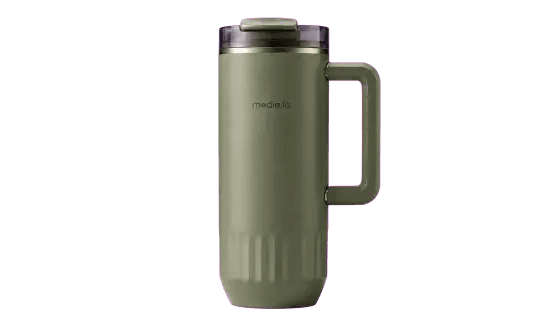
Use the uploaded images as the sole reference for the product's appearance, and create a 15-second, 16:9 landscape version of a high-end product official website landing page UI/UX demonstration video. The core product is the green military-style cup with a handle and insulated feature shown in the picture. Throughout the process, strictly maintain the cup body color, cylindrical proportion, transparent cup lid, top opening structure, right square handle, metal decorative ring, and ""media.io"" logo, without changing the product shape or creating other cup models.
The overall design adopts a dark outdoor functional style and the visual style of the official website of a high-end sports brand: a pure black background, interwoven with dark carbon fiber, metal brushed and waterproof fabric textures, and incorporating fast-flowing military green and warm golden dynamic light bands. The use of rough and powerful, slightly tilted oversized sans-serif fonts, with the text creating front-back occlusion with the product as the background graphic. The page layout is sophisticated, restrained, with a sense of speed and strength.
0 - 4 seconds: Start from the main screen of the product's official website. The insulated cup is suspended in the center of the screen in an extremely large proportion. A clear and legible giant title ""BUILT TO GO"" appears in the background. The product slowly approaches and slightly rotates. Green and gold light quickly sweeps across the cup body, highlighting the matte material, transparent lid, metal ring and wide handle. The top retains a minimalist navigation bar, and at the bottom, a few product parameters and thumbnails are arranged.
4 - 6 seconds: The mouse scrolls down the webpage, and the first screen smoothly exits upwards. The camera follows the page into the product detail area. The cup lid, handle, cup body and bottom details appear one by one in horizontal cards. The scrolling has a natural inertia and a slight speed blur, but the product information remains clear.
6 - 10 seconds: Enter the product function section. On the left side of the page, a clear title ""ALL-DAY TEMPERATURE"" is displayed, and on the right side, a complete suspended insulated cup is shown. The product rotates slowly and steadily at a quarter of a turn angle. Abstract cold air currents, fine water droplets, and metal waves appear in the background, demonstrating the insulation and cold preservation performance. When the mouse hovers over the function button, the product slightly enlarges, and the background changes from black to light gray, with the text and button colors reversing synchronously; only the UI background and interface colors are changed, without altering the insulated cup itself.
10–12 seconds: Continue scrolling to the ""LEAKPROOF LID"" and ""EASY-GRIP HANDLE"" function area. Use close-ups of the cup lid and handle, with geometric lines pointing to the structural details. The page elements slide in quickly and stop steadily in sequence.
12-15 seconds: The webpage smoothly returns to the home screen, the thermos cup is re-sized to the center of the screen, the giant title ""BUILT TO GO"" is located behind the product. A clear ""ADD TO CART"" capsule button appears at the bottom. The mouse accurately moves to the center of the button and triggers the hover effect: the button enlarges, turns black and white, and emits a greenish glow; the product remains stable. Finally, it stays on the complete product main visual and the purchase button.
Shots and animations: Smooth vertical scrolling of the webpage, product floating rotation, slow zoom in, layer parallax effect, high-speed light band sweeping, card sliding in, mouse hover zooming in, UI color inversion. All movements are compact and smooth, resembling the demonstration of a real and interactive high-end product website.
Restrictions: The color, structure, handle position, cup lid shape and brand logo of the insulated cup must not be altered; the product must not be transformed into other cup models; no figures or hands are allowed; unpacking is prohibited; the cup must not soften, bend, melt or deform; no garbled codes, incorrect labels or extra products are permitted; color inversion only affects the web background, buttons and text; the product must always remain clear, complete and stable.
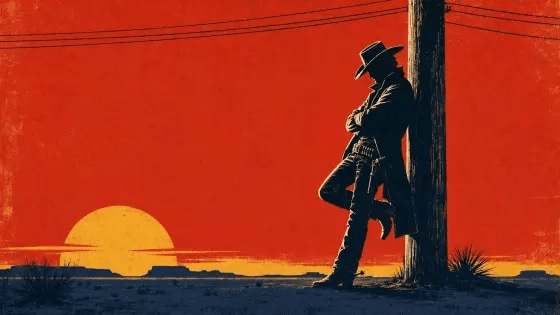
Using the attached reference image as the exact opening frame and character reference,
RHYTHM — HIGHEST PRIORITY:
Edit the entire sequence to an energetic 150 BPM jazz-western rhythm with rapid snare hits, double-bass pulses, sharp brass stabs, hand claps, spur sounds, whip cracks, and short revolver-cylinder clicks. Every cut, pose, camera move, graphic bar, and typography hit must land precisely on a beat or half-beat.
Create at least 20–24 clearly different shots within 15 seconds. Most shots last only 0.2–0.7 seconds. No shot may remain visually unchanged for longer than 0.8 seconds. Maintain constant visual progression and escalating energy.
Use only very short 2–4 frame micro-freezes, approximately 0.08–0.15 seconds, immediately followed by explosive movement. Never hold a freeze-frame for a full beat or several seconds. The rhythm must feel like: burst—hit-stop—burst—hard cut—burst.
VISUAL STYLE:
Create a high-energy 1960s Spaghetti Western title sequence combining mid-century graphic design, Saul Bass-inspired composition, Bauhaus geometry, pulp-western posters, comic-book panels, and rough screen-print texture.
Render the cowboy and environmental details as bold, high-contrast black silhouettes. Use only saturated red, mustard yellow, deep navy, black, and small cream highlights. Every cut should introduce a new color arrangement, crop, graphic shape, or camera angle.
Use dramatic diagonal compositions, oversized sun circles, sharp horizontal desert lines, rapidly moving telegraph wires, rotating revolver chambers, boot and spur close-ups, coat silhouettes, hat-brim close-ups, split screens, geometric shutters, expanding circles, diagonal bars, and bold typography.
TIMELINE AND SHOT DENSITY:
0.0–1.5s — RAPID OPENING:
Begin from the exact reference image for only 0.2 seconds.
Immediately perform four rapid cuts:
wide cowboy silhouette against red sky → snap zoom into hat brim → telegraph wires whip across frame → extreme close-up of shadowed eyes.
Insert a 3-frame black flash between selected shots.
The cowboy pushes sharply away from the pole on the first major brass hit.
1.5–4.0s — DETAIL IMPACT MONTAGE:
Create six fast close-ups, each lasting approximately 0.3–0.5 seconds:
boot strikes the ground → spur spins → coat tail snaps → fingers flex beside the holster → belt buckle flashes → revolver cylinder rotates.
Alternate red, mustard yellow, and deep navy backgrounds on every cut.
Use snap zooms, whip pans, crash zoom-outs, diagonal wipes, and 2–4 frame pose freezes.
4.0–7.0s — ACCELERATING WALK:
Show the cowboy walking rapidly across a flat mustard-yellow desert field.
Cut between full-body side view, low-angle boots, overhead graphic silhouette, extreme close-up of the swinging hand, and comic-book split panels.
His walking rhythm must land exactly on the percussion.
The telegraph pole and desert lines streak past in opposite directions to create intense parallax and speed.
Do not show a continuous slow walk—break the movement into fast rhythmic fragments.
7.0–10.0s — GEOMETRIC ACTION BURST:
Divide the screen into two, three, then four comic-book panels.
In different panels, show the hat turning, boots stopping, the coat opening, the hand approaching the revolver, and the cowboy sharply looking toward camera.
Panels slam open and shut on consecutive beats.
Use alternating full-frame red, yellow, navy, and black flashes.
Add rapid horizontal bars, expanding sun circles, rotating star shapes, and angular shadow wipes.
Every composition changes within 0.5 seconds.
10.0–13.0s — CLIMAX BUILD:
Increase the editing speed further with 8–10 cuts:
eyes → hand → holster → spur → revolver grip → coat → telegraph wire → oversized sun → full cowboy silhouette.
Use progressively tighter close-ups and stronger snap zooms.
The cowboy reaches the revolver, turns sharply, and hits a powerful gunfighter pose.
Use a 3-frame dead stop, then immediately cut to the next angle.
No slow motion and no long suspenseful pause.
13.0–15.0s — FINAL IMPACT:
Use three rapid false endings:
cowboy silhouette against yellow → hard cut to navy extreme close-up → hard cut to red wide shot.
On the final musical hit, reveal the cowboy beside the telegraph pole against a solid red sky and oversized mustard-yellow sun.
The exact title “OUTLAW” slams into the empty left side as large cream geometric letters.
Hold the final composition for only the last 0.6 seconds, then end with an immediate hard stop.


On this page Explore sections
What Is MiniMax H3 Max?
MiniMax H3 Max is a post-trained version of the MiniMax H3 video model, with post-training and inference optimization by fal Research. On Media.io, you can use it in an easy image-to-video workflow to animate still images with precise camera control, native synchronized audio, and consistent characters across shots.
Fast Generation
Iterate quickly — MiniMax H3 Max is tuned for speed, generating a 15-second 768p video in first-frame mode in about 48 seconds.
Native Synchronized Audio
Video and matching sound are generated in the same pass — dialogue, foley, ambience, and music with no separate dubbing step.
First & Last Frame
Supply a start image and an optional end image, and MiniMax H3 Max generates the coherent motion that connects them into one shot.
Cross-Shot Consistency
Across multiple shots in one generation, it is designed to keep a character's face, hair, clothing, and proportions recognizable.
Built for Speed, Control, and Audio Precision
Generate Fast, Iterate More
MiniMax H3 Max is tuned for speed — a 15-second 768p clip in first-frame mode can finish in about 48 seconds, so you can test ideas and refine prompts without long waits.
Get Audio and Video in One Pass
Describe the scene and the sound together, and MiniMax H3 Max generates matching dialogue, foley, music, and ambience with the video — no separate dubbing or manual sync.
Direct the Camera Precisely
Use clear cinematography instructions — low-angle tracking, push-in, zoom, and tilt — and the camera stays locked on the subject while coordinating motion and rhythm.
Animate from First Frame to Last Frame
Upload an opening image and an optional closing image, and MiniMax H3 Max generates the full, coherent motion between them — ideal for transitions, lifts, and scene changes.
Keep Characters and Style Consistent
Across multiple shots in one generation, MiniMax H3 Max is designed to hold a character's features and a unified art style — photorealism, pixel art, claymation, or stop motion.
How to Prompt MiniMax H3 Max for Story-Driven Videos
Think in moments, not keywords. Give MiniMax H3 Max a clear opening, two or three visual beats, synchronized sound cues, and a deliberate ending. For image-to-video, describe what should move or transform instead of repeating what is already visible.
Too vague
“A futuristic sneaker transforms.”
Direct the Video Beat by Beat
“A silver running shoe rests on a black glass platform in a dark studio. Start with a slow macro push-in as thin blue light traces the sole. The shoe then separates into floating layers—mesh, cushioning, and outsole—while the camera makes a smooth half-orbit around the product. Each component snaps back together in sync with crisp mechanical clicks and a rising electronic pulse. Finish on a clean hero shot with the complete shoe centered beneath a bright rim light, reflections settling as the music resolves.”
What Can You Build with MiniMax H3 Max AI Video Generator?
Make Characters Actually Talk — With Sound
Most image-to-video tools hand you silent motion. MiniMax H3 Max generates the character's movement and their voice or dialogue in the same pass — so a still portrait can deliver a line, a mascot can pitch a product, and an AI avatar can narrate a scene, with no separate text-to-speech or lip-sync step to stitch together.
- Bring portraits, mascots, and avatars to life with synced dialogue and ambient sound in one generation.
- Skip the TTS-plus-lip-sync pipeline — the audio is baked into the clip.
- Great for talking-head explainers, character intros, and AI host videos.
Multi-Shot Scenes That Stay Consistent
Most models break the moment you cut — a new shot means a new character. MiniMax H3 Max is post-trained to hold a subject's look across multiple cuts within a generation, so you can storyboard an opener, a closer, and the beats in between and get a sequence that reads as the same person, product, or place. Bring your own character reference as the opening frame and direct each cut separately.
- Build a short narrative arc — intro, action, reaction — without the subject drifting between shots.
- Cut between angles and keep the character recognizable (review and regenerate any shot that slips).
- Ideal for character-driven shorts, branded mini-ads, and pitch-test sequences.
Product Videos That Sound Like a Finished Ad
Feed in a single product photo and get back a clip that moves and sounds finished — the whoosh of a reveal, the click of a mechanism, the ambient room tone of a studio. Because MiniMax H3 Max writes the sound in the same pass as the motion, you get an audio-visual product spot in one render instead of three: still image, silent video, then a separate sound design and sync pass.
- Turn one product image into a reveal or demo clip with matching foley and ambience.
- Direct studio-style camera moves — push-in, orbit, tilt — with the sound generated to fit.
- Output at 480p / 768p in 5, 10, or 15 seconds to match the platform you're posting to.
First-and-Last-Frame Transitions, Generated in Between
Give MiniMax H3 Max a start frame and an optional end frame and it generates the full, coherent motion that bridges them — a person turning, a door opening, a day-to-night shift. Because the model is post-trained on the H3 image-to-video stack, the in-between frames hold together instead of morphing, and the synchronized sound rides along with the motion rather than being added after.
- Control both the start and the end state — not just the opening frame.
- Get clean transitions, reveals, and match-cuts with motion that connects the two images.
- Pair the visual transition with generated sound that matches the action.
How to Create a MiniMax H3 Max Video on Media.io
Upload an image, describe how you want it to move and sound, then generate your video with the speed-optimized MiniMax H3 Max.
Upload Your Image
Choose a portrait, product photo, artwork, or landscape you want to animate. For the best result, use a clear image with a recognizable subject.
Add Motion and Sound
Describe what should happen in the video. You can include the subject’s movement, camera direction, dialogue, music, ambience, or sound effects.
Generate and Download
Select MiniMax H3 Max and generate your video. Preview the result, try another version if needed, then download and share your favorite.
Generate with MiniMax H3 MaxMiniMax H3 Max vs MiniMax H3
| Feature | MiniMax H3 | MiniMax H3 Max |
|---|---|---|
| Maximum Resolution | 768P / 2K | 480P / 768P |
| Native Synchronized Audio | Audio input only | Yes, generated in the same pass |
| Generation Speed (15s, 768p) | Standard | ~48 seconds (Turbo path even faster) |
| Character Consistency Across Shots | Single-shot focus | Designed to maintain across cuts |
| Image-to-Video Input | Opening frame / first & last frame | First & last frame (post-trained) |
| Best For | High-resolution single-shot generation | Fast, sound-synced, consistent multi-shot video |
What Creators Say About MiniMax H3 Max

AI Content Creator

“The speed is genuinely impressive.” A 15-second clip with sound in under a minute means I can actually iterate on ideas instead of waiting around between renders.

Digital Marketer
“Audio and video in one pass.” Getting synchronized sound at the same time as the motion means I skip a whole editing step and the results feel more finished.

Indie Filmmaker
“Great for multi-shot consistency.” MiniMax H3 Max keeps the character looking right across cuts, so I can build a short sequence without redoing every shot from scratch.
Frequently Asked Questions About MiniMax H3 Max AI Video Model
1. What is MiniMax H3 Max?
MiniMax H3 Max is a fal-post-trained version of the MiniMax H3 video model, tuned for faster image-to-video generation with native synchronized audio and stronger consistency across shots. On Media.io it lets you turn a single still into a sound-synced video clip in one workflow.
2. How fast is MiniMax H3 Max?
A 15-second 768p clip from a first frame typically renders in around 48 seconds on the standard path, with a faster Turbo path available for quicker previews. Actual times vary with resolution, duration, and demand.
3. Can MiniMax H3 Max generate audio?
Yes. MiniMax H3 Max generates synchronized audio in the same pass as the video, so motion and sound arrive together rather than as a separate editing step.
4. Does MiniMax H3 Max support first and last frame image-to-video?
Yes. You can provide a first frame, or both a first and last frame, to guide the start and end of the motion. This makes it easier to control how a clip begins and ends.
5. What resolutions and durations does MiniMax H3 Max support?
MiniMax H3 Max supports 480p(the default) and 768p output, with clip durations of 5, 10, or 15 seconds. Choose the combination that fits your platform and storage budget.
6. Does MiniMax H3 Max keep characters consistent across shots?
MiniMax H3 Max is designed to maintain character consistency across multiple shots. Results aren't guaranteed in every case, so review and regenerate if a shot doesn't hold the look you want.
7. What styles and camera movements can I prompt for?
You can describe camera moves such as tracking, push-in, zoom, and tilt, and visual styles ranging from photorealism to pixel art, claymation, and stop motion. Clear, specific prompts give you more control over the result.
8. Is MiniMax H3 Max free to use on Media.io?
Free credits are available so you can try MiniMax H3 Max without paying, and paid plans unlock more generations and higher resolution options. Sign in to see the current credit balance and plan details.
More AI Video Tools
 4.7 (162,357 Votes)