















Kling 4.0 AI Video Generator
Kling 4.0 is now available on Media.io. Turn text prompts and reference images into cinematic AI videos with stronger prompt understanding, smoother motion and more consistent subjects. The Kling 4.0 model supports up to 30-second native generation, up to 15 multimodal references, up to 10 keyframes and native stereo audio in supported workflows.
Create stories, product ads and character-led scenes with more precise control over action, emotion, shot direction and selective video edits. Start creating with Kling 4.0 on Media.io; available reference, editing, duration and output options may vary by generation mode.
Kling 4.0 Prompt Inspiration — Reference Image
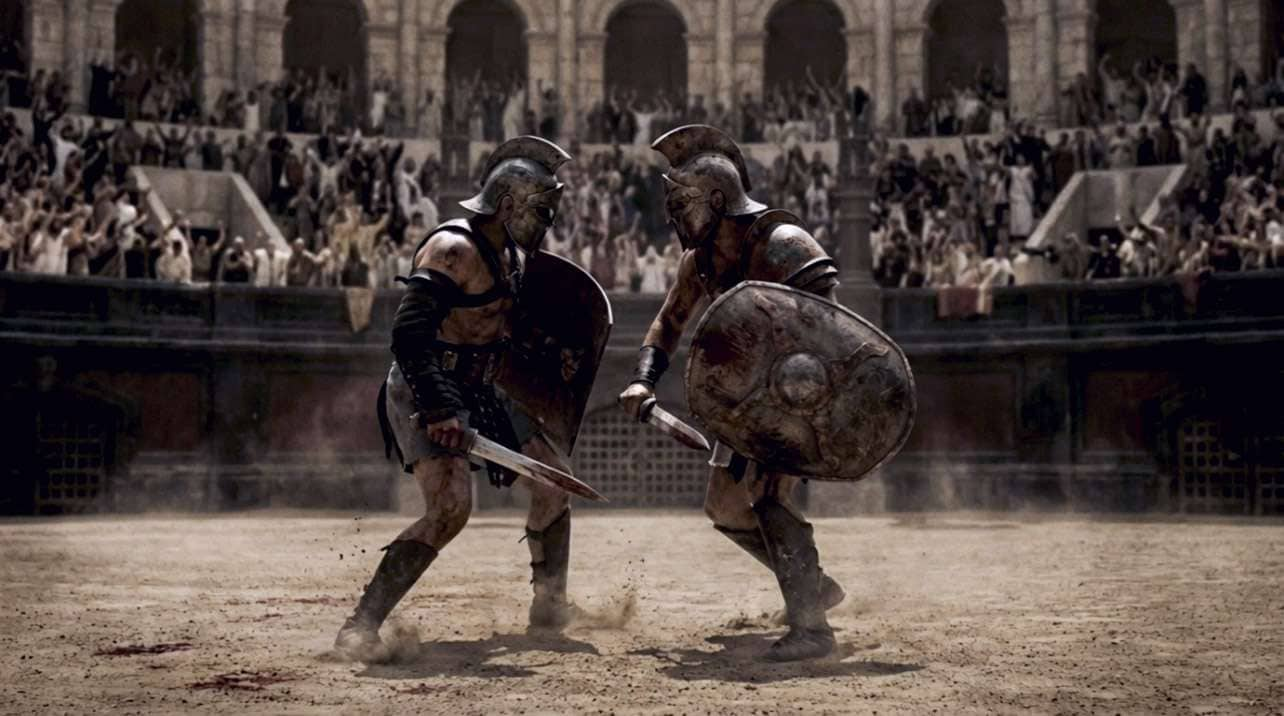
Kling 4.0 Cinematic Prompt Idea
Scene set in an ancient Roman colosseum, massive stone arena packed with roaring spectators. Dust, sweat, blood stains on the ground, harsh sunlight mixed with drifting shadows. Heavy, tense atmosphere. Shot 1 (03s): Wide establishing shot. Two gladiators face each other at the center of the arena, shields raised, swords ready. The crowd in the background is blurred but animated, arms waving, dust floating in the air. Camera slowly pushes in, low angle, emphasizing scale and pressure. Shot 2 (36s): Cut to a medium side shot circling the fighters. One gladiator steps forward aggressively, shield colliding with the others guard. Metal clang echoes. Sand bursts under their feet. Camera handheld-style, slight shake for realism and intensity. Shot 3 (68s): Quick close-up cuts: swords scraping shields, clenched hands, tense eyes behind helmets, blood-stained armor. Slow-motion accent on a blade swing narrowly blocked, dust and sweat suspended in the air. Shot 4 (810s): Medium-wide shot as both fighters reset their stance, circling each other cautiously. The crowd noise swells. Camera pulls back slightly, holding the moment before the next strike, ending on maximum tension. Style & mood: Dark, gritty, ultra-realistic historical epic. Cinematic lighting, dramatic contrast, heavy textures, natural motion blur, subtle slow motion on impacts. Film grain, 4K quality, intense sound design feel, raw violence and honor.
Generate Now
Video Preview
Kling 4.0 Prompt Inspiration — Reference Image

Kling 4.0 Cinematic Prompt Idea
Epic scale, bold camera movement, dramatic atmosphere. Shot 1 (05s): Camera starts extremely close behind the cowboys right shoulder, almost brushing past the fabric of his coat. The camera aggressively pushes forward and slightly upward, passing over his shoulder and horses neck, revealing the vast canyon ahead. Sun rays cut through dust in the air. Below, a steam train roars through the canyon, smoke billowing and curling upward. Strong parallax between foreground (cowboy, horse) and deep background (canyon, train). Wind lifts dust and coat edges. Powerful sense of scale and destiny. Shot 2 (510s): Hard cut to a dynamic side-angle tracking shot. The cowboy suddenly pulls the reins and urges the horse forward. The horse surges into motion along the cliff edge, hooves kicking up dust. Camera races alongside at low height, slightly behind the rider, creating speed and danger. The canyon drops away beneath them as the sun flares across the lens. Motion blur on the background, sharp focus on rider and horse. Ends with the cowboy riding decisively into the light. Style & mood: Cinematic western epic, bold and confident. Golden-hour lighting, dramatic sunbeams, heavy dust, strong contrast. Ultra-realistic textures, film grain, shallow depth of field, 4K quality. Sense of freedom, fate, and forward momentum.
Generate Now
Video Preview


Kling 4.0 available on Media.io
Kling 4.0 Is Now on Media.io
Kling 4.0 officially launched on October 15, 2026, and is now integrated into Media.io. Its upgrades focus on motion stability, character continuity, longer narrative sequences and targeted video editing. Build more complete scenes with prompts and references, then refine the result using the options supported by your selected mode.
Now on Media.ioKling 4.0 video creation from text and images, with mode-dependent reference and editing options.
Kling 4.0 model highlightsUp to 30s native video, 15 references, 10 keyframes, stereo audio and cinematic camera direction.
Plan every shotControl subject appearance, action, camera movement and story beats with detailed prompts and references.
Output availabilityCheck selected Media.io mode for duration, aspect ratio, resolution, audio and editing availability. HDR and video extension should not be assumed.
What’s New in Kling 4.0?
Kling 4.0 brings longer storytelling and finer creative control to AI video production. Use clearer instructions, multimodal references, keyframes and native audio to make scenes feel more connected and intentional. Specific options depend on the Media.io workflow selected.
Up to 30-Second Native Generation
Kling 4.0 doubles the commonly documented 3.0 generation ceiling from 15 seconds to as much as 30 seconds, giving creators more room for complete shots, actions and short narrative beats.
Up to 15 Multimodal References
Use a larger set of reference assets to guide characters, products, scenes and visual direction. This is especially useful for ad variations and asset-driven creative production.
10-Keyframe Story Control
Support for up to 10 keyframes gives creators more control over narrative checkpoints, shot evolution and continuity than a simple start/end-frame workflow.
Stereo Audio, Languages & Lip Sync
Kling 4.0 strengthens audio generation with stereo sound, multilingual voice support and improved lip-sync positioning for localization, dialogue and character-led videos.
21:9, Local Editing & Stronger Motion
Kling 4.0 introduces cinematic 21:9 framing, complex camera motion, high-speed action and more targeted changes to subjects, expressions, motion, camera position and backgrounds.
Media.io CLI
Explore Media.io CLI
Build Kling 4.0 Videos with Media.io CLI
Plan camera moves, shot timing and reusable prompts in Codex, Claude Code or another compatible AI agent, then connect your workflow to Media.io CLI. Use the Media.io-supported video workflow, and select Kling 4.0 wherever your integration exposes it. Review the output and iterate on characters, action and scene direction.
Codex
Claude Code
Other AI Agents
01
Build the Video Idea in Your Agent
Develop shot direction, camera movement, pacing, visual style, and reusable prompt frameworks where you already plan your project.
→
02
Call Media.io with Plugins or Skills
Use the supported Media.io integration in your agent to move from prompt work into AI image or video generation without breaking your creative flow.
→
03
Create with Kling 4.0 on Media.io
Bring your creative brief into Media.io, select Kling 4.0, generate the scene and refine prompts or supported edits until the result fits your story.
PLUGIN@Media.io + your video prompt
SKILLS/media-generate + your video prompt
For the latest supported agents and setup instructions, use the current Media.io CLI page.
What Can You Create with Kling 4.0?
From social ads to continuous cinematic scenes, Kling 4.0 combines longer video generation, more stable motion, consistent characters and targeted editing to support creative work beyond a single isolated shot.
Advertising & E-commerce Variations
Kling 4.0’s multi-reference direction and selective editing are particularly relevant when a team wants to preserve a product, character or winning creative structure while changing markets, shots or campaign elements.
Create variations that keep the product or character recognizable while changing the setting, action or camera perspective. Adjust only what the new concept requires.
Create with Kling 4.0Film Previsualization & Longer Story Beats
Up to 30-second native generation, multiple keyframes and 21:9 framing point toward stronger previsualization, concept-film and sequence design workflows where shot continuity matters.
Direct establishing shots, tracking moves, emotional close-ups and scene changes in a single longer sequence. Review transitions and continuity before exporting.
Try Kling 4.0 Video GeneratorMultilingual Social & Localized Campaigns
Kling 4.0’s support for multiple languages and accents, stronger lip sync and stereo audio makes localized dialogue, character-led ads and multi-market creative testing especially worth evaluating.
Produce localized character-led clips with coordinated voices, more natural lip sync and stable appearances. Check the language and audio choices offered by the current generation mode.
Create with Kling 4.0How to Make a Kling 4.0 AI Video on Media.io
Get started with Kling 4.0 on Media.io in three steps. Choose a creation mode, guide your story with clear instructions and references, then generate and refine the video.
01
Choose Kling 4.0
- Open Media.io video generation and select Kling 4.0.
- Choose text-to-video or image-to-video according to your source assets.
02
Structure Prompt + References
- Define subject, action, camera, lighting, audio and shot progression.
- Add character and scene references or keyframes where supported.
03
Generate, Review & Refine
- Generate the video and check character continuity, camera motion and sound.
- Refine the prompt or use available targeted editing controls to improve the result.
Kling 4.0 vs Kling 3.0: Key Upgrades
| Capability | Kling 4.0 | Kling 3.0 / 3.0 Omni | Why It Matters |
|---|---|---|---|
| Native generation length | Up to 30s | Up to 15s | More complete action and narrative beats in one generation. |
| Multimodal references | Up to 15 multimodal references | Unified reference workflows in Omni | Better asset-driven control for characters, products and scenes. |
| Keyframe control | Up to 10 keyframes | Start/end-frame and storyboard-style controls | More explicit narrative checkpoints and continuity guidance. |
| Audio | Stereo audio, multilingual voices and improved lip sync | Native audio, multilingual/accents, lip sync | Moves closer to localized, production-oriented audio-visual output. |
| Framing & output | 21:9; resolution and HDR vary by mode | Up to 4K in supported modes | More cinematic framing and a potential professional color workflow. |
| Availability on Media.io | Now available | Available now | Create directly with Kling 4.0 on Media.io. |
Kling 4.0 model specifications are based on Kling AI official release information (October 2026). Media.io UI options, output resolution, HDR, extension, audio and reference limits depend on the selected workflow.
Viral on Social: Explore the Hottest AI Video Trends
See what creators are making on TikTok, Reels & Shorts — watch the effects and try your next viral idea.
Explore All AI TrendsNo I Aint Crazy YB AI Trend
Try this trend ↗Bob Filter AI Trend
Try this trend ↗Private Jet Entrance AI Video
Try this trend ↗X vs 1000 Cuts AI Video
Try this trend ↗Napoleon Dynamite Dance AI Video
Try this trend ↗Waiting on My Fries AI Video
Try this trend ↗She Love the Way I Talk AI Dance
Try this trend ↗Funny Goalkeeper AI Video
Try this trend ↗GTA 6 Swamp Airboat Escape AI Video
Try this trend ↗Rooster Wet Cement AI Video
Try this trend ↗Flower from Nose AI Video
Try this trend ↗What If You Fly AI Video
Try this trend ↗Olly Olly AI Dance
Try this trend ↗Opa Opa Opa AI Hair Bounce
Try this trend ↗Golden Statue Baby Kiss AI
Try this trend ↗Need for Speed AI Video
Try this trend ↗Tying My Shoes Tip Cup AI Video
Try this trend ↗King Jin AI Video
Try this trend ↗Shutup Remix AI Trend
Try this trend ↗Soccer Missed Goal AI Video
Try this trend ↗Self Hug Sketch AI Video
Try this trend ↗Riding Lion AI Trend
Try this trend ↗Stop the Wedding AI Hand Dance
Try this trend ↗Teach Me How to Dougie AI
Try this trend ↗Tidal Wave AI Video
Try this trend ↗Airport Finger Circle AI Transition
Try this trend ↗Favorite Rumors About Us AI
Try this trend ↗NYC Rats AI Video
Try this trend ↗Lil T Jones Dance AI
Try this trend ↗Kling 4.0 AI Video Generator FAQs
1. Is Kling 4.0 available on Media.io now?
Yes. Kling 4.0 is now available on Media.io. Open the video generator, select Kling 4.0 and create from a text prompt or image. Available duration, references and editing features depend on the selected creation mode.
2. What is new in Kling 4.0?
Kling 4.0 officially launched on October 15, 2026. It improves high-motion stability, long-take storytelling, prompt understanding and subject consistency. The model also introduces up to 30 seconds of native generation, up to 15 multimodal references, up to 10 keyframes and stronger native audio capabilities.
3. What are the biggest Kling 4.0 upgrades over Kling 3.0?
The headline changes are up to 30-second native generation, as many as 15 multimodal references, 10 keyframes, stereo audio, stronger motion and local editing control, and 21:9 framing. Some professional output features, including 10-bit HDR and longer continuation, have been described as upcoming rather than fully stable today.
4. How do I create a Kling 4.0 video on Media.io?
Choose Kling 4.0 in Media.io, then enter a detailed prompt or upload an image. Describe the subject, action, camera movement, lighting, dialogue and desired story beats. Add references or keyframes when supported, generate your clip and review its motion and consistency before downloading.
5. Does Kling 4.0 support 4K and HDR?
Kling's official model information describes 4K, 1080p and 10-bit HDR capabilities. However, the options actually available on Media.io depend on the chosen generation mode. Check the resolution and export settings in the product before assuming that 4K or HDR is enabled.
6. Can Kling 4.0 edit an existing video while preserving the scene?
Kling 4.0 supports targeted video edits such as changing a subject, background, expression, action or camera direction while keeping other parts of the shot stable. Whether a specific edit can be made directly in Media.io depends on the editing tools exposed in your selected workflow.
Explore More AI Video Models & Kling Tools
Media.io Online AI Tools Quality Rating:
 4.7 (162,357 Votes)