Automatic Detection
Vmake advertises automatic detection that locates visible watermarks, logos, and text, so you can start without manually masking every frame. Useful for consistent overlays.

 ¡Desbloquea tu potencial creativo y experimenta la magia de Media AI ahora mismo!
Looking for a Vmake AI watermark remover alternative? Upload your video to Media.io, mark unwanted logos or text, and clean the selected area online. Media.io Video Eraser · Vmake Alternative.
Vmake is worth considering if you want automatic watermark detection, handling for moving watermarks, region adjustment, and batch uploads — Vmake advertises up to 30 videos per batch. The tool page promotes a free path with a roughly five-second preview, while its plan table lists daily file limits for full use. User feedback is mixed: some praise ease of use, others report poor removal effect, screen distortion, and preview/refund disputes. Media.io is another option for users who want to mark a specific area and timeline segment, then choose between AI cleanup and other removal modes.
Review basis: Official product documentation, public user reviews, and third-party examples. We have not conducted a controlled head-to-head performance test, so we do not claim one tool is better on quality, speed, or price.
Vmake's watermark remover is an online AI tool that combines automatic removal with optional region adjustments and batch uploads. These features make it relevant for cleaning logos, text, and moving overlays. See the official Vmake video watermark remover page.
Vmake advertises automatic detection that locates visible watermarks, logos, and text, so you can start without manually masking every frame. Useful for consistent overlays.
Vmake lists handling for moving watermarks, not just static logos. This matters when an overlay shifts position across frames rather than staying in one corner.
Vmake provides Erase and Protect region adjustments, so you can refine which area is treated and which detail is kept. Manual adjustment and batch are listed features — not gaps.
Vmake's tool page states you can upload up to 30 videos at once. The batch count and the daily plan limit are separate things — check both before a large job.
Vmake has more direct watermark-removal discussion than most tools in this category, but feedback is split. Here is what we could verify, with sources. Treat each item as an individual report, not a consensus.
A Reddit user acknowledged the removal effect on a video they tested, but raised questions about the five-second preview and the billing model. This supports "some footage comes out okay, but read the preview and payment terms carefully," not a blanket endorsement.
reddit.com →Positive Trustpilot reviews mention easy operation and good features/customer service. These speak to usability and support, and can't be generalized to "every clip comes out clean." The 4.1/5 from 929 reviews is a whole-brand (Vmake Labs) score, not a watermark-tool score.
trustpilot.com/review/vmake.ai →Negative reviews specifically about watermark removal report poor effect, screen distortion, and preview/refund disputes. We attribute these to the named complaints — they're a reason to check your actual clip and the export terms before paying, not a claim that the tool always fails.
trustpilot.com/review/vmake.ai →We found Vmake demos, method comparisons, and tutorials. One tutorial openly disclosed using a Vmake affiliate/tracking link. Use these as operation reference, not as fully independent effect endorsement.
youtube.com →We could not retrieve verifiable user reviews of Vmake Watermark Remover on Quora this round, so we don't write a consensus claim from it.
quora.com →Media.io already has a broader Vmake AI comparison page covering e-commerce video, UGC, enhancement, and overall plans. This page stays focused on watermark removal, preview, export limits, and alternatives — the two interlink.
media.io/comparison/vmake-ai.html →Based on Vmake's official pages, public user reviews, and third-party examples. The 4.1/5 Trustpilot score is a whole-brand figure, not a watermark-tool score. We did not conduct a controlled head-to-head performance test, and we do not claim Media.io outperforms Vmake on quality, speed, or price.
A balanced summary of Vmake's advertised strengths and the points to weigh before you pay, drawn from official documentation and the public feedback above.
Two facts need to be read together. Vmake's tool page advertises a free path with a roughly five-second preview, and its plan table lists daily file limits for the Watermark & Text Remover. A short preview is not the same as unlimited free full exports — so check both before you assume a whole video is free.
The tool page promotes a free path and mentions a roughly five-second preview of the removal. That's enough to glimpse the effect on a short segment, but not enough to judge stability across a full clip. Use the preview to sanity-check, then read the export rules.
vmake.ai/video-watermark-remover →Vmake's plan table for the Watermark & Text Remover shows Free = —, Plus = 10 files/day, and Pro = 50 files/day. So full use is gated by your plan's daily quota, separate from the free preview. The 4.1/5 Trustpilot score is a Vmake Labs brand score, not a watermark-tool score.
vmake.ai plan table →Both are browser-based, and Vmake also offers region adjustment and broader cleanup — so this is a workflow fit comparison, not a quality ranking. No row claims a proven winner, because we haven't run a controlled head-to-head test on the same source clips.
| Decision factor | Vmake | Media.io |
|---|---|---|
| Browser workflow | Online tool | Online tool |
| Removal controls | Auto detection + region adjustment | Brush selection + time range |
| Batch workflow | Up to 30 videos per upload | Verify in current workspace |
| Preview and access | ~5-second free preview; daily plan limits | Per current tool and account rules |
| Cleanup targets | Watermarks, text, and other overlays | Logos, text, timestamps, people, objects |
| Main consideration | Automation, batch needs, daily quota | Selecting a specific area and segment |
Prefer a brush-and-timeline workflow? Upload a video you own or are authorized to edit, mark the unwanted area, and preview the result before downloading.
Add the clip you want to clean to the Media.io Video Eraser workspace. Upload a video you own or are authorized to edit.
Try Media.io Video Eraser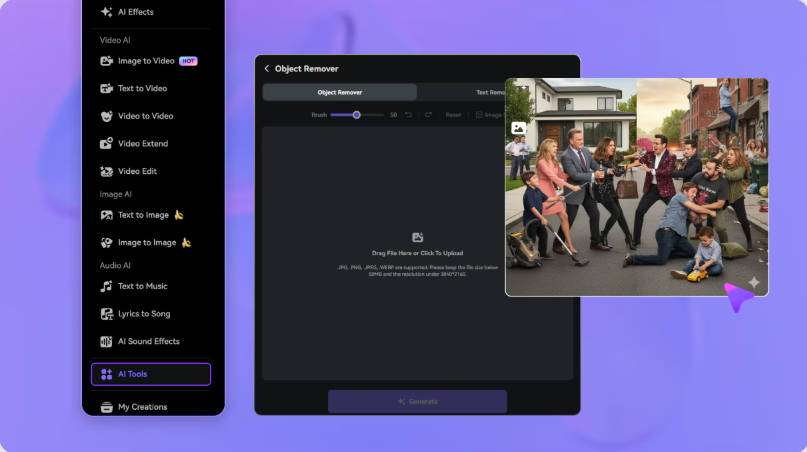
Brush over the unwanted logo or text and set the segment where it appears. Keep the selection away from captions, faces, and important details.
Mark the Watermark Area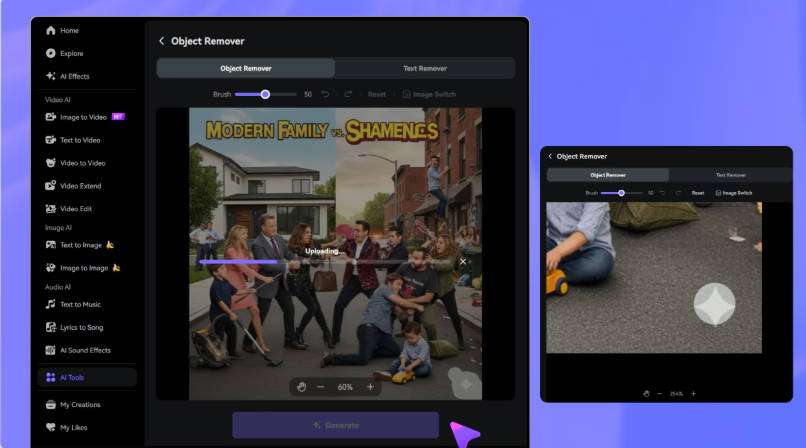
Run the removal, inspect the edited area through motion and scene changes, refine if needed, then download the result. AI cleanup reconstructs the region — it doesn't recover the exact original pixels.
Generate and Preview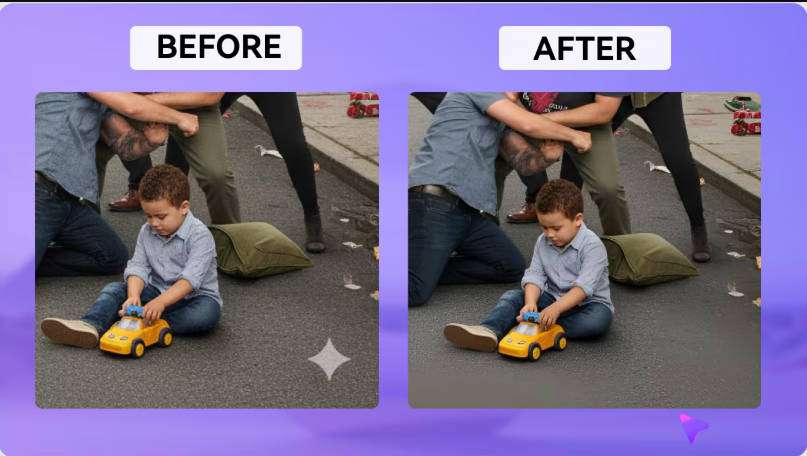
Vmake Watermark Remover is an online AI tool for removing visible logos, text, and other overlays from videos. Its workflow combines automatic detection, moving-watermark handling, Erase/Protect region adjustment, and batch uploads (up to 30 videos). Source: vmake.ai/video-watermark-remover.
Vmake promotes a free path with a roughly five-second preview, and its plan table lists daily file limits for the Watermark & Text Remover (Free = —, Plus = 10 files/day, Pro = 50 files/day). A short preview and full export are different things — check both before assuming a whole video is free.
Yes. The tool page mentions a roughly five-second free preview of the removal result. That's enough to glimpse the effect on a short segment, but not enough to judge stability across a full clip. Full exports are governed by the plan's daily file limits.
Yes. Vmake lists moving-watermark handling as a feature, so it's designed for overlays that shift position across frames, not only static corner logos. Results still vary by footage, so test a representative clip.
Yes. Vmake's tool page states you can upload up to 30 videos at once. The batch count and the daily plan limit are separate — a 30-video batch may still be capped by your plan's daily quota.
Removal reconstructs the selected region, and the result depends on the footage, the overlay, and how the area is selected. Vmake reviews include reports of blur, screen distortion, and poor effect. These are individual complaints — they're a reason to preview your own clip, not proof the tool always fails.
Media.io Video Eraser is an online alternative that lets you upload a video, brush over the logo or text, set the timeline segment, and review the result. It offers AI cleanup and a Gaussian Blur option, and it also handles text, timestamps, people, and objects. Source: media.io/ai/ai-tools/video-eraser.
Both are browser-based, and Vmake also offers region adjustment and broader cleanup, so this is a workflow-fit comparison. Media.io focuses on brush-and-timeline selection with multiple removal modes; Vmake emphasizes automatic detection, moving-watermark handling, and batch uploads. We have not run a controlled head-to-head test and make no quality, speed, or price superiority claim.
Media.io works by treating the selected region rather than cropping the frame, so the composition is preserved. You brush over the logo or text, set the time range, and process — the frame size stays the same. AI cleanup reconstructs the area; it doesn't restore the exact original pixels hidden behind the mark.
 4.7 (162,357 Votes)


