Automatic Watermark Detection
Wink advertises automatic detection that locates visible watermarks, so you don't have to mask every frame by hand. Useful for logos and text overlays that appear consistently.

 Unlock your creative potential and experience the magic of Media AI right away!
See what Wink offers, what users report, and which export limits to check. Try Media.io's AI alternative below to clean selected logos or text from your own video — Media.io Video Eraser · Wink Alternative.
Wink is worth considering if you want automatic detection, manual selection, and batch processing for images or videos. Published examples report successful cleanup, while limited user feedback also describes incomplete text removal. Check the current export conditions and test a representative file before committing to a paid workflow. Media.io is another option for users who prefer selecting a video region, setting the relevant timeline segment, and choosing between AI cleanup and other removal modes.
Review basis: Official product documentation, public user reviews, and third-party examples. We have not conducted a controlled head-to-head performance test, so we do not claim one tool is better on quality, speed, or price.
Wink offers an AI watermark remover for images and videos, including automatic detection, manual selection, and batch uploads. These features make it relevant to users cleaning logos, text, and other visible overlays. See the official Wink watermark remover page.
Wink advertises automatic detection that locates visible watermarks, so you don't have to mask every frame by hand. Useful for logos and text overlays that appear consistently.
A manual selection mode lets you define the area to clean yourself. This helps when a watermark overlaps important details or only part of the frame needs treatment.
Batch upload support lets you process multiple images or clips in one session, which can save time when cleaning the same logo across several files.
Wink handles both image and video watermark removal, so a single tool covers photos and short clips. Note that image and video cleanup are different tasks with different results.
Public feedback specifically about Wink's watermark removal is limited. Here is what we could verify in this pass, with sources so you can check the original pages. Treat each item as an individual report, not a consensus.
The currently open page shows 2.8/5 from 3 reviews. One user reported that after processing subtitle text, the background color behind the text remained, and described a poor customer-service experience; another complaint concerned video repair rather than watermark removal. The sample is very small and cannot be treated as representative.
trustpilot.com/review/wink.ai →A reply in the subreddit recommended a Wink watermark-removal link, with no process, sample, or effect description. This only shows that someone recommended it, not that Reddit users broadly approve the results.
reddit.com/r/UpScrolled →The US listing shows 4.7/5 from roughly 54K ratings, but those ratings cover the entire Wink app — enhancement, repair, beautification, and more — not the watermark remover specifically. Don't read it as a watermark-tool score.
apps.apple.com →Viberate reports successful corner-watermark removal, and 2oceansvibe shows an image case of repeated watermark removal. These are author-reported individual results — clarify the image-vs-video distinction and don't treat them as Media.io tests or user consensus.
viberate.com →A 2025 Wink mobile-app tutorial includes a text and object removal chapter. We retrieved the video description and chapter info only, so it can be cited as an operation tutorial — not as evidence about the current web version's effect.
youtube.com →Quora was access-restricted this round, so no verifiable reviews could be cited. The "Wink AI" listed on G2 and Capterra is different sales software and should be excluded from any Wink watermark-remover assessment.
g2.com/products/wink-ai →Based on Wink's official pages, public user reviews, and third-party examples. We did not conduct a controlled head-to-head performance test, and we do not claim Media.io outperforms Wink on quality, speed, or price.
A balanced summary of Wink's advertised strengths and the points to weigh before you pay, drawn from official documentation and the limited public feedback above.
One fact directly affects a purchase decision: Wink's Web Creative Plan and its mobile VIP / VIP+ memberships are separate. A subscription on one side does not automatically include the other, so confirm what each plan covers before you pay.
Wink's web pricing table lists a free option with limited credits and watermarked exports, and paid web plans that provide watermark-free exports. The exact download conditions for a specific watermark-removal task still depend on your account, so check the current terms before exporting.
wink.ai →Wink's mobile VIP and VIP+ memberships are separate from the web Creative Plan. A mobile subscription does not necessarily include the web tools, and vice versa. If you mostly edit on one platform, verify that the plan you're buying covers the workflow you actually use.
wink.ai →Both tools support browser-based cleanup and manual selection. The table below sticks to what each tool advertises or documents — and flags where you should verify in the current app. No row claims a proven quality winner, because we haven't run a controlled head-to-head test.
| Feature | Wink | Media.io |
|---|---|---|
| Browser-based video cleanup | Available | Available |
| Manual region selection | Advertised | Brush selection |
| Automatic watermark detection | Advertised | Do not claim without verification |
| Timeline-based selection | Verify in the current tool | Documented |
| Batch processing | Advertised | Verify before claiming |
| Alternative cleanup modes | Verify current options | Multiple modes, including Gaussian Blur |
| Image cleanup | Available | Separate image tool |
| Proven quality winner | No controlled comparison | No controlled comparison |
Prefer a brush-and-timeline workflow? Upload a video you own or are authorized to edit, mark the unwanted area, and preview the result before downloading.
Open the Media.io Video Eraser workspace and upload a video you own or are authorized to edit. Media.io branding is visible before you upload, so you know which tool you're using.
Try Media.io Video Eraser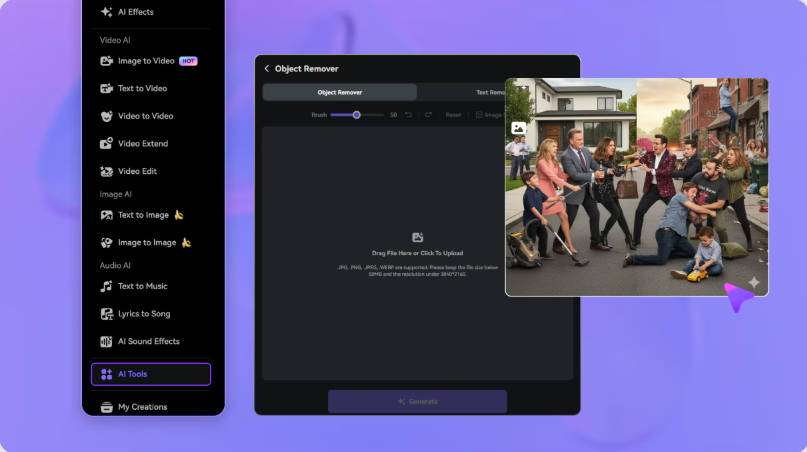
Choose a removal mode, mark the unwanted logo or text, and set the segment where it appears. Keep the selection away from captions, faces, and important details so nearby content stays outside the mask.
Mark the Watermark Area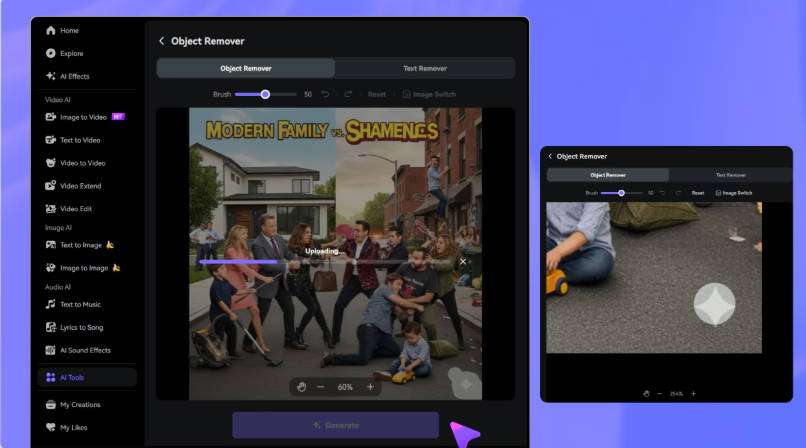
Preview the edited region through motion and scene changes. Refine the selection if needed, then download the result. AI cleanup reconstructs the selected region — it does not recover the exact original pixels hidden behind the mark.
Generate and Preview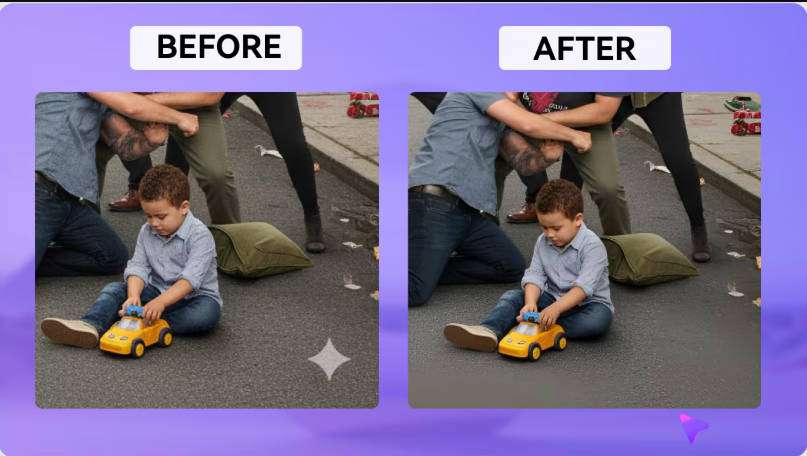
Wink watermark remover is an AI tool for removing visible watermarks from images and videos, with automatic detection, manual selection, and batch upload options. It's aimed at users cleaning logos, text, and other overlays. Source: wink.ai/video-watermark-remover.
Yes, Wink supports both image and video watermark removal. Image and video cleanup are different tasks with different results; third-party examples include image cases and a reported corner-watermark removal, so check which format a given example covers before assuming it applies to your file.
Wink offers a free web option with limited credits and watermarked exports, while paid web plans provide watermark-free exports. Free access does not guarantee unrestricted clean exports, so confirm the current conditions in your account. Source: wink.ai.
Not necessarily. Wink's Web Creative Plan and mobile VIP / VIP+ memberships are separate, so a mobile subscription may not include the web tools, and vice versa. Check what each plan covers before paying. Source: wink.ai.
Public feedback specifically about watermark removal is limited. Third-party articles report successful corner-watermark cleanup and image cases, while a small number of Trustpilot reviews (2.8/5, 3 reviews) include a complaint about residual background after text removal. Treat these as individual reports, not a consensus. Source: trustpilot.com/review/wink.ai.
They can. One Trustpilot review reported that after processing subtitle text, the background color behind the text remained. This is an individual report from a very small sample, but it's worth checking results carefully before exporting. Source: trustpilot.com/review/wink.ai.
Both offer browser-based cleanup and manual selection. Media.io provides a brush-and-timeline workflow with multiple removal modes including Gaussian Blur; Wink advertises automatic detection and batch uploads. We have not run a controlled head-to-head test, so we don't claim one is better on quality, speed, or price — compare them on your own file.
Yes. Uploading the same source clip to both Wink and Media.io's Video Eraser is the most reliable way to compare results for your specific case. Use a video you own or are authorized to edit, and check each tool's export conditions before downloading.
 4.7 (162,357 Votes)


