Online Watermark Remover
HitPaw's online tool lets you remove watermarks directly in a browser, so you can start without installing software. The online entry is a real, separate product path — not just a download page.

 Libérez votre potentiel créatif et découvrez la magie de l'IA médiatique dès mIAntenant!
Compare HitPaw's online and desktop options, then try Media.io's AI video eraser. Upload your clip, mark unwanted logos or text, and review the result — all in your browser. Media.io Video Eraser · HitPaw Alternative.
HitPaw is worth considering if you want a choice between an online watermark remover and desktop software with multiple processing modes. HitPaw offers both web and desktop tools, and its official FAQ records mode differences between Windows and Mac. User feedback praising ease of use specifically describes the smooth-fill approach, not the AI mode, so don't treat it as evidence of AI reconstruction quality. Media.io is another option for users who want to upload a clip, select the area and timeline segment, and choose between AI cleanup and other removal modes directly in the browser.
Review basis: Official product documentation, public user reviews, and third-party examples. We have not conducted a controlled head-to-head performance test, so we do not claim one tool is better on quality, speed, or price.
Version distinction is the main value of this review. HitPaw runs both an online watermark remover and desktop software, and its desktop FAQ documents different modes for Windows and Mac. Before you pick a version, check which features apply to the platform you actually use. See the HitPaw online watermark remover.
HitPaw's online tool lets you remove watermarks directly in a browser, so you can start without installing software. The online entry is a real, separate product path — not just a download page.
HitPaw also ships desktop watermark remover software with more processing modes than the online tool. Desktop software suits users who prefer local processing or work offline.
HitPaw's desktop FAQ recommends choosing a mode based on the background, and notes that smaller, segmented selections can come out cleaner. This means the mode and the masked area both affect the result.
HitPaw's official FAQ records different available modes for Windows and Mac. Before relying on a specific mode, confirm it is supported on your platform in the current version.
A key clarification: HitPaw's desktop FAQ draws a line between background reconstruction (removal) and blur/cover. The same distinction applies to Media.io — AI removal cleans and reconstructs a region, while Gaussian Blur obscures it. Don't mix the two effects. Source: hitpaw.com/support/hitpaw-watermark-remover-faqs.
Public feedback specifically about HitPaw's watermark removal is limited and mixed. Here is what we could verify this round, with sources so you can check the original pages. Treat each item as an individual report, not a consensus.
HitPaw's Trustpilot page is currently suspended for guideline violations, so no brand rating is displayed and we do not cite a score here. One older review we retrieved before the suspension praised ease of use for watermark removal, but stated it used the smooth-fill method, not the AI mode. That supports an ease-of-use claim, not an AI-quality claim.
trustpilot.com/review/hitpaw.com →Reddit discussion recognized HitPaw's earlier AI text-removal effect, but a 2024 reply reported that the mode later stopped working. We treat this as an old-version case, not a confirmed current defect — the product has changed since, and we have not tested the current build.
reddit.com →We found third-party tutorials and official HitPaw demos showing the removal workflow. These are useful as operation reference — how the tool is used — but they are not independent, reproducible effect benchmarks.
youtube.com →We could not retrieve verifiable user reviews of HitPaw Watermark Remover on Quora this round, so we don't write any consensus claim from it.
quora.com →HitPaw's own FAQ advises choosing a mode based on the background and using smaller, segmented selections for cleaner results. This is an official usage note — it confirms that mode and selection affect output, but is not a user review.
hitpaw.com FAQ →HitPaw's site confirms a real online watermark-remover entry alongside desktop software. This is why we do not present "no installation" as a Media.io-exclusive advantage — HitPaw also offers a browser path.
online.hitpaw.com →Based on HitPaw's official pages, public user reviews, and third-party examples. HitPaw's Trustpilot page is suspended, so no rating is cited. We did not conduct a controlled head-to-head performance test, and we do not claim Media.io outperforms HitPaw on quality, speed, or price.
A balanced summary of HitPaw's advertised strengths and the points to weigh before you commit, drawn from official documentation and the limited public feedback above.
Because HitPaw sells both an online tool and desktop software, pricing and export limits need to be checked per version. Don't assume the online subscription price applies to the desktop product, or vice versa.
HitPaw's online tool is browser-based and may offer trial access before a paid export. Confirm the current trial terms and whether exported video carries limits or watermarks before you rely on a free result. Pricing is set per the online plan, separately from desktop.
online.hitpaw.com →HitPaw's desktop watermark remover is a separate purchase with its own license and feature set. Check the platform (Windows or Mac), the available modes, and the export conditions for your specific version before buying. Desktop pricing does not transfer to the online tool.
hitpaw.com FAQ →Both tools offer a browser-based path, so "no installation" is not a Media.io-exclusive advantage. The table sticks to what each tool advertises or documents — and flags where you should verify in the current app. No row claims a proven quality winner, because we haven't run a controlled head-to-head test.
| Feature | HitPaw | Media.io |
|---|---|---|
| Browser-based cleanup | Available (online tool) | Available |
| Desktop software | Available, multiple modes | Browser workflow |
| Windows / Mac mode differences | Documented in FAQ | Single browser tool |
| Manual region selection | Advertised | Brush selection |
| Timeline-based selection | Verify in current tool | Documented |
| Alternative cleanup modes | Multiple desktop modes | Multiple modes incl. Gaussian Blur |
| AI reconstruction vs. blur | FAQ distinguishes the two | AI removal vs. Gaussian Blur |
| Proven quality winner | No controlled comparison | No controlled comparison |
Prefer a brush-and-timeline workflow? Upload a video you own or are authorized to edit, mark the unwanted area, and preview the result before downloading.
Open the Media.io Video Eraser workspace and upload a video you own or are authorized to edit. Media.io branding is visible before you upload, so you know which tool you're using.
Try Media.io Video Eraser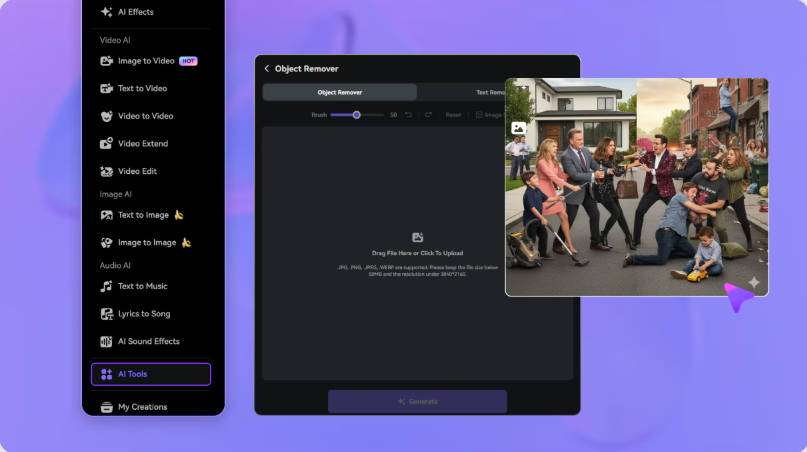
Choose a removal mode, mark the unwanted logo or text, and set the segment where it appears. Keep the selection away from captions, faces, and important details so nearby content stays outside the mask.
Mark the Watermark Area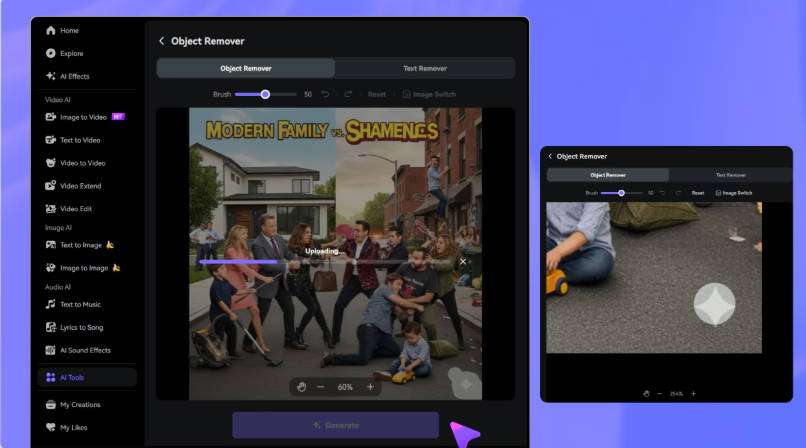
Preview the edited region through motion and scene changes. Refine the selection if needed, then download the result. AI cleanup reconstructs the selected region — it does not recover the exact original pixels hidden behind the mark.
Generate and Preview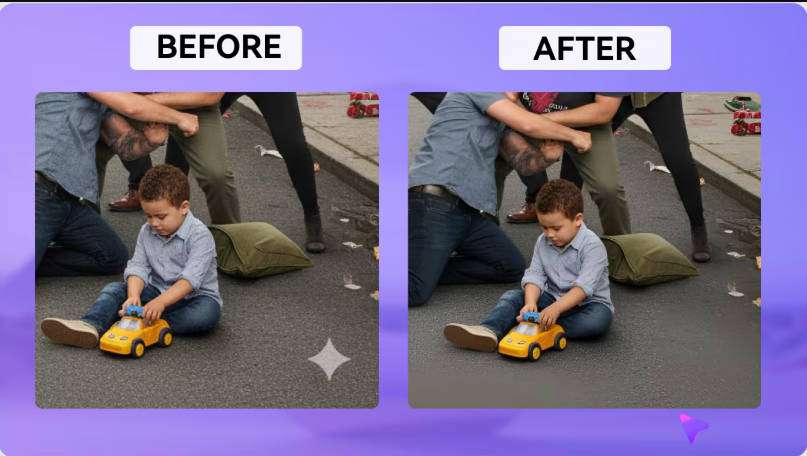
HitPaw Watermark Remover is a tool for removing visible watermarks, logos, and text from videos, offered as both an online tool and desktop software. The desktop version provides multiple processing modes, and HitPaw's FAQ recommends choosing a mode based on the background. Source: online.hitpaw.com.
HitPaw offers trial access on some paths, but full clean exports generally require a paid plan or license. Because online and desktop are separate products, confirm the trial terms, export limits, and price for the specific version you plan to use. We don't assert a single blanket free-or-paid answer.
HitPaw's online tool runs in a browser and is quickest to try; the desktop software offers more processing modes and works offline. Pricing, features, and available modes differ between the two, and the desktop FAQ also records differences between Windows and Mac. Check the version that matches your platform. Source: hitpaw.com FAQ.
HitPaw's online tool is browser-based and works on Mac. For the desktop software, the official FAQ documents mode differences between Windows and Mac, so confirm which modes are available on macOS in the current version before relying on a specific feature.
HitPaw's FAQ distinguishes between background reconstruction (removal) and blur/cover, and recommends selecting a mode based on the background. Whether a given clip comes out clean or blurred depends on the mode, the footage, and the selection — so we don't promise every video can be cleaned without blur. Test a representative clip first.
Media.io Video Eraser is an online alternative that lets you upload a video, brush over the unwanted logo or text, set the timeline segment, and review the result in your browser. It offers AI cleanup and a Gaussian Blur option, and it also handles text, timestamps, and objects.
Both offer a browser-based path, so "no installation" is not a Media.io-exclusive advantage. Media.io focuses on brush-and-timeline selection with multiple removal modes in one online workspace; HitPaw offers the added choice of desktop software with its own modes. We have not run a controlled head-to-head test and make no quality, speed, or price superiority claim. Source: media.io/ai/ai-tools/video-eraser.
 4.7 (162,357 Votes)


