















Bild zu Bild
Nano Banana Pro
Bild hochladen
0 / 9
Klicken oder ziehen, um hochzuladen, oder wählen Sie aus Meine Historie
Keine Ideen? Erstellen Sie zuerst ein Bild. >
Unterstützte Upload-Formate: jpg, png, jpeg
Tipps
0/2000
Seitenverhältnis
Auto
9:16
16:9
1:1
4:3
3:4
3:2
2:3
21:9
Auflösung
1K
2K
4K
Banana Pro Unbegrenzter Modus
Anzahl der Bilder
1
2
3
4
Öffentliche Sichtbarkeit
Alle
Bild
Video
Audio
Liste generieren
Die generierten Ergebnisse werden 7 Tage lang aufbewahrt. Bitte speichern Sie sie rechtzeitig.
ai_video_generatorEntfalten Sie Ihr kreatives Potenzial und erleben Sie jetzt die Magie der Media-KI!

Create Virtual Watch Try-On Wrist Shots with AI

Upload a wrist photo or product shot and instantly generate realistic virtual watch try-on images for ecommerce, social ads, or UX mockups. Media.io’s virtual watch try on workspace lets you test sizes, styles, and skin tones in minutes—no studio shoot or AR app required.

Generate My Watch Try-On

Type your idea -> AI designs it. Free to try.

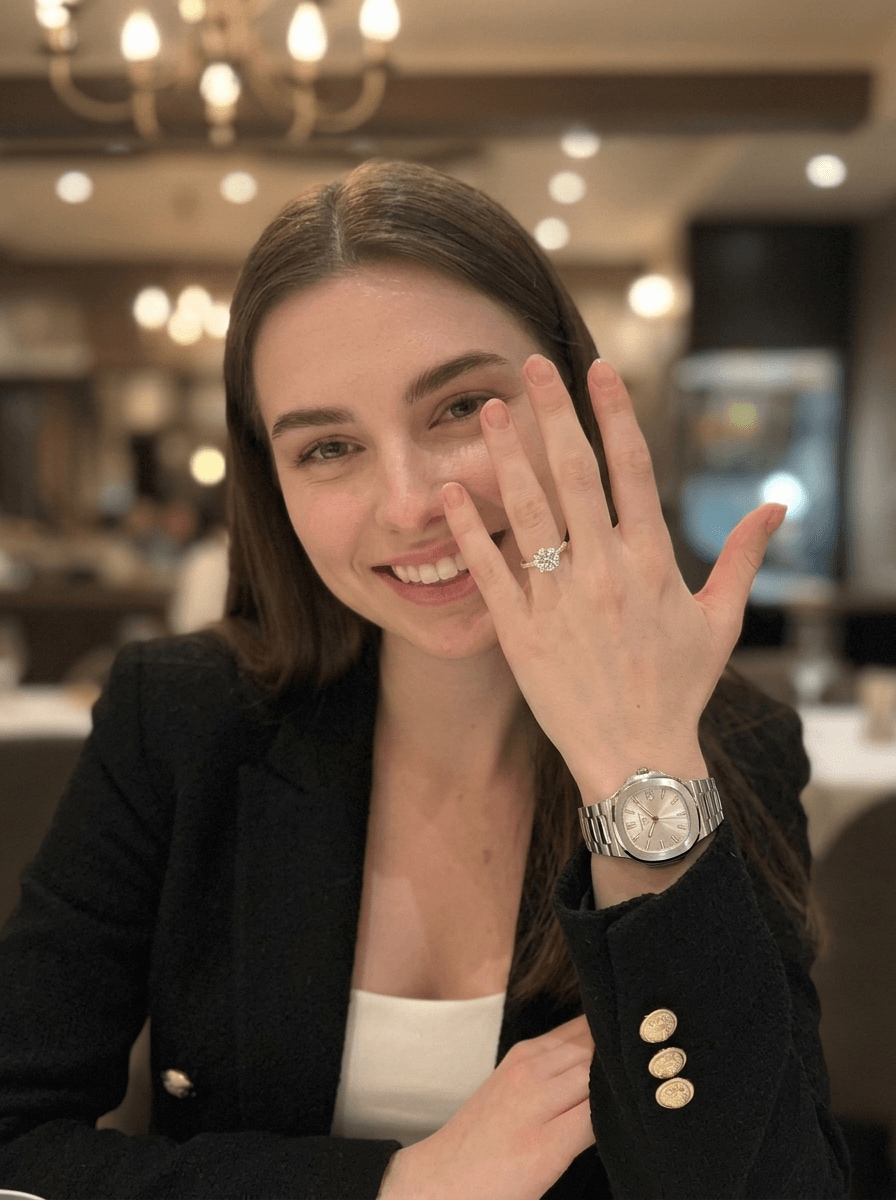
Virtual Watch Try-On • Style 01
virtual watch try on
Virtual watch try on style 01
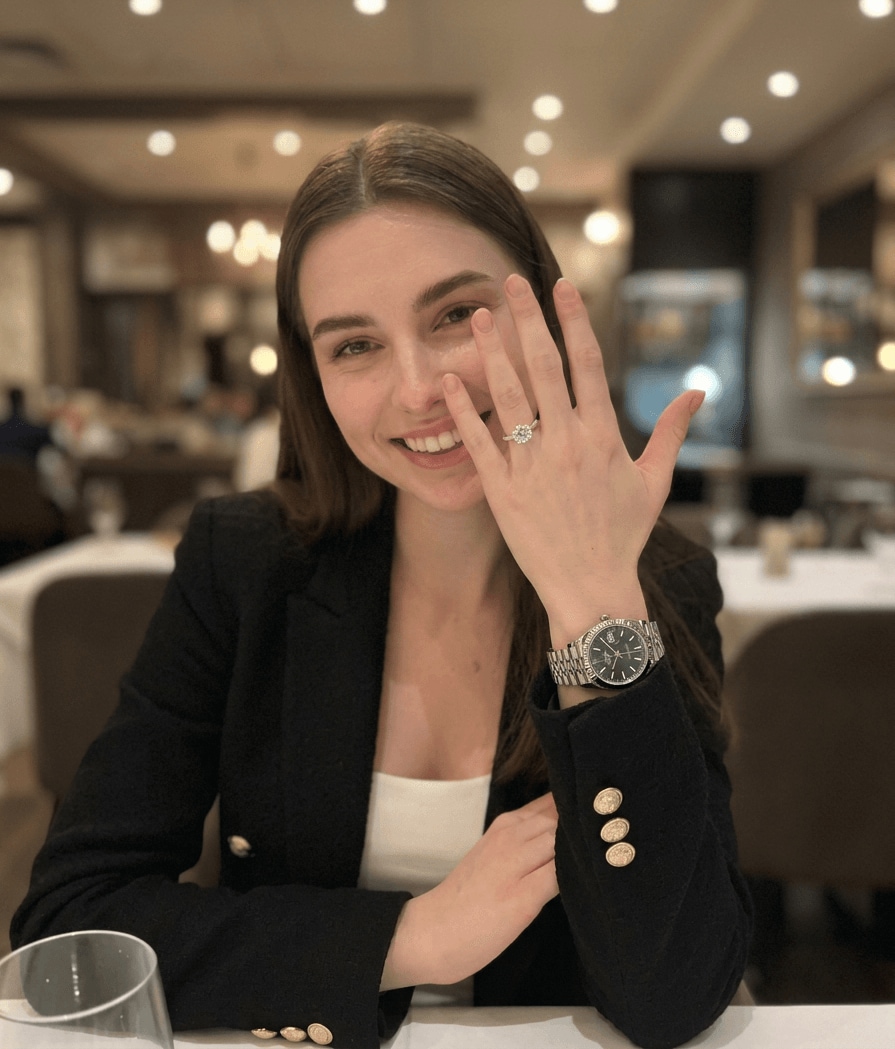
Rolex Virtual Try-On • Style 02
try watch on wrist
Rolex virtual try on style 02

Try realistic AI watch effects on your wrist, from everyday styles to luxury Rolex-inspired looks.

Why Use Media.io for Virtual Watch Try-On Images

Photorealistic wrist shots in any style

Generate lifelike watch-on-wrist images or concept art from your own photos using advanced AI models like Nano Banana Pro and Nano Banana 2. Switch between realistic, 3D render, or illustration styles to match ecommerce pages, ad creatives, or pitch decks.


High-resolution, flexible aspect ratios

Create virtual try-on visuals for any channel, from 1:1 product thumbnails to 9:16 social stories. Media.io supports up to 1K, 2K, and 4K resolution with common ratios like 1:1, 9:16, 16:9, 4:3, 3:4, 3:2, and 2:3 for crisp, scalable assets.

Browser-based, works on any device

No AR SDKs or heavy apps required. Media.io runs in your browser on Windows, Mac, iOS, or Android, so teams can prototype AI watch mockup generator flows, review creatives, and export assets from anywhere.

Secure workflow with flexible pricing

Uploaded images are automatically deleted after 7 days to protect your product and model assets. Free users get 3 credits per day, and paid plans unlock more generations and watermark-free downloads at https://www.media.io/pricing.html.

How to Generate Virtual Watch Try-On Images Online

1
2
3
1
Open Media.io AI Watch Try-On Generator

Open Media.io AI Watch Try-On Generator. Go to media.io/ai and open the AI Watch Try-On Generator under AI -> Image. This online tool runs in your browser, so there’s nothing to install and you can work from desktop or mobile.

2
Enter a Prompt or Upload

Enter a Prompt or Upload. Type a detailed prompt (e.g., "ultra realistic close-up of a stainless steel watch on wrist in a luxury showroom") or upload a reference wrist photo or watch render. Adjust style and settings to match your brand or app UI concept.

3
Generate, Refine & Download

Generate, Refine & Download. Click Generate to create your virtual watch try on images. Tweak prompts or upload a new angle until it fits your layout. Then download high-resolution files for ecommerce pages, social ads, or UX mockups.

Step 1
Step 2
Step 3

What Creators Say About Media.io Virtual Try-On Images

user
Mark Peterson

DTC Watch Brand Founder

star star star star star

"Replaced test shoots with AI wrist shots." We used to book half-day shoots just to test new strap combos. Now we upload one clean wrist photo and let Media.io generate dozens of virtual watch try-on variations. It’s fast enough for A/B testing ads and landing pages before we commit to production.

user
Sara Kim

UX Designer, Ecommerce

star star star star star

"Perfect for virtual watch try-on flows." I needed realistic screenshots for a virtual watch try on app concept. Media.io generated wrist shots, AR-style overlays, and size comparison UIs from prompts. Having consistent 9:16 and 1:1 assets made our prototype feel like a finished product.

user
Luca Romano

Performance Marketing Manager

star star star star star

"High-performing creatives at low cost." The before/after wrist creatives we made with Media.io outperformed our old static packshots. Being able to test different skin tones and lifestyles without reshoots is a huge win for budget and speed, especially when launching new watch styles.

Virtual Watch Try-On FAQs

1. How can I try on a watch virtually with Media.io?

With Media.io, you generate virtual watch try on images instead of using real-time AR. Upload a clear wrist photo or product render, describe the watch style you want, and let the AI create realistic wrist shots or mock app screens. You can then use these images on ecommerce pages, ads, or pitch decks.

Many watch brands offer AR try-on apps, but Media.io is a browser-based AI generator. It works on Windows, Mac, iOS, and Android with no install required. You upload photos and generate virtual wrist shots and UI mockups that support your own app or website experience.

Media.io uses advanced image generation models like Nano Banana Pro and Nano Banana 2. You provide a photo and/or text prompt, and the AI creates new images at up to 1K, 2K, or 4K resolution in styles such as realistic, 3D render, or illustration. It’s ideal for virtual watch try on concepts, not live AR fitting.

Media.io’s images are visual approximations, not calibrated sizing tools. They’re great for demonstrating relative proportions, case-size options, or UX flows, but they don’t replace a technical sizing guide or physical try-on. Treat the outputs as marketing and design visuals rather than exact measurements.

Yes, you can describe any style you like—such as a luxury steel sports watch or gold dress watch—and generate similar virtual wrist visuals. Just avoid trademarked logos in your prompts. Free users get 3 credits per day; for more generations and watermark-free downloads, upgrade at https://www.media.io/pricing.html.

No special hardware is required. Any device with a modern browser—laptop, tablet, or smartphone—can access Media.io. Upload a clear wrist photo from your camera or library, choose aspect ratios like 1:1 or 9:16, and the AI will generate high-resolution visuals you can download and reuse.

Media.io Online AI Tools Quality Rating:
vote 4.7 (162,357 Votes)







