Разнообразные стили отслеживания
Доступ к готовым формулам для бокового слежения, слежения сзади, слежения спереди/ведущего, низкого угла и FPV-преследования. Никаких больше стандартных движений камеры.
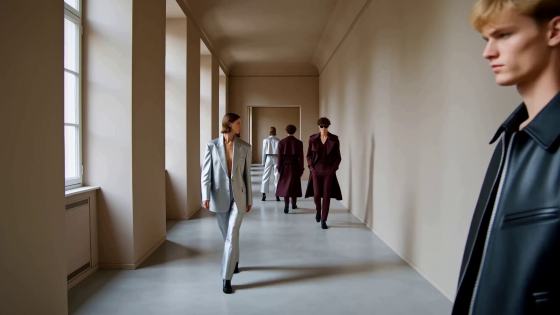
Прекратите борьбу со слабыми, дрейфующими движениями камеры в ИИ-генераторах видео. Откройте наши готовые к использованию формулы подсказок, разработанные для идеального кадрирования объекта. Просто выберите стиль отслеживающего плана, скопируйте шаблон движения камеры, замените объект и мгновенно создайте профессиональные планы слежения в Seedance, Kling, Runway и Veo.
Бесплатные кредиты при регистрации.
Доступ к готовым формулам для бокового слежения, слежения сзади, слежения спереди/ведущего, низкого угла и FPV-преследования. Никаких больше стандартных движений камеры.
Красивое кадрирование объектов без смещения. Оптимизировано для динамичных сцен, таких как бег, автомобильные погони, мотоциклы и показы мод.
Каждая подсказка для отслеживающей камеры полностью протестирована и структурирована для бесперебойной работы на ведущих платформах генерации видео, включая Seedance, Kling AI, Runway Gen-3 и Veo.
Наша формула подсказок определяет точное положение камеры, расстояние, относительную скорость и завершающее действие. Получайте стабильное, профессиональное кадрирование при каждом результате.
Выберите из наших специальных пресетов движения, включая бокового слежения, слежения сзади, FPV-преследования, слежение с низким углом или слежение за скоростью транспортного средства.
Применяйте нашу структуру: положение камеры + расстояние + скорость + движение объекта + завершающее действие. Замените заполнитель своим объектом или сценой.
Вставьте оптимизированную подсказку в Media.io, Seedance, Kling или Runway. Наблюдайте, как ИИ-камера поддерживает идеальную связь с вашим объектом.

Режиссёр экшн-фильмов

«Никакого скользящего фона или дрейфующих объектов.» Я боролся со сценами высокоскоростной погони. Формула подсказки для съёмки слежения за автомобилем отлично сработала в Kling. Она синхронизировала скорость камеры и идеально зафиксировала кадрирование!

Видеограф в сфере моды
«Безупречное боковое слежение в Seedance.» При съёмке прогулок по подиуму камера раньше уходила вперёд слишком быстро. Подсказка для бокового слежения из этого шаблона дала мне идеальное, стабильное движение в профиль. Истинно кинематографично.

Тревел-контент-мейкер
«Потрясающая глубина при низком отслеживающем плане.» Указание расстояния камеры и завершающих действий в Runway Gen-3 полностью изменило правила игры. Подсказка для низкого угла слежения сзади выглядит точно так же, как снято на физический стабилизатор Ronin.

Независимый аниматор
«Подсказки для FPV-преследования — это золото.» Мне нужна была ИИ-видеосъёмка с отслеживанием животного, бегущего через лес. Расплывчатые запросы давали статичные кадры, но эти подсказки заставили камеру идеально соответствовать скорости бега в Veo.
ИИ-отслеживающий план движется непосредственно вместе с движущимся объектом, сохраняя относительное расстояние и угол. Орбитальный план огибает статичный или движущийся объект по кругу, тогда как план с тележки физически перемещает камеру по фиксированному пути (вперёд/назад или влево/вправо), независимо от поведения объекта. Явное определение подсказок для отслеживающего плана гарантирует синхронизацию движения камеры со скоростью персонажа.
Дрейф происходит из-за расплывчатых инструкций типа «камера следует за мужчиной», что позволяет пространственной привязке модели смещаться. Чтобы этого избежать, в подсказке необходимо явно указать: положение камеры (например, боковой профиль, низкий сзади), постоянное расстояние (например, фиксированное расстояние 3 метра) и относительную скорость (например, синхронизированная скорость с идущим объектом).
Наша проверенная кинематографическая формула: [Положение и угол камеры] + [Относительное расстояние] + [Скорость движения] + [Действие объекта] + [Завершающее действие или изменение окружения]. Например: «Низкий угол слежения сзади с фиксированным расстоянием 1,5 метра, камера движется в синхронизированном темпе бега за женщиной-спортсменкой, пересекающей светящуюся неоновую финишную черту.»
Да. Эти структурированные подсказки для отслеживающих планов разработаны для работы с основными ИИ-генераторами видео по тексту. Такие платформы, как Seedance и Kling AI, отлично реагируют на специфические ключевые слова привязки движения, такие как «боковой отслеживающий план», «FPV-преследование» и «синхронизированное движение камеры».
Для автомобилей, мотоциклов или сцен погони используйте ключевые слова FPV-преследования и динамической скорости. Сочетайте такие термины, как «низковысотная FPV-отслеживающая камера», «преследование мчащегося спортивного автомобиля сзади» и «камера, соответствующая скорости мотоцикла, кинематографическое размытие движения», чтобы генератор соответствовал скорости вместо того, чтобы объект выходил из кадра.
 4.7 (162 357 голосов)


