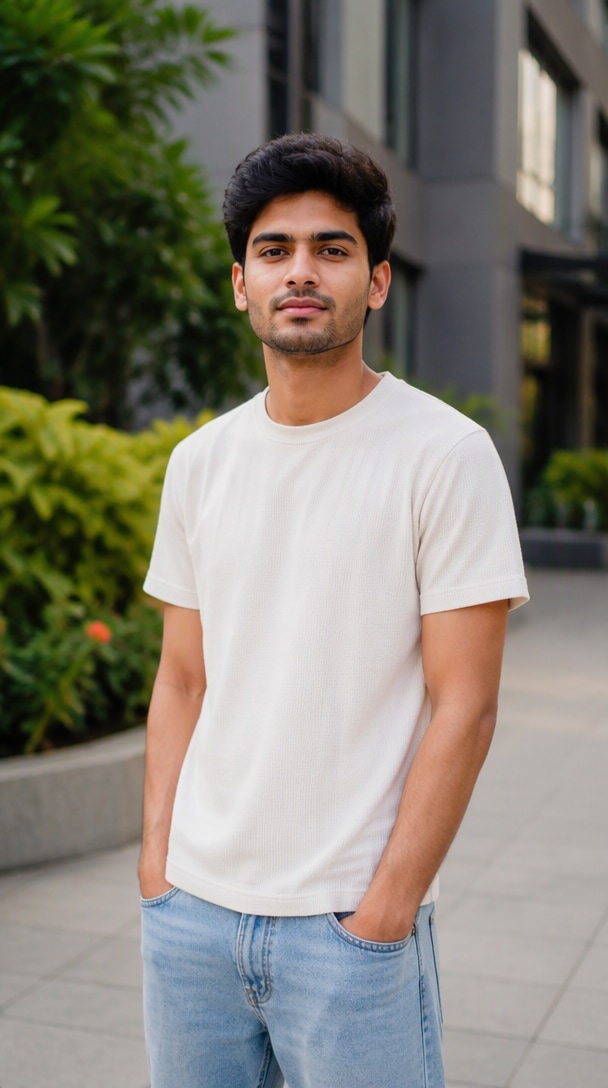
SOURCE
Original Photo
One portrait becomes the reference for all seven heartbreak scenes.
Turn one portrait into a cinematic heartbreak story with rainy roads, streetlights, slow camera motion, and a consistent character across connected scenes. Build a sad night reel with Media.io Image to Video, then arrange the shots into a complete story.
Upload a clear portrait, animate each heartbreak scene, and keep the same identity, outfit, night setting, and cinematic color grade.
See the full story in two rows: one source photo followed by seven connected AI video scenes. The same character and night-time mood continue from the opening memory shot to the final distant-headlights ending.
One portrait becomes the reference for all seven heartbreak scenes.
A quiet opening hook: the character looks down at a memory on the phone as the camera slowly pushes in.
The same character walks slowly along the wet road with a lowered gaze and restrained body movement.
A wider highway shot adds rain, wet-road reflections, mist, and distant headlights to deepen the lonely mood.
The character pauses on a roadside barrier, holding the emotion in a still, cinematic night composition.
A subtle upward look changes the emotional beat without breaking character, outfit, lighting, or scene continuity.
A slow lateral camera move creates depth around the same character, guardrail, streetlights, and rainy road.
Finish on a wide, quiet highway shot as the character recedes into the night and distant headlights close the story.
The heartbreak AI video prompt trend is built around connected emotional shots, not a single sad animation. Media.io helps you turn one character into a coherent night-time story, from looking at an old photo to walking alone under streetlights and ending on a distant highway shot.
Reuse the same portrait reference and repeat identity, hairstyle, outfit, body proportions, and color-grade instructions in every shot to make a multi-scene heartbreak reel feel continuous.
Go beyond a generic crying effect. Structure the reel as a sequence: looking at an old photo, standing alone, walking at night, sitting by the road, looking at the sky, and a quiet final shot.
Use image-to-video prompts for subtle walking, lowered gaze, rain, passing headlights, slow dolly movement, gentle zooms, and natural clothing motion while keeping the mood restrained and cinematic.
Combine 5–7 generated clips, add slow transitions, ambient rain, captions, and suitable licensed music. Export a vertical version for Reels, TikTok, or Shorts without losing the continuous night-story look.
Choose a clear solo photo with a visible face and natural body proportions. For a “looking at her/his photo” opening, prepare a second image that appears only on the phone screen.
Use the heartbreak AI video prompt for each scene. Keep the same person, outfit, rainy highway or street, lighting, and teal-dark color grade while changing only the action and camera framing.
Generate each shot, select the most consistent clips, then arrange them into a 5–7 scene story. Add slow transitions, rain ambience, subtitles, and music before exporting your cinematic heartbreak reel.

Reels Creator

“The Scenes Stay Connected.” I wanted a sad night reel that felt like one story, not seven unrelated AI clips. Repeating the same identity and outfit details made the sequence much more coherent.

Short-Form Video Creator
“Rain Looks Cinematic.” The wet-road reflections, streetlights, and slow camera movement gave my portrait a cinematic mood without making the character overact or cry in every scene.

AI Editing Enthusiast
“Easy Multi-Scene Workflow.” Generating the walk, sitting shot, and final highway scene separately gave me more control. I could keep the same look and choose the strongest clip for each beat.
It is a cinematic AI video format built around a lonely character at night, usually on a road, bridge, or quiet street. Common visual cues include rain or wet pavement, streetlights, neon or headlight bokeh, a reflective expression, and slow camera movement. Current prompt pages often structure the idea as several connected scenes rather than one isolated animation.
Use the same clear reference portrait for every generation and repeat the identity constraints in each prompt: same face, hairstyle, skin tone, body build, outfit, location, lighting, and color grade. Generate one scene at a time when possible. Change only the action and camera framing, then select clips with the closest visual match.
Describe four layers clearly: character consistency, environment, emotional action, and cinematography. For this trend, useful details include a lonely night road, wet asphalt, rain, streetlights, distant headlights, lowered gaze, slow walking, restrained body language, shallow depth of field, film grain, and a slow dolly, pan, or zoom.
Yes. Use one image as the main character reference and a second image only for the photo shown on the phone screen. State this explicitly so the second person is not generated as a live character in the scene. Use images you own or have permission to use, especially when depicting real people.
For Reels, TikTok, and Shorts, a vertical 9:16 final edit is the practical choice. Keep individual shots slow and readable, then connect 5–7 short scenes with gentle transitions. A phone-photo close-up makes a clear opening hook, while a wide night-road or distant-headlight shot gives the story a natural ending.
 4.7 (162,357 Votes)


