Langganan pertama hinggaDiskon 50%
Beli Sekarang

Tren Video AI Zombie: Prompt Kisah Cinta | Media.io

Buat kisah cinta zombie berbasis AI dari dua foto. Salin prompt video 10 detik untuk pelukan yang emosional, kilas balik yang hangat, dan potongan pertandingan sinematik.
All Submissions

Zombie Love Story AI Video Generator: Bring Your Photos into the Story

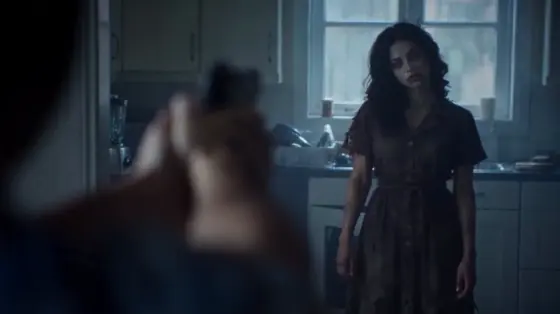
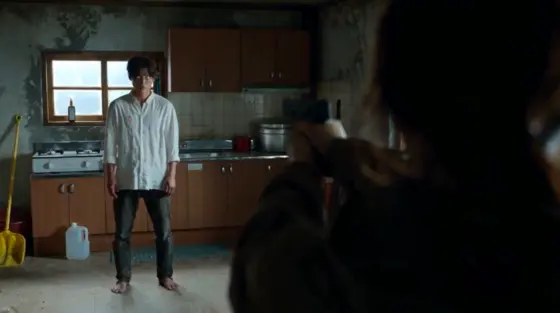
Create a zombie love story AI video with you and your partner at the heart of the scene. One person is infected; the other cannot fire, lowers the gun, and chooses an embrace. The moment cuts to a warm memory of them together. Explore two-photo role guides and copy-ready zombie AI video prompts, then use a compatible reference-to-video workflow to build your story.

Create My Zombie Love Story Explore More Zombie Effects

Use Image 1 for the human survivor and Image 2 for the infected partner. Upload clear photos of yourself or consenting adults. For a pet story, use your own pet as Image 2. Multiple-photo inputs, reference clips, duration, and audio depend on the selected model.

What Makes the Zombie Love Story AI Video Work?

Tell the Story in Four Emotional Beats

The zombie love story AI trend moves from a tense encounter to a lowered gun, an embrace, and a happier memory. Give each beat room to read. The contrast between fear and affection makes the short film feel like a relationship story, even without dialogue.

Keep Both Faces and Roles Consistent

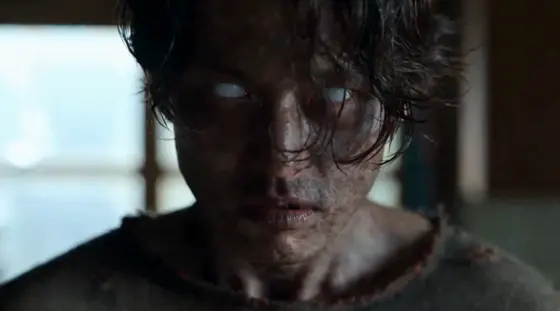
Image 1 defines the survivor; Image 2 defines the infected partner. Preserve both faces, hairstyles, and body proportions in every shot. Change only the infected partner's skin and eyes in the dark scene, then restore their healthy appearance in the memory. Never swap the roles.

Match the Embrace Across the Cut

Use close-ups to establish the survivor's hesitation and the partner's infected appearance, then a wider view for the embrace. At contact, cut to the same pose in a sunlit field. Match body positions, screen direction, and camera angle so the memory transition connects both scenes.

Choose Your Couple or Pet Story

Start with the cabin-to-wheat-field couple story, or adapt it to a rainy city, a coastal reunion, or a pet memory. Keep the emotional arc intact while changing the setting. Choose 9:16 for Reels and Shorts or 16:9 for a wider film composition, where supported.

How to Make a Zombie Love Story AI Video from Two Photos

01

Step 1: Upload and Assign Two Photos

Choose two sharp, well-lit photos with one adult in each image. Assign Image 1 to the human survivor and Image 2 to the infected partner. Use a model that accepts multiple references. If you are using a single-image workflow, first create a shared scene image with both characters, then animate it.

02

Step 2: Choose a Zombie Love Story Prompt

Copy a zombie love story AI video prompt below and choose your setting. Keep the character roles and embrace-to-memory cut explicit. An optional reference clip can guide framing and motion in supported models. Select an available duration; split the dark encounter and warm memory into separate shots when needed.

03

Step 3: Review the Faces and Memory Cut

Generate and preview your zombie AI video. Check that only Image 2 becomes infected, the gun is lowered without firing, and the embrace remains natural. Review both identities after the memory cut. Refine or assemble separate shots, add suitable audio if needed, then download your video for TikTok, Reels, or Shorts.

Copy-Ready Zombie Love Story AI Video Prompts

Decorative avatar beside the cabin zombie love story prompt
Cabin to Golden Memories

Copy-Ready Video Prompt

Cabin Zombie Love Story Prompt: Create a cinematic zombie love story using Image 1 as the adult human survivor and Image 2 as the adult infected partner. Preserve both faces, hairstyles, and body proportions; never swap roles. In a dim wooden cabin, show the survivor tearfully holding a raised gun, then cut to the partner approaching with pale gray skin, cloudy eyes, and subtle dark veins. The survivor lowers the gun without firing and opens their arms. Show the partner moving into an embrace, with natural hand placement and separate bodies. At contact, hard-cut to the same two people hugging in a golden wheat field, both healthy. Match their pose, screen positions, and camera angle across the cut. Shift from cold blue shadows to warm sunset light. Keep outfits consistent within each scene. Use 9:16 and a supported duration, or generate the two scenes separately. No blood, wounds, biting, gunfire, face merging, extra characters, or text.

Decorative avatar beside the rainy city zombie love story prompt
Rainy City Reunion

Copy-Ready Video Prompt

Rainy City Zombie Love Story Prompt: Use Image 1 for the adult survivor and Image 2 for the adult infected partner. Keep their facial identities and hairstyles recognizable throughout. Begin on a deserted rainy street at night, framed as a medium two-shot. The survivor looks at the infected partner, whose skin is pale gray and eyes are cloudy. Show a brief close-up of the survivor hesitating, then lowering the gun and stepping forward with open arms. The partner gently closes the distance and embraces them. At the first contact, cut to the same embrace on that street in a happy daytime memory: both characters healthy, pavement dry, soft sunlight, relaxed smiles. Match their body positions and the camera angle; the change of light reveals the memory. Preserve clothing within each scene and keep rain in the night scene only. Use a supported duration in 9:16; split the scenes if needed. No shooting, biting, blood, duplicate people, face swaps, or captions.

Decorative avatar beside the zombie pet memory prompt
Zombie Pet Memory

Copy-Ready Video Prompt

Zombie Pet Memory Prompt: Create an emotional fictional pet story. Image 1 defines the adult owner; Image 2 defines their dog or cat. Preserve the owner's identity and the pet's species, muzzle, ears, fur markings, and relative size. In a dim cabin, the owner kneels with empty hands as the pet approaches with a subtle fantasy zombie appearance: slightly desaturated fur and cloudy eyes, without wounds. The owner opens their arms, and the pet gently leans against their chest. At contact, hard-cut to the same pose in a sunlit meadow. Restore the pet's healthy eyes and natural fur colors while keeping its markings unchanged. The owner smiles and strokes its back. Match their positions and camera angle across the cut. Use 9:16 and a supported duration, or generate the cabin and meadow separately. Keep the pet's anatomy natural. No weapons, attacks, biting, blood, human hands on the pet, extra animals, or text.

Decorative avatar beside the coastal zombie love story prompt
Coastal Love Story

Copy-Ready Video Prompt

Coastal Zombie Love Story Prompt: Create a cinematic two-person story from Image 1, the adult human survivor, and Image 2, the adult infected partner. Preserve their faces, hairstyles, and body proportions across all shots. At a deserted coastal shelter under stormy skies, show the survivor recognizing the partner despite pale gray skin and cloudy eyes. Cut from their emotional close-ups to a medium two-shot. The survivor lowers the gun without firing and opens their arms; the partner steps closer into a gentle embrace. At contact, hard-cut to the same couple embracing on a beach at sunset, both healthy. Match the pose and screen positions, then slowly widen the camera to reveal the warm sea and golden light. Keep each character's outfit consistent within each scene. Use a supported duration and 9:16 or 16:9. Generate separate shots if necessary. No gunfire, gore, bites, identity swaps, face merging, extra limbs, or text.

FAQs About the Zombie Love Story AI Video Generator

1. What is the zombie love story AI video trend?

A zombie love story AI video is a fictional short film in which one partner is infected and the other chooses an embrace instead of firing a gun. A cut then reveals a happy memory of the same pair. Unlike a single-person zombie transformation effect, this format depends on two consistent identities, emotional reactions, and an embrace that connects the dark scene with the warm memory.

2. Do I need two photos for a zombie love story video?

Two separate photos help define the human survivor and infected partner in a compatible multi-reference model. Use one clear, well-lit adult face per photo and label the roles in your prompt. For a single-image model, create a shared keyframe with both characters first. Photo requirements and multiple-reference support depend on the selected workflow.

3. Do I need a reference video to create the story?

You can build an original zombie love story from photos and a written shot plan. A reference video is useful when you want similar framing, movement, and cut timing, but only in models that accept video references. Use a clip you have permission to upload. For a cleaner memory transition, generate matching embrace shots and join them in an editor.

4. Can I make a zombie love story with my pet?

You can adapt the story using your own dog or cat as Image 2 and an adult owner as Image 1. The pet prompt uses a gentle reunion without a weapon: the owner kneels, the pet approaches, and their contact cuts to a healthy pet in a sunny memory. Preserve the pet's species, fur markings, size, and natural anatomy. Results depend on the selected model.

5. How do I fix swapped faces or a broken memory transition?

Repeat the role assignment: Image 1 stays human; Image 2 is infected only in the dark scene. Reduce the number of actions and check each face before generating the next shot. If the cut fails, create two embrace keyframes with matching body positions, screen direction, and framing, then generate and join the clips separately. Add music afterward if your model does not generate suitable audio.

Media.io Online AI Tools Quality Rating:
vote 4.7 (162,357 Votes)






