














Intercambio de rostros con IA
Subir imagen de origen
Sube una imagen con rostros nítidos
Haz clic o arrastra para subir, o elige de Mi HistorialHaga clic para cargarMi Historial
¿Sin ideas? Genera primero una imagen. >
Sube imágenes jpg, jpeg o png de hasta 50 MB, con un ancho/alto mínimo de 300 px.
Subir rostro
Sube el rostro que vas a colocar
Face onto Body

Swap Any Face onto Any Body with AI Precision

Media.io lets you put a face onto a body in seconds using advanced AI photo face swap technology. Easily create realistic portraits, group edits, or fun meme-style images without tricky manual editing. The tool ensures the lighting, skin tone, and perspective all blend naturally, giving every result a professional touch. Use it for creative content, digital artistry, or personal profile photos that stand out.

Try Face Onto Body Swap Now
Realistic blending AI precision Instant results No editing skills needed
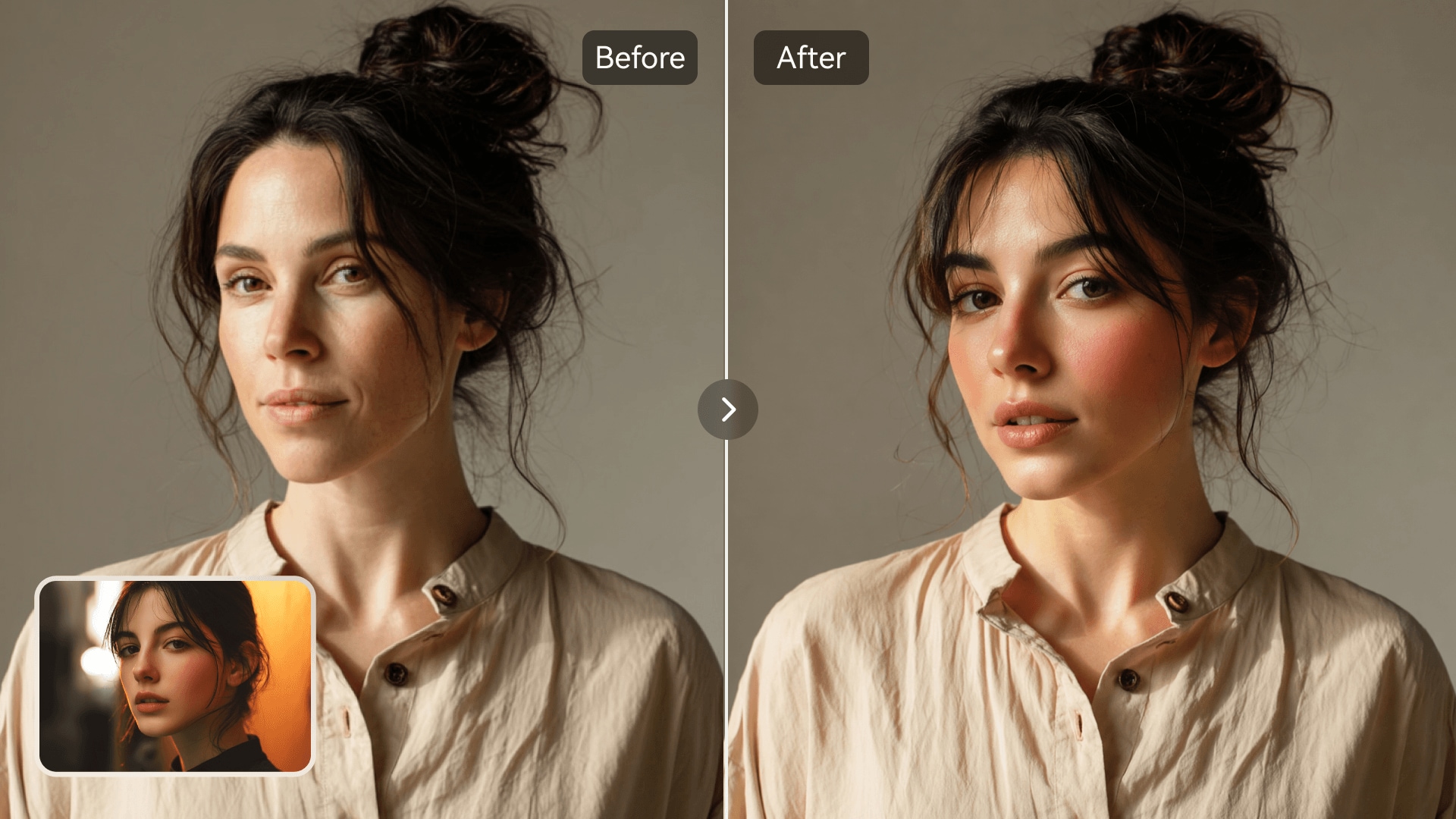
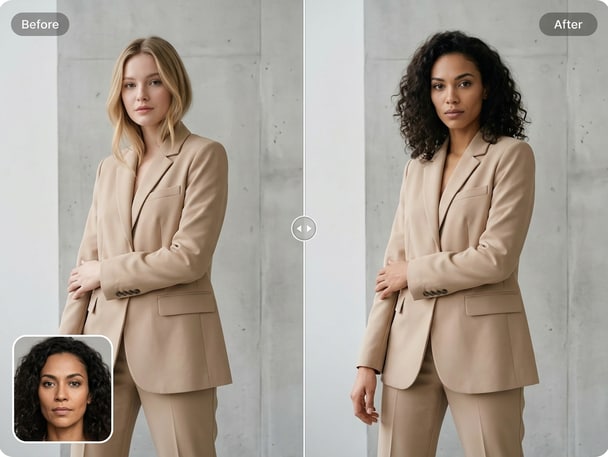
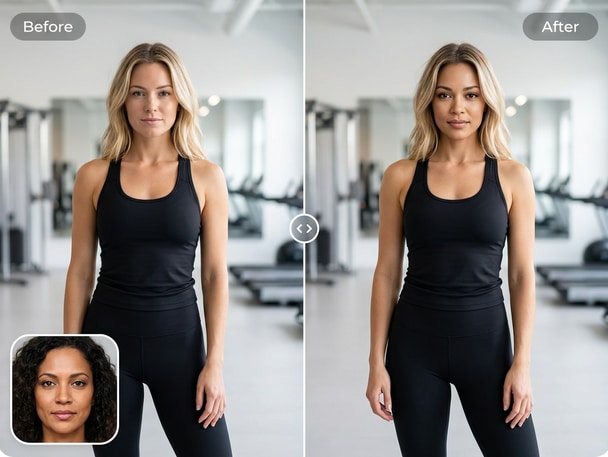
AI face onto body example with natural blending
Before and after face onto body edit comparison

Realistic Face Integration

Media.io's AI engine ensures that every face you place onto a body looks genuinely natural. The tool adjusts facial alignment, tone, and expression to match the target body automatically. This makes every edit appear seamless, even in detailed portraits or professional settings. Whether you are doing a face replacement for creative mockups or social content, consistency and believability come built-in.
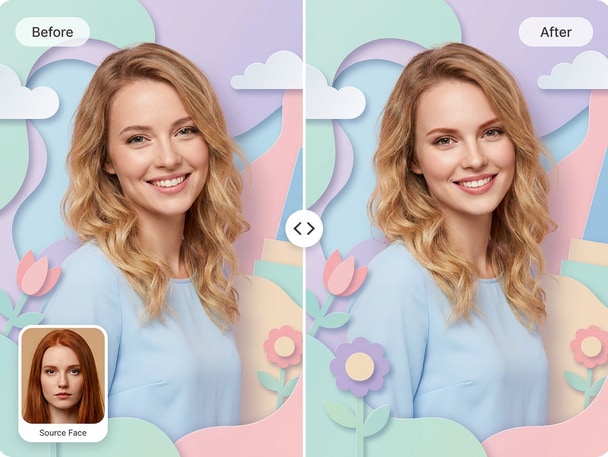
Perfect for Creative and Social Use

Put a face onto a body to make personalized content, memes, or character designs that pop. With Media.io, users can quickly generate fun visual concepts for marketing, entertainment, or social sharing. Each output remains smooth and proportional, ensuring that every image feels genuine and engaging. Turn your imagination into shareable creations faster than ever.

AI-Powered Accuracy

Forget manual cropping or mismatched edges. Media.io's AI face onto body swap automatically detects position, lighting, and proportions for a natural outcome. The advanced algorithm tracks both source and target details to deliver lifelike compositions. Every face replacement feels balanced and expressive without requiring post-edit touch-ups.

Simple Online Workflow

You do not need to install anything or understand complex software-Media.io handles everything in your browser. Upload your images, let AI map the face onto body, and preview the transformation within seconds. The intuitive interface keeps the workflow clear from upload to download. Whether for quick tests or final export, Media.

Try AI Face Cutout Swap for Quick Image Edits

Want even more flexibility? The Media.io Face Cutout Swap tool lets you isolate a face cutout and place it precisely anywhere for creative edits, perfect for product photos or fun visuals.

How to Swap a Face onto a Body with Media.io

01

Upload Your Images

Select the source photo with the face and the target photo with the body. Media.io supports common formats and handles uploads quickly for a smooth experience.

02

AI Matches and Swaps

Our AI automatically detects facial points, contours, and tone to merge the face onto the selected body seamlessly. You'll see instant results in the browser.

03

Preview and Download

Review the swapped image, make adjustments if needed, and download your file in seconds. Media.io makes it simple to export ready-to-share images with professional quality.

What Users Say About Media.io Face onto Body Swap

user
Laura W.

Social Media Designer

starstarstarstarstar

"Incredible Realism in Every Merge" I tried Media.io to swap a face onto a body for a campaign preview, and it genuinely surprised me. The lighting correction feels natural, even across different tones. It's now my go-to tool for body face merge tasks in my marketing mockups. The interface makes everything so quick that I can test multiple ideas in minutes.

user
James N.

Freelance Photographer

starstarstarstarstar

"Smooth and Professional Results" As a photographer, I often need to create sample composites for clients. Media.io's AI photo face swap produces realistic, frame-ready results every time. I especially appreciate the way it balances proportions without distortions. This tool simplifies a process that used to take me hours.

user
Emily R.

Content Creator

starstarstarstarstar

"Perfect for Fun Social Posts" I used the face onto body swap feature to make creative visuals for my online series, and it worked effortlessly. The results blended perfectly and got a great reaction from my audience. What stood out to me is how natural the edges looked-no rough lines or mismatched tones. It's definitely my top creative shortcut now.

user
David M.

Digital Artist

starstarstarstarstar

"Highly Accurate Face Placement" I tested Media.io for realistic face replacement work, and the precision impressed me. The AI accurately aligned complex facial structures with different body angles. Even under different lighting, the result was smooth and believable. I recommend this to anyone looking for realistic AI photo edits.

user
Rachel P.

Marketing Specialist

starstarstarstarstar

"Quick Edits With Natural Finishes" Swapping a face onto a body used to feel tedious, but Media.io made it intuitive. I used it for promotional mockups, and the results looked professional instantly. The natural skin tone blending was spot-on across various images. This AI face swap saved me both time and editing effort.

Creators and photo editors love the simplicity and realism of the AI photo face replacement process.

FAQs About AI Face onto Body Swap

1. How Does the AI Face onto Body Tool Work?
faqfaq

Media.io's AI identifies facial features and maps them onto a target body image with natural color and proportion adjustments. It blends tones and shadows to achieve a realistic outcome. Each edit is handled through a secure online process you control. You simply upload two images and let the technology do the rest.

Yes. Media.io's face onto body feature is designed for everyone, not just graphic designers. The interface guides you through each step automatically. You'll see live previews, so you can confirm positioning and quality right away.

The AI analyzes source and target lighting to blend both seamlessly. It automatically adjusts brightness and contrast for realistic results. Whether you're editing portraits or social content, your output looks balanced. This lighting adaptation is part of what makes Media.io's AI edits appear lifelike.

Yes, you can use Media.io directly from your mobile browser. The tool works on both Android and iOS without installation. Upload images, let AI process them, and download your finished photo instantly. Mobile convenience makes on-the-go content creation easier than ever.

Media.io focuses on natural blending, fast AI processing, and accessible design. Unlike generic apps, it prioritizes realism and subtlety for photo face swaps. It supports high-resolution editing for both social and professional use. The entire process happens online with clear control over your files.

Currently, the tool supports one-to-one face onto body swaps for optimal accuracy. This ensures lighting and alignment remain natural. For multi-face edits, you can repeat the process for each individual swap. The fast AI workflow keeps batch tasks easy to handle.

Yes, you can use AI-generated results for concept previews, mockups, or internal creative design. Each AI photo face swap maintains quality fit for professional presentation. However, always use your own or licensed images responsibly. The clarity of the output makes it ideal for marketing visuals.

Media.io offers flexible options, including free previews and paid exports based on quality preference. You can test edits before choosing your download resolution. This structure helps users of all needs, from casual to professional. The process stays transparent at every stage.

Media.io Online AI Tools Quality Rating:
vote 4.7 (162,357 Votes)