Erstes Abonnement bis zu50 % Rabatt
Jetzt kaufen

Thalapathy Vijay Hubschrauber-Eintritt KI-Videoaufforderung

Probieren Sie den viralen Thalapathy Vijay Hubschrauber-Einstiegs-AI-Video-Prompt aus. Laden Sie Ihr Foto hoch, um einen cineastischen Heldenauftritt mit realistischer Bewegung, Rotorwind, fliegendem Staub und niedrigem Kamerawinkel zu erstellen.
Alle Einreichungen

Thalapathy Vijay Helicopter Entry AI Video Prompt

Inspired by the viral Thalapathy Vijay helicopter entry AI video trend? Upload your own photo and create a cinematic South Indian-style hero entrance with natural walking, realistic helicopter rotor wind, flying dust, shirt and hair movement, and a dramatic low-angle tracking camera.

Before

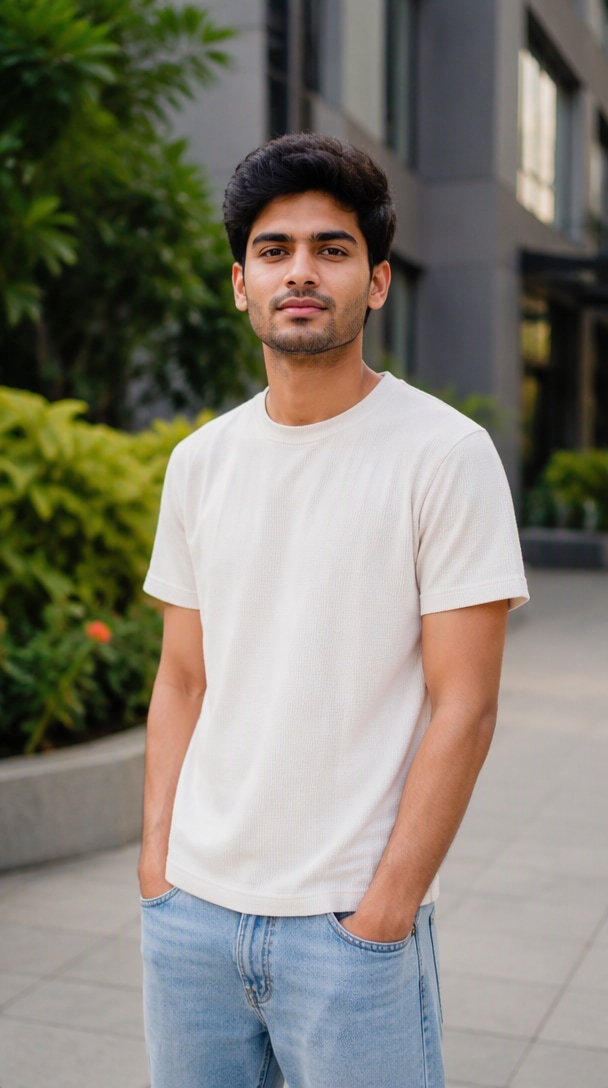
Your Photo
Before creating a Thalapathy Vijay helicopter entry AI video

After

AI Helicopter Entry
Create My Helicopter Entry

Use your own clear full-body photo for stronger identity consistency and more natural movement.

What Is the Viral Thalapathy Vijay Helicopter Entry AI Video?

The Thalapathy Vijay Helicopter Entry AI Video Prompt trend turns a reference photo into a larger-than-life cinematic entrance: a helicopter waits in the background, the hero steps forward confidently, rotor wash sends dust through the scene, clothes and hair react to the wind, and a low-angle camera follows the walk. On Media.io, use the trend as inspiration while keeping the generated character based on your own uploaded photo.

Why Create a Helicopter Entry AI Video with Media.io

Keep Your Identity Locked

Use your reference photo as the identity anchor and preserve facial structure, hairstyle, skin tone, outfit, body proportions, and overall appearance across frames. Strong identity instructions help reduce face drift during a dramatic Vijay AI video prompt-style walk.

Natural Hero Walking

Make the hero move like a real person, not slide across the ground. A strong hero entry AI video needs natural foot placement, believable body-weight transfer, balanced arm swing, stable posture, and consistent forward momentum.

Rotor Wind, Hair & Dust Physics

Connect the helicopter to the environment. Rotor wash should move the shirt and hair while pushing dust outward from the aircraft. Physically connected motion helps a cinematic helicopter AI video feel coherent instead of looking like separate effects.

Low-Angle Tracking Camera

Turn a simple walk into a mass entry AI video with a smooth low-angle tracking shot. Establish the helicopter first, then move backward with the subject while keeping framing stable, depth cinematic, and camera shake restrained.

Thalapathy Vijay Helicopter Entry AI Video Prompt – Copy & Paste

Use your uploaded photo only as the identity reference. For a more natural result, start the generated video directly inside the completed helicopter scene from frame one. Avoid prompts that ask the model to transform the original photo into the scene, because visible morphing, dissolves, or unnatural helicopter reveals can appear.

Main Helicopter Entry Prompt

Use the uploaded photo ONLY as the identity reference for the main character. Preserve the same face, facial structure, hairstyle, skin tone, age, body proportions, and overall appearance throughout the entire video. IMPORTANT: Start the video directly inside the completed cinematic scene. From the very first frame, the same person is already naturally walking on a dusty open ground with a realistic helicopter fully present behind them. Do NOT show the uploaded static photo. Do NOT animate, zoom out from, dissolve, morph, transform, or transition from the uploaded image into the helicopter scene. No before-and-after transition and no image-to-scene transformation. The person walks confidently toward the camera while the helicopter remains naturally positioned in the background. Walking must be anatomically realistic with correct foot contact, natural weight transfer, subtle shoulder movement, balanced arm swing, stable body proportions, and continuous forward momentum. The helicopter rotor is already spinning naturally from the opening frame. Rotor wash creates believable downward airflow that gently moves the person's hair and shirt and lifts fine dust from the ground around the helicopter. Dust spreads outward according to the rotor airflow and never covers the person's face. Use one continuous low-angle backward tracking shot. The camera smoothly follows the person without cuts, jumps, sudden zooms, or angle changes. Use warm cinematic sunlight, realistic shadows, subtle atmospheric haze, detailed ground texture, realistic helicopter geometry, natural depth of field, and premium South Indian action-cinema-inspired atmosphere. Keep the person, helicopter, environment, lighting, and camera perspective spatially consistent throughout. No face morphing, identity change, photo transformation, helicopter appearing from nowhere, teleporting, floating feet, sliding walk, duplicated person, deformed helicopter, or random scene changes. 9:16 vertical, photorealistic cinematic video.

How to Make a Helicopter Entry AI Video in 3 Steps

01

Step 1: Upload Your Own Photo

Choose a clear full-body or three-quarter portrait with your face, hairstyle, clothes, arms, and legs visible. Avoid heavy blur, extreme poses, hidden faces, or crops that cut off the feet.

02

Step 2: Generate the Hero Entry

Paste the helicopter entry AI video prompt and focus on one clean action: a natural walk away from the helicopter while rotor wind affects hair, clothes, and dust. Check identity, feet, hands, aircraft shape, and camera motion.

03

Step 3: Finish It in Viral Studio

Combine your strongest clips, then add music, bass hits, beat cuts, helicopter sound effects, title text, speed changes, and final color adjustments. Export a polished 9:16 Reel for short-form platforms.

5 Helicopter Entry AI Video Prompts to Try

1. Classic Helicopter Hero Entry

Best for: iconic mass-entry visuals.

Use the uploaded photo ONLY as the identity reference. Start directly inside the fully established cinematic scene from frame one: the same person is already walking toward the camera with a realistic helicopter fully present behind them. Never show or animate the original static image, and never morph, dissolve, zoom out from, or transform the uploaded photo into the final scene. Preserve the same face, hairstyle, skin tone, outfit, body proportions, and age appearance throughout. The helicopter rotor is already spinning naturally and produces believable downward airflow that moves the person's hair and shirt and lifts fine dust outward from the ground. Walking must have correct foot contact, natural weight transfer, balanced arm swing, and stable anatomy. Use one continuous low-angle backward tracking shot with no cuts or sudden perspective changes. Warm cinematic sunlight, realistic shadows, subtle haze, detailed ground texture, natural depth of field, and premium action-cinema atmosphere. No face morphing, no helicopter appearing from nowhere, no sliding feet, no duplicated person, no deformed helicopter. 9:16 vertical, photorealistic.

2. Red-Dust Mass Entry

Best for: high-energy cinematic visuals.

Use the uploaded photo only as the identity reference. Begin immediately with a fully established red-earth cinematic location. The person and a realistic helicopter are already physically present from frame one. Do not display the uploaded photo as a starting frame and do not transform the original portrait into the scene. The person is already walking confidently toward the camera as the shot begins. Behind them, a grounded helicopter has its rotor spinning at a physically believable speed. Rotor wash pushes red dust outward across the ground in a realistic radial direction; fine dust rises gradually rather than suddenly appearing. The same airflow naturally moves loose shirt fabric and hair. Keep the face clearly visible. Walking must show realistic heel-to-toe contact, body-weight transfer, coordinated arm movement, and stable anatomy. Use one continuous low-angle tracking camera moving backward at the same pace as the character. Strong warm backlight passes naturally through the airborne red dust. No artificial smoke explosion, random dust movement, face change, sliding feet, helicopter deformation, scene transition, or object appearing or disappearing. 9:16 vertical, realistic cinematic action-film photography.

3. Golden Hour Helicopter Entry

Best for: the most natural cinematic result.

Use the uploaded photo strictly as the identity reference. The video must open directly on a finished golden-hour cinematic scene. From the first frame, the same person is already walking naturally across an open landscape with a realistic helicopter clearly visible behind them. Never show or animate the original uploaded still image. No morphing, crossfade, zoom-out reveal, background-generation transition, transformation effect, or helicopter materializing into view. The scene should feel as if a real camera started recording while the action was already happening. Preserve the exact identity, face, hairstyle, skin tone, clothing, and body proportions. The rotor spins continuously and naturally; subtle rotor wash moves hair and loose clothing while a thin layer of dust travels naturally across the ground. Use a smooth low-angle backward tracking shot with consistent distance and perspective. Golden sunset light creates a natural rim light, realistic long shadows, subtle haze, restrained lens flare, and warm cinematic color grading. Keep the helicopter stable in shape and position. No static-photo opening, transformation, identity drift, teleportation, sliding feet, sudden dust explosion, or random camera movement. 9:16 vertical, photorealistic and physically believable.

4. Night Helicopter Arrival

Best for: dark action-movie style.

Use the uploaded image only to preserve the main character's identity. Start directly in a fully established cinematic night scene. From frame one, the character is already walking toward the camera and a realistic helicopter is already visible behind them with its rotor spinning. Do not begin with the uploaded photograph and do not transform it into the night environment. No morphing, fade-in transformation, background replacement animation, magical helicopter appearance, or before-and-after reveal. The helicopter landing lights are already on and shine naturally through light atmospheric dust. The person walks forward with realistic gait mechanics, stable foot contact, natural weight shift, subtle arm swing, and correct knee movement. Rotor airflow gently moves the person's hair and clothing, while fine dust moves naturally across the ground according to the same airflow. Use one continuous low-angle backward tracking shot. Keep the face sharp while the helicopter remains recognizable in the background. Use realistic blue-and-amber cinematic lighting, subtle wet-ground reflections, physically accurate shadows, restrained haze, and natural skin tones. No scene morphing, photo-to-video transition, face changes, duplicated character, floating feet, random light changes, deformed helicopter, or camera teleportation. 9:16 vertical, premium photorealistic night cinematography.

5. Slow-Motion Final Hero Walk

Best for: bass-hit or final Reel shots.

Use the uploaded photo only as the exact identity reference. Start immediately with a fully formed cinematic helicopter-entry scene. The person is already mid-walk toward the camera from the first frame, with a realistic helicopter already operating naturally in the background. Never display the uploaded still photo and never animate the original portrait into motion before establishing the environment. No morphing, transformation, crossfade, scene-generation reveal, zoom-out transition, or helicopter appearing during the shot. Create one continuous restrained slow-motion hero walk. Preserve the same face, facial proportions, hairstyle, skin tone, clothing, body shape, and age appearance. Walking remains physically correct even in slow motion: clear ground contact, natural weight transfer, subtle coordinated arm movement, and no sliding or floating. Rotor wash creates natural wind through the hair and clothing while fine dust drifts through the background without covering the face. Use a single low-angle camera tracking smoothly backward. Let the character occupy more of the frame through natural forward movement rather than artificial digital zoom. Keep the helicopter visible enough to establish context. End naturally on a strong medium hero framing suitable for a bass hit or title cut. No identity morphing, static-photo transition, artificial zoom transformation, scene change, teleporting, sliding feet, or deformed hands or helicopter. 9:16 vertical, photorealistic cinematic slow motion.
What Makes a Cinematic Helicopter Entry Look Realistic?

Identity Consistency

Keep the same face, hairstyle, skin tone, outfit, and body shape in every frame. A clear reference image plus explicit identity-preservation language reduces drift.

Physically Believable Walking

Feet should contact the ground, weight should shift naturally between steps, and arm motion should stay synchronized with forward movement.

Rotor-Driven Wind & Dust

Dust, hair, and loose clothing should react to the same directional airflow produced by the helicopter rotor instead of moving independently.

One Camera Move Per Shot

For a Google Flow helicopter entry prompt or other AI video prompt, use one dominant move per clip. Separate wide, tracking, and close-up shots instead of forcing every camera angle into one generation.

What Creators Like About Helicopter Hero Entry Videos

Arjun, AI video creator
Arjun Mehta

AI Video Creator

starstarstarstarstar

“The walk finally feels grounded.” Adding foot placement and weight-transfer instructions stopped the floating look. The helicopter stayed behind me while the camera moved smoothly backward.

Riya, Reels creator
Riya Sharma

Reels Creator

starstarstarstarstar

“Rotor wind makes it believable.” The best improvement was connecting the dust, hair, and shirt movement to the same wind direction instead of asking for random cinematic dust.

Dev, short-form editor
Dev Kapoor

Short-Form Editor

starstarstarstarstar

“Separate shots edit much better.” Generating the wide shot, hero walk, and close-up separately gave me cleaner clips. I could then add bass hits and beat cuts without forcing everything into one generation.

FAQs About Thalapathy Vijay Helicopter Entry AI Video Prompt

1. What is the Thalapathy Vijay Helicopter Entry AI Video Prompt?

The Thalapathy Vijay Helicopter Entry AI Video Prompt refers to a viral cinematic AI video concept built around a dramatic helicopter entrance, confident hero walk, rotor wind, flying dust, action-film lighting, and low-angle camera movement. On Media.io, use the trend as inspiration while generating the character from your own uploaded photo.

2. How do I create a Thalapathy Vijay helicopter entry AI video with my own photo?

Upload a clear full-body or three-quarter photo, then use a detailed helicopter entry AI video prompt that locks your identity while describing natural walking, helicopter rotor movement, directional wind, dust simulation, clothing movement, and low-angle camera motion. Generate the key shots separately for better consistency, then combine them into the final Reel.

3. What should I include in a Google Flow helicopter entry prompt?

A strong Google Flow helicopter entry prompt should define the reference character, identity consistency, action, helicopter position, environment, rotor movement, wind interaction, dust behavior, lighting, and camera movement. Avoid requesting too many camera moves in one clip; separate wide, tracking, and close-up shots when needed.

4. How do I keep my face consistent in a Vijay AI video prompt?

Use your own high-quality reference photo and explicitly preserve the same facial structure, hairstyle, skin tone, age appearance, outfit, body shape, and proportions. Keep your identity locked and borrow only general cinematic elements such as helicopter staging, confident walking, dramatic lighting, rotor wind, dust, and low-angle cinematography.

5. How do I make a hero entry AI video look more cinematic?

Focus on physical realism before adding more effects. Use natural walking mechanics, realistic rotor rotation, directional wind affecting hair and clothing, physically motivated dust, strong environmental lighting, and one controlled camera move per shot. Then add music, bass hits, beat cuts, titles, sound effects, and multi-shot editing in Viral Studio.

Media.io Online AI Tools Quality Rating:
vote4.7 (162,357 Votes)






