














AI Face Swap
Upload Source Image
Upload an image with clear faces
Click or drag to upload, or choose from My HistoryClick To UploadMy History
No ideas? Generate an image first >
Upload jpg, jpeg, png images up to 50 MB, with a minimum width/height of 300 px.
Upload Face
Upload the face you want to swap in
Pikachu Face Swap

Create Playful Photos with Pikachu Face Swap

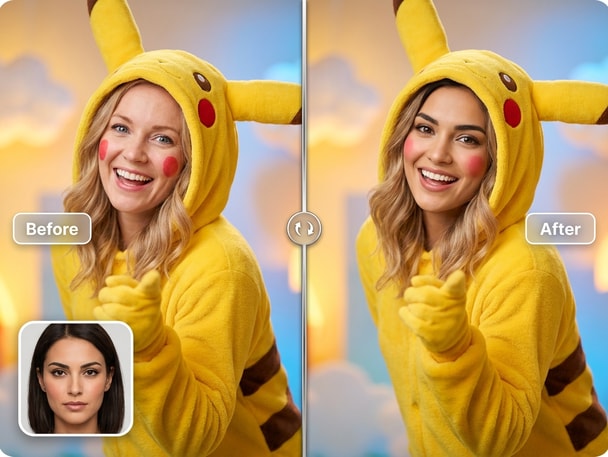
Media.io's AI-powered Pikachu face swap lets you bring creativity and fun into your photos. Transform your face with lively cartoon-inspired expressions while keeping natural skin tone and lighting. Whether you want to create memes, cosplay edits, or attention-grabbing profile pictures, this tool gives you photorealistic results instantly. Designed for beginners and creators alike, it delivers quick, safe, and visually consistent swaps every time.

Try Pikachu Face Swap Now
Free Online Swap No App Needed AI-Powered Precision Instant Photo Results
Example of Pikachu face swap transformation on selfie
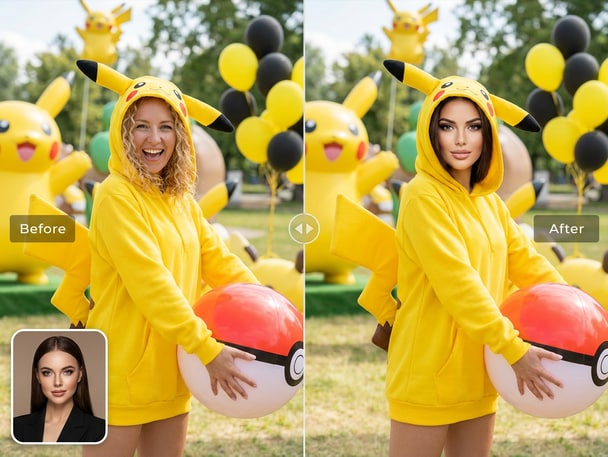
Cosplay-style Pikachu face swap photo

Make Funny Character Photos

Use the Pikachu face swap to add humor and charm to everyday selfies. Media.io's AI adapts your facial shape and lighting, creating a natural blend between your photo and the character style. Perfect for social posts or creative storytelling, the results stay clear and detailed. You can easily download or share your images immediately after swapping.
Quick Cosplay and Costume Edits

If you love costume concepts or cosplay experiments, Media.io's Pikachu face swap helps you visualize ideas fast. Upload your portrait, select the character theme, and let the AI merge everything seamlessly. The tool ensures true-to-tone color adjustments so the final result looks polished and creative. Ideal for testing themed looks, social banners, or fan-inspired visuals.

Perfect for Memes and Social Content

Media.io makes meme creation effortless through lifelike swaps that keep faces expressive and sharp. The Pikachu face swap tool automatically aligns facial landmarks for balanced proportions. The output looks genuine enough for reaction images, comment posts, or TikTok edits. Share your funny new versions in seconds without needing advanced editing skills.

Safe and Easy Online Workflow

With a clean online process, the Pikachu face swap takes just a few clicks. Upload a photo, preview the AI effect, and download your transformed image. No software installation or technical setup is required. Media.io ensures quick photo processing with smart rendering that keeps image quality crisp and clear for any use case.

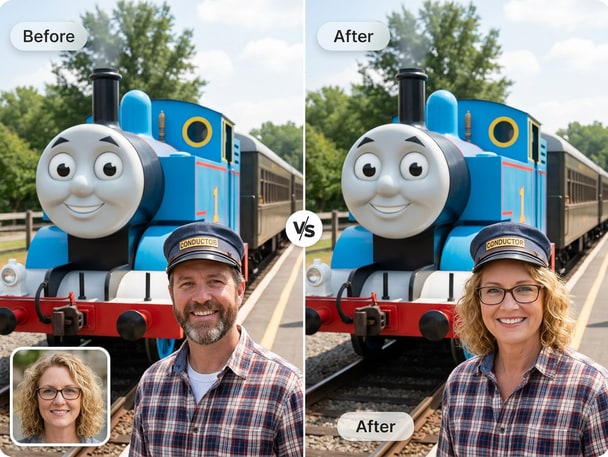
Face Swap With Thomas the Train for Playful Edits

Explore face swap with thomas the train with Media.io AI Photo Face Swap. This recommended face swap theme gives visitors another related way to create realistic photo edits, meme visuals, avatars, or social-ready images online. It keeps the journey connected from the current page while guiding users to a new face swap use case.

How to Make a Pikachu Face Swap Online

01

Upload Your Photo

Choose a clear front-facing image from your device and upload it to Media.io. The AI automatically detects your face and prepares it for transformation.

02

Select Pikachu Style

Pick the Pikachu theme to apply from the available AI styles. Media.io aligns and blends your facial features with cartoon elements seamlessly.

03

Preview and Download

After the face swap is generated, preview the results and fine-tune if needed. Click download to save your image or share directly on social platforms.

User Reviews for Pikachu Face Swap

user
Liam W.

Content Creator

starstarstarstarstar

"Super Fun Way to Make Meme Photos" I tried the Pikachu face swap for a video thumbnail, and I was surprised by how natural it looked. The color tone and lighting matched perfectly with my original photo. The AI character face swap feature saved me hours of manual editing. It's great for quick, social-friendly meme content that stands out.

user
Chloe D.

Digital Designer

starstarstarstarstar

"Loved the Quick, Realistic Swap Output" Media.io's Pikachu face swap turned my plain selfie into something hilarious in seconds. The blending looked surprisingly smooth and playful. I've used other cartoon photo face swap apps before, but this one gave better clarity and detail. It's become a go-to for my creative mini-projects.

user
Ryan T.

Social Media User

starstarstarstarstar

"Best Tool for Cosplay Themes" I used the Pikachu style swap for a cosplay concept, and the preview results were fantastic. The AI handled lighting adjustments automatically, so it felt very natural. This cosplay face swap online saves me so much time preparing layouts for fan pages. Definitely worth bookmarking for quick experiments.

user
Ava B.

Marketing Student

starstarstarstarstar

"Added a Fun Twist to My Profile Picture" The Pikachu face swap made my profile picture stand out on every platform. I liked that the tool required no software and took seconds to process. It's an excellent choice for anyone testing creative profile picture face swap ideas. The download quality was crisp and easy to reuse across channels.

user
Ethan P.

Freelance Illustrator

starstarstarstarstar

"Reliable AI for Quick Visual Mockups" For creating concept art or funny posts, the Pikachu face swap tool provides solid base visuals. The cartoon aesthetic is rendered with realistic precision, which makes it easy to reuse in designs. I often combine it with the funny meme face swap mode for diverse looks. The workflow is smooth and intuitive.

Creators and meme fans love the fun precision of Media.io's AI swaps.

Frequently Asked Questions About Pikachu Face Swap

1. How Does Media.io's Pikachu Face Swap Work?
faqfaq

Media.io's AI identifies key facial points from your photo and replaces them with Pikachu-themed features while maintaining natural tone and lighting. The system blends layers smoothly for accurate alignment. This ensures that your cartoon photo face swap appears balanced and visually authentic. You only need to upload once and get results instantly.

Yes, the Pikachu face swap is ideal for creating funny meme content or reaction posts. The AI ensures consistent expressions and clarity across edits. You can move seamlessly from upload to download with no technical knowledge needed. Many users rely on it to design viral and funny meme face swap visuals online.

Absolutely. The Pikachu face swap keeps proportion and lighting adjustable to create balanced profile photos. You can easily update avatars, icons, or cover photos with fun cartoon details. It helps your online presence look unique but still polished and personal. Every photo is processed to maintain clear resolution for uploads.

No installation is required to run Media.io's Pikachu face swap tool. Everything runs securely in the browser for a quick, online editing experience. The AI manages lighting, tone, and shape compatibility automatically. Just upload your picture, and you can get a ready-to-share image within moments.

Yes, Media.io processes images safely within your browser environment. Your uploads are handled only to create the requested swap and not kept long-term. You get instant results that you can save or delete after completion. The platform values both creative flexibility and security for every AI character face swap project.

Yes, you can upload multiple images back-to-back for testing different looks or characters. Each will process individually so that you can select the best result afterward. The workflow is optimized for multiple outputs, ideal for meme batches or creative tests. This makes it easy to explore cosplay face swap online ideas efficiently.

While it's best with single-face images, the AI can detect and handle multiple faces with reasonable balance. The primary detected subject gets prioritized blending quality for clarity. If everyone is facing forward, you'll still get impressive cartoon adaptation results. This flexibility lets you generate playful group photo edits easily.

Media.io supports popular formats like JPG, PNG, and JPEG for easy uploads. Regardless of source, the AI facial alignment stays accurate during transformation. The image export also maintains the same resolution quality. This keeps both cosplay and profile picture face swap outputs sharp and share-ready.

Media.io Online AI Tools Quality Rating:
vote 4.7 (162,357 Votes)







