

MV 에이전트
오디오 업로드
업로드
1초에서 3분 길이의 오디오 파일을 업로드하세요.
이미지 업로드
업로드
지원되는 업로드 형식: jpg, png, jpeg.
프롬프트
0/2000
팁: 더 나은 결과를 얻기 위해 영어 프롬프트를 사용하십시오.
720P
16:9
샘플 이미지

Turn Your Chill Beats Into a Lofi Music Video

Make your lofi music stand out with dreamy visuals and slow animated motion using Media.io's AI Music Video Generator. Upload your track and a calm, aesthetic image to set the vibe instantly. You can add a short text prompt to control the mood, lighting, or animation style. The AI blends your audio rhythm with motion that fits the lofi aesthetic perfectly, ideal for YouTube or study playlists.

Create Lofi Video Now

Perfect for creators sharing on YouTube, Reels, or background study streams.

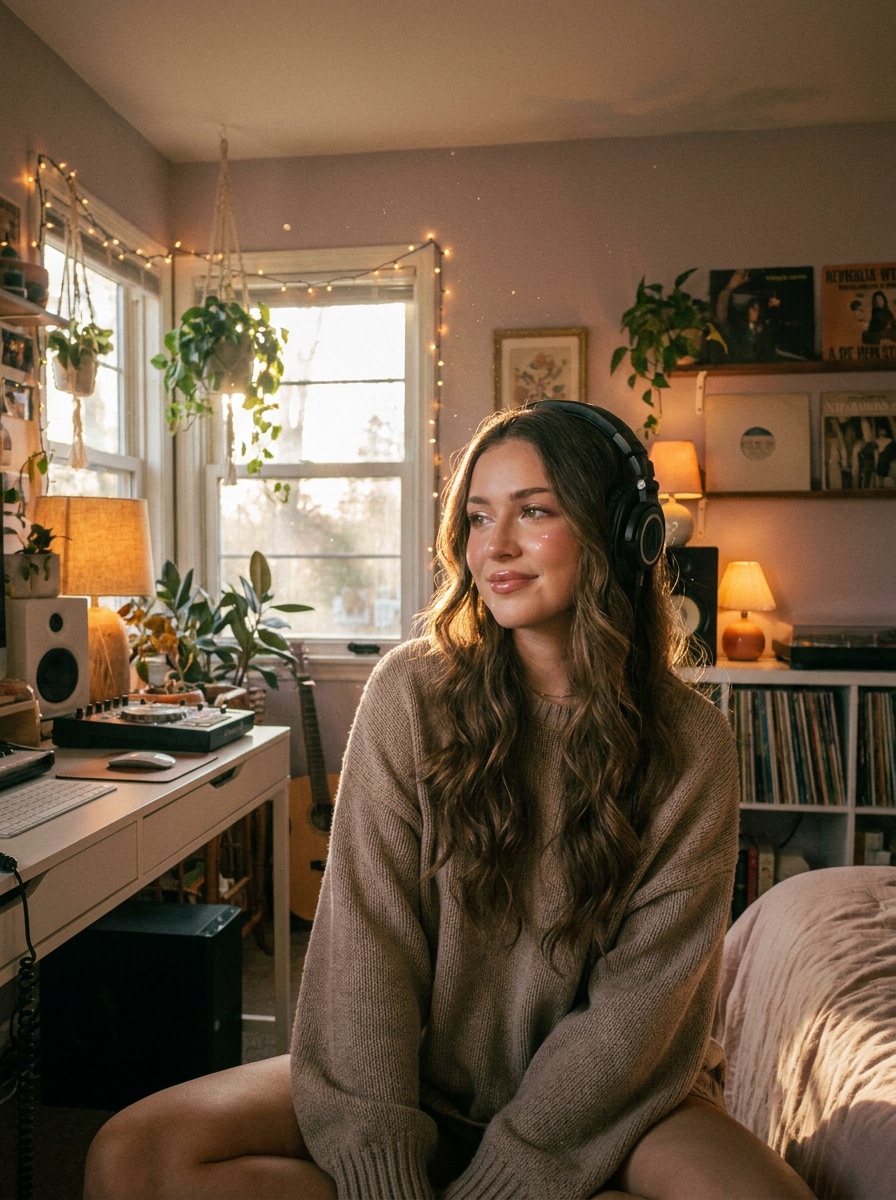
Upload Your Music and Scene Image
A cozy lofi room visual generated from music using Media.io AI
Sample Lofi Beat Audio
wave
wave
0:09
Generate Lofi MV ↗
Watch an AI-Generated Lofi Music Video Example
✓ AI Style ✓ Audio Synced ✓ Cozy Aesthetic ✓ Loop Ready

Why Choose Media.io for Lofi Music Video Creation

Visuals That Match the Mood

Media.io analyzes the tone and pace of your song to produce motion and lighting that match the chill atmosphere typical of lofi tracks. Each video unfolds with soft transitions and muted tones that make your beats feel alive. Whether you prefer dreamy landscapes or cozy indoor scenes, the generator adapts to your references seamlessly. It ensures every loop looks deliberate and cinematic instead of random animation.

Simple Workflow with Full Control

All you need is your audio file and a single still image such as a portrait, room setup, or album cover. Optionally, add a prompt to tweak stylistic details like fog, rain, or dusk tones. Media.io's streamlined interface automatically mixes your inputs into a cohesive MV without complex software. In minutes, you get results ready for upload or sharing on social media platforms.

Perfect for Content Creators and Musicians

Indie artists, beatmakers, and vloggers use the AI Lofi Generator to boost engagement with minimal effort. The soft, animated visuals enhance any chill playlist, podcast intro, or study stream background. With automatic fine-tuning, every clip looks professional enough for YouTube thumbnails and Instagram highlights. You can focus on music creation while Media.io handles the visuals for you.

Fast Rendering and Share-Ready Output

Media.io's cloud-based rendering delivers full-quality videos quickly, even for long audio tracks. Each export is optimized for smooth playback and loop compatibility. You can download or directly post your final MV to TikTok, Instagram, or YouTube Shorts. Save time and keep your creative workflow in one place without additional editing tools.

How to Make a Lofi Music Video Online

01

1. Upload Your Audio Track

Import your lofi song or ambient beat in MP3 or WAV format. The AI uses your music waveform to detect rhythm and emotion, setting the tone for the visual animation.

02

2. Add an Image or MV Cover

Upload a still photo or illustration that captures your song's mood, such as a cozy room, street scene, or portrait. Media.io uses it as the base frame for AI motion generation.

03

3. Customize and Generate Video

Optionally enter a short text prompt guiding color, lighting, or movement. Click Generate, wait a minute, and your lofi music video will be ready to preview and download.

What Creators Say About Media.io's Lofi Music Video Generator

user
Sophie L.

Indie Producer

star star star star star

"Perfect for Study Beats and Chill Playlists" I use this AI lofi video maker to turn my instrumentals into short MVs that loop nicely on YouTube. The visual motion aligns well with the mellow rhythm, giving my tracks a consistent vibe. I love how easy it is to upload my covers and get professional results without After Effects. It's been a great way to brand my chill channel content.

user
Marco D.

Visual Artist

star star star star star

"Smooth AI Rendering for Chill Scenes" The Media.io generator understands color tone and ambient flow way better than I expected. I tested it using my digital paintings and a beat sample, and it animated them beautifully. The output felt authentic to the slow, dreamy character of lofi animations. It's now my go-to tool whenever I need quick visuals that sync naturally with my music.

user
Yuna K.

YouTuber

star star star star star

"Great for Background Loops on Streams" I use the AI lofi generator for creating quiet background visuals when I stream or work. The generated videos feel alive but not distracting, which is perfect for study channels. Uploading and rendering take less than five minutes, saving me hours of editing. For long playlists or continuous loops, this workflow fits perfectly.

user
Isaac R.

Beatmaker

star star star star star

"High-Quality Lofi MV Output" Every AI lofi music video I've made on Media.io looks crisp and perfectly timed to my beats. The interface makes it simple for a non-video-editing musician like me. I appreciate that the results are consistent whether I upload a portrait or a landscape image. It really helps me focus more on sound design and less on video production hassle.

Frequently Asked Questions About AI Lofi Music Videos

1. What Formats Can I Upload for a Lofi Music Video?

You can upload standard audio formats like MP3, WAV, or M4A for your song. For visuals, Media.io supports JPG and PNG images with sufficient resolution. The system processes both elements and generates animated content automatically. Make sure your audio is under 10 minutes for the fastest rendering experience.

Yes, you can guide the AI by adding short text prompts describing the mood or look you want, such as 'rainy city night' or 'warm bedroom lighting. ' The generator uses this input along with your image and audio to shape the animation. You can experiment with multiple runs for slightly different outcomes. Each version will sync with your original track's rhythm.

You can share your generated videos on YouTube, Instagram Reels, TikTok, and any other social media platform. The exports are optimized for online streaming and looped playback. Many creators also use them as visualizers for podcasts, background streams, or digital album art. Just remember to upload your final video under your own channel rights.

No, Media.io produces clean outputs without intrusive branding. Free users may have minor resolution limits, but no unwanted logos are added. You can upgrade your plan for higher render quality and longer durations. This ensures your aesthetic remains consistent across all your chill music uploads.

On average, a one- to three-minute track takes about one to two minutes to process. Longer audio files or higher-resolution images may require slightly more time. The AI handles rendering in the cloud, freeing up your device from heavy computation. Once completed, your preview and download options appear automatically in your account.

Media.io Online AI Tools Quality Rating:
vote 4.7 (162,357 Votes)







