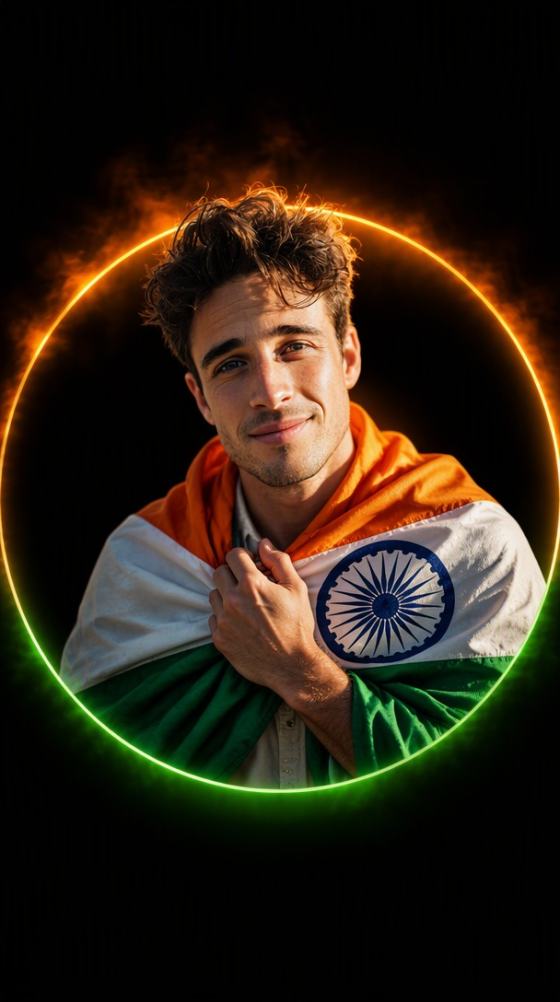
Prompt visto il 15 agosto: Prompt fotografici gratuiti per il Giorno dell'Indipendenza 2026

Prova un prompt visto il 15 agosto gratuitamente e crea foto patriottiche con AI per ragazze, ragazzi e coppie. Esplora i prompt fotografici speciali per il Giorno dell'Indipendenza e genera la tua modifica del 15 agosto online con Media.io.
All Submissions

Independence Day Special Photo Prompt

Turn an everyday portrait into a powerful 15 August visual with an Independence Day special photo prompt. Upload your photo, add a patriotic AI prompt, and create an Indian Independence Day portrait with tricolor lighting, the Indian flag, cinematic backgrounds, and social-ready styling—no advanced editing skills required.

Create Independence Day Photo

Upload a photo, enter a prompt, and create your patriotic AI portrait.

Why Create Independence Day Photos with Media.io?

Create a personalized 15 August portrait for Instagram, WhatsApp, profile pictures, school events, community greetings, or Independence Day posters—without building the design manually.

Turn a Simple Portrait into a Patriotic Visual

Start with an existing selfie or portrait and use an Indian Independence Day special photo prompt to add flags, tricolor lighting, patriotic clothing, or a cinematic background while keeping the result personal.

Create Your Own Look Beyond Fixed Templates

Describe the style you actually want—from a white kurta and tricolor stole to a saree portrait, poster-style composition, or subtle saffron-white-green lighting—without being limited to one preset.

Easy Alternative for Gemini AI Prompt Users

Already experimenting with Gemini AI Independence Day prompts? Use the same natural-language prompt approach in Media.io and adjust the scene, clothing, lighting, pose, and background to explore different results.

Made for Fast Social Sharing

Create Independence Day profile photos, Instagram posts, WhatsApp status images, Facebook visuals, digital greetings, and 15 August posters without manually masking subjects or rebuilding backgrounds.

How to Use an Independence Day Special Photo Prompt

01

Step 1: Upload Your Photo

Choose a sharp, front-facing photo of yourself, a friend, or a couple. Good lighting and a visible face help preserve facial details more accurately.

02

Step 2: Enter Your Independence Day Photo Prompt

Copy an Independence Day special photo prompt or write your own. Describe the Indian flag, saffron-white-green lighting, Ashoka Chakra details, clothing, pose, camera style, and background you want.

03

Step 3: Generate and Share

Generate your patriotic portrait, preview the result, refine the prompt if needed, and save your favorite image for Instagram, WhatsApp, Facebook, profile pictures, or Independence Day greetings.

Independence Day Special Photo Prompt Ideas

Start with one of these prompt ideas, then customize the clothing, pose, lighting, flag placement, background, or composition to match your photo.

Cinematic Indian Independence Day Portrait

Create a cinematic portrait of the person in the uploaded photo celebrating Indian Independence Day. Preserve the person’s recognizable facial features and natural appearance. Add a majestic Indian tricolor flag flowing in the background, warm saffron and green rim lighting, subtle Ashoka Chakra details, realistic skin texture, shallow depth of field, and a premium patriotic poster composition.

Indian Flag Independence Day Photo Prompt

Transform the uploaded portrait into an Indian Independence Day special photo. Keep the person’s face recognizable and natural. Place a large Indian national flag behind the subject, add saffron-white-green atmospheric lighting, soft celebratory particles, realistic fabric details, professional portrait lighting, and a clean patriotic composition.

15 August Social Media Profile Photo

Create a stylish 15 August Indian Independence Day profile picture using the uploaded portrait. Preserve the face and hairstyle. Add elegant tricolor lighting, a subtle Indian flag background, an Ashoka Chakra-inspired circular light element, dramatic contrast, and a centered social-media-ready composition.

Tricolor Cinematic Portrait

Transform the uploaded portrait into a cinematic Independence Day photograph. Preserve the face and identity. Use saffron light from one side, green light from the other, soft white light on the face, subtle Indian flag elements in the background, natural skin texture, and professional portrait photography.

15 August Poster-Style Portrait

Create a premium 15 August Independence Day poster portrait from the uploaded image. Keep the person’s face realistic and recognizable. Add the Indian tricolor flag, subtle Ashoka Chakra design elements, atmospheric light rays, cinematic shadows, a confident pose, and an inspiring patriotic atmosphere.

Traditional Independence Day Portrait

Create a realistic Indian Independence Day portrait from the uploaded photo. Preserve the subject’s recognizable facial features. Dress the person in a white kurta, saree, or other traditional outfit with subtle saffron and green accents. Add a flowing Indian flag, warm sunrise lighting, clean depth of field, and a respectful festive mood.

What Can You Create with an Independence Day Special Photo Prompt?

Independence Day Profile Pictures

Refresh your Instagram, WhatsApp, Facebook, or other social profile with a patriotic portrait using tricolor lighting, a flag backdrop, subtle Ashoka Chakra elements, or a clean cinematic look.

15 August Social Media Posts

Create scroll-stopping Independence Day content for feeds, stories, status updates, and celebration posts. Experiment with cinematic portraits, poster compositions, traditional clothing, or modern patriotic aesthetics.

Independence Day Greetings

Turn a personal portrait into a shareable greeting image for friends, family, colleagues, communities, or followers. A personalized AI-generated visual can feel more distinctive than a generic 15 August template.

What Users Say About Media.io

user
Aarav Mehta

Content Creator

“My Face Stayed Natural.” I used a prompt seen girl style with a white saree and tricolor background. The result still looked like me and was ready for my Independence Day Instagram post.

user
Priya Sharma

Social Media Creator

“Fast Patriotic Poster Creation.” Media.io helped me create several 15 August concepts without manually replacing backgrounds. Changing clothes and lighting through prompts was especially useful.

user
Rohan Verma

Student

“Easy Personalized Festive Posts.” I added our team members’ names and generated matching Independence Day images for social media. The workflow was simple without advanced editing experience.

FAQs About Independence Day Special Photo Prompts

1. What is an Independence Day special photo prompt?

An Independence Day special photo prompt is a text instruction that tells an AI image tool how to create or transform a photo for an Independence Day theme. For Indian Independence Day, prompts often describe the Indian tricolor, national flag, Ashoka Chakra, saffron-white-green lighting, patriotic clothing, cinematic backgrounds, and 15 August celebration themes.

You can use the prompt examples on this page as starting points and customize them for your own image. Change details such as clothing, background, camera angle, lighting, flag placement, or portrait style, then generate your own version with Media.io.

The best prompt depends on the result you want. For a realistic portrait, describe facial preservation, natural skin texture, professional portrait lighting, the Indian flag, controlled tricolor lighting, and a clean background. Add clothing, pose, camera style, and atmosphere only when they support the main composition.

Yes. Many Gemini AI photo prompts use natural-language instructions describing the subject, clothing, lighting, background, mood, and photographic style. You can adapt the same prompt-writing approach in Media.io, although different AI models may produce different visual results.

Start with a clear, high-quality portrait and avoid overloading the prompt with too many competing elements. Ask the AI to preserve recognizable facial features and use terms such as “realistic photography,” “natural skin texture,” and “professional portrait lighting.” Controlled saffron and green rim light usually looks more natural than covering the entire face with strong tricolor effects.

Media.io Online AI Tools Quality Rating:
vote4.7 (162,357 Votes)



