
















MiniMax H3 Max: vídeo con IA instantáneo con sonido nativo
Convierte una foto en un vídeo cinematográfico con sonido en aproximadamente un minuto. El generador de vídeo con IA MiniMax H3 Max en Media.io anima imágenes fijas con control preciso de cámara, audio sincronizado nativo y personajes consistentes entre tomas, impulsado por el modelo MiniMax H3 Max post-entrenado de fal.
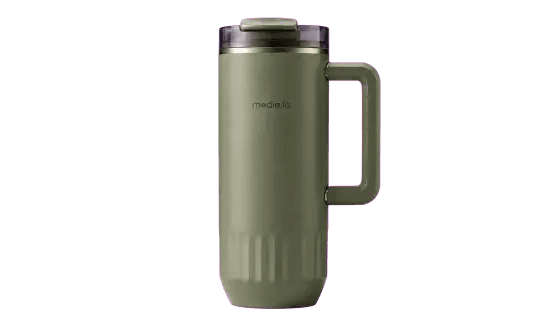
Usa las imágenes cargadas como única referencia para la apariencia del producto y crea un vídeo de demostración de UI/UX de página de destino de sitio web oficial de producto de alta gama, de 15 segundos, en formato horizontal 16:9. El producto central es el vaso verde estilo militar con asa y función de aislamiento térmico que se muestra en la imagen. A lo largo de todo el proceso, mantén estrictamente el color del cuerpo del vaso, la proporción cilíndrica, la tapa transparente, la estructura de apertura superior, el asa cuadrada derecha, el anillo decorativo metálico y el logotipo ""media.io"", sin cambiar la forma del producto ni crear otros modelos de vasos. El diseño general adopta un estilo funcional oscuro para exteriores y el estilo visual del sitio web oficial de una marca deportiva de alta gama: fondo negro puro, entrelazado con texturas de fibra de carbono oscura, metal cepillado y tela impermeable, e incorporando bandas de luz dinámica verde militar y dorada cálida que fluyen rápidamente. El uso de fuentes sans-serif sobredimensionadas, rugosas y potentes, ligeramente inclinadas, con el texto creando oclusión frontal y trasera con el producto como gráfico de fondo. El diseño de la página es sofisticado, contenido, con sensación de velocidad y fuerza. 0 - 4 segundos: Comienza desde la pantalla principal del sitio web oficial del producto. El vaso térmico está suspendido en el centro de la pantalla en una proporción extremadamente grande. Un título gigante claro y legible ""BUILT TO GO"" aparece en el fondo. El producto se acerca lentamente y gira ligeramente. La luz verde y dorada barre rápidamente el cuerpo del vaso, destacando el material mate, la tapa transparente, el anillo metálico y el asa ancha. En la parte superior se conserva una barra de navegación minimalista, y en la parte inferior se disponen algunos parámetros del producto y miniaturas. 4 - 6 segundos: El ratón se desplaza hacia abajo en la página web, y la primera pantalla sale suavemente hacia arriba. La cámara sigue la página hacia el área de detalles del producto. La tapa, el asa, el cuerpo del vaso y los detalles de la base aparecen uno a uno en tarjetas horizontales. El desplazamiento tiene una inercia natural y un ligero desenfoque de velocidad, pero la información del producto permanece clara. 6 - 10 segundos: Entra en la sección de funciones del producto. En el lado izquierdo de la página se muestra un título claro ""ALL-DAY TEMPERATURE"", y en el lado derecho se muestra un vaso térmico completo suspendido. El producto gira lenta y establemente en un ángulo de un cuarto de vuelta. Corrientes de aire frío abstractas, gotas de agua finas y ondas metálicas aparecen en el fondo, demostrando el rendimiento de aislamiento térmico y conservación de frío. Cuando el ratón se sitúa sobre el botón de función, el producto se agranda ligeramente y el fondo cambia de negro a gris claro, con los colores del texto y los botones invirtiéndose de forma sincronizada; solo se cambian el fondo de la UI y los colores de la interfaz, sin alterar el vaso térmico en sí. 10–12 segundos: Continúa desplazándote hasta el área de funciones ""LEAKPROOF LID"" y ""EASY-GRIP HANDLE"". Usa primeros planos de la tapa y el asa, con líneas geométricas señalando los detalles estructurales. Los elementos de la página se deslizan rápidamente y se detienen con estabilidad en secuencia. 12-15 segundos: La página web vuelve suavemente a la pantalla de inicio, el vaso térmico se redimensiona al centro de la pantalla, el título gigante ""BUILT TO GO"" se sitúa detrás del producto. Un botón cápsula claro ""ADD TO CART"" aparece en la parte inferior. El ratón se mueve con precisión al centro del botón y activa el efecto hover: el botón se agranda, se vuelve blanco y negro y emite un brillo verdoso; el producto permanece estable. Finalmente, se mantiene en el visual principal completo del producto y el botón de compra. Tomas y animaciones: Desplazamiento vertical suave de la página web, rotación flotante del producto, acercamiento lento, efecto de paralaje de capas, barrido de bandas de luz a alta velocidad, deslizamiento de tarjetas, acercamiento con hover del ratón, inversión de color de la UI. Todos los movimientos son compactos y fluidos, semejando la demostración de un sitio web real e interactivo de productos de alta gama. Restricciones: No se deben alterar el color, la estructura, la posición del asa, la forma de la tapa ni el logotipo de marca del vaso térmico; el producto no debe transformarse en otros modelos de vasos; no se permiten figuras ni manos; se prohíbe el desempaquetado; el vaso no debe ablandarse, doblarse, derretirse ni deformarse; no se permiten códigos ilegibles, etiquetas incorrectas ni productos adicionales; la inversión de color solo afecta al fondo web, botones y texto; el producto debe permanecer siempre claro, completo y estable.
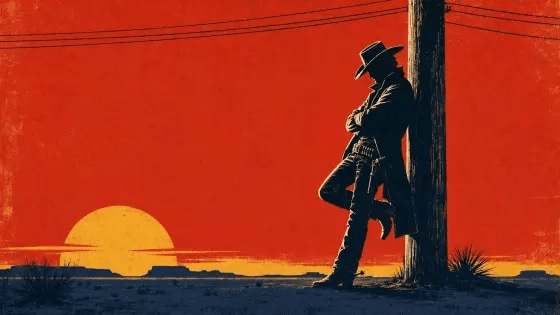
Usando la imagen de referencia adjunta como fotograma de apertura exacto y referencia de personaje,
RITMO — MÁXIMA PRIORIDAD:
Edita toda la secuencia con un ritmo enérgico de jazz-western a 150 BPM con golpes rápidos de caja, pulsos de contrabajo, stabs de metales afilados, palmadas, sonidos de espuelas, chasquidos de látigo y clics cortos de cilindro de revólver. Cada corte, pose, movimiento de cámara, barra gráfica y tipografía debe caer con precisión en un tiempo o medio tiempo.
Crea al menos 20–24 tomas claramente diferentes en 15 segundos. La mayoría de las tomas duran solo 0,2–0,7 segundos. Ninguna toma puede permanecer visualmente sin cambios durante más de 0,8 segundos. Mantén una progresión visual constante y una energía en escalada.
Usa solo micro-congelaciones muy cortas de 2–4 fotogramas, aproximadamente 0,08–0,15 segundos, seguidas inmediatamente de movimiento explosivo. Nunca mantengas un fotograma congelado durante un tiempo completo o varios segundos. El ritmo debe sentirse como: estallido—golpe-parada—estallido—corte seco—estallido.
ESTILO VISUAL:
Crea una secuencia de títulos de spaghetti western de los años 60 de alta energía que combine diseño gráfico de mediados de siglo, composición inspirada en Saul Bass, geometría Bauhaus, carteles de western pulp, viñetas de cómic y textura de serigrafía rugosa.
Renderiza al vaquero y los detalles ambientales como siluetas negras audaces de alto contraste. Usa solo rojo saturado, amarillo mostaza, azul marino oscuro, negro y pequeños toques crema. Cada corte debe introducir una nueva disposición de color, encuadre, forma gráfica o ángulo de cámara.
Usa composiciones diagonales dramáticas, círculos de sol sobredimensionados, líneas de desierto horizontales afiladas, cables de telégrafo en rápido movimiento, cámaras de revólver giratorias, primeros planos de botas y espuelas, siluetas de abrigos, primeros planos del ala del sombrero, pantallas divididas, obturadores geométricos, círculos en expansión, barras diagonales y tipografía audaz.
LÍNEA DE TIEMPO Y DENSIDAD DE TOMAS:
0,0–1,5 s — APERTURA RÁPIDA:
Comienza desde la imagen de referencia exacta durante solo 0,2 segundos.
Inmediatamente realiza cuatro cortes rápidos:
silueta amplia del vaquero contra cielo rojo → zoom rápido al ala del sombrero → cables de telégrafo cruzan el fotograma → primer plano extremo de ojos ensombrecidos.
Inserta un destello negro de 3 fotogramas entre tomas seleccionadas.
El vaquero se separa bruscamente del poste en el primer golpe de metales principal.
1,5–4,0 s — MONTAJE DE IMPACTO DE DETALLES:
Crea seis primeros planos rápidos, cada uno de aproximadamente 0,3–0,5 segundos:
la bota golpea el suelo → la espuela gira → la cola del abrigo se sacude → los dedos se flexionan junto a la funda → la hebilla del cinturón destella → el cilindro del revólver gira.
Alterna fondos rojo, amarillo mostaza y azul marino oscuro en cada corte.
Usa zooms rápidos, paneos de latigazo, alejamientos bruscos, barridos diagonales y congelaciones de pose de 2–4 fotogramas.
4,0–7,0 s — CAMINATA EN ACELERACIÓN:
Muestra al vaquero caminando rápidamente a través de un campo desértico plano de color amarillo mostaza.
Alterna entre vista lateral de cuerpo completo, botas en ángulo bajo, silueta gráfica cenital, primer plano extremo de la mano oscilante y viñetas de cómic en pantalla dividida.
Su ritmo al caminar debe caer exactamente sobre la percusión.
El poste de telégrafo y las líneas del desierto pasan a toda velocidad en direcciones opuestas para crear un paralaje intenso y sensación de velocidad.
No muestres una caminata lenta continua: fragmenta el movimiento en trozos rítmicos rápidos.
7,0–10,0 s — ESTALLIDO DE ACCIÓN GEOMÉTRICA:
Divide la pantalla en dos, tres y luego cuatro viñetas de cómic.
En diferentes viñetas, muestra el sombrero girando, las botas deteniéndose, el abrigo abriéndose, la mano acercándose al revólver y el vaquero mirando bruscamente hacia la cámara.
Las viñetas se abren y cierran de golpe en tiempos consecutivos.
Usa destellos alternantes de rojo, amarillo, azul marino y negro a pantalla completa.
Añade barras horizontales rápidas, círculos de sol en expansión, formas de estrella giratorias y barridos de sombras angulares.
Cada composición cambia en menos de 0,5 segundos.
10,0–13,0 s — CONSTRUCCIÓN DEL CLÍMAX:
Aumenta aún más la velocidad de edición con 8–10 cortes:
ojos → mano → funda → espuela → empuñadura del revólver → abrigo → cable de telégrafo → sol sobredimensionado → silueta completa del vaquero.
Usa primeros planos progresivamente más cerrados y zooms rápidos más intensos.
El vaquero alcanza el revólver, gira bruscamente y adopta una pose poderosa de pistolero.
Usa una parada seca de 3 fotogramas, luego corta inmediatamente al siguiente ángulo.
Sin cámara lenta ni pausas largas de suspenso.
13.0–15.0s — IMPACTO FINAL:
Utiliza tres falsos finales rápidos:
silueta de vaquero contra amarillo → corte seco a primer plano extremo en azul marino → corte seco a plano general en rojo.
En el golpe musical final, revela al vaquero junto al poste de telégrafo contra un cielo rojo sólido y un sol amarillo mostaza sobredimensionado.
El título exacto "OUTLAW" irrumpe en el lado izquierdo vacío como grandes letras geométricas color crema.
Mantén la composición final solo durante los últimos 0.6 segundos, luego termina con un corte abrupto inmediato.


En esta página Explorar secciones
¿Qué es MiniMax H3 Max?
MiniMax H3 Max es una versión con post-entrenamiento del modelo de vídeo MiniMax H3, con post-entrenamiento y optimización de inferencia por fal Research. En Media.io, puedes usarlo en un flujo de trabajo sencillo de Imagen a vídeo para animar imágenes fijas con control preciso de cámara, Audio sincronizado nativo y personajes consistentes entre planos.
Generación rápida
Itera rápidamente: MiniMax H3 Max está optimizado para velocidad y genera un vídeo de 15 segundos a 768p en modo de primer fotograma en aproximadamente 48 segundos.
Audio sincronizado nativo
El vídeo y el sonido correspondiente se generan en la misma pasada: diálogos, foley, ambiente y música sin necesidad de un paso de doblaje aparte.
Primer y último fotograma
Proporciona una imagen de inicio y una imagen final opcional, y MiniMax H3 Max genera el movimiento coherente que las conecta en un solo plano.
Consistencia entre planos
A lo largo de múltiples planos en una sola generación, está diseñado para mantener el rostro, cabello, ropa y proporciones de un personaje reconocibles.
Diseñado para velocidad, control y precisión de Audio
Genera rápido, itera más
MiniMax H3 Max está optimizado para la velocidad: un clip de 15 segundos a 768p en modo de primer fotograma puede completarse en unos 48 segundos, para que puedas probar ideas y perfeccionar prompts sin largas esperas.
Obtén Audio y vídeo en una sola pasada
Describe la escena y el sonido juntos, y MiniMax H3 Max genera diálogos, efectos foley, música y ambiente que coinciden con el vídeo, sin doblaje separado ni sincronización manual.
Dirige la cámara con precisión
Usa instrucciones cinematográficas claras —seguimiento en ángulo bajo, acercamiento, zoom y inclinación— y la cámara se mantiene fija en el sujeto mientras coordina movimiento y ritmo.
Anima desde el primer fotograma hasta el último
Sube una imagen de apertura y una imagen de cierre opcional, y MiniMax H3 Max genera el movimiento completo y coherente entre ambas, ideal para transiciones, elevaciones y cambios de escena.
Mantén la consistencia de personajes y estilo
A lo largo de múltiples tomas en una sola generación, MiniMax H3 Max está diseñado para mantener las características de un personaje y un estilo artístico unificado: fotorrealismo, pixel art, claymation o Animación en volumen.
Cómo crear prompts en MiniMax H3 Max para vídeos narrativos
Piensa en momentos, no en palabras clave. Dale a MiniMax H3 Max una apertura clara, dos o tres momentos visuales clave, señales de sonido sincronizadas y un final deliberado. Para imagen a vídeo, describe lo que debe moverse o transformarse en lugar de repetir lo que ya es visible.
Demasiado vago
"Una zapatilla futurista se transforma."
Dirige el vídeo momento a momento
"Una zapatilla de running plateada descansa sobre una plataforma de cristal negro en un estudio oscuro. Comienza con un acercamiento macro lento mientras finas líneas de luz azul recorren la suela. La zapatilla se separa en capas flotantes —malla, amortiguación y suela exterior— mientras la cámara realiza una media órbita suave alrededor del producto. Cada componente vuelve a ensamblarse en sincronía con clics mecánicos nítidos y un pulso electrónico ascendente. Termina con una toma hero limpia con la zapatilla completa centrada bajo una luz de contorno brillante, los reflejos se asientan mientras la música se resuelve."
¿Qué puedes crear con el generador de vídeo con IA MiniMax H3 Max?
Haz que los personajes realmente hablen — con sonido
La mayoría de las herramientas de imagen a vídeo te entregan movimiento sin sonido. MiniMax H3 Max genera el movimiento del personaje y su voz o diálogo en la misma pasada, así que un retrato estático puede decir una frase, una mascota puede presentar un producto y un Avatar con IA puede narrar una escena, sin necesidad de un paso separado de Texto a voz o Sincronización labial que ensamblar.
- Da vida a retratos, mascotas y avatares con diálogo sincronizado y sonido de ambiente en una sola generación.
- Omite el flujo de TTS más sincronización labial — el audio viene integrado en el clip.
- Ideal para explicaciones con presentador, introducciones de personajes y vídeos con presentador de IA.
Escenas multitoma que mantienen la consistencia
La mayoría de los modelos fallan en el momento del corte: una nueva toma significa un nuevo personaje. MiniMax H3 Max está post-entrenado para mantener la apariencia de un sujeto a lo largo de múltiples cortes dentro de una generación, para que puedas crear el guion gráfico de una apertura, un cierre y los momentos intermedios y obtener una secuencia que se perciba como la misma persona, producto o lugar. Aporta tu propia referencia de personaje como fotograma de apertura y dirige cada corte por separado.
- Construye un arco narrativo corto — introducción, acción, reacción — sin que el sujeto cambie entre tomas.
- Corta entre ángulos y mantén al personaje reconocible (revisa y regenera cualquier toma que falle).
- Ideal para cortometrajes centrados en personajes, minianuncios de marca y secuencias de prueba de concepto.
Vídeos de producto que suenan como un anuncio terminado
Introduce una sola foto de producto y obtén un clip que se mueve y suena terminado: el silbido de una revelación, el clic de un mecanismo, el tono ambiente de un estudio. Como MiniMax H3 Max genera el sonido en la misma pasada que el movimiento, obtienes un spot audiovisual de producto en un solo render en lugar de tres: imagen fija, vídeo silencioso y luego un paso separado de diseño de sonido y sincronización.
- Convierte una imagen de producto en un clip de revelación o demostración con foley y ambiente a juego.
- Dirige movimientos de cámara estilo estudio — acercamiento, órbita, inclinación — con el sonido generado a medida.
- Salida a 480p / 768p en 5, 10 o 15 segundos para adaptarse a la plataforma donde publiques.
Transiciones de primer y último fotograma, generadas en el medio
Dale a MiniMax H3 Max un fotograma de inicio y un fotograma final opcional, y genera el movimiento completo y coherente que los conecta: una persona girando, una puerta abriéndose, un cambio de día a noche. Como el modelo está post-entrenado sobre la pila de imagen a vídeo de H3, los fotogramas intermedios se mantienen cohesionados en lugar de deformarse, y el sonido sincronizado acompaña al movimiento en lugar de añadirse después.
- Controla tanto el estado inicial como el final — no solo el fotograma de apertura.
- Obtén transiciones, revelaciones y cortes de continuidad limpios con movimiento que conecta las dos imágenes.
- Combina la transición visual con sonido generado que coincide con la acción.
Cómo crear un vídeo con MiniMax H3 Max en Media.io
Sube una imagen, describe cómo quieres que se mueva y suene, y luego genera tu vídeo con MiniMax H3 Max optimizado para velocidad.
Sube tu imagen
Elige un retrato, foto de producto, obra de arte o paisaje que quieras animar. Para obtener el mejor resultado, usa una imagen clara con un sujeto reconocible.
Añade movimiento y sonido
Describe lo que debe ocurrir en el vídeo. Puedes incluir el movimiento del sujeto, la dirección de cámara, diálogos, música, ambiente o Efectos de sonido.
Genera y descarga
Selecciona MiniMax H3 Max y genera tu vídeo. Previsualiza el resultado, prueba otra versión si es necesario, y luego descarga y comparte tu favorito.
Genera con MiniMax H3 MaxMiniMax H3 Max vs MiniMax H3
| Característica | MiniMax H3 | MiniMax H3 Max |
|---|---|---|
| Resolución máxima | 768P / 2K | 480P / 768P |
| Audio sincronizado nativo | Solo entrada de Audio | Sí, generado en la misma pasada |
| Velocidad de generación (15 s, 768p) | Estándar | ~48 segundos (la ruta Turbo es aún más rápida) |
| Consistencia de personajes entre tomas | Enfoque de toma única | Diseñado para mantenerla entre cortes |
| Entrada de Imagen a vídeo | Fotograma de apertura / primer y último fotograma | Primer y último fotograma (post-entrenado) |
| Ideal para | Generación de toma única en alta resolución | Vídeo multitoma rápido, sincronizado con sonido y consistente |
Lo que dicen los creadores sobre MiniMax H3 Max

Creador de contenido con IA

"La velocidad es realmente impresionante." Un clip de 15 segundos con sonido en menos de un minuto significa que puedo iterar ideas en lugar de esperar entre renders.

Especialista en marketing digital
"Audio y vídeo en una sola pasada." Obtener sonido sincronizado al mismo tiempo que el movimiento significa que me salto un paso completo de edición y los resultados se sienten más acabados.

Cineasta independiente
"Excelente para la consistencia en tomas múltiples." MiniMax H3 Max mantiene la apariencia del personaje correcta entre cortes, así que puedo construir una secuencia corta sin rehacer cada toma desde cero.
Preguntas frecuentes sobre el modelo de vídeo con IA MiniMax H3 Max
1. ¿Qué es MiniMax H3 Max?
MiniMax H3 Max es una versión post-entrenada por fal del modelo de vídeo MiniMax H3, optimizada para una generación más rápida de imagen a vídeo con audio sincronizado nativo y mayor consistencia entre tomas. En Media.io te permite convertir una sola imagen fija en un clip de vídeo con sonido sincronizado en un solo flujo de trabajo.
2. ¿Qué tan rápido es MiniMax H3 Max?
Un clip de 15 segundos a 768p a partir de un primer fotograma normalmente se renderiza en alrededor de 48 segundos en la ruta estándar, con una ruta Turbo más rápida disponible para previsualizaciones más ágiles. Los tiempos reales varían según la resolución, la duración y la demanda.
3. ¿Puede MiniMax H3 Max generar audio?
Sí. MiniMax H3 Max genera audio sincronizado en la misma pasada que el vídeo, de modo que el movimiento y el sonido llegan juntos en lugar de como un paso de edición separado.
4. ¿Soporta MiniMax H3 Max imagen a vídeo con primer y último fotograma?
Sí. Puedes proporcionar un primer fotograma, o tanto un primer como un último fotograma, para guiar el inicio y el final del movimiento. Esto facilita controlar cómo comienza y termina un clip.
5. ¿Qué resoluciones y duraciones soporta MiniMax H3 Max?
MiniMax H3 Max soporta 480p (la opción predeterminada) y 768p como salida, con duraciones de clip de 5, 10 o 15 segundos. Elige la combinación que se ajuste a tu plataforma y presupuesto de almacenamiento.
6. ¿Mantiene MiniMax H3 Max la consistencia de los personajes entre tomas?
MiniMax H3 Max está diseñado para mantener la consistencia de los personajes en múltiples tomas. Los resultados no están garantizados en todos los casos, así que revisa y usa Regenerar si una toma no conserva el aspecto que deseas.
7. ¿Qué estilos y movimientos de cámara puedo indicar en el prompt?
Puedes describir movimientos de cámara como seguimiento, acercamiento, zoom e inclinación, y estilos visuales que van desde fotorrealismo hasta pixel art, claymation y Animación en volumen. Los prompts claros y específicos te dan más control sobre el resultado.
8. ¿Es gratuito usar MiniMax H3 Max en Media.io?
Hay créditos gratuitos disponibles para que puedas probar MiniMax H3 Max sin pagar, y los planes de pago desbloquean más generaciones y opciones de mayor resolución. Inicia sesión para ver el Saldo de crédito actual y los detalles del plan.
Más herramientas de vídeo con IA
 4.7 (162,357 votos)