Klicken oder ziehen, um hochzuladen, oder wählen Sie aus Meine HistorieKlicken Sie zum HochladenMeine Historie
Keine Ideen? Erstellen Sie zuerst ein Bild. >
Laden Sie jpg-, jpeg- oder png-Bilder bis zu 50 MB hoch, mit einer Mindestbreite/-höhe von 300 px.
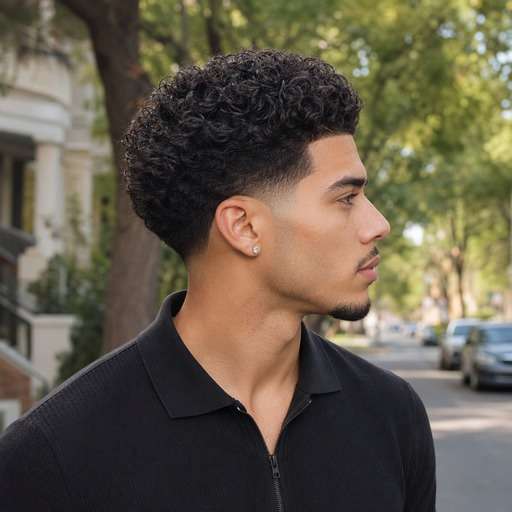
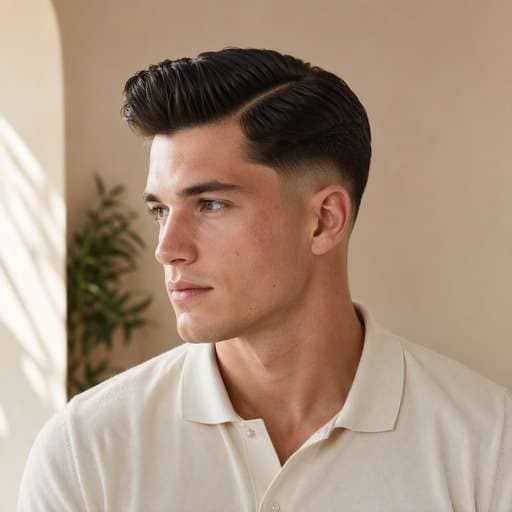
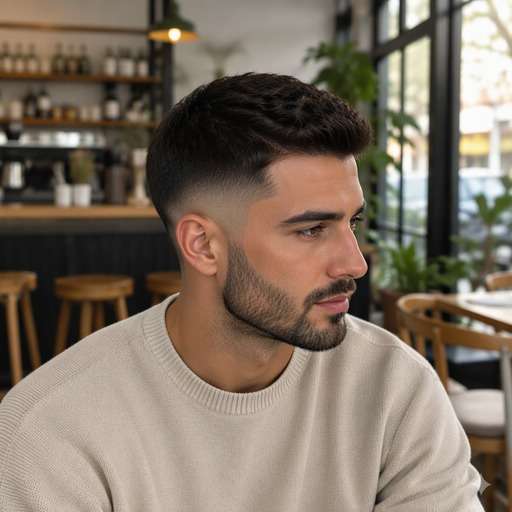
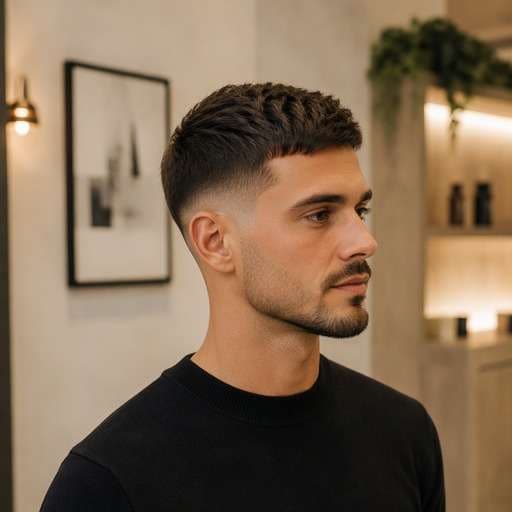
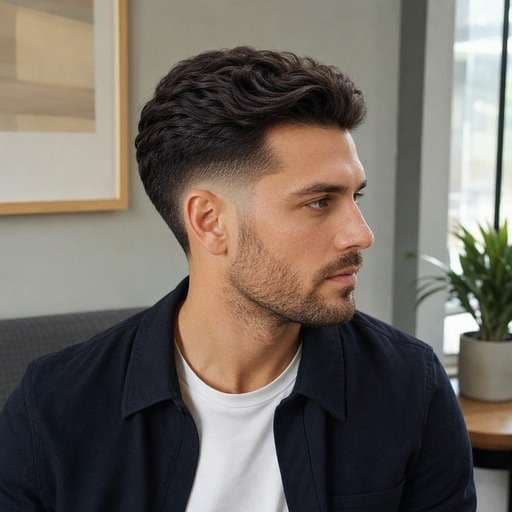
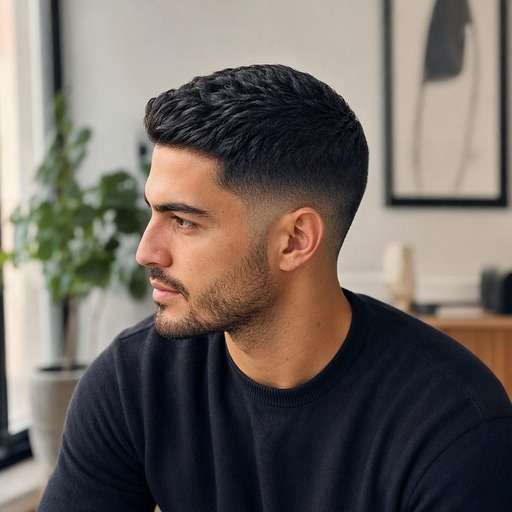
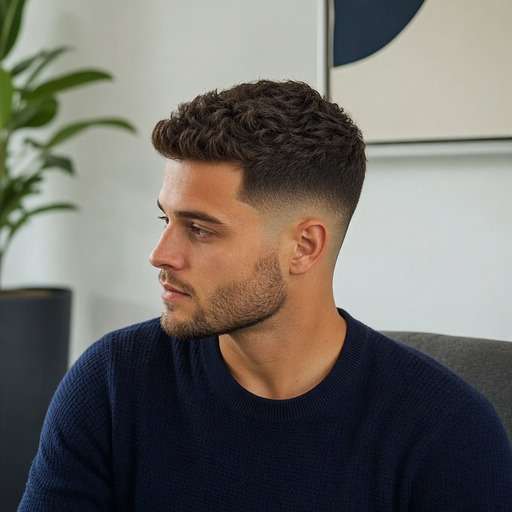
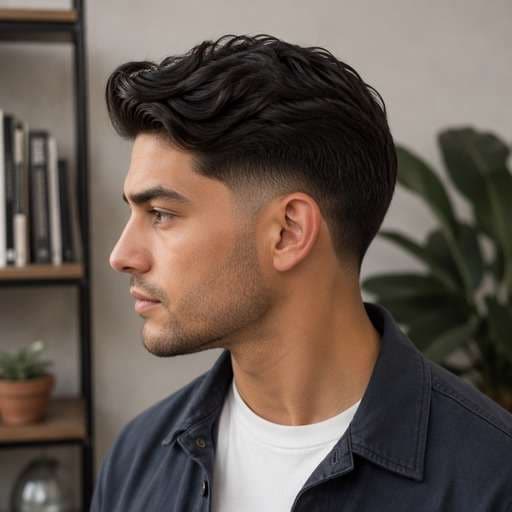
Preview a Low Drop Fade From the Side
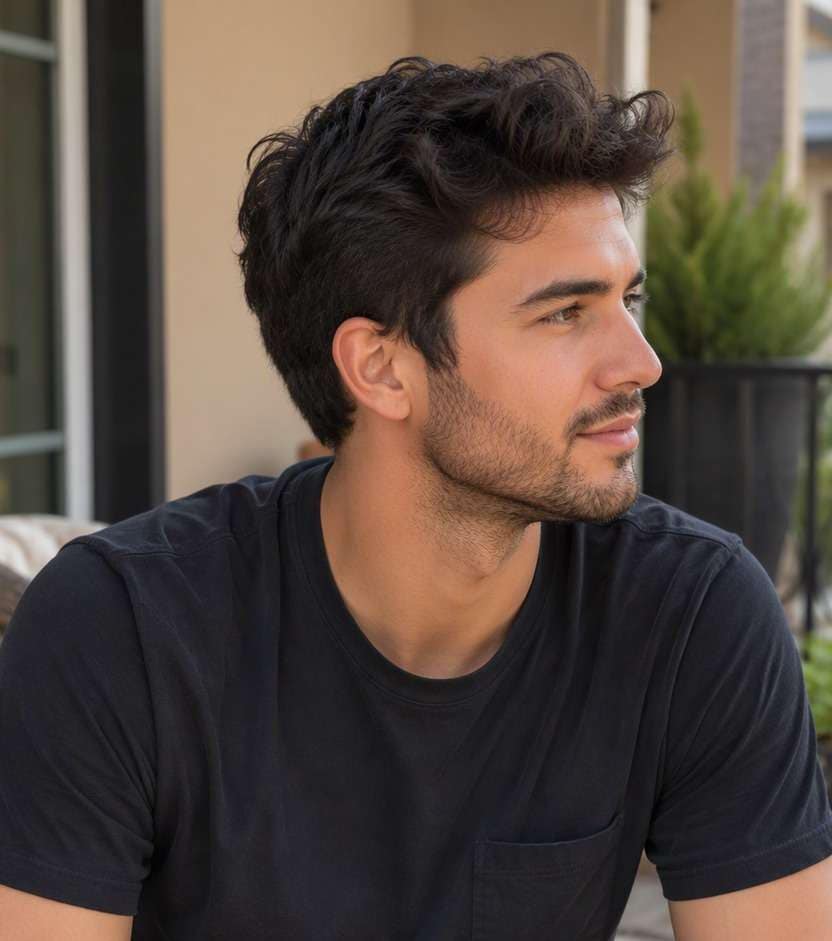
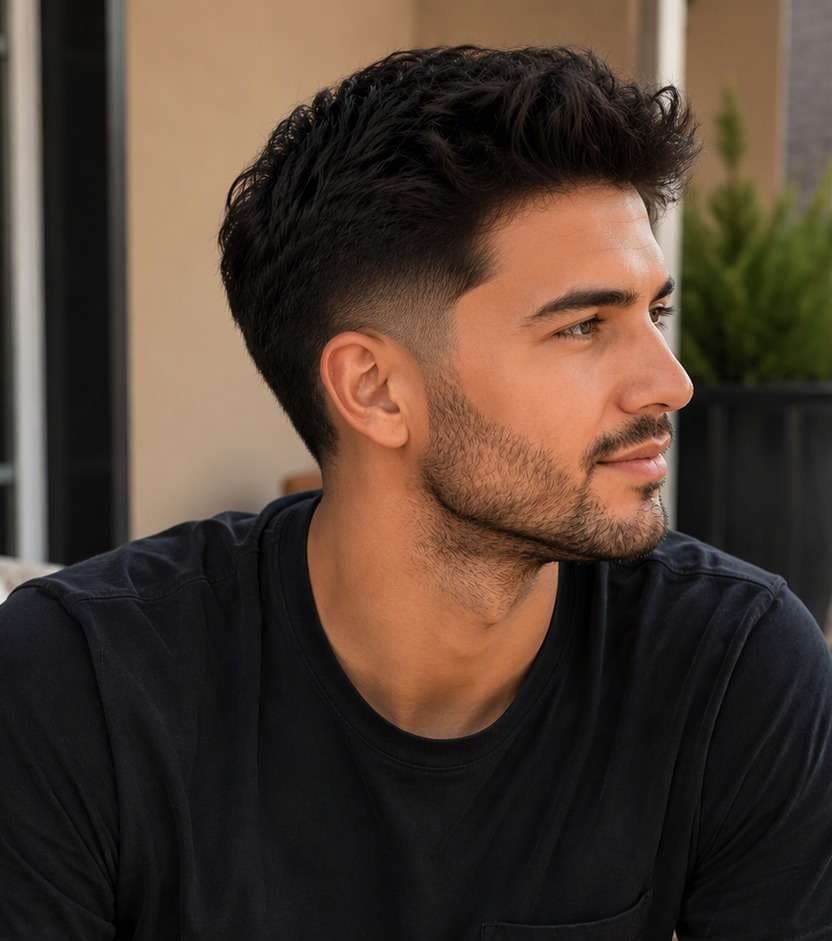
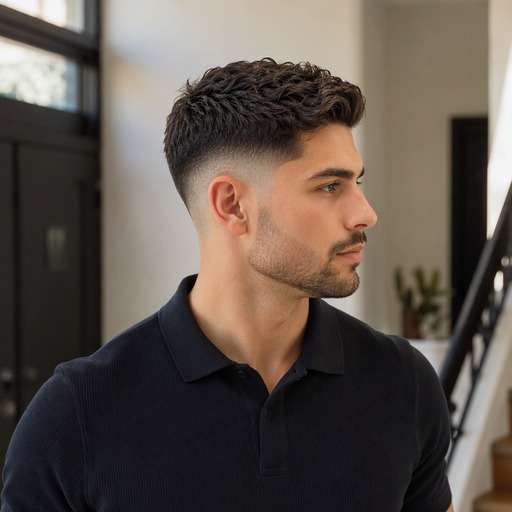
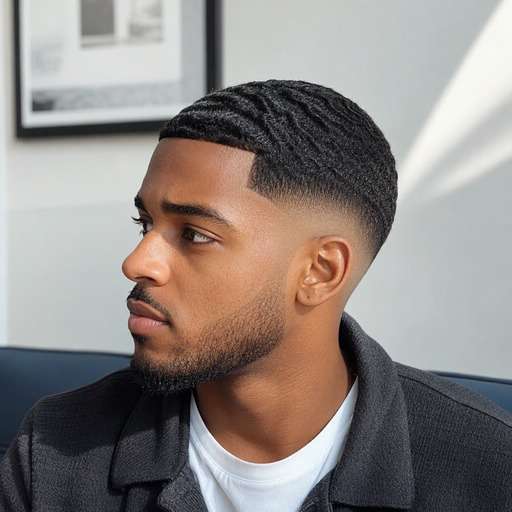
Thinking of a tidy low fade that dips naturally behind the ear? A low drop fade filter lets you preview the curved lower back line without taking the temple blend too high. Compare where the fade drops toward the nape on your own photo.
For a clearer preview, upload a well-lit photo with rear three-quarter portrait showing temple, ear and lower occipital curve.
Low Drop Fade Haircut Prompts
Not every low drop fade looks the same. Start by comparing low fade line dropping behind ear toward the rear head, curving down at nape. Choose the variation whose silhouette you want to test, copy the prompt into Face Editor and upload one clear photo. Keep the same face and viewpoint between versions so the hairstyle difference is easy to judge.
Classic Low Drop Fade
Use my uploaded photo of the same person as the starting image. Try classic low drop fade: make the gradient dip gradually behind the ear near the nape. Keep a believable low fade line dropping behind ear toward the rear head, curving down at nape. Preserve my face, skin tone, facial hair, expression and outfit, along with the original background and viewpoint. Use a hairstyle-revealing camera angle with realistic hair growth, clean but natural barber transitions and individually visible strands. Make the new haircut clear enough to compare with my original, without adding accessories, mirrors, phones, text or logos.
Low Drop Fade With Waves
Use my uploaded photo of the same person as the starting image. Try low drop fade with waves: keep short defined waves on top and a curved low rear fade. Keep a believable low fade line dropping behind ear toward the rear head, curving down at nape. Preserve my face, skin tone, facial hair, expression and outfit, along with the original background and viewpoint. Use a hairstyle-revealing camera angle with realistic hair growth, clean but natural barber transitions and individually visible strands. Make the new haircut clear enough to compare with my original, without adding accessories, mirrors, phones, text or logos.
Low Drop Fade With Curls
Use my uploaded photo of the same person as the starting image. Try low drop fade with curls: preserve compact curls over a lowered back transition. Keep a believable low fade line dropping behind ear toward the rear head, curving down at nape. Preserve my face, skin tone, facial hair, expression and outfit, along with the original background and viewpoint. Use a hairstyle-revealing camera angle with realistic hair growth, clean but natural barber transitions and individually visible strands. Make the new haircut clear enough to compare with my original, without adding accessories, mirrors, phones, text or logos.
Low Drop Fade With Side Part
Use my uploaded photo of the same person as the starting image. Try low drop fade with side part: hold neat side-part volume above the low curve. Keep a believable low fade line dropping behind ear toward the rear head, curving down at nape. Preserve my face, skin tone, facial hair, expression and outfit, along with the original background and viewpoint. Use a hairstyle-revealing camera angle with realistic hair growth, clean but natural barber transitions and individually visible strands. Make the new haircut clear enough to compare with my original, without adding accessories, mirrors, phones, text or logos.
Low Drop Fade With Beard
Use my uploaded photo of the same person as the starting image. Try low drop fade with beard: blend the sideburn naturally into a short beard. Keep a believable low fade line dropping behind ear toward the rear head, curving down at nape. Preserve my face, skin tone, facial hair, expression and outfit, along with the original background and viewpoint. Use a hairstyle-revealing camera angle with realistic hair growth, clean but natural barber transitions and individually visible strands. Make the new haircut clear enough to compare with my original, without adding accessories, mirrors, phones, text or logos.
Low Drop Fade With Crop
Use my uploaded photo of the same person as the starting image. Try low drop fade with crop: combine a short forward textured top with the dropping nape line. Keep a believable low fade line dropping behind ear toward the rear head, curving down at nape. Preserve my face, skin tone, facial hair, expression and outfit, along with the original background and viewpoint. Use a hairstyle-revealing camera angle with realistic hair growth, clean but natural barber transitions and individually visible strands. Make the new haircut clear enough to compare with my original, without adding accessories, mirrors, phones, text or logos.
Low Drop Fade With Longer Crown
Use my uploaded photo of the same person as the starting image. Try low drop fade with longer crown: maintain fullness at the back crown over the lower fade. Keep a believable low fade line dropping behind ear toward the rear head, curving down at nape. Preserve my face, skin tone, facial hair, expression and outfit, along with the original background and viewpoint. Use a hairstyle-revealing camera angle with realistic hair growth, clean but natural barber transitions and individually visible strands. Make the new haircut clear enough to compare with my original, without adding accessories, mirrors, phones, text or logos.
Subtle Low Drop Fade
Use my uploaded photo of the same person as the starting image. Try subtle low drop fade: use a dark gradual gradient with little exposed scalp. Keep a believable low fade line dropping behind ear toward the rear head, curving down at nape. Preserve my face, skin tone, facial hair, expression and outfit, along with the original background and viewpoint. Use a hairstyle-revealing camera angle with realistic hair growth, clean but natural barber transitions and individually visible strands. Make the new haircut clear enough to compare with my original, without adding accessories, mirrors, phones, text or logos.
Low Drop Skin Fade
Use my uploaded photo of the same person as the starting image. Try low drop skin fade: expose a narrow lower section of skin without raising the fade. Keep a believable low fade line dropping behind ear toward the rear head, curving down at nape. Preserve my face, skin tone, facial hair, expression and outfit, along with the original background and viewpoint. Use a hairstyle-revealing camera angle with realistic hair growth, clean but natural barber transitions and individually visible strands. Make the new haircut clear enough to compare with my original, without adding accessories, mirrors, phones, text or logos.
Low Drop Fade With Natural Neckline
Use my uploaded photo of the same person as the starting image. Try low drop fade with natural neckline: finish with a soft natural nape instead of a squared painted edge. Keep a believable low fade line dropping behind ear toward the rear head, curving down at nape. Preserve my face, skin tone, facial hair, expression and outfit, along with the original background and viewpoint. Use a hairstyle-revealing camera angle with realistic hair growth, clean but natural barber transitions and individually visible strands. Make the new haircut clear enough to compare with my original, without adding accessories, mirrors, phones, text or logos.
Find the Details That Matter in a Low Drop Fade Preview
Check the Drop Behind the Ear
The rear-facing dip is the reason to choose a drop fade. Compare a low drop with a conventional low fade from the same rear three-quarter angle rather than relying on a front view.
Preserve More Upper-Side Weight
A low placement generally keeps the upper temples fuller than a mid or high fade. Check that the edited version has not accidentally lifted the gradient into a high fade.
Choose Your Nape Finish
A softly tapered neck and a sharply exposed lower neckline change the back silhouette. Preview them as separate options, then tell your barber which finish matters more to you.
Inspect the Entire Blend
AI can make the back of the head look flatter or blur the curve. Look carefully at the ear line, nape and crown together before treating the image as a useful haircut reference.
How to Try Low Drop Fade on Your Photo
Keep the same source portrait while comparing low fade line dropping behind ear toward the rear head, curving down at nape. Start with a clear head-and-shoulders image, then change one hairstyle detail at a time.
Step 1
Upload Your Photo
Upload a clear portrait showing rear three-quarter portrait showing temple, ear and lower occipital curve. Leave enough room around the head to view the haircut from top to lower edges.
Step 2
Choose a Haircut Filter or Enter a Prompt
Choose a suitable haircut preset if available, or enter a custom prompt describing a low transition that falls behind the ear rather than circling upward. Ask for a natural hairline and realistic transition.
Step 3
Click Generate
Click Generate to preview the new hairstyle on your photo. Compare the original against the target shape and refine the fade height, texture or length that matters to this cut.
Use the image to decide on visible shape and proportion before changing your real hair. The key is low fade line dropping behind ear toward the rear head, curving down at nape, not an invented change to your face.
Upgrade a Conservative Office Cut
A low drop fade can tidy the neckline while leaving the upper sides familiar. Preview it with your usual side part if you want a change that feels noticeable but controlled.
Show the Back to Your Barber
If you're tired of explaining what "drop" means, bring a rear three-quarter reference showing the line descending behind your ear. That geometry is clearer than a celebrity photo shot from the front.
Compare Against a Burst Fade
The two cuts may look similar near the ear, but the drop fade sweeps down around the back rather than forming a tight circle around the ear. Preview both when deciding between them.
Check Your Low Drop Fade Preview Before Saving
Defining Shape
Image review checklist
"Is the key haircut feature visible?" Look for low fade line dropping behind ear toward the rear head, curving down at nape. If that detail is missing, make the instruction more specific before keeping the preview.
Before & After
Image review checklist
"Can you see a real hair change?" The baseline should show full hair around lower sides and nape, no distinct low dropping gradient. The new version should clearly show a low transition that falls behind the ear rather than circling upward with the same person and photo.
Natural Hair Edges
Image review checklist
"Check the scalp and temples" Look around the ear, forehead and nape for unrealistic lines or missing strands. Ask for a more natural transition when an edit looks artificial.
Barber Reference
Image review checklist
"Save a photo you can explain" Use the preview to discuss shape and length with your barber. The image cannot measure real hair density, growth direction or styling hold.
It begins low along the sides and curves downward behind the ears, often toward the lower back of the head. The exact depth varies by barber and head shape.
2. Is a low drop fade different from a low taper?
Usually yes. A low drop fade shows a broader curved gradient around the head, whereas a low taper often concentrates shorter hair at the sideburns and neckline.
3. Will I see the difference from the front?
Not very clearly. Use a three-quarter rear photo to judge the drop behind the ear; a straight frontal portrait hides the most important feature.
4. Can I choose a low skin drop fade?
Yes. Height and closeness are separate: the drop describes the line's path, and skin describes how close the lowest area is blended.
5. What photo gives the clearest low drop fade preview?
Use a sharp, evenly lit photo with rear three-quarter portrait showing temple, ear and lower occipital curve. Keep hair boundaries visible rather than hidden by hats or dramatic shadows. A consistent camera angle makes comparisons more useful.
6. Will the low drop fade preview match a real haircut exactly?
No. This is a visual reference that helps compare low fade line dropping behind ear toward the rear head, curving down at nape. Real length, growth patterns, density, scalp exposure and day-to-day styling depend on your hair and your barber.