

MV Agent
Ses Yükle
Upload
1 saniye ile 3 dakika arasındaki bir ses dosyasını yükleyin.
Upload Image
Upload
Support upload format: jpg, png, jpeg.
Prompt
0/2000
Tip: Use English prompts for the better outcome.
720P
16:9
Sample Image

Create Raw Phonk Vibes with AI Phonk Maker

Bring your gritty phonk beats to life with Media.io's AI Phonk Maker. Upload your track, add a street-scene image or urban cover art, and generate a fully synced AI music video in minutes. The system uses smart audio analysis to match visuals to rhythm and tone. Phonk producers and content creators can now turn underground sounds into stylish visuals perfect for YouTube Shorts, Reels, or TikTok drops.

Generate Phonk Visual Now

No editing skills needed-just upload and watch AI do the rest.

Sample Upload and Generation Preview
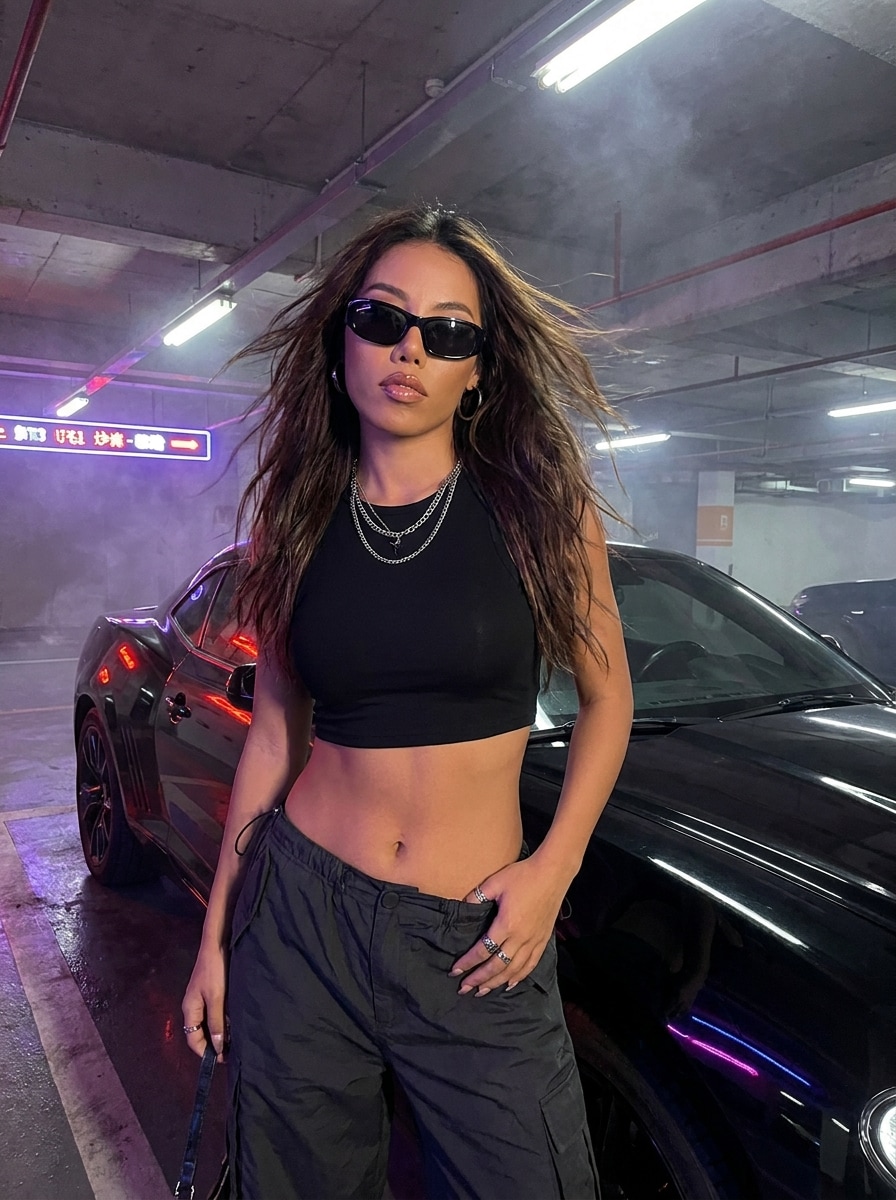
AI Phonk Maker street scene preview
Phonk Beat Example Track
wave
wave
0:09
Play Demo ↗
Experience the AI Phonk Maker Demo
✓ Free Trial ✓ No Watermark ✓ Fast Render ✓ Audio Sync AI

Why Choose Media.io AI Phonk Maker

Instant Phonk Mood Generation

The AI Phonk Maker instantly interprets your track's tempo and texture to build moody, urban-style imagery that fits the phonk aesthetic. You no longer need to learn complex video editing tools or rely on generic templates. Each result feels authentic, pairing smoky, distorted visuals with your unique beat. The process takes only minutes, letting you focus entirely on your sound.

Audio-Reactive Visual Style

Unlike static art covers, this AI converts every wave and snare hit into stylish motion. The result is an immersive, pulse-driven video experience that enhances the dark tone of phonk music. Your audio doesn't just play-it commands the visuals. This makes your releases instantly more shareable and memorable for audiences.

Designed for Creators and Streamers

Whether you're promoting a new beat tape or showcasing a sound design tutorial, the AI Phonk Maker gives your content a recognizable edge. Upload a performance clip or your label's logo to link visuals with your personal brand. The tool supports standard formats used across social and streaming platforms. This flexibility keeps your output professional while saving time on manual cutting and syncing.

Reliable Cloud-Based Workflow

Media.io handles all rendering securely in the cloud, so your computer never slows down during generation. Each video is stored safely and ready for high-quality export once complete. You can refine prompts, swap images, and regenerate new looks without starting over. This ensures a smooth creative process with zero local software requirements.

How to Use the AI Phonk Maker

01

Upload Your Audio or Beat

Start by selecting your phonk track or instrumental. Media.io reads your song's mood, tempo, and beat transitions through advanced AI audio analysis. The better the clarity of your track, the more accurate the visual rhythm matching.

02

Add an Image or MV Cover

Choose a cityscape, night-tone neon photo, or your MV cover to define the aesthetic. You can also upload a portrait to turn yourself into the animated feature of the video. The system uses the visual cues to build setting and style.

03

Generate and Download Your Video

Optionally, enter a short prompt to guide visual tone-like 'dark retro streets' or 'drifting cars in smoke.' Click generate, wait for the AI to mix imagery and music, and preview your new AI phonk video. Once satisfied, download or share directly to your social channels.

What Creators Say About the AI Phonk Maker

user
Liam Cruz

Beat Producer

star star star star star

"Gave My Tracks a Dirty Visual Edge" I produce gritty sound loops and wanted them to stand out visually. The AI phonk generator synced perfectly with the rhythm of my bass lines and gave me quick street visuals. It feels like an organic extension of my sound. I now use it for previews and full videos on TikTok.

user
Ava Thompson

Music Visual Artist

star star star star star

"Perfect Tool for DIY Music Visualizers" I've tried many visualizer apps, but Media.io's phonk music visualizer works the best for dark beats. It gives every drop a matching motion burst that's addictive to watch. The rendering is fast and produces authentic color tones. I've recommended it to my whole visual collective.

user
Rico Malone

DJ and Content Creator

star star star star star

"AI Made My Reels Stand Out Instantly" I wanted unique loops that match my live recorded mixes. Using the AI phonk video tool, each snippet looked tailor-made for my vibe. The sync accuracy blew me away, especially for fast transitions. This generator completely modernized my content workflow.

user
Harper Lin

Vocalist and Producer

star star star star star

"A Reliable Phonk Effect Maker for Aesthetic Clips" It's super simple but delivers pro results. I uploaded my vocals, picked a vintage car image, and got a dreamy AI-rendered clip that moves with the beat. The feature saved me hours of editing time and fits perfectly with the retro-phonk culture. Media.io really nailed the creative balance with this one.

AI Phonk Maker FAQ

1. What Type of Audio Works Best with AI Phonk Maker?

The AI Phonk Maker works best with tracks featuring steady rhythm and strong bass elements typical of phonk and lo-fi hip-hop. Clear mixdowns with minimal background noise help the AI better match motion and transitions. You can use full-length songs or short clips for previews. The system adjusts timing automatically for each submission.

Yes, you can guide the AI by selecting an image and adding a descriptive prompt. Choose between neon, retro, or cinematic tones depending on your audience. Adjusting your input visuals significantly influences the output mood. The prompts let you fine-tune chaos, color palette, and intensity.

Media.io offers watermark-free downloads for registered users or during the free trial phase. This ensures your final phonk visuals remain brand-ready and professional. Casual users testing output might see a preview mark, which disappears upon exporting the full file. It keeps the creative experience simple and transparent.

While tuned for phonk-style beats, the generator also works with trap, synthwave, and chill-hop. It responds to tempo and tone rather than just genre tags. Many creators experiment with different rhythms to see unique results. The flexibility makes it a versatile AI visual solution for cross-genre producers.

Rendering usually completes within a few minutes depending on track length and visual complexity. Since Media.io uses cloud servers, you can continue working on other tasks during processing. The progress bar shows each stage from audio analysis to frame blending. Download link appears automatically after completion for quick posting.

Media.io Online AI Tools Quality Rating:
vote 4.7 (162,357 Votes)







