첫 구독 최대50% 할인
지금 구매

불릿 바이크 AI 영상 생성기 – 바이크 타는 바이럴 소녀 트렌드

셀피를 영화 같은 감성의 Bullet Bike AI 영상으로 바꿔 보세요. 레헨가와 황금빛 밤 조명, 편안하게 기대 누운 포즈로 바이럴 된 바이크 걸 트렌드를 재현하세요.
모든 제출물

Bullet Bike AI Video Generator: Recreate the Viral Girl on Bike Trend

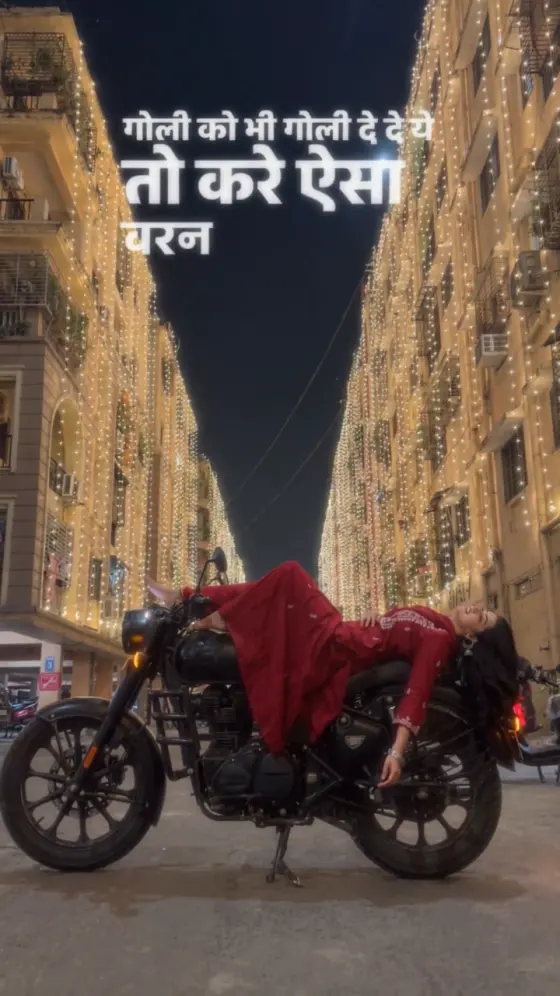
Your selfie. A black vintage motorcycle. A street glowing with golden lights. Recreate the Bullet Bike AI video trend with yourself as the star: sit sideways on the bike, then cut to a relaxed lie-back pose with your outfit draped around you. Try the black printed lehenga look or an all-black menswear remix. Use the copy-ready prompts with a compatible reference-video workflow, or create scene images first and animate them into your own cinematic Reel.

Create My Bullet Bike Video Explore Toy Car Trend

Start with one clear portrait. For the sit-to-recline sequence, use a compatible reference-video model or animate separate scene images. Aim for a 9:16 edit around 8–10 seconds, within your model's limits.

Your Photo. Your Golden-Night Bullet Bike Moment.

Put Yourself in the Bullet Bike Reel

Make your Bullet Bike AI video personal with a clear selfie as the identity reference. Guide the model to retain your recognizable face, skin tone, and hairstyle as the scene changes from a seated portrait to the relaxed reclining shot.

Recreate the Sit-to-Recline Reveal

Capture the signature girl on Bullet bike AI trend: a sideways seated pose, a brief dark transition, then a peaceful lie-back across the parked motorcycle. Let the pose change deliver the reveal while the bike stays still.

Bring the Golden Night to Your Photo

Build the Bullet bike night video look around warm fairy lights, a black retro motorcycle, and flowing traditional clothing. Choose a black printed lehenga for the main recreation or an all-black outfit for a menswear version.

Frame Your Cinematic Reel

Compose your Bullet Bike AI Reel in vertical 9:16, leaving room for the motorcycle, flowing skirt, and reclining pose. Finish with music and captions in your editor, then share your favorite take on Reels, TikTok, or Shorts.

How to Make a Bullet Bike AI Video from Your Photo

01

Step 1: Choose a Clear Portrait

Start with one well-lit photo showing your face clearly, without sunglasses or heavy filters. A front-facing or gentle three-quarter portrait gives the model useful identity details. Use your own photo or an image of an adult who agreed to the edit.

02

Step 2: Choose Your Bike Scene

Copy a Bullet Bike AI video prompt below. For a close recreation, add your portrait and the matching clip in a model that accepts reference video. For image-to-video, first create seated and reclining scene images with the same outfit, bike, and golden-lit street.

03

Step 3: Animate and Finish Your Reel

Generate your Bullet bike trend video, or animate the scene images separately and join them with a short dark transition. Check your face, limbs, fabric, and motorcycle details. Export in 9:16 and add your chosen music and lyrics afterward.

Bullet Bike AI Video Prompts for Your Nighttime Reel

Profile illustration for the girl on Bullet bike AI video prompt
Girl on Bullet Bike Recreation

One portrait + the matching reference video in a supported model

Recreate the black-lehenga Bullet bike video with your own face. Prompt: “Use Image 1 as the sole identity reference for the adult woman in Video 1. Retain her recognizable face, skin tone, hairstyle, and natural proportions throughout. Dress her in a black long-sleeved top and a wide, flowing black lehenga with white-gray elephant and floral motifs, matching the reference outfit. Follow Video 1's seated-to-reclining sequence: begin seated sideways on the parked black motorcycle, use a brief dark transition, then show her resting back across the bike with the skirt draped naturally around the seat. Follow the reference cut to a lower, closer angle with the red tail light glowing. Match the reference framing, shot order, warm golden fairy lights, buildings, and nighttime atmosphere. Keep the motorcycle stationary on its stand, with stable wheels and frame geometry. Use subtle breathing and gentle hair movement in the final pose. Retain 9:16 and the reference duration within the model's limits. One person only. No riding, extra limbs, face changes, floating body parts, fabric clipping, generated captions, dialogue, or watermark. Add music and lyrics afterward.”

Profile illustration for the men's Bullet bike AI video prompt
All-Black Menswear Remix

One portrait + the matching reference video in a supported model

Make the same golden-night Bullet bike edit in an all-black outfit. Prompt: “Use Image 1 as the identity reference for one adult man, adapting the person in Video 1 while retaining his recognizable facial features, skin tone, hairstyle, and proportions. Dress him in a black long-sleeved formal shirt, black trousers, a black belt, and black shoes. Keep this outfit consistent across every shot. Follow the reference: sit sideways on the parked motorcycle, transition briefly through darkness, then appear reclining comfortably across the seat and tank area. Follow the reference's final lower camera angle and calm hold. Keep body weight visibly supported, joints natural, and hands relaxed. Preserve the same black retro motorcycle, gold-lit buildings, street layout, night lighting, camera framing, and shot timing. The motorcycle stays still on its stand with its engine off. Use vertical 9:16 and a supported duration matching the reference. One person only. No riding away, new scenes, extra limbs, distorted wheels, changing clothes, text, dialogue, or watermark. Leave the soundtrack for the final edit.”

Profile illustration for preparing Bullet bike AI photo references
Create Your Bike Scene Photos

Image-generation prompt: create two stills before animating

Use this Bullet bike AI photo prompt to prepare your seated and reclining frames. Prompt: “Create one photorealistic 9:16 scene image using the uploaded portrait as the sole facial identity reference for an adult woman. Retain her recognizable facial features, skin tone, and hairstyle. Place her on a stationary black vintage-style motorcycle with a round headlamp, on a quiet nighttime street framed by buildings covered in warm golden fairy lights. Dress her in a black printed lehenga and matching long-sleeved top. For the first image, show her seated sideways on the motorcycle with a relaxed expression, one hand resting naturally on the seat. Include enough space for the full bike and skirt. Use realistic skin, fabric, metal reflections, and grounded shadows. No additional people, text, or watermark.” Generate this seated image first. Then reuse it as a visual reference and request a second still: “Keep the same woman, outfit, motorcycle, street, and lighting. Change her pose to a supported recline across the seat and tank area, head toward the rear, eyes gently closed, and skirt draped naturally. Keep limbs anatomically coherent and clearly separate from the motorcycle.” Animate the two stills separately and join them in your editor.

Profile illustration for animating a reclining Bullet bike scene image
Animate the Reclining Portrait

One prepared bike scene image + a subtle motion prompt

Turn your reclining Bullet bike photo into a short cinematic video. Prompt: “Animate the supplied scene image into a 5-second vertical 9:16 video, using a supported duration setting. Keep the same adult subject, recognizable face, hairstyle, outfit, reclining pose, and body proportions. Preserve the black motorcycle and the warm golden lights on the buildings. The subject remains peacefully reclined with gentle breathing and a small amount of hair movement. Add a very slow camera push-in without circling the bike or changing the viewing angle. Keep the motorcycle parked and motionless, the tail light steady, and the subject's body visibly supported. Maintain natural fabric folds, stable hands and feet, coherent wheel shapes, and consistent street details. Do not make the subject sit up, ride away, turn toward the camera, or change clothes. No extra people, abrupt movements, scene cuts, generated text, dialogue, or watermark.” Use this as a standalone night portrait or the closing shot of your Bullet Bike AI Reel.

FAQs About the Bullet Bike AI Video Generator

1. What is the Bullet trend AI girl video?

The girl on Bullet bike AI trend recreates a nighttime Reel in which a woman sits sideways on a black retro motorcycle, then appears reclining across it after a short transition. Golden festive lights and a flowing lehenga give the scene its cinematic look. Here, Bullet refers to the Royal Enfield-style motorcycle aesthetic. Royal Enfield and Bullet are third-party trademarks; this page is not affiliated with the brand.

2. Can I make a Bullet Bike AI video with one selfie?

One clear selfie can supply your facial identity, but the bike scene and motion need additional guidance. Use it with the matching clip in a model that supports reference video, or first generate scene images showing you seated and reclining on the motorcycle. Then animate those images. Supported inputs vary by model, and an ordinary selfie alone does not define the full pose sequence.

3. Which prompt should I use for girls, boys, or a different outfit?

For an adult woman's recreation, use the girl on Bullet bike prompt with the black printed lehenga. For an adult man's version, use the all-black menswear prompt. To try a colorful lehenga, saree, or another outfit, describe it explicitly and keep that choice consistent across both poses. When using a reference clip, specify whether the outfit should follow the clip or your custom description.

4. How do I avoid distorted poses and changing bike details?

Start with scene images that already show believable contact between the body, clothing, and motorcycle. Keep the bike stationary and request subtle movement. If a continuous lie-back action distorts the body, animate seated and reclining images separately and connect them with a brief dark transition. Review the face, arms, legs, skirt, wheels, and fuel tank before exporting.

5. Does the video include the “Bullet Bhi Hai Aur Ek Hi Hai Jaan” song?

The prompts focus on the visuals and do not automatically include the song associated with this version of the trend. Audio output depends on your model and settings. Add an authorized track in your editor or choose an available sound from the publishing platform's music library. Place lyrics and captions afterward for more control over spelling, timing, and placement.

Explore Media.io Online AI Tools
Media.io tools icon Create Images and Videos




