初回サブスクリプションは最大で50%割引
今すぐ購入

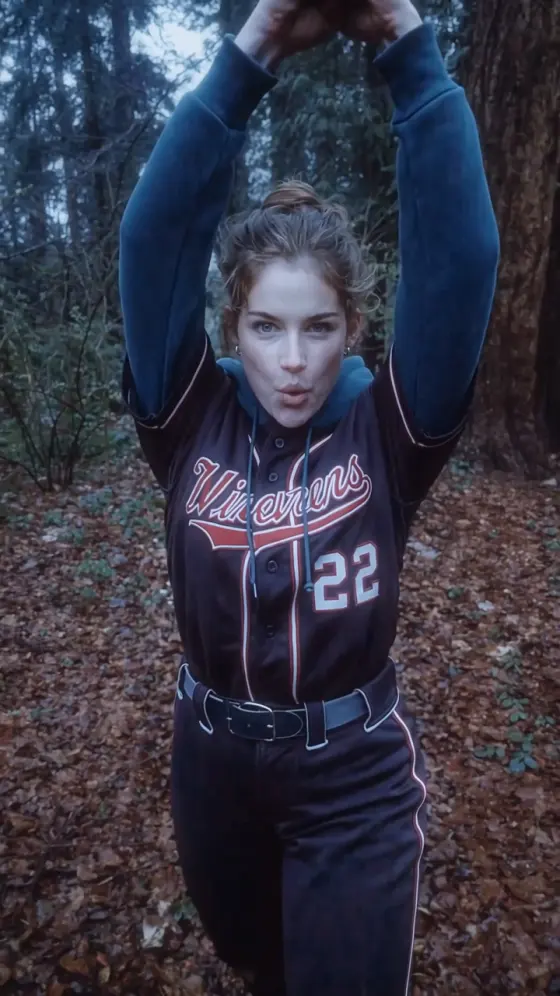
トワイライト野球シーン AI動画ジェネレーター&プロンプト

あなたの写真からトワイライトの野球シーンAI動画を作成しましょう。大きく足を上げるピッチ、雷雨のスイング、ヴァンパイア並みのスピードキャッチなどのプロンプトを試して、自分だけの動画に仕上げてください。
すべての投稿

Twilight Baseball Scene AI Video Generator

Your photo. The sky-high leg kick. A pitch at vampire speed. Create a Twilight baseball scene AI video starring you in a misty forest under stormy skies. Start with the signature pitching move, or try prompts for a thunderstorm swing and a flying catch. Explore copy-ready AI video prompts and photo tips to bring your own vampire baseball moment to life.

Create My Baseball Video Explore AI Party Image Prompts

Start with one clear photo and a single action. Use a prepared scene image for first-frame animation, or add a reference video in a compatible video-editing mode. Choose vertical 9:16 for TikTok and Reels.

Your Photo. One Unforgettable Vampire Baseball Moment.

Put Yourself on the Pitcher's Mound

Make your Twilight baseball scene AI video feel personal. Use a sharp photo with your face clearly visible, then ask the model to retain your facial features and hairstyle. A full-body scene image gives the high-leg pitch room to unfold.

Make the Signature High-Leg Pitch

Build your clip around the Twilight baseball pitching pose: a dramatic leg lift, a brief pause, and a lightning-fast throw. Keep the player fully in frame so the wind-up and balanced finish carry the scene.

Bring on the Fog and Thunder

Set your vampire baseball AI video in a foggy pine-forest clearing with cold blue-green light and gathering storm clouds. Try a separate batting clip with a distant lightning flash at contact for a dramatic companion shot.

Give Every Move Room to Land

Create a 9:16 photo-to-video baseball edit with space above the raised leg and around the throwing arm. Preview the face, hands, ball, and landing before sharing. Generate longer action sequences as separate clips when needed.

How to Make a Twilight Baseball Scene AI Video

01

Step 1: Choose Your Player Photo

Start with one clear photo of yourself, ideally showing your full body with your face unobstructed. For a first-frame image-to-video model, prepare a scene image of you in a baseball outfit in a misty forest. Leave room for the raised leg and throwing arm.

02

Step 2: Pick Your Baseball Prompt

Copy a Twilight baseball scene AI prompt below and start with one action: the high-leg pitch, the bat swing, or the flying catch. To follow an existing performance, use the reference-video prompt in a compatible editing mode with a clip you have permission to use.

03

Step 3: Generate, Review, and Share

Generate your Twilight baseball AI video using a supported duration and aspect ratio. Check your face, the ball's movement, and the player's balance. Download your favorite take, add suitable music in your editor or posting app, and share your vampire baseball moment.

Twilight Baseball Scene AI Prompts to Try with Your Photo

Profile illustration for the Twilight baseball scene AI pitching prompt
The Signature High-Leg Pitch

One prepared forest-baseball image + a motion prompt

Make the dramatic leg lift the star of your Twilight baseball AI edit. Prompt: “Animate the adult player in Image 1 performing one dramatic baseball pitch. Begin in a full-body shot with both feet planted. The player raises the front leg into an exaggerated high wind-up, pauses briefly, then drives forward and releases the baseball with supernatural speed. Finish in a balanced pitching stance. Keep the face, hairstyle, baseball outfit, and body proportions consistent. Preserve the misty pine-forest setting and cold blue-green lighting of the input image. Use a subtle camera push-in and keep the head, raised foot, throwing hand, and landing visible. Vertical 9:16. One player and one baseball throughout, with coherent hands and grounded movement. No additional players, scene changes, captions, or logos. Generate a new cinematic baseball interpretation rather than an exact movie-shot recreation.”

Profile illustration for the vampire baseball thunderstorm swing AI prompt
The Thunderstorm Bat Swing

One prepared batter image + a single-swing prompt

Time one powerful swing to a flash of lightning over the forest. Prompt: “Animate the adult batter in Image 1 in a single continuous full-body shot. The batter tightens a two-handed grip on the baseball bat, draws it back, and swings once at a single incoming baseball. Show a clear contact moment, then a controlled follow-through with both feet grounded. A distant lightning flash briefly lights the storm clouds at contact as the ball travels away toward the trees. Preserve the person's face, hairstyle, outfit, the bat's shape, and the foggy forest setting. Keep the camera at a three-quarter side angle with the full swing visible. Cold blue-green light, drifting mist, cinematic vampire-baseball energy. Vertical 9:16. One batter, one bat, one ball. No extra limbs, duplicate equipment, additional swings, text, or logos. If audio is supported, request wind, a bat crack, and distant thunder without a song or dialogue.”

Profile illustration for the Twilight-inspired baseball sprint and catch prompt
The Vampire-Speed Flying Catch

One prepared fielder image + a sprint-and-catch prompt

Follow a burst of supernatural speed with one clean airborne catch. Prompt: “Animate the adult fielder in Image 1 running across the forest clearing after one baseball. The player takes several fast strides, pushes off the ground, and makes a single athletic leap to catch the descending ball in one hand. End with a controlled landing and the ball visibly held. Track the player from the side in a wide full-body shot, leaving room above the head for the leap. Preserve the same face, hairstyle, outfit, and body proportions throughout. Keep the misty pines, damp grass, and cold storm light consistent with Image 1. Add a brief speed-trail effect during the sprint while keeping the player's body readable. Vertical 9:16. One player and one ball, with coherent hands and natural limb movement. No teleporting, hovering, duplicate players, scene cuts, captions, or logos.”

Profile illustration for the Twilight baseball reference-video character replacement prompt
Your Take on the Reference Move

One identity photo + your own or permitted reference clip

Use a compatible reference-video editor to follow an existing baseball performance. Prompt: “Edit Video 1 using Image 1 as the identity reference for the single adult baseball performer. Replace that performer consistently in every shot with the person from Image 1, retaining their facial features, skin tone, age, and hairstyle. Keep the reference performer's baseball outfit and follow the existing body movement, poses, gaze, expressions, and action timing. Preserve the original shot order, camera movement, framing, background, lighting, and aspect ratio. Reproduce only the actions already present in the reference; do not add a pitch, swing, sprint, or catch that is absent. Keep other subjects unchanged. Match the reference duration within the model's supported limits. No identity blending, duplicate performers, extra limbs, added shots, captions, or logos. Request silent output for separate sound editing.”

FAQs About Twilight Baseball Scene AI Videos

1. What is the Twilight baseball scene AI trend?

The Twilight baseball scene AI trend puts a new player into a vampire-inspired baseball video. It draws on the stormy forest setting and exaggerated athletic moves associated with Twilight's baseball scene: a high-leg pitch, a powerful swing, and supernatural speed. Photo-based prompts create a new interpretation, while compatible reference-video tools can follow an existing performance.

2. What photo should I use for a Twilight baseball AI video?

Choose one sharp photo with a clearly visible face and, ideally, the whole body in view. Avoid cropped limbs and obstructed faces. If the model uses your image as its first frame, prepare the baseball outfit and forest setting in that image first. Use your own photo or one you have permission to edit.

3. Do I need a CapCut template or reference video to make the trend?

You can create a new vampire baseball clip with a suitable image and a motion prompt, without a CapCut template. Following a specific performance requires a compatible reference-video workflow and a clip you can use. The first three prompts on this page guide new animations; the fourth requires both an identity photo and a reference video.

4. How can I improve the high-leg pitch and keep my face consistent?

Start with a clear full-body scene image and keep the camera movement simple. Ask for one leg lift, one throw, and a balanced finish. Leave space around the limbs and specify consistent facial features and clothing. If the sprint or catch causes visible drift, generate it separately. Results vary, so inspect every clip before sharing.

5. Will my AI video include the Twilight baseball scene song?

The original Twilight baseball scene features “Supermassive Black Hole” by Muse. Mentioning the scene in a prompt does not automatically include that recording. Generated audio depends on your model and settings. For your edit, add music available for your intended use through your editor or posting platform, then align the action with the track.

Explore Media.io Online AI Tools
Media.io tools icon Create Images and Videos




