初回サブスクリプションは最大で50%割引
今すぐ購入

ディワリ AI 変換動画プロンプト:白黒からカラーへ

あなたの写真をディワリ用のAI変換動画にしましょう。白黒からカラーに切り替わる演出と、祝祭用の衣装、輝くディヤ、そしてあなただけのスタイルを組み合わせたプロンプトを試してみてください。
すべての投稿

Diwali AI Transformation: From Black and White to Festive Color

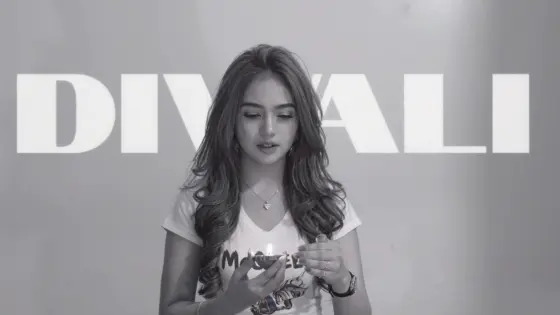
Make the Diwali AI transformation trend your own: start in black and white, hold a small diya, then reveal a colorful saree, lehenga, or kurta as the lights come alive. Explore copy-ready Diwali transformation video prompts for your festive glow-up, from a single-photo experiment to a planned before-and-after reveal. Keep your face at the center of the story and finish with your own music and Diwali caption.

Create My Diwali Transformation Explore Diwali Wishes Videos

Start with one clear portrait. For a planned outfit reveal, prepare matching black-and-white and festive-color images. Use reference clips or start-and-end frames only in a model that supports those inputs.

One Face. Two Looks. Your Diwali Transformation.

Keep Your Identity Through the Reveal

Make your Diwali AI transformation about you. Specify the same facial features, skin tone, hairstyle, and proportions on both sides of the transition. Change the clothes and lighting at the reveal, then check that your face stays recognizable.

Give the Color Reveal a Clear Cue

Recreate the Diwali black-and-white to color trend with a deliberate before-and-after moment. Begin in a simple T-shirt holding a diya, use its brightening glow as the transition cue, then reveal festive clothing and warm golden lights. Keep movement simple so the transformation takes center stage.

Choose Your Festive Outfit

Plan your Diwali outfit transformation around one clear final look: a red-and-gold saree, a jewel-toned lehenga, or an ivory kurta. Name the outfit in your prompt, allow it to change once, and keep its color, fabric, and accessories stable after the reveal.

Build a Before-and-After Reel

Frame your Diwali transformation video so the change is easy to see. Keep the opening and ending poses similar, with your face and diya visible. Match your reference framing, or compose a new 9:16 reel with space for a caption added after generation.

How to Make a Diwali AI Transformation Video

01

Step 1: Prepare Your Before Look

Start with one clear photo of yourself. Use an evenly lit, unobstructed portrait with your upper body visible. Plan a black-and-white opening in everyday clothing and a colorful festive ending. If using two images, keep the face, pose, hand position, and framing similar. Use photos you have permission to edit.

02

Step 2: Define the Outfit Reveal

Copy a Diwali transformation prompt below and choose a final saree, lehenga, or kurta. Describe when the scene changes from black and white to color, and allow the outfit to change at that moment. Upload your portrait, or use matching keyframes or a reference clip in a mode that supports them.

03

Step 3: Check and Finish Your Reel

Preview your Diwali black-and-white to color video and inspect the transition, returning face, hands, and final outfit. Adjust the prompt or source images if needed, then download your preferred take. Add your Diwali caption and music afterward, aligning the beat with the color reveal.

Diwali AI Transformation Video Prompts to Try

Profile illustration beside the Diwali black-and-white to color video prompt
Black-and-White to Saree Reveal

One portrait + a planned red-and-gold saree transformation

Let the diya glow reveal your festive saree look. Prompt: “Create a Diwali transformation video using the uploaded portrait as the identity reference. Keep the same facial features, skin tone, hairstyle, age, and body proportions throughout. Begin in black and white with the person in a simple T-shirt, standing in a courtyard and holding a small clay diya steadily at waist height. The person glances down at the diya. As its warm glow brightens, transition the whole scene into rich festive color and change the everyday outfit into an elegant red-and-gold saree. This is one intentional wardrobe transformation; preserve the person’s identity through it. Golden string lights and rows of diyas illuminate the courtyard. The person looks up and smiles gently. Use a restrained camera push-in and natural movement. Keep the diya upright, hands anatomically coherent, and the festive outfit stable after the reveal. No extra people, duplicate limbs, face morphing, flickering fabrics, or generated text. Leave space for a greeting to be added later. Use the selected duration and aspect ratio.”

Profile illustration beside the Diwali kurta transformation prompt
Everyday Look to Festive Kurta

One portrait + an ivory-and-gold kurta reveal

Give your Diwali glow-up a crisp, understated finish. Prompt: “Create a Diwali black-and-white to color transformation using the uploaded portrait as the identity reference. Preserve the same face, skin tone, hairstyle, age, and body proportions throughout. Begin with one person in a plain everyday T-shirt, shown in black and white in a courtyard, holding a small clay diya steadily with both hands at waist level. The person looks down briefly. As the diya glow brightens, use a single clean transition to reveal full color and an ivory kurta with subtle gold embroidery and matching trousers. Keep the same pose, face, hand position, and courtyard composition across the reveal. Warm string lights come on behind the person, who raises their gaze and gives a small smile. Explicitly allow one outfit change at the transition and keep the kurta stable afterward. Use minimal camera movement, natural skin texture, and coherent fingers. No extra people, duplicated lamps, face morphing, repeated wardrobe changes, or generated text. Use the selected duration and aspect ratio.”

Profile illustration beside the two-image Diwali lehenga transformation prompt
Two-Image Lehenga Transformation

Matching everyday and festive images + supported keyframe mode

Plan the first and last look before animating the transition. Prompt: “Use Image 1 as the opening frame and Image 2 as the ending frame for a Diwali transformation video. Both images show the same person in a matching pose and composition. Preserve their facial identity, skin tone, hairstyle, age, and body proportions between the frames. Begin with Image 1’s black-and-white everyday look, with the person holding a small diya. Use the diya’s brightening light to bridge the change into Image 2’s full-color festive look: a jewel-toned lehenga with coordinated jewelry and warm string lights in the background. Keep the person’s face and the diya position aligned through the reveal. Follow the supplied ending image for the final clothing, colors, and setting. Allow the planned outfit and lighting change once; keep the final look stable for a brief closing smile. Use minimal body motion and a steady camera. No extra people, intermediate costume changes, distorted hands, face blending, or generated lettering. Use a duration and aspect ratio supported by the selected keyframe mode.”

Profile illustration beside the reference-guided Diwali transformation prompt
Reference-Guided Diwali Transformation

One identity portrait + a compatible transformation reference

Follow a reference reveal while keeping the person recognizable. Prompt: “Use the uploaded portrait as the identity reference for the single main person, and the supplied Diwali transformation video as the reference for action, camera movement, framing, and transition timing. Preserve the portrait’s facial features, skin tone, hairstyle, age, and proportions. Follow the reference’s black-and-white opening, diya-holding pose, transition cue, and colorful festive ending. Explicitly allow the everyday outfit to change into the reference’s festive clothing at the reveal; do not lock the opening wardrobe across the transformation. Keep each outfit stable within its own segment. Match the reference’s gaze, expressions, diya position, camera movement, and lighting progression without copying the reference performer’s face. Keep natural hand anatomy and a stable facial identity. Do not add unreferenced actions, duplicate people, unrelated scenes, lip-sync, or generated text. Match the reference aspect ratio and duration within the selected model’s supported limits.”

FAQs About the Diwali AI Transformation Trend

1. What is the Diwali AI transformation trend?

This Diwali viral AI video format turns a black-and-white everyday look into a colorful festive outfit reveal. A small diya often provides the visual link between the two looks, while warm lights complete the ending. The prompts here focus on that before-and-after transformation, with saree, lehenga, kurta, and reference-guided variations.

2. What photos work best for a Diwali outfit transformation?

Choose a clear portrait with one unobstructed face, even lighting, and enough of the upper body visible to show the outfit and diya. For two-image generation, prepare an everyday opening and a festive ending of the same person with similar pose, hand position, camera angle, and framing. A black-and-white filter alone changes color; the festive ending also needs the clothing and lighting you want to reveal.

3. Can I make a black-and-white to color Diwali video from one photo?

Yes, you can try the transformation prompt with one portrait in image-to-video mode, but the outfit change and facial consistency can vary. For more control, prepare two images of the same person in a similar pose: an everyday black-and-white opening and a colorful festive ending. Use supported keyframe inputs, or animate the images separately and join the clips in an editor. Use a reference video only in a mode that accepts it.

4. How do I keep my face consistent while changing into festive clothes?

Separate identity instructions from wardrobe instructions. Ask the model to preserve your face, skin tone, hairstyle, and proportions, while allowing one planned outfit change at the reveal. Specify the final saree, lehenga, or kurta and keep it stable afterward. Avoid a conflicting instruction such as “never change clothing.” Check the face and hands on both sides of the transition and regenerate if needed.

5. How do I time music and text with the Diwali color reveal?

Generate and review the visual transition first, then place a music cue at the moment the outfit and color change. Add a short Diwali caption or Happy Diwali message after generation for control over spelling, placement, and timing. Audio availability depends on the selected model and settings. Use your editor or publishing platform’s available music library to finish the reel.

Explore Media.io Online AI Tools
Media.io tools icon Create Images and Videos




