Primo abbonamento fino a50% di sconto
Acquista ora

Prompt di scene negli armadietti per il generatore di video IA di End of Watch

Immaginati nella scena degli spogliatoi di End of Watch. Esplora i prompt video con IA e usa la tua foto insieme a una clip di riferimento abbinata per guidare i gesti e il timing della camera.
All Submissions

End of Watch AI Video Generator: Put Yourself in the Locker Scene

Step into the End of Watch locker scene with your own photo. Take the foreground role, face the camera with a serious expression, and follow the familiar rhythm of presenting each piece of equipment. Explore copy-ready End of Watch AI video prompts, then pair your photo with a matching reference clip in Motion Control to guide the gestures, sideways glances and close camera framing. Want a personal twist? Try an everyday-carry remix inspired by the locker room meme.

Create My End of Watch Video Explore Toy Car Trend

Start with a clear upper-body photo and a matching reference video for the locker-scene performance. Two-person replacement requires compatible role controls. Prop changes, original audio and output framing depend on the selected workflow.

Your Photo. A Straight Face. Your Locker-Scene Moment.

Take the Foreground Role

Make your End of Watch AI video instantly personal by putting yourself in front of the camera. Choose a sharp photo with your face, hair and upper body clearly visible, then use the reference performance to guide the lead's expressions and equipment-showcase gestures.

Bring a Friend into the Background

Give your End of Watch locker scene AI remix a familiar supporting face. If your reference includes a rear partner, a compatible multi-character workflow can help assign a second photo to that role. Keep the lead in front and the partner behind, with distinct identities throughout.

Capture the Show-and-Tell Rhythm

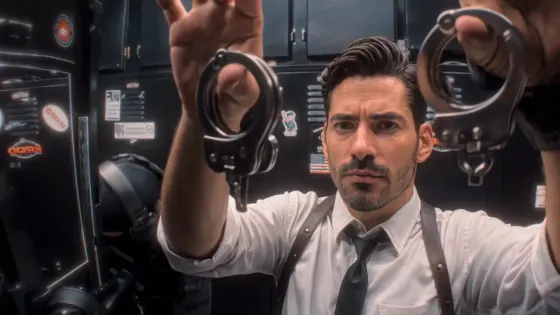
The End of Watch locker room meme is built around deliberate gestures: bring an item toward the lens, pause, lower it, then reveal the next. Use a matching reference to guide that sequence, including the lead's straight-faced delivery and brief glances toward the partner.

Give Your Remix a Personal Punchline

Turn your End of Watch photo-to-video idea into a short character introduction or a “ready for my shift” joke. For a fresh interpretation, try everyday essentials in a separate generation workflow. Add your caption after downloading, and keep hands and props visible when preparing the clip for social media.

How to Make an End of Watch AI Locker Scene Video

01

Step 1: Choose Your Lead Photo

Prepare one clear upper-body photo with your face, hair, shoulders and torso visible. A waist-up image with visible arms works well for planning the equipment-showcase scene. Avoid heavy face coverings and cluttered clothing details. For a two-person version, first check whether your chosen workflow supports separate role assignments.

02

Step 2: Add the Locker-Scene Reference

Open a compatible Motion Control workflow and add your photo plus a matching End of Watch locker-scene reference video. Copy a prompt below to clarify the lead's identity, framing and gestures. Follow the selected reference for the prop order; the movie title alone does not define the full performance.

03

Step 3: Review Your Scene and Share

Generate your End of Watch AI locker scene video, then check the face during head turns, fingers around each prop and transitions between items. Review the rear partner if present. Download your preferred take, check the audio, and add your caption or final sound edit before sharing.

End of Watch AI Video Prompts to Copy and Customize

Profile illustration for the End of Watch foreground lead replacement prompt
Your Locker-Scene Lead

One clear identity photo + a matching locker-scene reference in a compatible mode

Put yourself in the foreground of the End of Watch locker scene. Prompt: “Use Image 1 as the identity reference for the foreground lead in Video 1. Preserve the uploaded person's recognizable facial features, hairstyle, skin tone and body proportions. Follow the reference lead's serious expression, head turns, sideways glance and prop-presentation gestures. Match the sequence in which each item approaches the lens, pauses and returns out of the close view. Retain the reference locker-room setting, lead costume, camera framing and any unassigned background partner where supported. Keep the lead's identity consistent during close views and head turns. Maintain natural fingers, stable object shapes and clear separation between hands and props. Do not add new actions, extra people or text. Follow the reference timing and framing within the selected mode's supported settings.”

Profile illustration for the everyday-carry locker room meme prompt
Everyday-Carry Remix

One prepared upper-body scene image + a creative image-to-video prompt

Give everyday essentials the same deadpan, show-and-tell treatment. Prompt: “Animate the person in Image 1 in an everyday-carry showcase inspired by the End of Watch locker room meme. Preserve their recognizable face, hairstyle, outfit and body proportions. Retain the prepared locker background and use a steady waist-up view with space for the hands. The person raises a coffee cup toward the camera, pauses briefly, then lowers it below the frame. Next, they present a phone with the same deliberate gesture, lower it, and finally show a notebook. Keep the expression serious throughout, ending with a subtle, knowing smile. Show one object at a time and keep the face visible. Maintain consistent hands, clothing and object shapes. No extra people, floating props, sudden camera cuts or added text. Create a fresh interpretation rather than an exact recreation of the movie scene.”

Profile illustration for the End of Watch lead and rear partner replacement prompt
You and Your Rear Partner

Two identity photos + a matching reference in a mode with separate role controls

Cast yourself and a friend without mixing up the two roles. Prompt: “In a workflow that supports separate character assignments, use Image 1 for the foreground lead in Video 1 and Image 2 for the rear partner. Map each photo through the available role controls before generation. Preserve each person's distinct facial features, hairstyle and skin tone. Keep the lead nearest the camera and the partner in the reference background position. Follow the lead's equipment-presentation gestures and sideways glance, while the partner follows their own reference reactions. Retain the reference outfits, locker-room setting, camera movement and prop sequence. Keep identities separate during turns and interactions. Do not move the partner into the foreground or transfer the lead's props to them. No face blending, role switching, duplicated people or added text. Follow the selected reference within the workflow's supported settings.”

Profile illustration for a fictional character End of Watch AI motion prompt
Fictional Character Showcase

One prepared character image + a matching motion reference in a compatible mode

Give your original character a straight-faced locker-scene introduction. Prompt: “Animate the original humanoid character in Image 1 using Video 1 as the motion reference for the foreground performance. Preserve the character's distinctive face, hairstyle, outfit, proportions and visual style. Follow the reference gestures as the character brings each prop toward the camera, pauses, lowers it and moves to the next item. Keep the delivery serious and self-assured, including the reference head turns and final expression. Use the prepared image's locker-room setting and keep the hands and face inside the frame. Maintain the character design during movement without changing it into the reference actor's appearance. Keep props consistent and fingers naturally connected to the hands. Do not add new characters, outfit changes, extra limbs or text. Adapt movement to the character's proportions within the selected mode's capabilities.”

FAQs About the End of Watch AI Video Generator

1. What is the End of Watch AI locker scene trend?

The End of Watch AI trend puts a photo-based character into a locker-room performance inspired by the movie's equipment-showcase scene. The lead faces a close camera, presents items with deliberate gestures and may glance toward a rear partner. It is a character-performance remix, distinct from edits that replace the original equipment with game items.

2. What photo works best for an End of Watch AI video?

Choose a sharp photo of one person with the face, hair, shoulders and upper body clearly visible. A waist-up image with visible arms is useful for this gesture-focused scene; a full-body photo is not essential. Match the reference pose and framing where practical, and avoid objects covering the face.

3. Can I recreate the locker scene with only a photo and a prompt?

A photo and a prompt can create a new locker-room showcase, but they do not reliably specify the movie's gestures, prop order or timing. For a closer recreation, use a matching reference video in Motion Control or a compatible prepared template. The prompts here clarify the intended performance; they do not replace the reference clip.

4. Can I replace both people or change the equipment?

Replacing both people requires a workflow with separate identity inputs and role controls; a prompt alone does not provide those controls. Changing equipment is a separate editing or generation task. For an everyday-carry remix, try the creative prompt with a prepared scene image, then check every hand-to-object transition.

5. Will my End of Watch AI video include the original sound and lip sync?

Original audio and matching lip sync are not automatic. They depend on the selected model, template and audio settings. A character photo does not provide a speaking voice. Preview the result, check mouth movements and sound together, and use a supported audio or lip-sync workflow if your chosen mode does not supply them.

Explore Media.io Online AI Tools
Media.io tools icon Create Images and Videos




