初回サブスクリプションは最大で50%オフ!
今すぐ購入

Husband Emporium AIビデオジェネレーター – レトロ広告 | Media.io

Media.io でパートナーの写真を「Husband Emporium」AI動画に変身させましょう。ジムエディション向けのプロンプトを使って、レトロな“夫ショップ”風の広告と遊び心あふれるセールストークを作成できます。
すべての投稿

Husband Emporium AI Video Generator

Turn your partner’s photo into a Husband Emporium AI video with Media.io. Cast them as the Gym Edition in a candy-pink 1950s husband store, flexing on a gold display pedestal. Prepare the retro scene, animate a confident pose, then add a playful sales pitch. Explore image prompts, motion prompts and ideas for your own husband-store ad.

Make My Husband Emporium Video

Start with a clear adult portrait used with permission. Prepare the showroom image before animating; add dialogue and captions afterward.

Your Partner, the Latest Husband Model

Put Your Partner on Display

A Husband Emporium AI video turns a familiar face into the star of a fictional husband-store commercial. Put your husband, boyfriend or yourself on a gold pedestal and play the scene completely straight. The joke is the serious sales pitch for someone you know.

Build the Retro Showroom

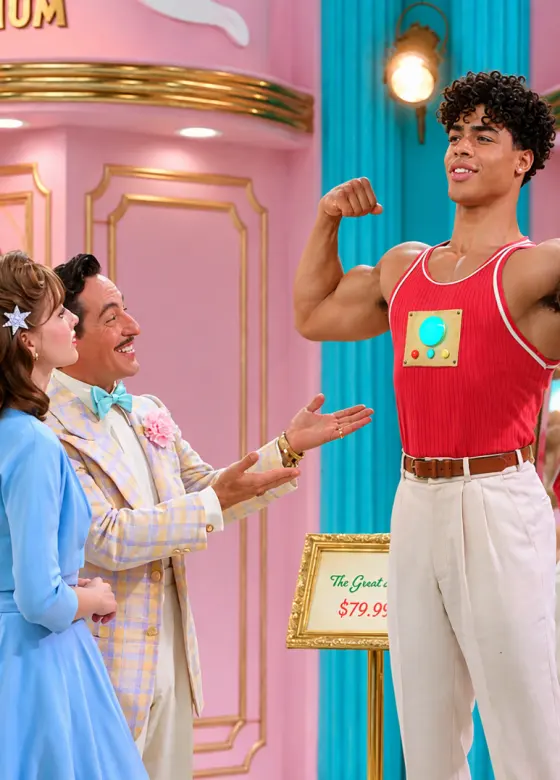
A 1950s husband-store ad starts with a recognizable set: candy-pink walls, turquoise accents, gold trim and a checkered floor. Frame the display model clearly in a red gym top and cream trousers. Add readable model names and price cards later in an editor.

Start with the Gym Edition

Make a Gym Edition husband video with a slow biceps pose and a self-satisfied smile. For a husband shopping AI video, prepare a separate customer reaction shot. Keeping each clip focused on one performance makes it easier to manage the faces, gestures and camera movement.

Give Your Ad a Punchline

Finish your retro husband commercial with an original sales line such as “Built for commitment—to his workout.” Add an Outdoorsman or Ghost scene as a separate shot, or try a Good Boy pet ending. Keep the same showroom palette across your clips before joining them.

How to Make a Husband Emporium AI Video from a Photo

01

Step 1: Prepare Your Husband Store Scene

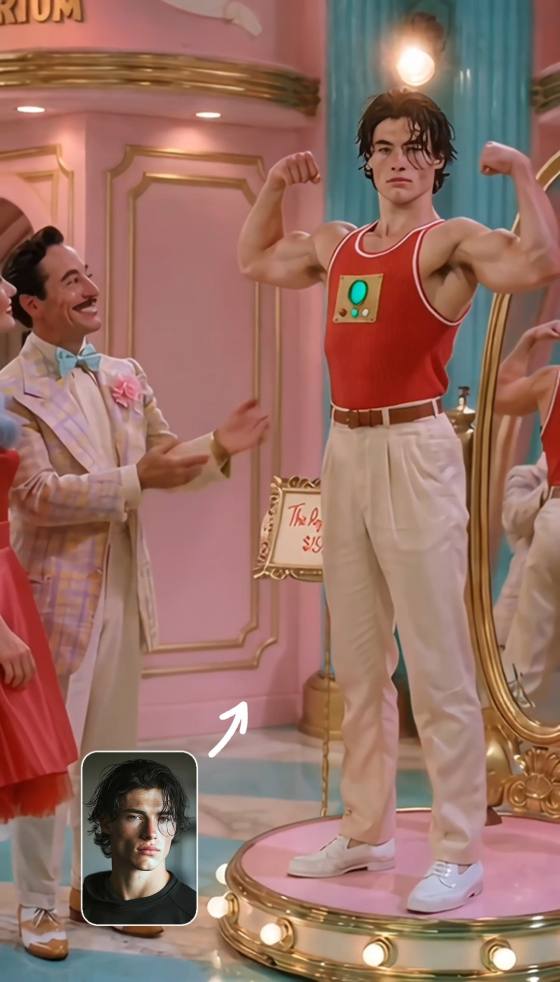
Choose a clear adult portrait and create a Gym Edition showroom image in a compatible image-editing mode. Preserve the person’s recognizable features while placing them in a red gym top on a gold pedestal. Start with one display model and check the face, hands and body proportions before animating.

02

Step 2: Animate the Display Model

Upload the prepared scene to an image-to-video mode and use a motion prompt below. Try a slow flex, a glance at the muscles and a confident smile. For a specific ad’s staging and cuts, use a matching template or video reference only in a mode that supports it.

03

Step 3: Add the Sales Pitch and Share

Preview your Husband Emporium AI video for a consistent face, natural arms and a stable pedestal. Regenerate affected shots, then join any customer reactions. Add your sales pitch, subtitles and retro audio in an editor, or use supported audio features. Check speech timing before exporting for TikTok, Reels or Shorts.

Husband Emporium AI Prompts for a Retro Husband Store Ad

user
Build Your Gym Edition Showroom

Input: One clear adult portrait in a compatible image-editing mode

star star star star star

Image Prompt: The Gym Edition on Display. Use the uploaded adult portrait as the identity reference. Create a still for a Husband Emporium AI video: the same person stands alone on a round illuminated gold pedestal inside a fictional 1950s husband store. Preserve recognizable facial features, hairstyle and skin tone. Dress the display model in a red sleeveless gym top and cream trousers, arms resting naturally at the sides, with a confident expression. Use candy-pink walls, turquoise accents, gold trim and a checkered floor. Frame from head to below the knees, with both hands visible and room above the shoulders for a biceps pose. Warm studio lighting, subtle film grain, vintage color-film look, vertical 9:16. Natural anatomy, no other people, no lettering or logos.

user
Animate the Gym Edition Flex

Input: A prepared single-person Gym Edition showroom image

star star star star star

Video Prompt: A Husband Model Who Loves His Muscles. Animate the prepared image into a Gym Edition husband AI video. The display model stays on the gold pedestal, slowly raises both arms into a relaxed biceps pose, briefly glances at one upper arm, then looks toward the camera with a pleased smile. Keep the performance restrained and earnest, like a vintage product demonstration. Use a gentle camera push-in in one continuous shot. Preserve the face, hairstyle, red gym top, cream trousers and body proportions. Keep the pedestal and showroom fixed. No walking, outfit changes, additional people, scene cuts, dialogue or generated text. Preserve the starting aspect ratio.

user
Film Your Husband-Shopping Reaction

Input: A separately prepared image of one adult shopper in the same retro store

star star star star star

Video Prompt: Is This the Husband for You? Animate the prepared shopper image as a husband shopping AI reaction shot. The shopper looks toward an off-camera display, raises one eyebrow, tilts their head slightly and finishes with an amused half-smile. Keep the hands relaxed and the body in place. Preserve the shopper’s identity, retro outfit and the candy-pink showroom with gold trim. Use a steady medium shot with subtle film grain. No talking, walking, additional characters, scene changes or generated text. Preserve the starting aspect ratio. Edit this reaction after the Gym Edition flex and add the sales dialogue separately.

user
Follow a Husband Emporium Reference

Input: A matching retro ad reference and the photos required by a compatible video-reference mode

star star star star star

Reference Prompt: Cast Your Partner in the Retro Ad. Use the supplied video to guide a Husband Emporium AI remake in a mode that supports video references and the required identity inputs. Assign the partner photo to the husband on display. If a second identity reference is supported, assign the shopper photo to the customer; keep the clerk as a separate character. Follow the selected reference’s staging, gestures, framing and shot order. Maintain each person’s distinct face and role, period clothing and the pink-and-gold showroom. Do not swap identities between characters. Review hands, faces and any mirror reflections. If multi-person shots drift, generate the display and reaction shots separately. Dialogue, lip-sync and source-audio handling depend on the selected mode.

FAQs About the Husband Emporium AI Video Trend

1. What is the Husband Emporium AI video trend?

The Husband Emporium AI video trend uses a fictional 1950s shop where husbands are presented as product models. The Gym Edition flexes on a display pedestal, turning a familiar partner into the subject of a deadpan sales pitch. Create your own version from a portrait, a prepared retro scene and motion prompts.

2. Which husband model should I make first?

Start with the Gym Edition: one person on a gold pedestal, a red gym top, a slow flex and a confident smile. It gives your short ad a clear visual joke. The Outdoorsman, Ghost and Situationship 3000 are other character ideas; prepare each as its own scene for more control.

3. Do I need one photo or two for Husband Emporium AI?

One clear adult portrait is enough to prepare the Gym Edition display image. To appear as the shopper too, use another portrait in a mode that supports multiple references, or create a separate reaction shot. Use photos with permission and check any template’s input requirements before generating.

4. How do I fix changing faces, distorted arms or unreadable signs?

Begin with a sharp scene image and natural anatomy. Reduce the motion to one slow flex, keep the camera steady and regenerate any shot with face or hand changes. Avoid mirrors in your first version. Add model names, prices and subtitles afterward so the lettering stays readable.

5. Can one prompt recreate the whole ad with dialogue?

A prompt can describe a husband-store scene, but a complete ad adds multiple roles, cuts and speech timing. Make the display and customer reaction as separate shots, then edit them together. For closer staging, use a matching template or video reference in a compatible mode. Audio and lip-sync support vary by mode.

Media.io Husband Emporium AI Video Generator:
vote Explore Gym Edition prompts, retro husband-store scenes and playful sales-pitch ideas
