初回サブスクリプションは最大で50%オフ!
今すぐ購入

Gangsta's Paradise 写真から作るAI動画ジェネレーター | Media.io

写真から「Gangsta's Paradise」にインスパイアされたAI動画を作成しましょう。ラップデュオのプロンプトや、SF風のハンガーシーン、合唱フィナーレを探求してみてください。自分と友人をキャストしましょう。
すべての投稿

Gangsta's Paradise AI Video Generator

Turn your photos into a Gangsta's Paradise-inspired AI rap video with Media.io. Cast yourself and a friend as the lead rapper and closing singer, animate a prepared performance image, or use a matching video reference in a compatible mode to guide the duo and choir finale.

Create Your AI Rap Video

Start with a prepared duo image. Separate identity photos and video references require a mode that supports them.

What Makes the Gangsta's Paradise AI Video Trend Recognizable?

One Verse, One Chorus Payoff

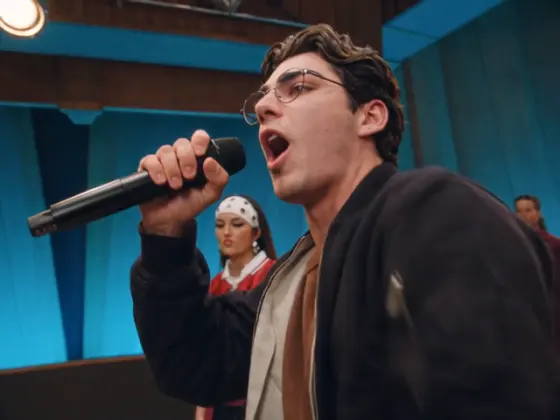
The appeal of the Gangsta's Paradise AI trend is the performance handoff: one person delivers the verse with total seriousness while a second waits, then steps in for the closing chorus. Build toward that final entrance instead of having both people sing throughout.

A Stage Full of Unexpected Singers

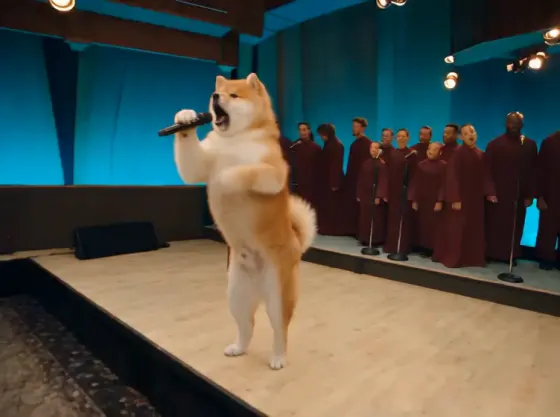
Give your Gangsta's Paradise AI rap video a bright sci-fi hangar with an armored backing ensemble, or a blue-lit stage with a red-robed choir. Microphone close-ups establish the lead; a wide shot reveals the chorus behind the duo.

Two Photos, Two Distinct Roles

Cast yourself and a friend as the lead rapper and supporting singer. Animate one prepared image containing both people, or assign separate photos in a mode with multiple identity references. Keep each face, outfit and role consistent across shots.

Your Own Duo Performance

Create a personal music-performance meme for TikTok, Reels or Shorts. Try best friends, siblings or a couple, then add captions and available music during editing. A short, serious performance followed by an unexpected choir reveal gives the clip its punchline.

How to Make a Gangsta's Paradise AI Video from Photos

01

Step 1: Choose Your Performance Workflow

Open Media.io and choose an image-to-video mode to animate a prepared stage or hangar image. For the specific verse-to-chorus sequence, use a matching Gangsta's Paradise video reference or template in a mode that supports it.

02

Step 2: Prepare Photos and Assign Roles

Use a clear duo image with both faces visible and a microphone in the lead's hand. If starting with separate portraits, first prepare a shared scene or use supported identity inputs. Assign Photo A to the rapper and Photo B to the closing singer.

03

Step 3: Generate, Review and Add Audio

Choose a Gangsta's Paradise AI prompt below and generate your performance. Check both identities, microphone placement and the final handoff. Add the song and align your cuts afterward; precise lip-sync requires a compatible audio-driven workflow.

Gangsta's Paradise AI Video Prompts: Four Performance Ideas

Prompt category icon
One-Image Duo Animation

Input: One prepared image of two performers

Prompt: The Closing Singer Takes the Mic. Animate this prepared duo image into a Gangsta's Paradise-inspired AI video. Preserve both faces, hairstyles, outfits and starting positions. The left performer holds a microphone, looks into the camera and makes small rhythmic hand gestures. The right performer waits quietly, then leans forward near the end as if joining the chorus. Keep a steady medium-wide shot and restrained movement. Do not swap identities, merge bodies or duplicate microphones. Add music and any precise lip-sync separately.

Prompt category icon
Reference-Led Rap Duo Remix

Input: Matching video reference + supported identity photos

Prompt: Follow the Verse-to-Chorus Reference. Use the supplied performance video to guide this Gangsta's Paradise AI template-style remix. Assign Photo A to the lead rapper and Photo B to the closing singer using the available identity controls. Follow the reference's shot order, microphone gestures, walk-past timing and final choir reveal. Keep the supporting performer silent until the handoff. Preserve each face and outfit through every cut, with no role switching or blended features. Handle soundtrack alignment and precise lip-sync through supported audio controls or editing.

Prompt category icon
Sci-Fi Hangar Choir Reveal

Input: One prepared duo image in a sci-fi hangar

Prompt: The Hangar Becomes a Concert. Animate this scene as a Gangsta's Paradise sci-fi choir meme. Keep the two foreground performers recognizable in their original outfits. The lead grips a microphone and gestures toward the camera while the partner waits beside them. Rows of original armored characters stand behind the duo. Slowly widen the frame to reveal the backing ensemble lifting microphones together; the partner leans forward for the finale. Maintain clear spacing, consistent armor and stable faces. Use the choir reveal as a visual cue, then add music in editing.

Prompt category icon
Blue-Lit Gospel Choir Finale

Input: One prepared duo image with a red-robed choir

Prompt: Bring in the Backing Choir. Create a Gangsta's Paradise choir AI video from this blue-lit stage image. Preserve the two lead performers' faces and outfits. The person holding the microphone gives a serious performance with subtle head nods and small hand gestures. The second person waits, then steps slightly forward at the end. Behind them, the red-robed choir sways gently and raises its heads together for the finale. Use one steady wide shot, natural movement and clear separation between performers. Add the soundtrack and any synchronized singing separately.

FAQs About the Gangsta's Paradise AI Video Generator

1. What is the Gangsta's Paradise AI video trend?

It is an AI music-performance meme built around Gangsta's Paradise by Coolio featuring L.V. A lead performer delivers the verse, a second joins near the end, and a backing choir provides the finale. Recognizable versions use a sci-fi hangar or a blue-lit stage with a red-robed choir.

2. How do I use a Gangsta Paradise AI video generator with my photos?

Prepare a clear duo performance image, open an image-to-video mode on Media.io and describe the rapper, waiting partner and closing handoff. For closer scene timing, use a matching reference in a compatible mode. Review both faces and microphone gestures, then add music and align the performance during editing.

3. Do I need two separate photos, or can I use one duo image?

One prepared image containing both performers works for a prompt-led animation. With two separate portraits, first create a shared performance image or choose a mode that supports multiple identity references. Assign Photo A to the rapper and Photo B to the closing singer, and keep the roles consistent throughout.

4. Which Gangsta's Paradise AI prompt helps prevent face swaps and role errors?

Try: Preserve both identities, outfits and positions. The left performer holds the microphone and leads; the right performer waits, then leans forward for the finale. Keep a steady medium-wide shot with small gestures. If faces drift, simplify the action, shorten the shot and use a clearer prepared image or supported identity references.

5. Does the generator recreate the full template, original song and lip-sync?

A photo and prompt can create an inspired performance. Matching a full sequence needs a compatible reference-video or template workflow; exact lip-sync needs suitable audio-driven tools. A text prompt does not supply the original recording. Add music available for your intended use afterward. Keep the reference's 4:3 framing when supported, or reframe your adaptation.

Media.io AI Video Creation:
Community feedback icon Explore AI rap video and choir performance prompts
