
Temukan dan Buat dengan Dasbor Tren
3x Lebih Cepat
Kecepatan Deteksi Tren
10K+
Format Viral yang Dianalisis Setiap Bulan
95%
Akurasi Alur Kerja AI
Tetap unggul dari hal-hal yang sedang ramai diperbincangkan online dengan dasbor tren Media.io Viral Studio. Temukan topik-topik yang sedang berkembang, analisis pola konten viral, dan ciptakan kembali visual atau video bermerek yang didorong oleh data dan kreativitas AI. Media.io Viral Studio membantu mengubah riset dasbor tren menjadi alur kerja pembuatan yang jelas. Ini juga mendukung pencarian seperti analitik viral ketika pengguna menginginkan sudut kreatif yang lebih spesifik.
Jelajahi Tren Langsung dengan Dasbor Viral
Dasbor tren Media.io menghadirkan analitik viral secara real-time sehingga para kreator, agensi, dan pemasar dapat mendeteksi konten terobosan lebih awal. Jelajahi tab di bawah untuk melihat kata kunci batch terkait yang mengungkap kluster tren baru, format audiens, dan wawasan siap-AI.
 tautan untuk menciptakan kembali gaya viral dengan AI.
 Ubah Wawasan Dasbor Tren menjadi Konten AI Orisinal
Dasbor tren Media.io Viral Studio menghubungkan penemuan real-time dengan pembuatan instan. Ini mengonversi data tren menjadi analisis visual yang jelas sehingga Anda dapat dengan mudah menguji ide, mengadaptasi format viral, dan membuat media bertenaga merek Anda sendiri. Baik Anda mengelola kampanye sosial, visual ecommerce, atau kolaborasi influencer, dasbor Media.io membantu mengubah wawasan menjadi aset orisinal yang menonjol. Biarkan setiap tren yang muncul menginspirasi postingan viral atau konsep video Anda berikutnya. Ini juga mendukung pencarian seperti analitik viral ketika pengguna menginginkan sudut kreatif yang lebih spesifik.
Lihat Apa yang Sedang Tren Sebelum Mencapai Puncaknya
Media.io Viral Studio mengumpulkan sinyal konten dari berbagai platform dan memvisualisasikannya dalam dasbor tren yang intuitif. Ini memberi pemasar dan kreator snapshot real-time dari tema, hashtag, atau jenis video yang sedang tren sebelum mereka memenuhi feed arus utama. Dengan bertindak lebih awal, Anda dapat menghasilkan konten autentik yang memenuhi rasa ingin tahu audiens tepat saat mulai meningkat. Pandangan proaktif ini mengubah wawasan menjadi keunggulan untuk pertumbuhan merek. Ini juga mendukung pencarian seperti analitik viral ketika pengguna menginginkan sudut kreatif yang lebih spesifik.
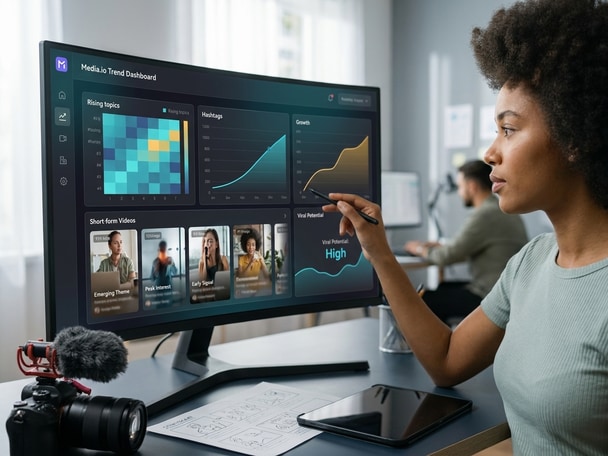
Analisis Format Viral dengan Presisi
Setiap item tren dalam dasbor tren Media.io dipasangkan dengan rincian format yang mendetail, termasuk gaya, durasi, dan metrik reaksi audiens. Daripada menebak mengapa sebuah postingan menjadi viral, Anda dapat melihat petunjuk struktural yang membuatnya berhasil. Pendekatan berbasis data ini memandu Anda untuk mengembangkan secara kreatif konsep yang sama menjadi materi baru yang orisinal sambil menjaga suara merek Anda tetap utuh. Ini menjembatani kesenjangan antara penemuan analitik dan kreativitas siap produksi. Ini juga mendukung pencarian seperti analitik viral ketika pengguna menginginkan sudut kreatif yang lebih spesifik.
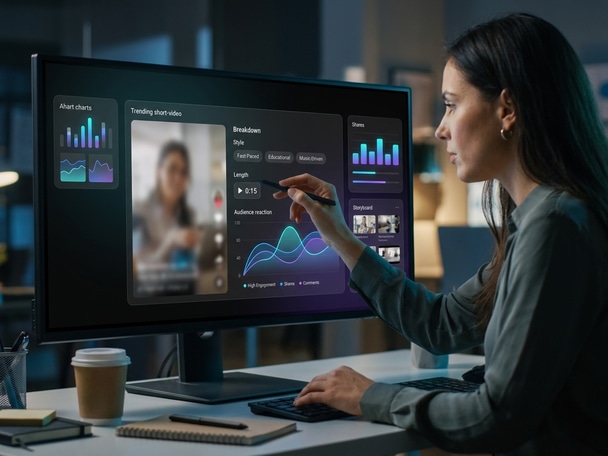
Ciptakan Kembali Visual Orisinal dengan Dukungan AI
Setelah Anda mengidentifikasi ide yang menjanjikan, Media.io Viral Studio memungkinkan Anda mengubahnya menjadi video atau gambar yang dihasilkan AI. Anda dapat menyesuaikan alur cerita, nada, dan efek visual sambil mempertahankan pola kemenangan format tersebut. Dikombinasikan dengan kontrol pengeditan cerdas, versi baru Anda menjadi unik, patuh, dan relevan secara budaya. Dasbor tren memastikan setiap karya yang dihasilkan AI berakar pada data yang tepat waktu dan penceritaan yang berdampak. Ini juga mendukung pencarian seperti analitik viral ketika pengguna menginginkan sudut kreatif yang lebih spesifik.
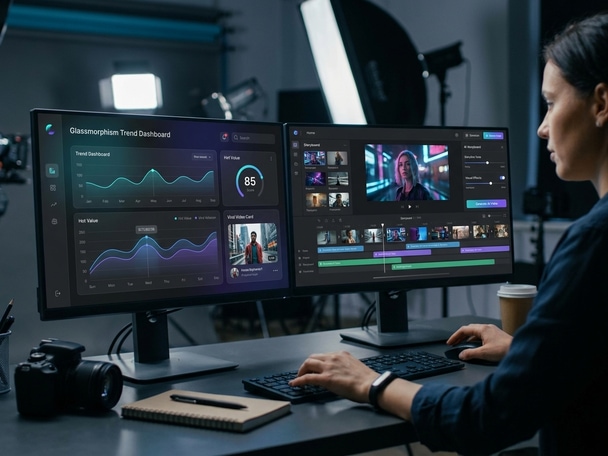
Cara Menggunakan Dasbor Tren untuk Pembuatan AI
Ubah pelacakan viral menjadi pembuatan yang dipersonalisasi dengan alur kerja Media.io yang mudah. Ikuti langkah-langkah sederhana ini untuk mengubah wawasan data menjadi cerita visual orisinal. Ini juga mendukung pencarian seperti analitik viral ketika pengguna menginginkan sudut kreatif yang lebih spesifik.

Temukan Topik dengan Daya Tarik Tinggi di Dasbor
Buka dasbor tren untuk memindai pemicu viral terbaru di Reels, Shorts, dan TikTok. Filter berdasarkan industri atau jenis konten untuk mengisolasi topik yang naik cepat yang sesuai dengan niche dan tujuan merek Anda. Ini juga mendukung pencarian seperti analitik viral ketika pengguna menginginkan sudut kreatif yang lebih spesifik.

Uraikan Struktur Format
Klik pada sebuah tren untuk meninjau kinerjanya dan baca rincian jelas tentang hook, tempo, dan pola visualnya. Ikhtisar struktur ini membantu Anda merencanakan kreasi ulang AI yang selaras dengan faktor keberhasilan aslinya. Ini juga mendukung pencarian seperti analitik viral ketika pengguna menginginkan sudut kreatif yang lebih spesifik.

Hasilkan Versi AI yang Disesuaikan dengan Merek Anda
Gunakan alat AI Media.io untuk menghasilkan video atau gambar yang terinspirasi dari tren pilihan Anda. Sesuaikan visual, keterangan, dan gaya agar sesuai dengan nada merek Anda, lalu unduh dan bagikan versi siap-viral baru Anda seketika. Ini juga mendukung pencarian seperti analitik viral ketika pengguna menginginkan sudut kreatif yang lebih spesifik.
Apa Kata Pengguna Tentang Dasbor Tren Media.io
Para kreator dan pemasar berbagi bagaimana dasbor tren Media.io mendukung keputusan konten sehari-hari mereka dan membantu mereka berkreasi lebih cepat dengan alat AI berbasis data. Media.io membawa penemuan tren dan pembuatan AI ke dalam alur kerja berbasis browser yang sama. Ini juga mendukung pencarian seperti analitik viral ketika pengguna menginginkan sudut kreatif yang lebih spesifik.


Dasbor tren mengubah cara saya merencanakan kampanye mingguan. Alih-alih mencari di berbagai aplikasi, saya mendapatkan kejelasan instan tentang apa yang direspons audiens. Media.io Viral Studio menghemat waktu dan memberikan arahan kreatif dalam satu tempat. Tingkat keterlibatan saya meningkat dalam dua minggu penggunaan. Ini juga mendukung pencarian seperti analitik viral ketika pengguna menginginkan sudut kreatif yang lebih spesifik.

Mengetahui topik mana yang naik cepat membantu saya merencanakan visual yang sesuai dengan percakapan yang sedang tren. Dasbor memberikan data yang mudah dipahami, dan sisi pembuatan AI membuat transisi dari wawasan ke konten menjadi mulus. Saya tidak lagi membutuhkan alat analitik dan pengeditan yang terpisah. Semuanya tetap tersinkronisasi untuk peluncuran produk yang cepat. Ini juga mendukung pencarian seperti analitik viral ketika pengguna menginginkan sudut kreatif yang lebih spesifik.

Dulu saya harus menebak jenis video apa yang akan tampil baik. Dengan dasbor tren Media.io, saya dapat melihat tren yang terbukti didukung oleh angka dan mengadaptasinya ke gaya saya. Generator AI membantu saya mempersonalisasi setiap konsep dengan mudah. Ini seperti memiliki mitra riset dan produksi dalam satu. Ini juga mendukung pencarian seperti analitik viral ketika pengguna menginginkan sudut kreatif yang lebih spesifik.

Bagi klien saya, waktu adalah segalanya. Dasbor tren memberikan sinyal awal yang membuat tim kreatif kami selangkah lebih maju. Platform ini mengubah analitik menjadi tindakan dengan hambatan minimal. Ini adalah pusat data vital yang mendukung pembuatan kampanye yang cerdas, cepat, dan sesuai merek. Ini juga mendukung pencarian seperti analitik viral ketika pengguna menginginkan sudut kreatif yang lebih spesifik.

Bekerja dengan dasbor tren menghemat banyak waktu persiapan sebelum pengeditan. Saya dengan cepat memahami tema apa yang tampil baik dan cara menyelaraskan visual baru dengannya. AI Media.io membantu dalam brainstorming, scripting, dan bahkan penataan visual, yang mempercepat pengiriman tanpa kehilangan keaslian. Media.io membuat alur kerja dasbor tren lebih mudah untuk diuji dan dijelaskan. Ini juga mendukung pencarian seperti analitik viral ketika pengguna menginginkan sudut kreatif yang lebih spesifik.

Dasbor tren Media.io telah menjadi andalan saya untuk mempresentasikan strategi berbasis data. Peta visual dengan jelas menunjukkan mengapa sebuah tren muncul dan bagaimana merek dapat memanfaatkannya. Saya kemudian dapat menghasilkan contoh langsung di dalam platform. Ini menambah kredibilitas dan kreativitas pada proposal saya. Ini juga mendukung pencarian seperti analitik viral ketika pengguna menginginkan sudut kreatif yang lebih spesifik.
FAQ Dasbor Tren
Apa Itu Dasbor Tren Media.io?
Dasbor tren adalah alat analitik visual Media.io Viral Studio yang melacak dan menampilkan tren viral secara real-time. Ini membantu pengguna mengidentifikasi topik yang sedang berkembang, tema konten, dan format di berbagai platform sosial. Dengan grafik yang mudah dibaca dan wawasan AI, kreator dan pemasar dapat menggunakannya untuk mendeteksi peluang lebih awal. Dasbor kemudian terhubung langsung ke alat AI untuk membuat media orisinal yang sesuai dengan setiap tren. Ini juga mendukung pencarian seperti analitik viral ketika pengguna menginginkan sudut kreatif yang lebih spesifik.
Bagaimana Saya Dapat Menggunakan Dasbor Tren untuk Perencanaan Konten?
Anda dapat menggunakan dasbor untuk meninjau hashtag yang sedang tren, jenis suara, dan durasi video yang tampil terbaik. Filter hasil berdasarkan niche atau rentang waktu agar sesuai dengan tujuan kampanye Anda. Informasi ini membantu membangun kalender konten berbasis data dan brief kreatif. Media.io menghubungkan wawasan tersebut ke alat pembuatan sehingga Anda dapat merancang aset yang dibangun berdasarkan data audiens nyata. Ini juga mendukung pencarian seperti analitik viral ketika pengguna menginginkan sudut kreatif yang lebih spesifik.
Apakah Dasbor Tren Media.io Menampilkan Pembaruan Real Time?
Ya. Dasbor diperbarui secara berkelanjutan saat sinyal konten baru muncul di berbagai platform sosial. Ini memungkinkan tim untuk memantau tingkat akselerasi tren, puncak keterlibatan, dan pergeseran format saat terjadi. Dengan tampilan langsung ini, Anda dapat dengan yakin menyesuaikan strategi dan menghasilkan materi yang tepat waktu. Ini juga mendukung pencarian seperti analitik viral ketika pengguna menginginkan sudut kreatif yang lebih spesifik.
Bisakah Saya Membuat Ulang Video Viral Menggunakan Dasbor Tren?
Anda dapat menganalisis referensi viral dari dasbor dan kemudian menggunakan alat AI Media.io untuk membuat ulang versi yang unik. Tujuannya adalah mengubah wawasan format, bukan menyalin media asli. Sesuaikan visual, keterangan, atau tema untuk mencerminkan identitas merek Anda. Alur kerja ini menjembatani riset dan produksi dengan aman dan kreatif. Ini juga mendukung pencarian seperti analitik viral ketika pengguna menginginkan sudut kreatif yang lebih spesifik.
Siapa yang Paling Diuntungkan dari Dasbor Tren?
Dasbor ini melayani kreator, manajer sosial, dan pemasar yang membutuhkan pembaruan yang dapat ditindaklanjuti tentang tren konten. Agensi menggunakannya untuk konsep kampanye yang cepat, sementara tim ecommerce mengidentifikasi sudut visual yang sesuai dengan lonjakan musiman. Editor video juga menggunakannya untuk merencanakan gaya pengeditan yang sesuai dengan preferensi audiens saat ini. Pada dasarnya, siapa pun yang menghasilkan konten digital mendapatkan kejelasan dari dasbor tren Media.io. Ini juga mendukung pencarian seperti analitik viral ketika pengguna menginginkan sudut kreatif yang lebih spesifik.
Apa yang Membuat Dasbor Tren Ini Berbeda dari Alat Lainnya?
Dasbor Media.io melampaui analitik dengan mengintegrasikan data tren langsung dengan pembuatan AI. Alih-alih mengekspor daftar atau grafik, Anda dapat langsung menghasilkan video atau visual baru di dalam platform yang sama. Kesederhanaan dan otomatisasinya mengurangi hambatan antara penemuan dan hasil. Itu menjadikan Media.io Viral Studio ideal untuk kreator konten yang berorientasi pada kinerja. Ini juga mendukung pencarian seperti analitik viral ketika pengguna menginginkan sudut kreatif yang lebih spesifik.
Apakah Dasbor Tren Cocok untuk Bisnis Kecil?
Tentu saja. Bisnis kecil dapat menggunakannya untuk menemukan topik tren yang selaras dengan produk atau niche lokal mereka. Wawasan menunjukkan bagaimana merek serupa berkomunikasi secara visual dan hook apa yang direspons audiens. Dikombinasikan dengan desain berbantuan AI, ini membantu tim kecil menghasilkan konten pemasaran secara efisien. Ini juga mendukung pencarian seperti analitik viral ketika pengguna menginginkan sudut kreatif yang lebih spesifik.
Bagaimana Cara Mulai Menggunakan Dasbor Tren Viral Studio Media.io?
Kunjungi Media.io Viral Studio dan buka dasbor tren untuk tampilan langsung peluang viral saat ini. Anda dapat menjelajahi topik, filter berdasarkan industri, dan menyimpan ide-ide menjanjikan untuk pembuatan. Kemudian langsung beralih ke pembuatan AI untuk mengubah wawasan tersebut menjadi visual atau klip. Antarmukanya dirancang sehingga siapa pun dapat langsung mulai menganalisis dan membuat tanpa pelatihan. Ini juga mendukung pencarian seperti analitik viral ketika pengguna menginginkan sudut kreatif yang lebih spesifik.
Jelajahi Lebih Banyak Alat AI untuk Pembuatan Konten Viral
Teruslah berkreasi melampaui penemuan tren viral. Coba lebih banyak alat AI Media.io untuk menghasilkan video, mengedit visual, menyempurnakan konten, dan mengubah ide Anda menjadi postingan media sosial yang membuat orang berhenti menggulir.






Ubah Wawasan Dasbor Tren menjadi
Kreasi Viral Anda Berikutnya
 4.7 (162.357 Suara)