Erstes Abonnement bis zu50 % Rabatt
Jetzt kaufen

Du wirkst einsam KI-Videogenerator

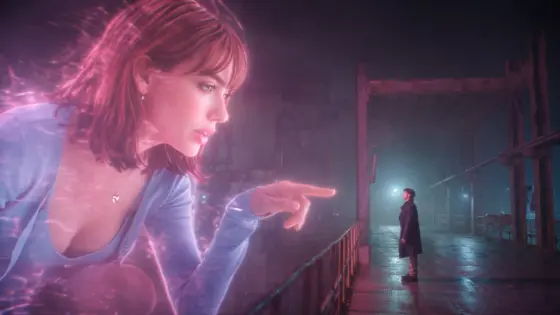
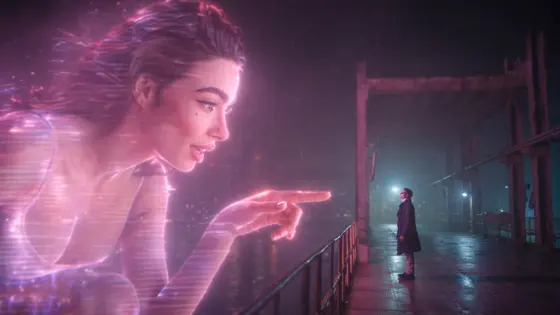
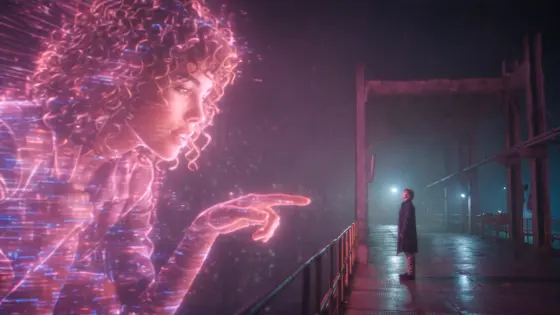
Erstelle aus deinem Foto ein „You Look Lonely“-KI-Video. Erzeuge auf Media.io ein riesiges Hologramm in einer regnerischen Cyberpunk-Stadt mit von Blade Runner inspirierten Neon-Effekten.
Alle Einreichungen

You Look Lonely AI Video

Turn your photo into the You Look Lonely AI Video trend. Create a towering purple hologram above a rainy cyberpunk city, reaching toward someone on a neon-lit bridge. Make your own emotional, sci-fi-inspired giant hologram video with Media.io Image to Video.

Create My Hologram AI Video

Start with a clear portrait or prepared hologram scene. Face consistency, scale, speech, and audio depend on the selected AI model; add exact dialogue in editing if needed.

Why Create a You Look Lonely Hologram AI Video?

Become a Giant Neon Hologram

Turn your portrait into a towering, translucent violet hologram above a rain-soaked futuristic bridge. Describe soft facial expressions, faint digital scan lines, and glowing light reflected on the street. Use a sharp, front-facing photo to help preserve your identity.

Create an Emotional Cyberpunk Encounter

Tell a visual story with a lone figure looking up as the hologram slowly leans closer and reaches out. Keep the scale difference obvious and the gestures gentle. Short, sequential actions can make the encounter more convincing.

Make a Couple or Friend Hologram Scene

Imagine your partner or friend as the giant hologram while another character stands on the bridge. If your model supports multiple reference images, use both portraits; otherwise prepare a composite reference image first. Faces and proportions may change between frames.

Turn a Hologram Photo into a Cinematic Video

Animate a giant hologram AI photo or Blade Runner-inspired wallpaper with drifting rain, subtle head movement, purple light, and a slow camera push. Choose a vertical frame for Reels and Shorts; add licensed audio or captions after generation.

How to Make a You Look Lonely AI Video in 3 Steps

01

Step 1: Upload Your Portrait or Scene

Open Media.io Image to Video and upload a clear portrait or a prepared image of a giant hologram above a rainy bridge. To feature two specific people, use multiple references only if the selected model supports them, or create a combined scene image first.

02

Step 2: Describe the Giant Hologram

Write a prompt for a purple translucent hologram leaning toward a small figure on a neon-lit bridge. Specify rain, wet reflections, a gentle hand gesture, and slow cinematic camera movement. Request 9:16 framing for a vertical video.

03

Step 3: Generate, Review and Share

Generate the clip and inspect the hologram face, body scale, fingers, and continuity. If speech or lettering is inaccurate, add the line “You look lonely. I can fix that.” as a caption or recorded voiceover in editing. Share with suitable synthetic-media labeling.

You Look Lonely AI Video FAQs

What is the You Look Lonely AI trend?

The You Look Lonely AI trend reimagines a memorable giant hologram scene associated with Blade Runner 2049. A colossal glowing figure looks down at a person in a rainy futuristic city, often accompanied by the phrase “You look lonely. I can fix that.” AI creators use their own portraits to make new fictional hologram scenes rather than authentic movie footage.

How can I make a You Look Lonely AI video from my photo?

Open Media.io Image to Video and upload a clear portrait or a prepared cyberpunk scene. Describe a huge purple hologram leaning down over a rain-soaked bridge toward a smaller person. Specify slow movement, stable facial features, neon lighting, and a vertical frame. Generate and review the result; identity and hand details may require another attempt.

What is a good You Look Lonely AI generator prompt?

Try: “Vertical 9:16 cinematic sci-fi noir video. A colossal translucent violet hologram of the person in the reference photo appears above a rainy futuristic city bridge. A small figure in a dark coat looks up from the wet pavement. The hologram slowly leans closer and extends one softly glowing hand without touching the person. Purple neon reflections, drifting mist, gentle expression, realistic rain, subtle digital scan lines, slow camera push, consistent face, stable anatomy, no text or logos.” Add the spoken line separately if the selected model cannot produce reliable dialogue.

Can I create a Blade Runner-inspired hologram AI wallpaper or photo?

Yes. You can first create a vertical still image of a giant purple hologram over a rainy neon city and use it as a phone wallpaper or as the starting image for Image to Video. The style can evoke cinematic cyberpunk lighting without copying film frames or actors. For the best animation, keep the hologram face clearly visible and leave room for the smaller figure.

Can I use my partner’s photo and the “You look lonely, I can fix that” audio?

You can create a couple or friend hologram concept with photos you have permission to use. Use two reference images only when the chosen model supports them; otherwise prepare a combined scene. The original film soundtrack, actors’ likenesses, and third-party music may have separate rights. Add licensed audio or your own voiceover and disclose AI-generated footage where required.