初回サブスクリプションは最大で50%割引
今すぐ購入

ゾンビAI動画トレンド:ラブストーリープロンプト | Media.io

2枚の写真からゾンビAIのラブストーリーを作成しましょう。感情的なハグ、温かい回想シーン、そしてシネマティックなマッチカット用の10秒動画プロンプトをコピーします。
すべての投稿

Recreate the Zombie AI Video Trend from Two Photos

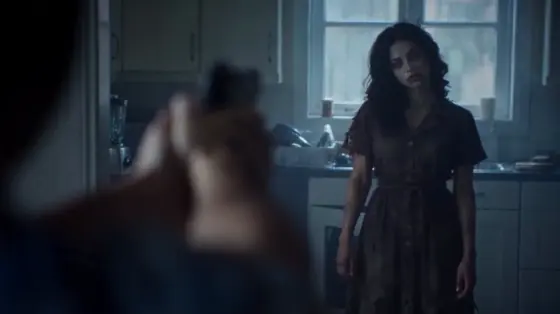
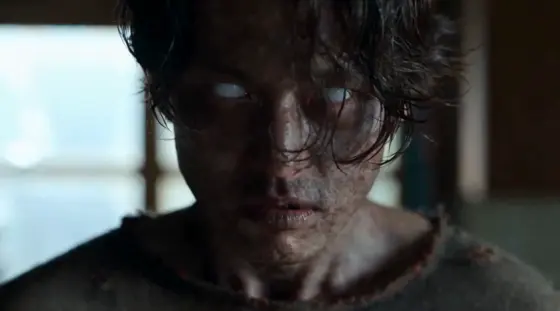
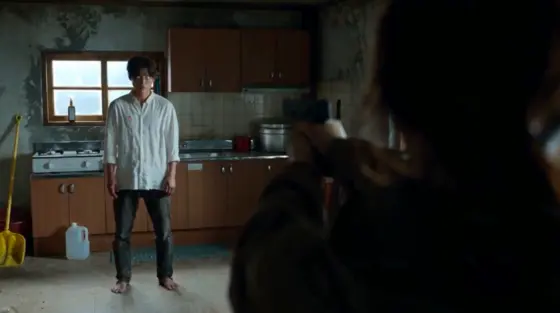
Explore the zombie AI video trend: one partner has turned, the other cannot bring themselves to shoot, and an embrace cuts into a happy memory. Upload two photos and try copy-ready zombie love story AI video prompts for a 10-second scene. Choose a kitchen, beach, snowy cabin, or friendship story, then guide the faces, emotions, and match cut with reference images.

Create My Zombie Love Story Explore More Zombie Effects

Upload two clear photos of yourself and an authorized adult partner or friend. Each prompt assigns Image 1 and Image 2 to specific roles. Use a model that supports two image references and 10-second video; add an authorized reference clip where supported.

What Makes the Zombie AI Video Trend Work?

Tell a Zombie Apocalypse Love Story

The zombie apocalypse love story moves from fear to recognition, then from an approaching infected partner to a loving embrace in the past. The 10-second prompts place the confrontation in the first five seconds and the warm memory in the final five. The ending stays inside the memory.

Keep Both Faces Recognizable

Assign each uploaded photo to one character and keep those roles fixed. The infected partner must remain recognizable and return as the same healthy person in the flashback. Preserve facial structure, hair, age, and body proportions; describe each timeline's clothing separately.

Match the Hug Across Two Scenes

The signature transition is a match cut at physical contact. Keep the same character on each side of the frame, with matching shoulders, arms, and movement direction. Cold present-day lighting changes to a warm memory, while the embrace continues across the cut.

Choose Your Love Story Setting

Start with the classic kitchen-to-field scene, reverse the roles for a zombie girlfriend story, or try a snowy cabin and beach memory. The best-friends version keeps the same emotional structure with platonic gestures. Each prompt uses two adult characters and a non-graphic zombie appearance.

How to Make the Zombie AI Video Trend

01

Step 1: Upload Two Character Photos

Choose one sharp, well-lit photo of each adult, with visible faces and no heavy filters. Check the role labels before uploading: Image 1 is the healthy survivor and Image 2 is the infected partner in the prompts below. Use the same photos for the present and the flashback.

02

Step 2: Choose a 10-Second Story Prompt

Copy a zombie AI video prompt below. Keep the five-second confrontation and five-second memory, or simplify further if needed. Select a model with two-image references and a 10-second duration. These prompts use 16:9; change to 9:16 for a vertical version. Add an authorized motion reference only where supported.

03

Step 3: Check the Faces and Hug Transition

Review both identities, the infected appearance, the lowered weapon, and the embrace. Confirm the flashback shows the same partner healthy and the characters keep their screen positions at the cut. If the transition fails, generate two shorter clips and use the contact frame to guide the memory where supported.

10-Second Zombie AI Video Prompts to Copy

Decorative profile illustration beside the kitchen zombie love story prompt
Kitchen to Golden Field

Copy-Ready Video Prompt

Kitchen-to-Field Zombie Love Story Prompt: Create a 10-second 16:9 photorealistic live-action video at 24 fps. Image 1 is the adult woman; Image 2 is her male partner. Preserve both recognizable faces, hair, ages, skin tones, and proportions. 0-2s: In a neglected kitchen under cold window light, show her tearful close-up, then her infected partner with pale grey skin, cloudy eyes, and messy hair. She holds an unfired pistol in her right hand. 2-4s: She lowers it away from both bodies and opens her arms; he approaches quickly. 4-5s: Woman screen left, man screen right. Cut exactly as they embrace. 5-8s: Match cut to the same embrace in a golden field before his infection. Match camera angle, shoulders, arms, and movement. Both are healthy, wearing a cream blouse and pale-blue shirt. They gently sink into the grass, smiling; she touches his cheek. 8-10s: Wide sunset view, seated together with her head on his shoulder. End in the memory, not a cure. Natural sound only. No music, dialogue, gunfire, biting, gore, extra people, text, logos, identity swaps, or distorted anatomy.

Decorative profile illustration beside the zombie girlfriend beach memory prompt
Zombie Girlfriend Beach Memory

Copy-Ready Video Prompt

Zombie Girlfriend Beach Memory Prompt: Create a 10-second 16:9 photorealistic live-action video at 24 fps. Image 1 is the adult male survivor; Image 2 is his female partner. Preserve both recognizable identities, hair, ages, skin tones, and proportions. 0-2s: Inside a deserted seaside house under cold overcast light, show his tearful close-up, then her infected face: pale grey skin, cloudy eyes, tangled hair, and a distressed cream dress. He holds an unfired pistol in his right hand. 2-4s: He lowers it away from both bodies and opens his arms; she approaches quickly. 4-5s: Man screen left, woman screen right. Cut at their first embrace. 5-8s: Match cut to the same embrace on a quiet beach before the outbreak. Preserve the camera angle, body positions, and movement. Both are healthy, wearing a linen shirt and clean summer dress. She smiles and touches his cheek. 8-10s: Wide view of them seated beside the sea, her head on his shoulder beneath a pink-and-gold sunset. Stay in the memory. Natural waves, wind, breathing, and laughter only. No music, speech, shooting, biting, gore, extra people, text, logos, face changes, or duplicate bodies.

Decorative profile illustration beside the snowy cabin zombie love story prompt
Snowy Cabin Love Story

Copy-Ready Video Prompt

Snowy Cabin Zombie Love Story Prompt: Create a 10-second 16:9 ultra-realistic live-action video at 24 fps. Image 1 is the adult woman; Image 2 is her male partner. Preserve their recognizable faces, hair, ages, skin tones, and proportions across both timelines. 0-2s: In a cold mountain cabin with frosted windows, show her tearful face, then his infected face with pale grey skin, cloudy eyes, and dishevelled hair. She wears a green parka; he wears a worn charcoal coat. She holds an unfired pistol in her right hand. 2-4s: She lowers it away, opens her arms, and he rushes toward her. 4-5s: Woman screen left, man screen right. Cut precisely at their embrace. 5-8s: Match cut to the same embrace on a golden-hour snowy hillside before his infection. Match shoulders, arms, camera angle, and momentum. Both are healthy in a cream coat and pale-blue jacket. Continue into a gentle playful fall into soft snow; they laugh with faces close. 8-10s: Wide view, seated shoulder to shoulder against pink mountains at sunset. End in the memory. Realistic snow and contact. Natural sound only. No music, dialogue, gunfire, biting, gore, extra people, text, logos, or identity swaps.

Decorative profile illustration beside the best friends zombie video prompt
Best Friends Road-Trip Memory

Copy-Ready Video Prompt

Best Friends Zombie Video Prompt: Create a 10-second 16:9 photorealistic live-action video at 24 fps. Image 1 is the adult survivor; Image 2 is their infected best friend. Preserve both recognizable faces, hairstyles, ages, skin tones, and proportions. Keep the relationship platonic. 0-2s: In a deserted roadside diner under cold daylight, show the survivor crying, then the friend with pale grey skin, cloudy eyes, and messy hair. The survivor holds an unfired pistol in the right hand. 2-4s: Recognition replaces fear. The survivor lowers the pistol away and opens their arms; the friend moves quickly forward. 4-5s: Survivor screen left, friend screen right. Cut as they embrace. 5-8s: Match cut into the same friendship hug at a sunny roadside overlook before the outbreak. Match camera angle, shoulders, arms, and movement. Both are healthy in clean travel clothes. They step back, exchange a shoulder pat, and laugh beside their parked car. 8-10s: Wide sunset view, seated side by side on a low wall, one arm around the other's shoulders. Stay in the memory. Natural sound only. No music, dialogue, romantic kissing, shooting, biting, gore, extra people, text, logos, identity swaps, or duplicated bodies.

FAQs About the Zombie AI Video Trend

1. What is the zombie AI video trend?

The zombie AI video trend is a short emotional story: one partner has become infected, the other hesitates, and their embrace cuts into a happy memory from before the outbreak. These prompts adapt that structure into 10-second videos, ending in the warm flashback rather than showing a cure.

2. What photos do I need for a zombie love story video?

Use two clear photos, one of each adult. Image 1 is the healthy survivor; Image 2 is the partner or friend who becomes infected. Upload a normal photo for both roles: the prompt describes the zombie appearance. Choose a model that accepts multiple image references, and keep the upload order consistent.

3. Do I need the original zombie trend video?

No. Two character photos and a storyboard prompt can guide an original zombie love story. An authorized reference clip may help with framing, movement, and timing in models that accept video inputs. The original video is not required, and a reference does not guarantee identical faces, actions, or cuts.

4. Is this a zombie filter or a zombie love story video?

A zombie filter changes one person's appearance in a photo or transformation clip. This page focuses on a two-character zombie love story: confrontation, recognition, an embrace, and a flashback. Choose the girlfriend, boyfriend, or best-friends prompt according to who becomes infected and the relationship you want to show.

5. How do I fix changing faces or a broken hug transition?

Keep the same two reference photos and role order, then simplify the shots. At the transition, match screen positions, shoulder angles, arm placement, and movement direction. If one generation still fails, make the confrontation and memory separately, using the contact frame as the next starting frame where supported. Likeness and timing can vary.

Media.io Online AI Tools Quality Rating:
vote 4.7 (162,357 Votes)






