AIキャラクター
Nano Banana Pro
0/2000
1K
3:4
ビュータイプ
クリエイティブモデルカード
クリエイティブモデルカード
スタイライズされたコンセプトと迅速な探索のために。
スタイル
現実的
現実的
すべて
追加済み
未追加
再利用できるAIキャラクターやブランドインフルエンサーを生成
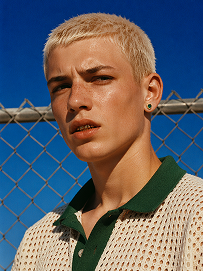
Outdoor bust portrait, cool teenage young man with short platinum blonde buzz cut, freckles across nose and cheeks, gold teeth grills on front teeth, single emerald green gem earring in left ear, sweat drop on cheek, wearing off-white open-knit polo shirt with dark green collar, standing in front of chain-link fence, vivid deep blue clear sky background, harsh bright midday direct sunlight, high contrast sharp shadows, 90s street fashion editorial photography, realistic skin texture, film grain, saturated vibrant color grading, shot on 35mm film, ultra detailed, 8K, sharp focus
プロンプトを使用
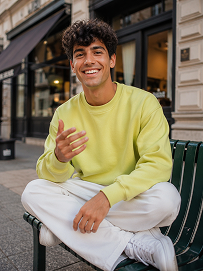
Realistic treet portrait, handsome young man with fluffy dark curly hair, sitting cross-legged on a dark green outdoor metal bench on city sidewalk, big bright smile showing teeth, right hand raised gesturing as if chatting, wearing lime yellow crew neck sweatshirt, loose white casual trousers, white sneakers, modern urban building background with shallow depth of field, natural soft daylight, lifelike skin texture, casual lifestyle photography, shot on Canon R5, 50mm f/1.8 lens, sharp focus, 8K, ultra detailed, warm natural tone
プロンプトを使用
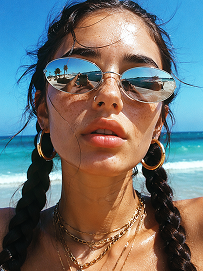
Close-up beach portrait, young woman with two thick dark long braids, freckles all over nose and cheeks, futuristic silver oval mirrored sunglasses reflecting beach scenery, large gold hoop earrings, layered multiple gold chain necklaces, slightly open mouth, bright harsh summer midday sunlight, clear turquoise ocean and blue sky background, wind blowing stray hair strands on face, realistic skin texture, sun-kissed complexion, vintage film grain, summer coastal fashion photography, sharp details, high saturation, shot on 35mm film, 8K ultra realistic
プロンプトを使用

Generate Friendly Teacher Headshots for Education Profiles

Build a professional teacher portrait without booking a studio or chasing the perfect camera setup. Media.io helps educators create warm, credible headshots for faculty pages, course bios, tutoring profiles, and school newsletters. Adjust style, outfit, expression, and background to match your classroom brand or school identity.

Create Teacher Headshots Now

Tip: Use a clean outfit, a natural smile, and a soft campus or neutral backdrop for stronger faculty profile results.

AI-generated elementary teacher headshot with a warm smile for a school staff page

Elementary Teacher Faculty Portrait

AI teacher headshot of an adult science instructor for a course bio and faculty profile

High School Science Instructor Bio Photo

AI-generated instructor headshot for an online course landing page and educator bio

Online Course Creator Profile Image

Professional AI tutor headshot for a tutoring profile with a friendly and credible look

Private Tutor Profile Portrait

AI faculty headshot of an adult lecturer for a university newsletter and presentation profile

University Lecturer Newsletter Headshot

AI-generated school staff headshot designed for presentation slides and team introductions

School Staff Presentation Slide Portrait

Why Educators Use an AI Teacher Headshot Generator

Teachers and education teams often need more than one portrait for different channels. A faculty page may need a formal look, while a course bio or newsletter works better with a softer, more welcoming style. Media.io makes it easier to create both without starting from scratch every time. That means faster updates, stronger consistency, and less dependence on one photo shoot.

Make First Impressions Feel Approachable

A teacher headshot should feel professional without looking distant or overly corporate. With AI styling controls, you can create a portrait that reflects warmth, trust, and confidence. This matters when students, parents, or prospective learners first see your faculty profile. A more approachable visual can make course pages and educator introductions feel more human.

Keep School and Course Profiles Consistent

Education teams often publish profiles across faculty directories, learning platforms, newsletters, and slide decks. Media.io helps you maintain a more unified visual standard across those touchpoints. You can align wardrobe, lighting, crop, and background tone for a cleaner brand presentation. That consistency is especially useful for school departments, tutoring companies, and online academies.

Save Time on Retakes and Scheduling

Traditional headshots can slow down website updates, staff onboarding, and course launches. An AI teacher headshot generator lets you move from idea to usable portrait in minutes. You can test multiple looks before choosing the best one for a faculty bio or newsletter feature. This reduces delays and gives educators more flexibility when they need fresh visuals quickly.

Create Reusable Bio Visuals for Many Formats

One great teacher portrait often needs to work across several education use cases. You may need a square profile image for a tutoring site, a vertical crop for a presentation, and a polished version for school marketing. Media.io supports fast iteration so your visual assets can adapt to each format. That makes your headshot more valuable long after the first download.

How to Create a Teacher Headshot with Media.io

01

Choose a Teaching Persona and Style

Start with the kind of educator image you need, such as faculty page, tutor profile, course instructor bio, or newsletter feature. Pick a style that fits your audience, from formal academic to friendly classroom-ready. This gives your result a clearer direction from the beginning.

02

Refine Outfit, Expression, and Background

Adjust clothing, pose, lighting, and backdrop to match your school, subject, or brand tone. A neutral background works well for directories, while a subtle classroom or campus feel can add context. Small refinements help the portrait look more credible and more useful across channels.

03

Download and Reuse Your Best Version

Save the strongest result and use it across faculty bios, course pages, tutoring platforms, newsletters, and presentation slides. You can return to generate variations for seasonal updates or new programs. This makes it easier to keep educator visuals fresh without restarting the process.

What Education Users Say

user
Rachel M.

Middle School Teacher

starstarstarstarstar

"Perfect for my faculty bio refresh" I needed a newer photo for our school website, but I did not have time for a professional shoot. Media.io gave me several teacher-style portraits that looked polished and still felt like me. I liked being able to test different backgrounds and expressions without extra effort. The final image worked well on our faculty page and in a parent newsletter.

user
Daniel S.

Online Course Creator

starstarstarstarstar

"Helped my instructor profile look more credible" My course landing page needed a headshot that looked more professional than a webcam screenshot. The generator made it easy to create a clean instructor portrait that matched my brand colors and tone. It felt more trustworthy for new students browsing my bio. I now use the same image style across my course thumbnails and email materials.

user
Priya L.

Private Tutor

starstarstarstarstar

"Great for tutoring platforms and parent outreach" As a tutor, I need to look both qualified and approachable. Media.io helped me create a portrait that felt friendly without looking too casual. I used one version for my tutoring profile and another for a printable flyer. Having those options made my personal brand look much more consistent.

user
Marcus T.

School Communications Coordinator

starstarstarstarstar

"Useful for staff consistency across channels" Our team often struggles with a mix of outdated photos, cropped snapshots, and inconsistent staff images. This tool helped us create a more unified look for several profile uses. The results were clean enough for faculty pages, school newsletters, and internal presentation decks. It saved us time and improved how our staff directory looks overall.

user
Elena B.

University Lecturer

starstarstarstarstar

"Easy way to update presentation and bio visuals" I needed a fresh image for conference slides, a lecturer bio, and a department page. Media.io made it simple to generate a headshot that looked professional but still approachable for students. The portrait style felt appropriate for academic settings without becoming too stiff. I appreciated how quickly I could create a version I was comfortable using publicly.

Educators and school teams use AI headshots to speed up profile updates while keeping a warm, consistent visual identity.

Teacher Headshot Generator FAQ

1. What is an AI teacher headshot generator?
faqfaq

An AI teacher headshot generator helps you create professional educator portraits without a traditional photo shoot. It is useful for faculty pages, course bios, tutoring profiles, school newsletters, and presentation materials. Instead of relying on one old photo, you can generate styles that better match your role and audience. This gives teachers and education teams more flexibility when building consistent profile visuals.

This tool is built for teachers, tutors, lecturers, course creators, school staff, and education marketers. It works well for anyone who needs a warm and credible profile image for education-related use. That includes faculty directories, online learning platforms, webinar speaker bios, and school communications. If your work depends on trust and approachability, a tailored headshot can improve how your profile is received.

Yes, that is one of the most common use cases for this page. You can generate portraits for faculty directories, instructor bios, department pages, and course landing pages. The goal is to create a polished image that still feels human and accessible to students or families. Different background and wardrobe choices can help you match either a formal academic look or a more modern online teaching style.

A strong teacher headshot usually combines professionalism with a welcoming expression. Clean lighting, simple wardrobe choices, and a distraction-free background often work best for school and course settings. The portrait should support trust while still feeling approachable to students, parents, or adult learners. In many cases, a subtle smile and soft natural styling perform better than an overly formal corporate look.

Yes, and that is one of the main advantages of using AI for teacher portraits. You can create a formal version for a faculty profile, a softer one for a newsletter, and another crop for presentation slides or tutoring platforms. This helps you keep the same core identity while adapting the image to each context. It is especially useful when one educator appears across multiple school and marketing channels.

No, you do not need advanced design or photography experience to get useful results. Media.io is made to help users move from concept to visual quickly with straightforward controls. You can focus on the look you want, such as academic, friendly, modern, or school-branded, and refine from there. That makes it practical for individual educators as well as larger school teams.

Yes, they are a practical fit for school newsletters, event promotions, speaker introductions, and presentation decks. These formats often need a clean portrait that reads clearly at smaller sizes or in quick introductions. A consistent headshot style also helps school communications feel more organized and professional. When reused across materials, the same portrait can strengthen recognition and trust.

A teacher-focused page is built around education-specific needs rather than generic business branding alone. The copy, prompts, and sample scenarios emphasize faculty bios, tutoring profiles, course pages, newsletters, and school presentations. That means the expected outcome is not just polished, but also welcoming and credible for an education audience. It helps users create visuals that fit how teachers are actually introduced online.

Media.io Online AI Tools Quality Rating:
vote 4.7 (162,357 Votes)