
AI Manga Story Video Generator for Scripts, Chapters, and Webcomic Ideas
Turn a manga script, chapter beat, webcomic plot, or light novel scene into a manga-style AI video. Media.io's AI Manga Story Video Generator helps organize your story flow, create recognizable characters, preview panel-like scenes, regenerate weak shots, and generate a complete video with voiceover, music, and platform-ready formats.
Create Manga-Style Story Videos from Scripts, Chapters, and Ideas
Build a manga-style video workflow around your story: create recognizable characters, turn chapter beats into a clear visual flow, preview panel-like scenes, regenerate weak shots, and finish with voiceover, music, and platform-ready formats.
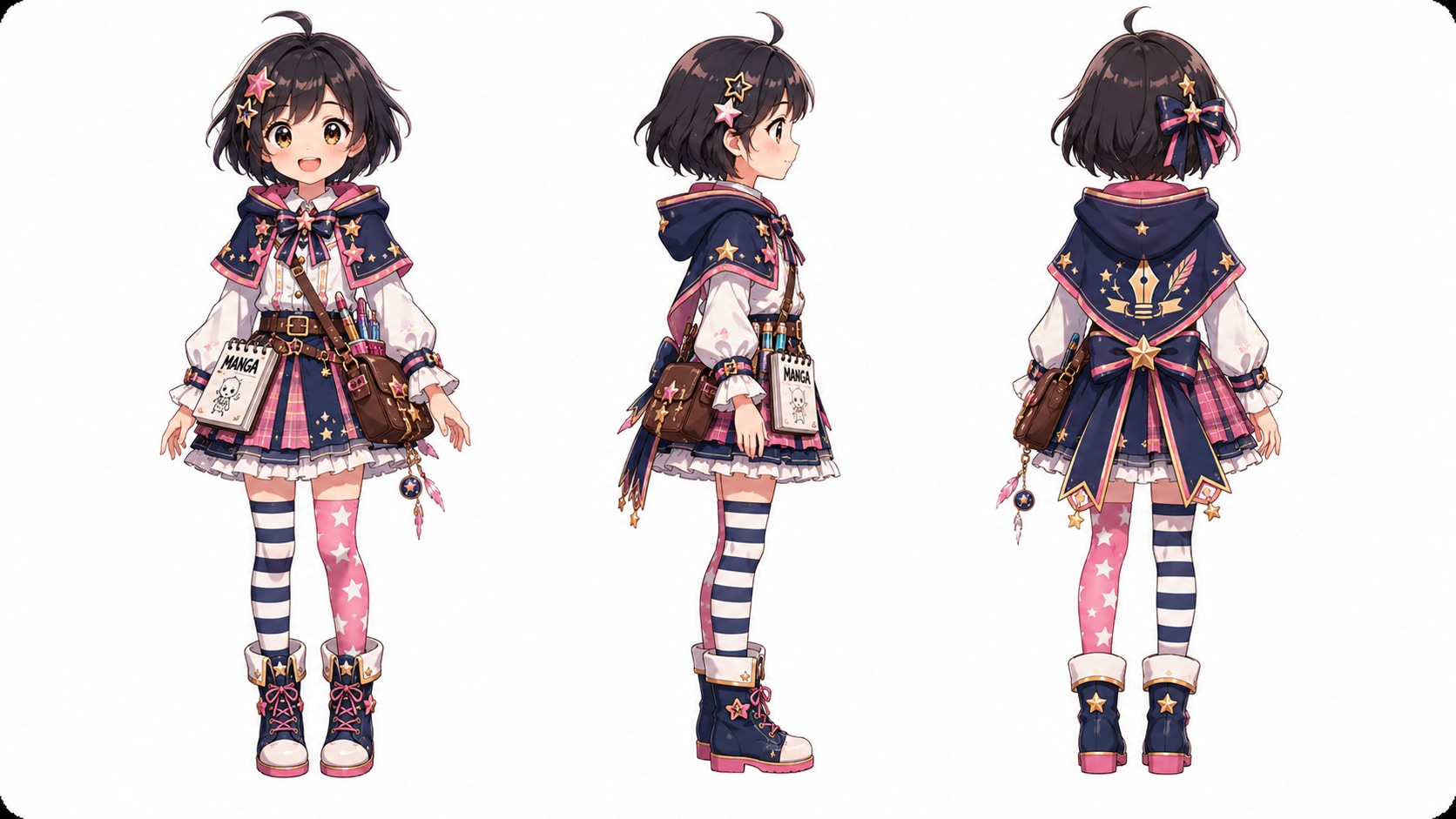
Keep Manga Characters Recognizable Across Every Scene
Character drift is one of the biggest problems in AI manga videos. Build your hero, rival, mentor, villain, or side character before generation, then use text, photo, or sketch references to help keep faces, hairstyles, outfits, and proportions recognizable from scene to scene.
- Text / Photo / Sketch - Create manga characters from the source you already have
- Manga-Style References - Guide hair, outfit, face shape, and character details
- Recurring Cast - Reuse the same characters across manga episodes or story arcs
- On-Model Look - Reduce random character changes in your AI manga story video
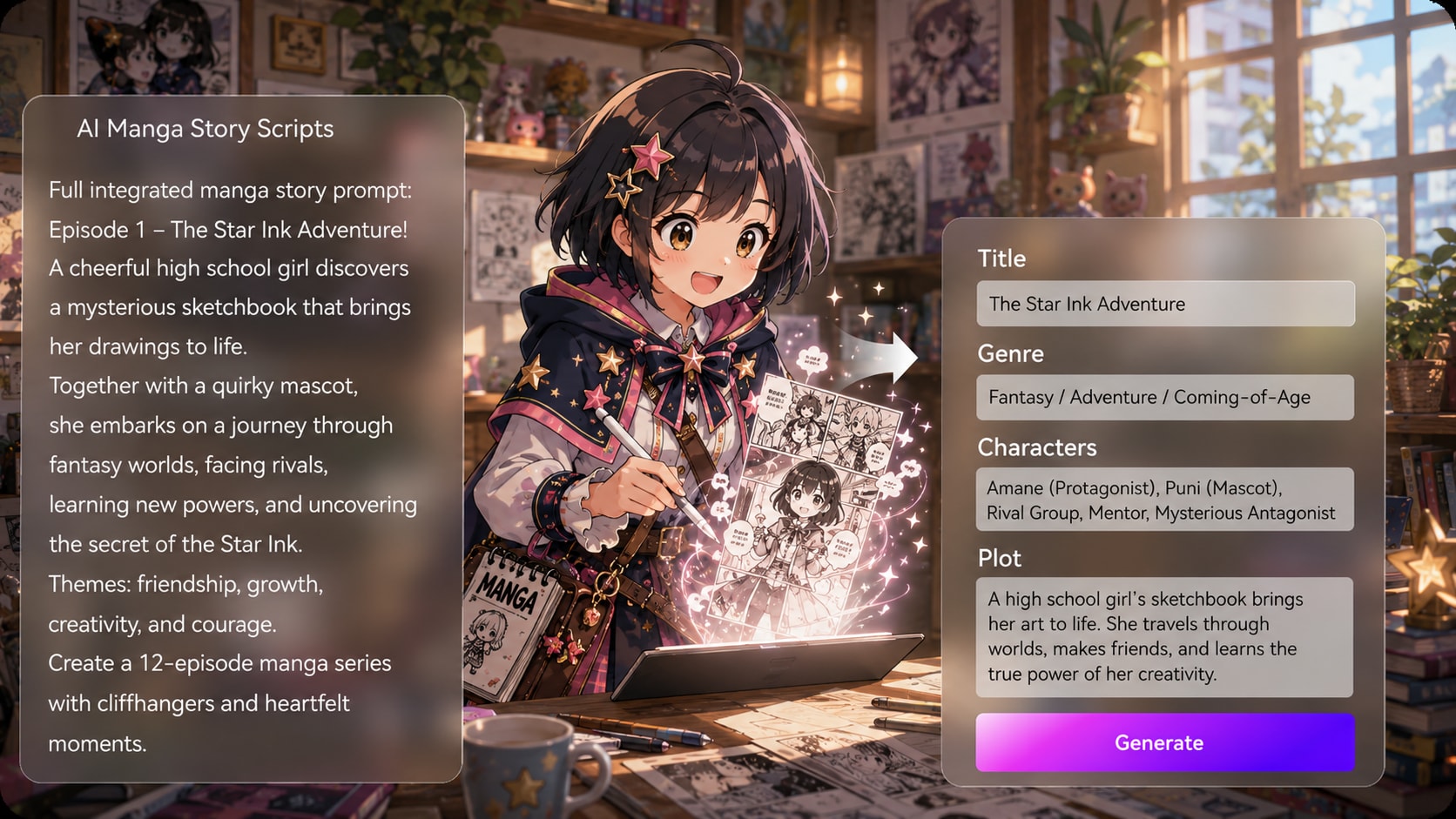
Turn Manga Chapters into a Clear Video Story Flow
Paste a manga script, webcomic plot, light novel scene, or episode idea and let Media.io help organize the story before generation. Turn setup, conflict, reaction, and cliffhanger beats into a clearer visual flow, so your manga chapter to video workflow does not feel like disconnected clips.
- Script to Manga Video - Start from a chapter, scene draft, or story idea
- Chapter Beat Structure - Organize setup, conflict, reveal, reaction, and ending
- Scene Direction Notes - Keep settings, characters, and story moments easier to follow
- Recap or Teaser Ready - Shape manga stories for short episodes, trailers, or webcomic promos
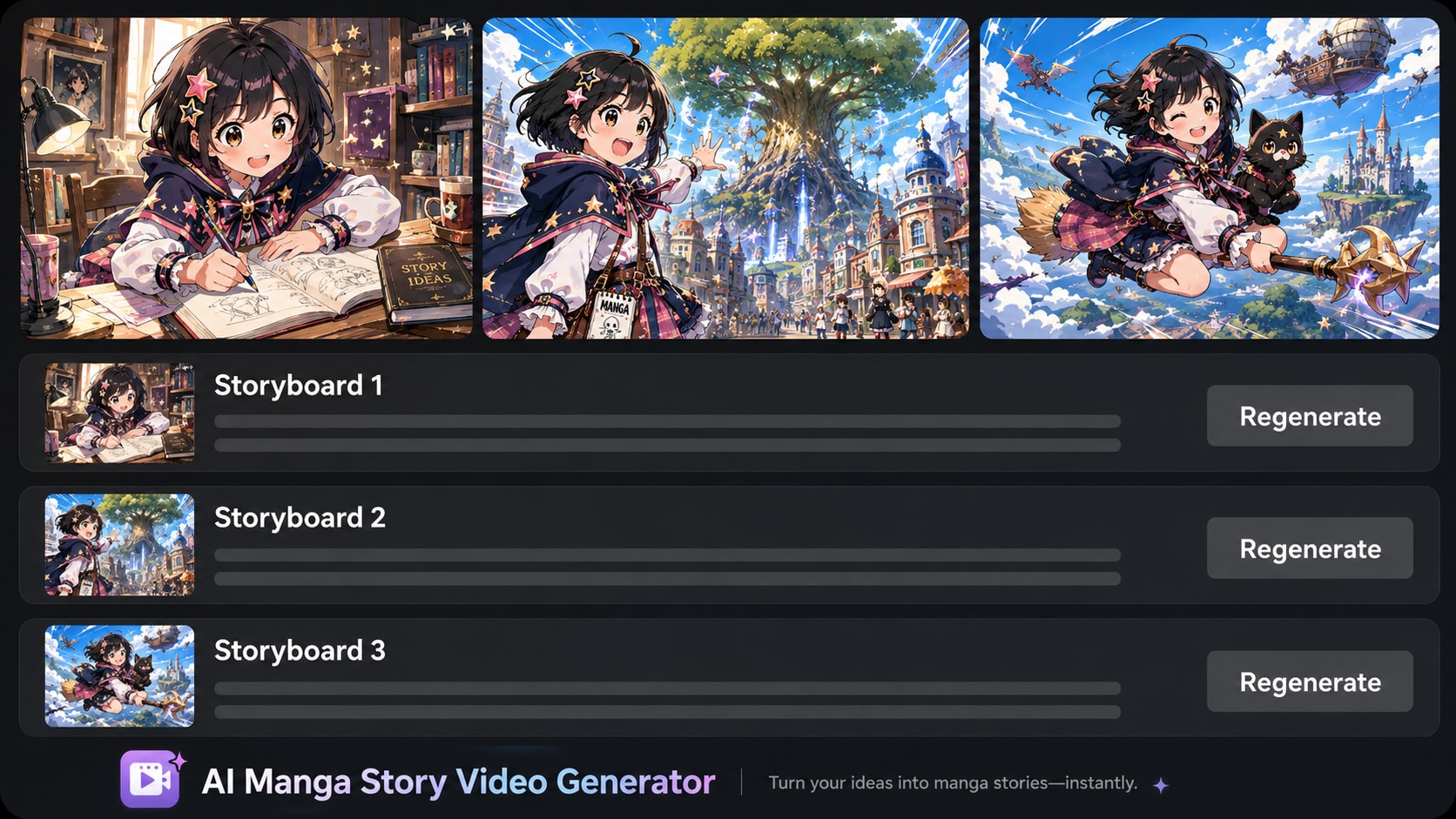
Preview Panel-Like Scenes and Re-Roll the Shot That Feels Off
Manga videos depend on the right pose, expression, and dramatic beat. Preview panel-like scenes before the final video is generated, then regenerate a single weak shot when one moment feels off-style, unclear, or out of character without rebuilding the whole manga story video.
- Panel-Like Story Preview - Review the manga storyboard flow scene by scene
- Pose and Expression Check - Catch weak reactions, awkward action, or off-model moments
- Single-Shot Re-Roll - Regenerate one shot while keeping the rest of the story flow
- Better Manga Continuity - Keep the action, emotion, and camera feel easier to follow
Generate a Complete Manga Video with Voiceover and Music
Go beyond a silent manga clip. Generate a complete AI manga video with stylized visuals, narration, and background music, then prepare it for YouTube Shorts, TikTok, Reels, webcomic promotion, manga trailers, or wider YouTube uploads with Media.io polishing tools.
- Manga-Style Visuals - Turn story moments into watchable AI manga video scenes
- Voiceover & Music - Add narration and background music for stronger story mood
- Shorts and YouTube Formats - Create vertical manga videos or widescreen story trailers
- Polish After Generation - Enhance clarity, extend a beat, or remove distracting details

Make a Manga Story Video with Media.io
A simple script-to-video workflow for manga creators, webcomic storytellers, and short-form channels.

Paste Your Manga Script
Start with a manga script, chapter beat, webcomic plot, light novel scene, or story idea. Choose the output format that fits your plan, such as a vertical manga video for Shorts or a widescreen story trailer for YouTube.

Build the Cast and Story Flow
Create manga characters from text, a sketch, or a reference photo, then let Media.io organize the story into clear beats. This helps keep your hero, rival, mentor, or villain recognizable as the scene flow develops.

Generate, Re-Roll, and Polish
Generate a manga-style AI video with visuals, voiceover, and music. Preview the panel-like flow, re-roll one weak shot if a pose or expression feels off, then polish the final video before sharing.
Compare Media.io with
Basic AI Manga Story Video Makers
Basic tools often create one eye-catching clip. Media.io helps turn manga scripts, chapters, and webcomic ideas into more coherent story videos with recognizable characters, panel-like flow, voiceover, music, and room to re-roll weak shots.
Create Manga Story Videos for Shorts, Webcomics, Pitches, and Lessons

YouTube Shorts Story Creators
Turn manga scripts, cliffhanger scenes, and short chapter ideas into vertical story videos with recognizable characters, fast setup, clear reactions, and a strong ending beat for YouTube Shorts.

TikTok Manga Clip Makers
Create mobile-first manga clips from chapter beats, dramatic reveals, reaction moments, or webcomic scenes. Keep the action readable, the cast recognizable, and the rhythm built for quick scrolling.

Webcomic and Manga Creators
Promote a manga chapter, webcomic launch, or character arc with a short story trailer. Turn your plot, cast, and key scenes into a manga-style video that helps readers feel the mood before they click.

Educators Teaching Visual Storytelling
Use manga-style story videos to explain setup, conflict, reaction, cliffhanger, and continuity. Students can compare script beats with panel-like scenes and learn how visual stories move from text to video.
See What Creators Ship
Ship with Story-First Video Generation
Explore finished examples, then adapt the structure for manga-style storytelling.
Loved by Creators Making Manga Story Videos
See how manga creators, short-form storytellers, educators, and faceless channels use Media.io to turn scripts, chapter beats, and webcomic ideas into manga-style AI videos with stronger continuity and publish-ready flow.


"My biggest problem with AI manga clips was character drift. Media.io helped me create a more recognizable cast before generation, so the hero's hair, outfit, and face felt more consistent across a short manga-style episode."

"I used it as a manga to video generator for a 60-second episode recap. Starting from chapter beats made the story flow clearer, and being able to re-roll one weak shot saved me from rebuilding the whole video."

"I needed a manga-style teaser for an anime concept, not just a random visual clip. Media.io helped me turn the script into a short story video with a clearer setup, stronger mood, and a format that worked for mobile preview."

"For manga chapter to video work, the biggest win is structure. I can paste a scene idea, see how the story flow is organized, and generate a manga-style video that feels closer to a planned episode than a prompt experiment."

"I teach visual storytelling, and Media.io is useful for showing how setup, conflict, reaction, and cliffhanger beats can become panel-like scenes. Students can compare a script with the generated video and discuss story flow more easily."

"I run a faceless channel and needed a faster way to make manga story videos without drawing every frame. Media.io gives me a repeatable script-to-video workflow, then I can polish the final clip for mobile feeds."
FAQs on AI Manga Story Video Generator
What Is an AI Manga Story Video Generator?
An AI manga story video generator helps turn a manga script, chapter beat, webcomic plot, light novel scene, or story idea into a manga-style AI video. Media.io helps organize the story flow, create recognizable characters, preview panel-like scenes, generate visuals with voiceover and music, and polish the final video for sharing.
Can I Turn a Manga Script or Chapter into a Video?
Yes. You can paste a manga script, chapter outline, webcomic scene, episode recap, or light novel-style passage. Media.io helps turn setup, conflict, reaction, reveal, and cliffhanger beats into a clearer manga story video workflow instead of generating disconnected clips from a short prompt.
Can I Keep Manga Characters Consistent Across Scenes?
Yes. Character consistency is one of the biggest pain points in AI manga videos. Media.io lets you create characters from text, photos, or sketches and use character references to guide the look of your hero, rival, mentor, villain, or side character across scenes.
Can I Make a Manga Video from a Webcomic or Light Novel Scene?
Yes. Media.io works well for webcomic promos, manga chapter teasers, light novel scene previews, character arc trailers, and short episode recaps. Paste the story idea or scene description, then let the workflow help turn it into a manga-style video with visual flow, narration, and background music.
Does Media.io Create Manga Videos with Voiceover and Music?
Yes. Media.io can help generate a complete AI manga video with stylized visuals, voiceover, and background music. This makes the result feel more like a finished manga story video, manga trailer, or episode teaser instead of a silent AI clip.
Can I Preview Manga Panel-Like Scenes Before the Final Video?
Yes. Media.io provides a storyboard-style preview so you can understand how your manga story may flow before the final video is generated. This is useful for checking scene order, character appearances, dramatic reactions, and whether each panel-like moment supports the story.
Can I Regenerate One Manga Shot If the Pose or Expression Looks Wrong?
Yes. If one shot feels off-style, unclear, or out of character, you can re-roll that single moment without rebuilding the whole manga story video. This helps fix weak poses, awkward expressions, action mistakes, or visual continuity issues faster.
Can I Make Manga Videos for YouTube Shorts, TikTok, and Reels?
Yes. You can create vertical manga story videos for YouTube Shorts, TikTok, and Instagram Reels, or widescreen manga trailers and story videos for YouTube. This is useful for manga recaps, webcomic promotions, faceless channels, short-form story episodes, and anime-style teasers.
How Long Can the Generated Manga Story Video Be?
Media.io can generate manga story videos up to 2 minutes long. That works well for manga trailers, chapter teasers, episode recaps, light novel scene previews, Shorts-style clips, and short story videos for social platforms.
What Aspect Ratios Can I Use for Manga Story Videos?
You can choose vertical formats for Shorts, TikTok, and Reels, square formats for social feeds, or widescreen formats for YouTube and trailer-style uploads. Choosing the format early helps your manga scenes feel better framed for the platform where viewers will watch.
Can I Use My Own Character Photo, Sketch, or Manga Reference?
Yes. You can use text, a reference photo, or a sketch to help create your manga-style character setup. For commercial publishing, make sure you own or have permission to use any uploaded character references, artwork, photos, logos, or story materials.
What Makes Media.io Different from a Basic AI Manga Video Maker?
Basic AI video tools often focus on a single prompt or one short clip. Media.io is built for a fuller manga story video workflow: script-to-video structure, recognizable character setup, panel-like scene preview, single-shot re-roll, voiceover, background music, and post-generation polishing with Media.io tools.
Discover More AI Video Generators for Every Story Style
Want to create more than manga story videos? Explore related Media.io AI video generators for anime stories, horror tales, faceless channels, kids stories, general story videos, animation ideas, and other script-to-video workflows built for different creators and story formats.







Write the Chapter Hook
Ship the Manga Clip
Start from your script, keep your cast consistent, and export a clean story cut that fits your channel format.
 4. 8 (38427 Votes)