
Transform Any URL into a Viral Video with AI
10x
Faster Trend-to-Video Workflow
95%
Accuracy in Format Detection
100K+
AI Videos Generated Monthly
Paste any webpage or link and let Media.io Viral Studio instantly analyze the trend, format, and creative flow. Recreate it as your own video or image content ready for TikTok, Reels, or YouTube Shorts-powered entirely by AI. Media.io Viral Studio helps turn url to video ai research into a clear creation workflow. This also supports searches such as link to video ai when users want a more specific creative angle.
Explore Live Formats from Trending Urls
Track, study, and remix viral pages into share-ready content. The tabs below connect you with related batch keywords showing live trends, reference cases, and AI-ready creative ideas. This also supports searches such as link to video ai when users want a more specific creative angle.
 link to recreate the viral style with AI.
 Expand Link Based Inspiration into AI Ready Video Creation
Marketers and creators often find inspiration from trending links, but turning them into actual video content can be time-consuming. Media.io Viral Studio automates this process, analyzing tone, layout, and engagement style from a source URL. It then helps you align AI output to your own brand message. The platform simplifies the entire workflow-from finding viral formats to producing fresh video assets optimized for any channel. This also supports searches such as link to video ai when users want a more specific creative angle.
Discover What Makes a Web Page Go Viral
Media.io Viral Studio highlights the psychological hooks, layouts, and storytelling rhythms from a shared or trending link. It guides you through audience intent data and post timing insights to understand why specific pages perform. Instead of guessing, you can identify proven triggers before starting your creative process. The system ensures every new AI video is rooted in real-world engagement logic. This also supports searches such as link to video ai when users want a more specific creative angle.
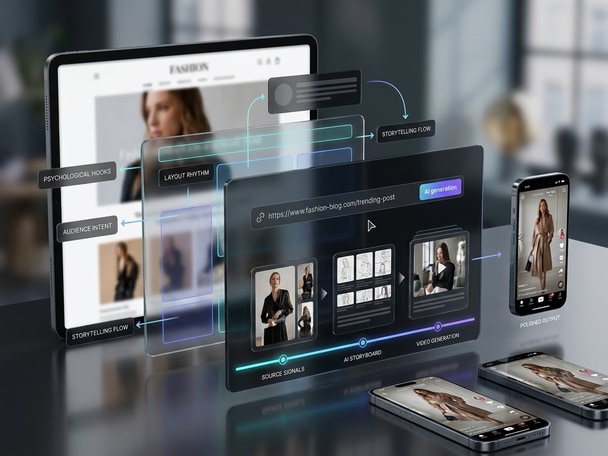
Turn Urls into Unique Video Formats
With AI-driven content modeling, Media.io turns source URLs into visually rich, editable templates. You can generate short videos, reels, or animations while preserving your brand personality. Each result stays original, ensuring you build on viral mechanisms without duplicating the source. This saves hours otherwise spent scripting or storyboarding from scratch. This also supports searches such as link to video ai when users want a more specific creative angle.

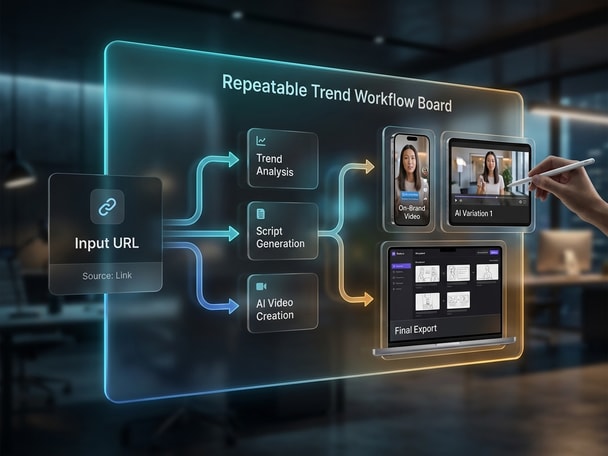
Build a Repeatable Trend Workflow
Media.io Viral Studio gives teams a repeatable system: enter a URL, extract trend cues, and recreate it into an on-brand version fast. This empowers content teams, agencies, and ecommerce marketers to scale output responsibly. By integrating analytics and AI video generation, you can consistently transform trending insights into creative formats that keep your campaigns fresh. Media.io Viral Studio helps creators move from trend research to original AI content with less manual work. This also supports searches such as link to video ai when users want a more specific creative angle.
How to Turn a URL into an AI Video in Minutes
Follow these steps to go from link discovery to published AI videos with Media.io Viral Studio. Media.io Viral Studio keeps the process beginner-friendly while still giving you room to adjust the creative direction. This also supports searches such as link to video ai when users want a more specific creative angle.

Paste a Trendy URL for Analysis
Share the URL of a blog, campaign, or post that's performing well. Media.io automatically extracts its visual and narrative elements to understand the engagement drivers behind it. This also supports searches such as link to video ai when users want a more specific creative angle.

Review the Viral Structure and Messaging
See the AI's breakdown of pacing, tone, and visual hierarchy. This helps you identify which elements to amplify or adjust for your own brand video. This also supports searches such as link to video ai when users want a more specific creative angle.

Generate and Download Your Branded AI Video
Media.io's AI engine converts the key insights into an original short-form video matching your preferred style. Review, edit, and export in seconds for TikTok, YouTube Shorts, or Reels. This also supports searches such as link to video ai when users want a more specific creative angle.
What Creators Say About Media.io Viral Studio
Users across industries trust Media.io to accelerate content ideation and make URL-to-video creation effortless. Media.io brings trend discovery and AI creation into the same browser-based workflow. This also supports searches such as link to video ai when users want a more specific creative angle.


Media.io Viral Studio helped me turn trending article links into quick videos that go live the same day. The AI suggestions were surprisingly accurate about what drives clicks. It saves time by handling transitions and captions automatically. I now use it each week for content planning. This also supports searches such as link to video ai when users want a more specific creative angle.

I often need to repurpose marketing URLs into social clips. This tool speeds up the creative workflow from research to final output. The built-in trend data adds real strategy behind every piece. It's now part of our growth stack for cross-channel campaigns. This also supports searches such as link to video ai when users want a more specific creative angle.

Media.io lets me transform product landing pages into dynamic short videos instantly. The AI captures the value props and converts them to engaging scripts and visuals. What used to take a design team all day now happens in minutes. It's perfect for promo launches. This also supports searches such as link to video ai when users want a more specific creative angle.

As an agency, we handle multiple brand campaigns daily. Media.io Viral Studio is invaluable because it identifies viral angles based on top-performing URLs. Our creatives get structured insights before the edit begins. The result is faster delivery and smarter storytelling. This also supports searches such as link to video ai when users want a more specific creative angle.

I use Media.io to interpret trending pages and turn their flow into storyboard-ready outlines. The platform's AI provides reference beats that make editing faster. It's like having a virtual creative assistant that reads the internet and turns it into your next cut. Highly recommended. This also supports searches such as link to video ai when users want a more specific creative angle.

I don't have a big team, but Media.io lets me compete in video marketing easily. Turning my website URLs into short-form videos helps me reach more customers. The AI templates handle design consistency so my brand looks professional. It's the easiest way to keep my feed updated. This also supports searches such as link to video ai when users want a more specific creative angle.
FAQs About URL to Video AI
What Is a URL to Video AI Tool?
A URL to video AI tool converts webpage links into video content. Media.io Viral Studio uses AI to examine the source layout, copy tone, and audience style before generating an original video for your brand. It helps transform web insights into moving visuals that grab attention. This saves time compared with manual editing or storyboarding. This also supports searches such as link to video ai when users want a more specific creative angle.
How Does Media.io's URL to Video AI Feature Work?
Media.io analyzes the URL you enter, detects trending elements, and extracts content structure. Then it recreates these insights into a customizable AI video using your own branding or product visuals. The process takes minutes and aligns video pacing with proven viral patterns. It's ideal for creators aiming to scale consistent storytelling. This also supports searches such as link to video ai when users want a more specific creative angle.
Can I Use Any Website URL for AI Video Generation?
You can use most public URLs including blog articles, campaign pages, or social posts. Media.io focuses on safe, accessible data to extract creative cues. Proprietary or restricted content should not be uploaded. As long as the page is public, your idea can become an AI-generated video. This also supports searches such as link to video ai when users want a more specific creative angle.
Will the AI Copy the Original Video Exactly?
No. Media.io Viral Studio always creates original assets rather than exact copies. It focuses on learning from layout, rhythm, and engagement style to generate something new. This ensures each final video is unique to your brand. This also supports searches such as link to video ai when users want a more specific creative angle.
Can I Edit the AI Generated Video?
Yes. After generation, you can easily adjust clips, add new captions, or refine transitions directly in Media.io's interface. You can also import assets to other editors if needed. The flexible pipeline supports every stage from trend analysis to final edit. This also supports searches such as link to video ai when users want a more specific creative angle.
Is Media.io's URL to Video AI Free to Use?
Media.io offers a free tier for testing the feature with limited exports. You can upgrade for higher resolution output, brand templates, and version history. The subscription options scale with your team's creative volume. All plans include AI optimization and trend tracking tools. This also supports searches such as link to video ai when users want a more specific creative angle.
What Makes URL to Video AI Useful for Marketers?
Marketers can instantly repurpose campaign URLs into cross-platform motion assets. It ensures consistent tone and messaging while expanding creative coverage. With Media.io, each URL becomes a launchpad for ad variations and social videos. The time saved translates directly to faster campaign testing. This also supports searches such as link to video ai when users want a more specific creative angle.
Does Media.io Support Multiple Platforms Like TikTok or YouTube Shorts?
Yes. Media.io formats every AI video for platforms including TikTok, YouTube Shorts, Reels, and X. The generator adapts aspect ratios, length, and captions automatically. You just choose the channel and download a ready-to-publish result. This also supports searches such as link to video ai when users want a more specific creative angle.
Explore More AI Tools for Viral Content Creation
Keep creating beyond viral trend discovery. Try more Media.io AI tools to generate videos, edit visuals, enhance content, and turn your ideas into scroll-stopping social media posts.






 4.7 (162,357 Votes)